
OpenAI Explains How Codex Sandbox Protects Developers by Restricting AI Agent Access
OpenAI has detailed how its Codex sandbox restricts AI agent access to local files and networks. The approach combines operating system-level isolation, configurable permissions and layered security controls to reduce risks when AI agents execute commands.
Xcademia Team
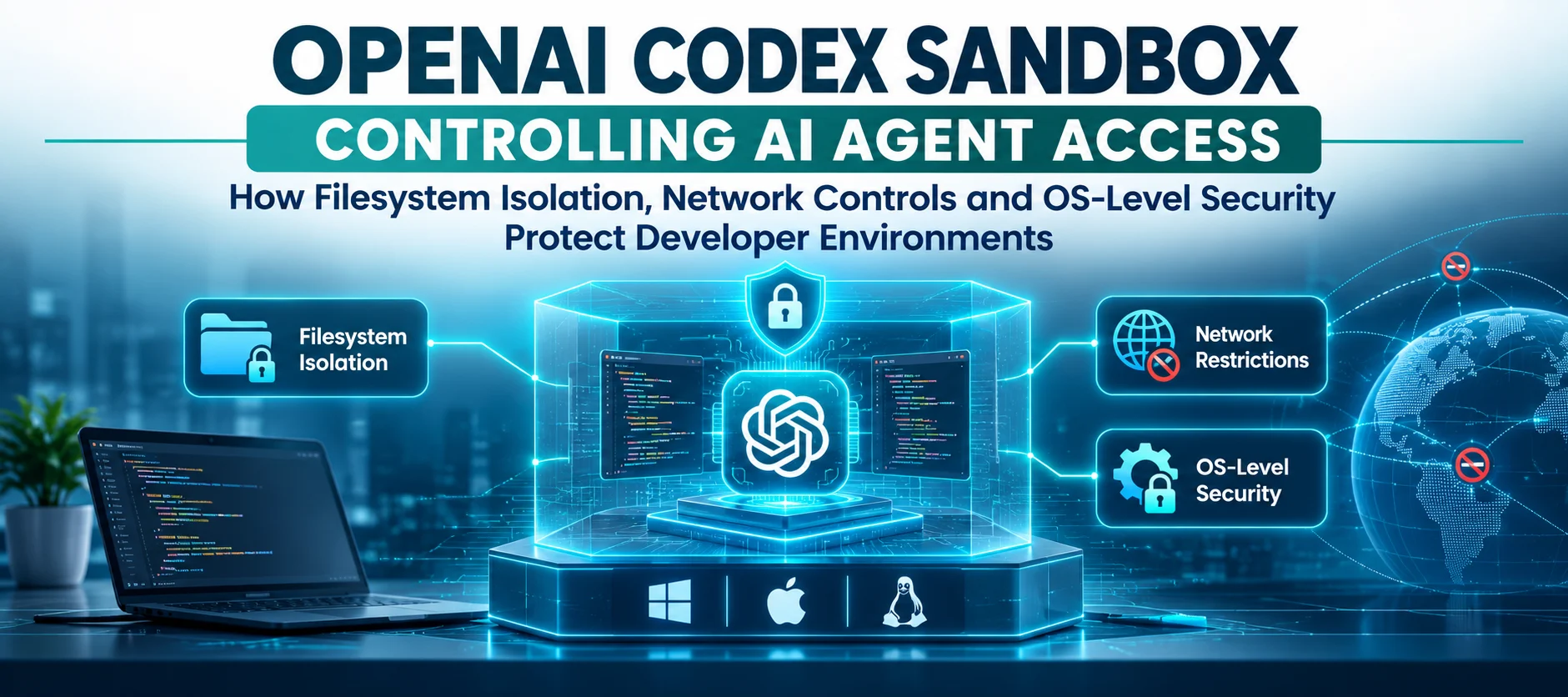
Inside the Codex Sandbox: How OpenAI Controls AI Agent Access to Developer Systems
AI coding agents are becoming increasingly capable of interacting with development environments. They can execute shell commands, modify source files, access project resources and perform tasks that traditionally required direct developer involvement.
However, giving an AI agent the ability to execute commands on a developer's machine introduces important security considerations. A command that helps automate a development task could also access sensitive files, modify configurations or attempt to communicate with external services.
OpenAI has published a technical explanation of its Codex sandbox, detailing how the company restricts the actions of AI agents while allowing them to operate within developers' existing environments.
Published on 18 November 2026, the engineering article explains the architecture behind the sandbox, its filesystem and network permission models, enterprise configuration options and operating system-specific enforcement mechanisms.
The central idea is to let Codex perform useful development work without automatically granting it unrestricted access to the host machine.
Why AI Coding Agents Need Sandboxing
AI agents interact with development systems differently from traditional software assistants. Rather than simply suggesting code, Codex can execute commands and interact with the local development environment.
This creates a wider security boundary that organisations need to consider.
For example, a developer might ask Codex to organise photographs, review source code or run a build process. Each task requires different levels of access.
A photo-organising task may require permission to modify a particular folder but not access the internet.
A code-review task may require reading source files and accessing online documentation without modifying the repository.
A development task may require write access to project files while protecting sensitive configuration directories.
OpenAI's sandbox addresses these requirements through configurable permission profiles that control filesystem and network access.
The approach follows a defence-in-depth philosophy. Model training and alignment remain important, but the execution environment also needs independent security restrictions.
The key distinction: The sandbox does not rely exclusively on the AI model to behave safely. It places technical restrictions around the commands the model can execute.
How the Codex Sandbox Restricts Filesystem and Network Access
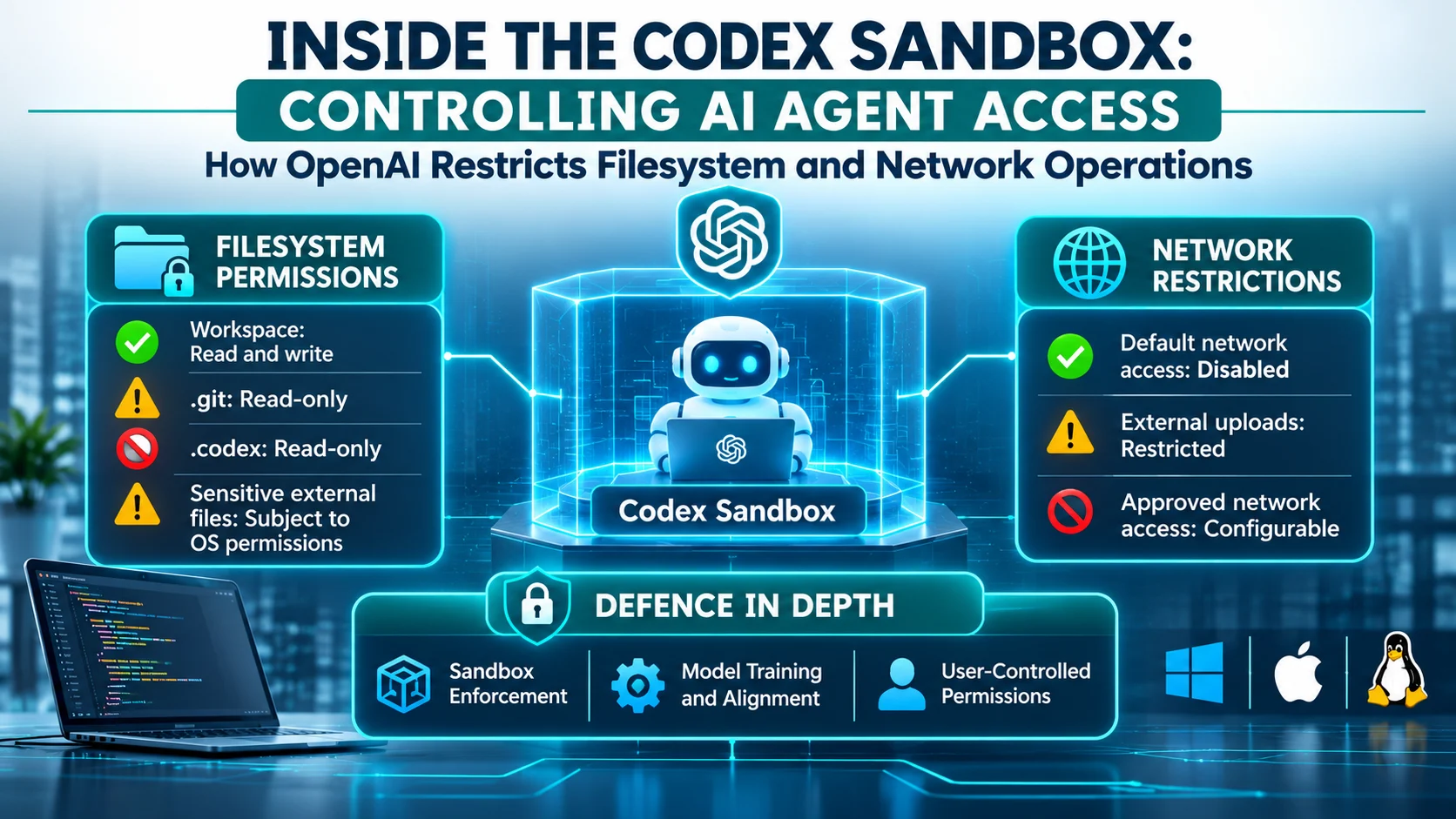
OpenAI's built-in :workspace permission profile establishes conservative defaults while allowing Codex to perform meaningful development work.
Its main controls include:
Filesystem write restrictions
Codex can write within the designated workspace. However, directories such as .git and .codex remain read-only.
This allows the agent to edit source code while preventing direct modifications to important Git metadata, Git hooks and Codex configuration files.
Broad filesystem read access
The default workspace profile permits broad filesystem reads, subject to the operating system permissions already assigned to the user.
This is important because compilers, runtimes and build tools often depend on libraries, SDKs and configuration files located outside the project directory.
However, this introduces a trade-off: sensitive files outside the workspace, including configuration files containing API keys, may also remain readable.
Network access restrictions
The :workspace profile disables network access by default.
This helps prevent commands from uploading accessible data to external services. However, it can also prevent legitimate activities, such as downloading software dependencies.
Additional permissions may therefore be required for certain development operations.
OpenAI also highlights that sandbox restrictions cannot prevent every harmful action. For example, an agent could potentially introduce malicious code into a locally installed package such as node_modules/prettier. If an editor subsequently executes that package outside the sandbox, the malicious behaviour could occur beyond the original command's restrictions.
This illustrates why filesystem and network controls must work alongside model training and alignment.
Why OpenAI Uses Operating System-Level Sandboxing Instead of Relying Only on Containers
Virtual machines and containers are common approaches to application isolation. However, OpenAI takes a different approach with Codex.
Instead of moving execution into a separate environment, Codex uses the sandboxing facilities provided by the operating system to restrict commands running within the developer's existing environment.
This design addresses a practical challenge for software engineers: their local machines often contain specialised development tools that are difficult to reproduce inside containers.
Consider iOS application development.
A developer working on a Mac may depend on native macOS executables, Apple's build toolchain and the iPhone simulator. Running Codex inside a Docker container would prevent direct access to these host-dependent tools.
A container-based approach could delegate these operations to the Mac host, but those delegated processes would execute outside the container's sandbox unless separately restricted.
OpenAI therefore prioritises operating system-specific sandboxing to allow Codex to work within the environment best suited to the task.
The company provides a common interface across macOS, Windows and Linux. This interface accepts a command and a permission profile, allowing the harness to apply the relevant platform-specific restrictions.
Where limited network access is permitted, the caller must also provide a network proxy to enforce the configured restrictions.
How the Codex Harness Enforces Sandbox Permissions
The Codex harness is responsible for executing tool calls generated by the AI model.
For development tasks, one of the most frequently used tools is the shell tool, which executes commands in a way similar to an interactive Bash environment.
OpenAI explains that the harness modifies the normal command-execution process to ensure commands run inside the sandbox.
Rather than launching a command directly through a standard process execution mechanism, the harness uses a function called:
spawn_command_under_sandbox()
The function accepts several important inputs:
Program and arguments: The command that needs to execute.
Working directory: The directory in which the command runs.
Environment variables: The environment provided to the process.
Permission profile: The filesystem and network restrictions applied to execution.
Network proxy: The mechanism used when restricted network access is required.
The function starts the process under the selected sandbox restrictions and returns a child-process handle.
An important security detail is that child processes inherit their parent's sandbox constraints. These restrictions continue to apply throughout the process tree initiated by the original command, including descendant processes that outlive it.
This helps prevent a command from escaping its original restrictions simply by launching another process.
The harness also evaluates requests for additional permissions. Codex can request expanded access, but the harness determines whether those permissions should be granted.
OpenAI describes three permission modes:
Permission mode | Purpose |
|---|---|
| Uses the default sandbox configuration |
| Requests expanded filesystem or network permissions |
| Requests execution outside the sandbox |
For escalated execution, Codex may ask the user for approval or route the request through an automatic review mechanism.
This separates the AI agent's request for access from the decision to grant it.
Configurable Permission Profiles for Developers
OpenAI allows developers to define reusable permission profiles through the Codex config.toml configuration file.
These profiles make it possible to establish consistent filesystem and network restrictions across projects.
For example, a developer can create a profile called dev that extends the built-in :workspace profile.
The additional configuration can grant write access to a build-cache directory while keeping selected project directories read-only.
It can also deny access to sensitive paths.
An example from OpenAI's documentation includes:
default_permissions = "dev"

[permissions.dev]
description = "Development with extra read-only protections."
extends = ":workspace"

[permissions.dev.filesystem]
"~/build-cache" = "write"

[permissions.dev.filesystem.":workspace_roots"]
".devcontainer" = "read"
".vscode" = "read"
"**/*.env" = "deny"
"secrets" = "deny"
This configuration demonstrates three filesystem permission levels:
read: Allows reading files without granting write access.write: Allows reading and modifying files.deny: Blocks access to the specified paths.
The ability to extend an existing profile also means developers do not need to rebuild every permission rule from scratch.
Network permission configuration
Codex supports three broad network configurations:
Disable all network access.
Enable full, direct network access.
Allow network access through a proxy that enforces domain-specific rules.
For example, developers can configure a network profile that permits access to selected domains while blocking others.
[permissions.dev.network]
enabled = true

[permissions.dev.network.domains]
"*.openai.com" = "allow"
"localhost" = "allow"
"127.0.0.1" = "allow"
"::1" = "allow"
"evil.example" = "deny"

[features]
network_proxy = true
OpenAI explains that domain rules support exact names and wildcard patterns. Explicit deny rules take precedence over allow rules.
Requests to domains without an applicable permission may require approval or be blocked.
This provides a more controlled alternative to granting unrestricted internet access to an AI coding agent.
Enterprise Security: How Administrators Enforce Permission Policies
The sandbox also supports centralised configuration for organisations that need consistent security policies across development teams.
Codex allows configuration settings to be layered across different sources.
These can include:
Individual user configurations.
Project-specific configurations.
Enterprise administrator policies.
System-level requirements.
Cloud-provided requirements.
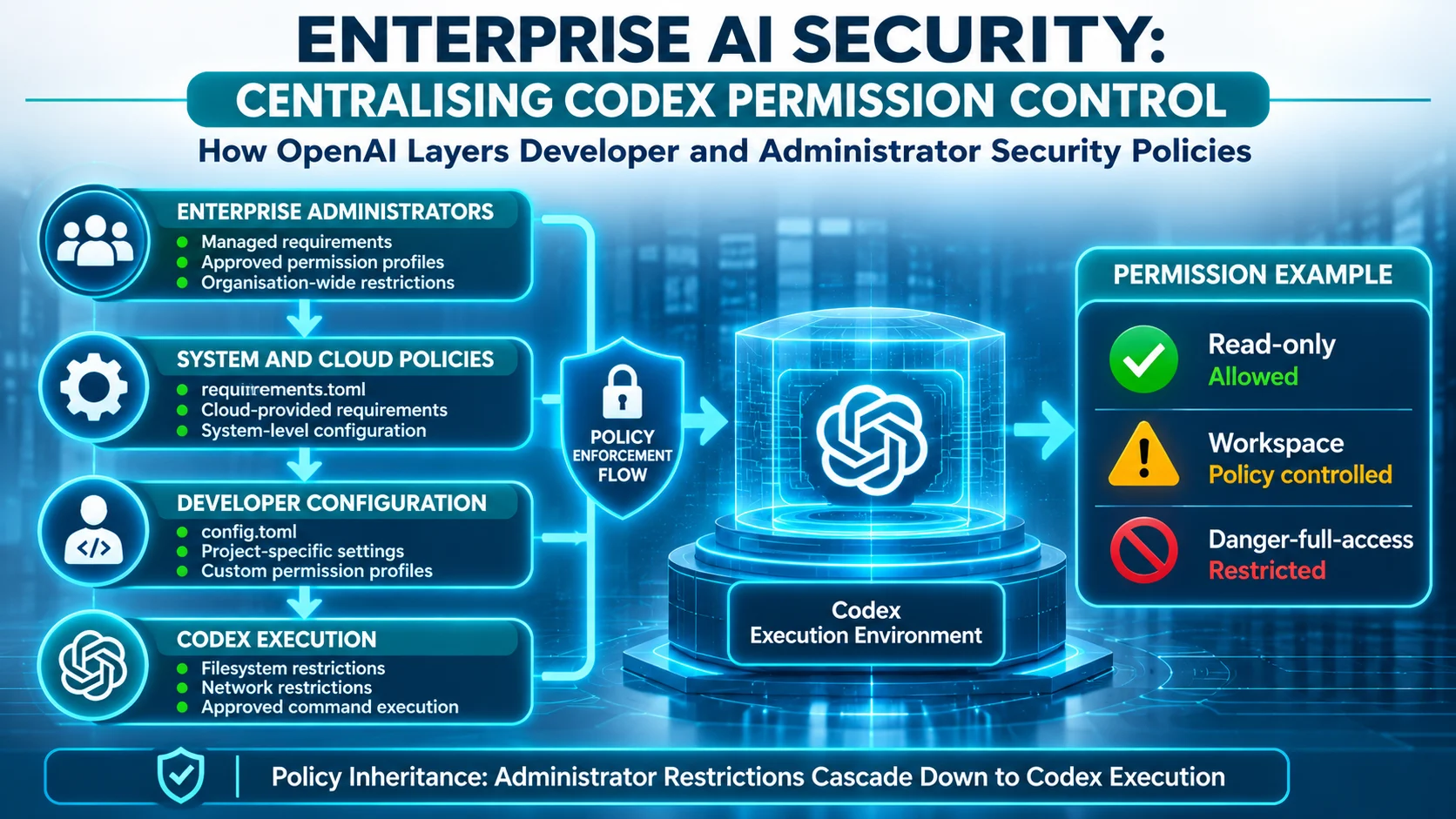
When multiple configuration files apply, Codex merges their settings. Tables are merged recursively, while arrays are replaced as a whole. Higher-precedence configuration sources take priority when settings conflict.
Managed requirements
Enterprise administrators can use requirements.toml to restrict which permission profiles users are allowed to select.
For example, an organisation could establish read-only access as the default while preventing users from selecting the :danger-full-access profile.
default_permissions = ":read-only"

[allowed_permission_profiles]
":read-only" = true
":danger-full-access" = false
Cloud-provided requirements can take precedence over system-level requirements.
This separation allows developers to customise their environments within the boundaries established by organisational security policies.
Using the Codex Sandbox to Secure MCP Servers
One particularly important part of OpenAI's explanation concerns Model Context Protocol (MCP) servers.
MCP servers allow AI applications to connect with external tools and resources. However, these integrations can introduce additional security considerations because their processes may have access to local files and network resources.
OpenAI explains that the Codex harness does not automatically sandbox the command used to start a configured standard input/output (stdio) MCP server.
The reason is practical: Codex cannot reliably determine which files or network services every MCP server needs. Applying a default permission profile could therefore break legitimate configurations.
This creates a potential security concern.
OpenAI provides an example involving the @modelcontextprotocol/server-memory package.
When launched directly through npx, the MCP server can inherit the permissions of the user running Codex. This could allow it to access files and make network requests beyond what the integration actually requires.
Applying a dedicated MCP permission profile
OpenAI demonstrates how to address this by creating a dedicated profile called memory-mcp.
The example:
Allows broad read access required by Node.js and npm dependencies.
Grants write access to the npm cache.
Grants write access to the designated memory-data directory.
Disables network access.
The original MCP server command is then wrapped with:
codex sandbox --permission-profile memory-mcp
OpenAI also explains that the package must first be downloaded and cached, and the data directory created.
Once these preparation steps are complete, the MCP server can run using the cached package without network access, with writes restricted to its designated locations.
This is an important practical example because it demonstrates that sandboxing can extend beyond the primary AI coding agent to supporting processes.
How Codex Enforces Security Across macOS, Linux and Windows
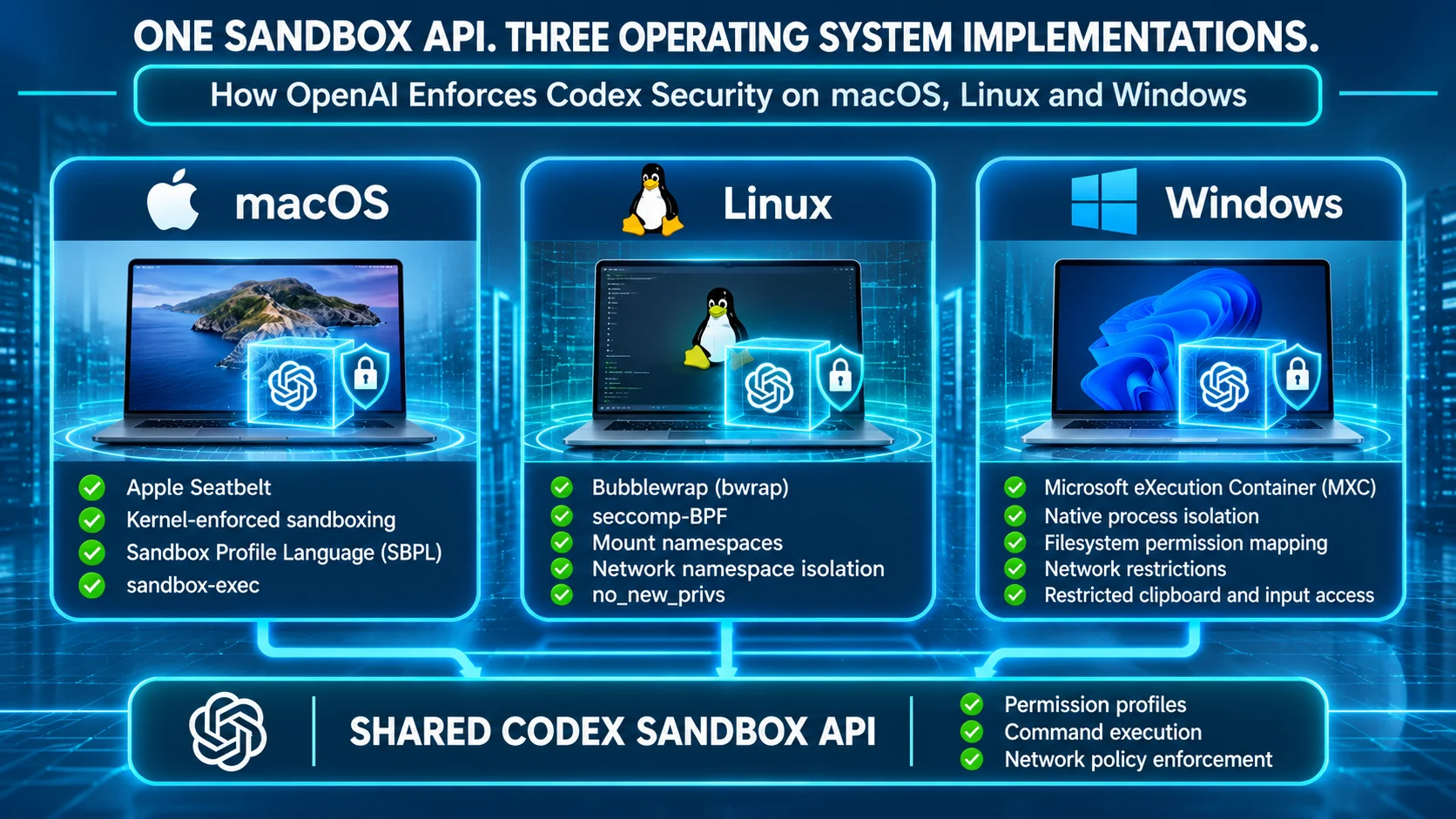
Codex uses a common sandbox API across three major operating systems. However, the underlying enforcement mechanisms differ according to each platform.
macOS: Apple Seatbelt
On macOS, Codex uses Apple's Seatbelt sandboxing mechanism.
Seatbelt provides kernel-enforced restrictions through Sandbox Profile Language (SBPL).
Codex invokes this mechanism using:
/usr/bin/sandbox-exec
The sandbox profile defines which operations a command can perform, including filesystem access and network connections.
OpenAI explains that its base policy begins with:
(deny default)
This means outbound connections remain blocked unless explicitly permitted.
When network proxy access is enabled, the policy allows connections to designated local proxy ports.
OpenAI also acknowledges a technical limitation: Apple does not document SBPL for third-party use, and the sandbox-exec command is marked deprecated in its manual documentation.
Despite this, macOS continues to ship Seatbelt profiles, and software including Google Chrome and Chromium still uses the mechanism.
OpenAI states that it plans to continue using Seatbelt for the foreseeable future.
Linux: Bubblewrap and seccomp-BPF
Linux uses a combination of two security technologies:
Bubblewrap (bwrap): Creates an isolated filesystem environment using namespaces.
seccomp-BPF: Filters system calls to restrict what a process can do.
An internal helper called codex-linux-sandbox coordinates the process.
Bubblewrap creates a separate filesystem view based on the permission profile.
It uses different options to control access:
Option | Purpose |
|---|---|
| Creates writable file or directory access |
| Creates read-only access |
| Restricts access to specified paths |
| Isolates IPC resources |
| Isolates process identifiers |
| Creates a separate network namespace |
Codex then applies seccomp-BPF restrictions to the launcher process.
These restrictions are inherited by child processes.
The Linux implementation also uses the no_new_privs flag to prevent processes from gaining additional privileges when executing other programs.
When network access is disabled, certain network-related system calls, including connect() and bind(), are blocked.
When proxy-based networking is enabled, Codex uses a separate network namespace and a local TCP listener to relay permitted connections to the proxy.
This arrangement allows sandboxed commands to access the approved proxy without exposing the host's network namespace directly.
Windows: Transitioning to Microsoft MXC
Windows has a different implementation.
OpenAI says it is transitioning its existing Windows sandbox to Microsoft's Microsoft eXecution Container (MXC) library.
MXC supports multiple containment backends across Windows, Linux and macOS. Codex uses an MXC-based sandbox on compatible Windows devices.
The transition is intended to address limitations in the previous Windows implementation, including:
The requirement for elevated administrator access during setup.
Expensive and slow access-control list (ACL) operations.
Persistent sandbox configuration on the host machine.
Management of firewall rules, sandbox users and control-plane files.
Codex uses the MXC SDK to translate permission profiles into execution requests.
These requests contain command information, working directories, environment variables and access permissions.
The documented configuration covers filesystem and network access, as well as Windows resources such as the desktop and clipboard.
OpenAI also specifies several restrictions:
Registry reads remain permitted.
Certain desktop and Win32k access needed by PowerShell during startup are retained.
Clipboard access is disabled.
Input injection is disabled.
Desktop and system-settings controls are disabled.
MXC is prevented from falling back to modifying host filesystem permissions.
The Windows implementation is therefore designed to maintain compatibility with normal development workflows while applying restrictions to the execution environment.
Important distinction: OpenAI describes this as an ongoing transition to MXC, not as a statement that every Windows installation already uses the new implementation.
Network Proxy: Controlling What AI Agents Can Access
The network proxy is a shared component of the Codex sandbox architecture.
Its purpose is to enforce domain-level restrictions defined in permission profiles.
When proxy-based networking is enabled, the harness starts a proxy and configures the sandbox to allow connections to it while blocking direct connections to external hosts.
The implementation uses:
HTTP proxy support.
SOCKS5 proxy support.
Standard environment variables such as
HTTP_PROXY,HTTPS_PROXYandALL_PROXY.Application-specific proxy variables, including
PIP_PROXY.
However, OpenAI acknowledges that not all applications respect these environment variables.
If an application attempts to establish a direct external connection instead, operating system restrictions are intended to block that connection.
Why DNS requests matter
OpenAI highlights an important detail involving Domain Name System (DNS) requests.
Even a DNS lookup can expose information if sensitive data is encoded into a requested hostname.
For this reason, the proxy resolves a hostname only after determining that the destination is permitted or approved.
However, OpenAI also acknowledges that broad wildcard rules or access to DNS services can still permit DNS-based data exfiltration.
This is an important reminder that network restrictions need careful configuration. Simply enabling a proxy does not eliminate every possible data-leakage path.
What the Codex Sandbox Means for Developers and Security Teams
OpenAI's announcement highlights several important considerations for organisations adopting AI-powered development tools.
For software developers
Developers can use AI agents within their existing environments while applying restrictions to files, directories and network connections.
The configurable permission profiles provide a way to balance development flexibility with access control.
For DevOps and infrastructure teams
The ability to run commands under reusable permission profiles creates opportunities to apply consistent execution restrictions across development tools.
The standalone codex sandbox command is particularly relevant because it makes the sandbox available outside a normal Codex agent session.
For enterprise security teams
Managed requirements allow administrators to establish boundaries around the permission profiles available to developers.
This can help organisations align AI agent execution with internal security policies.
For AI application developers
The MCP server example demonstrates why supporting services also need security controls.
An AI application may have multiple processes operating with different access requirements. Applying a dedicated permission profile to each process can help reduce unnecessary access.
Key Security Lessons From OpenAI's Codex Sandbox
The announcement highlights several broader lessons for organisations developing or deploying AI agents.
AI agents should operate with controlled permissions.
Giving an agent access to an entire development machine is not always necessary. Access should reflect the requirements of the task.
Filesystem and network restrictions should work together.
Limiting file modifications without restricting network access may leave other data-exposure paths available.
Child processes require the same security attention.
Restrictions need to remain effective when an AI-generated command launches additional processes.
Supporting integrations also need protection.
MCP servers and other supporting processes should not automatically inherit unrestricted user permissions.
Enterprise policies should remain enforceable.
Developers need flexibility, but administrators also need mechanisms to establish organisation-wide restrictions.
What Organisations Should Consider Before Deploying AI Coding Agents
OpenAI's technical explanation provides useful guidance for organisations evaluating AI-powered software development tools.
Based on the announcement, security teams should consider the following areas:
Review filesystem permissions: Identify which project directories and external resources an agent genuinely needs.
Protect sensitive configuration: Apply restrictions to environment files, API keys and secrets.
Control outbound networking: Prefer explicitly approved destinations over unrestricted network access where practical.
Assess supporting processes: Review MCP servers and other integrations separately.
Test permission profiles: Verify that restrictions block the operations they are designed to prevent.
Establish enterprise policies: Define which permission profiles developers can use.
Review platform differences: Understand the enforcement mechanisms available on macOS, Linux and Windows.
These are practical recommendations derived from the architecture described by OpenAI, rather than additional product capabilities announced by the company.
Industry Perspective: Security Is Becoming Part of AI Agent Infrastructure
The announcement highlights a broader industry shift towards treating AI agent security as an execution-environment problem, rather than relying exclusively on model behaviour.
As AI agents gain the ability to execute commands, interact with files and connect to external services, organisations need to consider what those agents can access and how those permissions are enforced.
OpenAI's Codex sandbox illustrates one approach: combining operating system-level restrictions, configurable permission profiles, network controls and enterprise policy enforcement.
For enterprises, this could mean evaluating AI coding agents using the same security principles applied to other privileged development tools.
The architecture also highlights an important distinction between restricting an agent's direct actions and securing the wider environment in which its commands and supporting processes operate.
The company acknowledges that certain risks remain, including malicious changes to locally installed packages and potential DNS-based data exfiltration under permissive network configurations.
Sandboxing should therefore be considered one component of a wider security strategy, not a complete replacement for secure development practices, access management and code review.
Conclusion
OpenAI's explanation of the Codex sandbox provides a detailed look at how the company approaches security when AI agents execute commands on developer machines.
Its architecture combines filesystem restrictions, network permission profiles, process isolation and operating system-specific enforcement across macOS, Linux and Windows.
The inclusion of enterprise-managed requirements and standalone sandbox execution also makes the design relevant beyond individual developers.
For organisations adopting AI-powered development workflows, the central lesson is straightforward: granting an AI agent the ability to perform work should not automatically mean granting it unrestricted access to the environment.
The future of secure AI development will depend not only on what models can do, but also on how carefully their execution environments are designed and controlled.
Source: OpenAI Engineering
About the Author