
Microsoft Uncovers High-Volume Phishing Campaign Exploiting Microsoft 365 Outage Alerts
Microsoft has identified a coordinated phishing campaign exploiting Microsoft 365 outage notifications to target organisations across multiple sectors. Attackers used fake service alerts and urgent email-recovery messages to encourage recipients to click malicious links.
Xcademia Team

A recent Microsoft 365 service disruption has become an opportunity for cybercriminals to launch a coordinated phishing campaign targeting organisations across multiple industries worldwide.
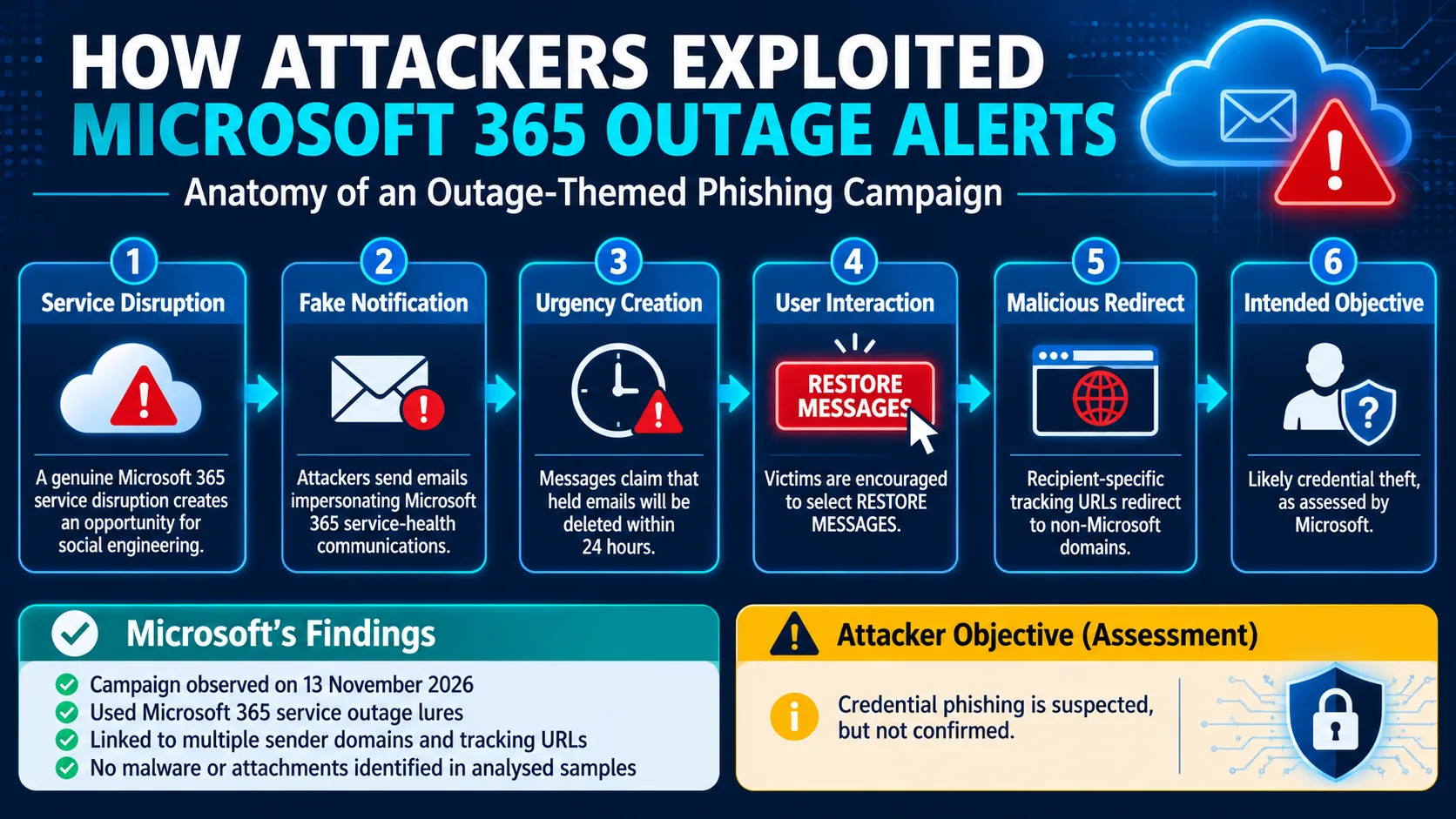
On 13 November 2026, Microsoft Threat Intelligence identified a high-volume phishing operation in which attackers impersonated Microsoft 365 service-health notifications. The fraudulent emails claimed that messages had been held during a service disruption and would be permanently deleted within 24 hours unless recipients took action to restore them.
The campaign demonstrates how threat actors can exploit legitimate technology incidents to make social engineering attacks more convincing. Rather than relying on an unfamiliar security warning, attackers used a situation that Microsoft 365 users could recognise, creating urgency around potentially lost business communications.
According to Microsoft Security Research, the activity was consistent with credential phishing. However, Microsoft did not confirm that credentials were successfully captured, malware was delivered, or accounts were compromised.
What Happened: Attackers Exploited Microsoft 365 Service Disruption
Microsoft observed the campaign on 13 November 2026, following a Microsoft 365 service disruption.
The attackers designed emails to resemble official Microsoft service notifications. Their messages referenced Exchange Online and other Microsoft 365 services, including Outlook, Teams, SharePoint and Copilot.
One example claimed that four email messages had been held following a purported Exchange Online incident on 12 November.
Recipients were instructed to select a prominent RESTORE MESSAGES button to recover the supposedly delayed emails.
The messages also introduced a 24-hour deletion deadline, encouraging users to act quickly rather than verify the notification through official channels.
Microsoft identified the campaign as a coordinated operation involving multiple sender domains, randomised email subjects and recipient-specific tracking links.
Importantly, the phishing campaign should be distinguished from the underlying Microsoft 365 outage. The available reporting does not establish that the service disruption itself resulted from a cyberattack.
How the Phishing Campaign Worked
Microsoft identified several techniques that helped the fraudulent messages resemble legitimate service communications.
1. Fake Microsoft 365 service notifications
The attackers used display names such as:
MSF Outage Notification
AMZ Service Health
These names combined short, organisation-style prefixes with familiar service-notification terminology.
The messages also referenced Microsoft products and services to make the notifications appear relevant to business users.
2. Randomised email subject lines
The observed emails used subject patterns such as:
Outage - followed by a random character sequence
Strengthen - Security followed by a random sequence
Restore - 4 messages followed by a random sequence
Randomisation can make it more difficult for basic email-filtering rules that rely on exact subject matching to identify related messages.
3. Urgency-driven social engineering
The emails claimed that messages would be deleted within 24 hours unless users restored them.
This approach exploited concerns about missing business communications, encouraging recipients to interact with the message without independently verifying its authenticity.
4. Recipient-specific tracking links
The attackers used email-delivery and link-tracking infrastructure to generate individual URLs for recipients.
These links redirected users towards non-Microsoft destinations, including domains identified during Microsoft's investigation.
Domains and Infrastructure Identified by Microsoft
Microsoft identified several domains associated with the phishing campaign.
Domain | Observed role |
|---|---|
moments-notice[.]com | Sender-domain cluster |
planetmaison[.]com | Sender-domain cluster |
newbooker[.]com | Sender-domain cluster |
reallifeaccounting[.]com | Principal downstream destination |
outagefixed[.]sbs | Additional downstream destination |
outagerestored[.]sbs | Additional downstream destination |
The investigation also identified tracking infrastructure associated with SendGrid and other URL-tracking services.
In multiple samples, tracked links redirected to reallifeaccounting[.]com, including the path /themelist0.html.
Microsoft observed a link-based campaign. Its analysis did not identify QR codes or non-email attachments in the examined samples.
The company also did not identify evidence of executable files, archives, documents or other malware payloads being delivered through the analysed messages.
These findings are important because they help distinguish the observed activity from malware-based attacks.
Why the Campaign Matters for Organisations
The campaign highlights a recurring challenge in enterprise cybersecurity: attackers can use legitimate business events to create convincing phishing scenarios.
Service disruptions can create uncertainty among employees, particularly when access to email and collaboration tools is affected.
Threat actors can exploit that uncertainty by presenting fraudulent notifications as routine service communications.
For organisations using cloud-based productivity platforms, this creates several security considerations:
Business email security: Employees may trust messages that appear connected to an ongoing service incident.
Identity protection: Fraudulent recovery links can expose corporate credentials if users submit them.
Cloud collaboration security: A compromised account could create risks for connected services and business information.
Incident response: Security teams need to investigate both suspicious emails and the activity of users who interacted with them.
Microsoft's findings also reinforce the importance of validating service-related communications independently rather than relying on links contained in unsolicited emails.
Microsoft's Recommended Mitigation and Protection Measures
Microsoft has provided immediate response recommendations and longer-term security measures for organisations that may have received the fraudulent emails.
Immediate response actions
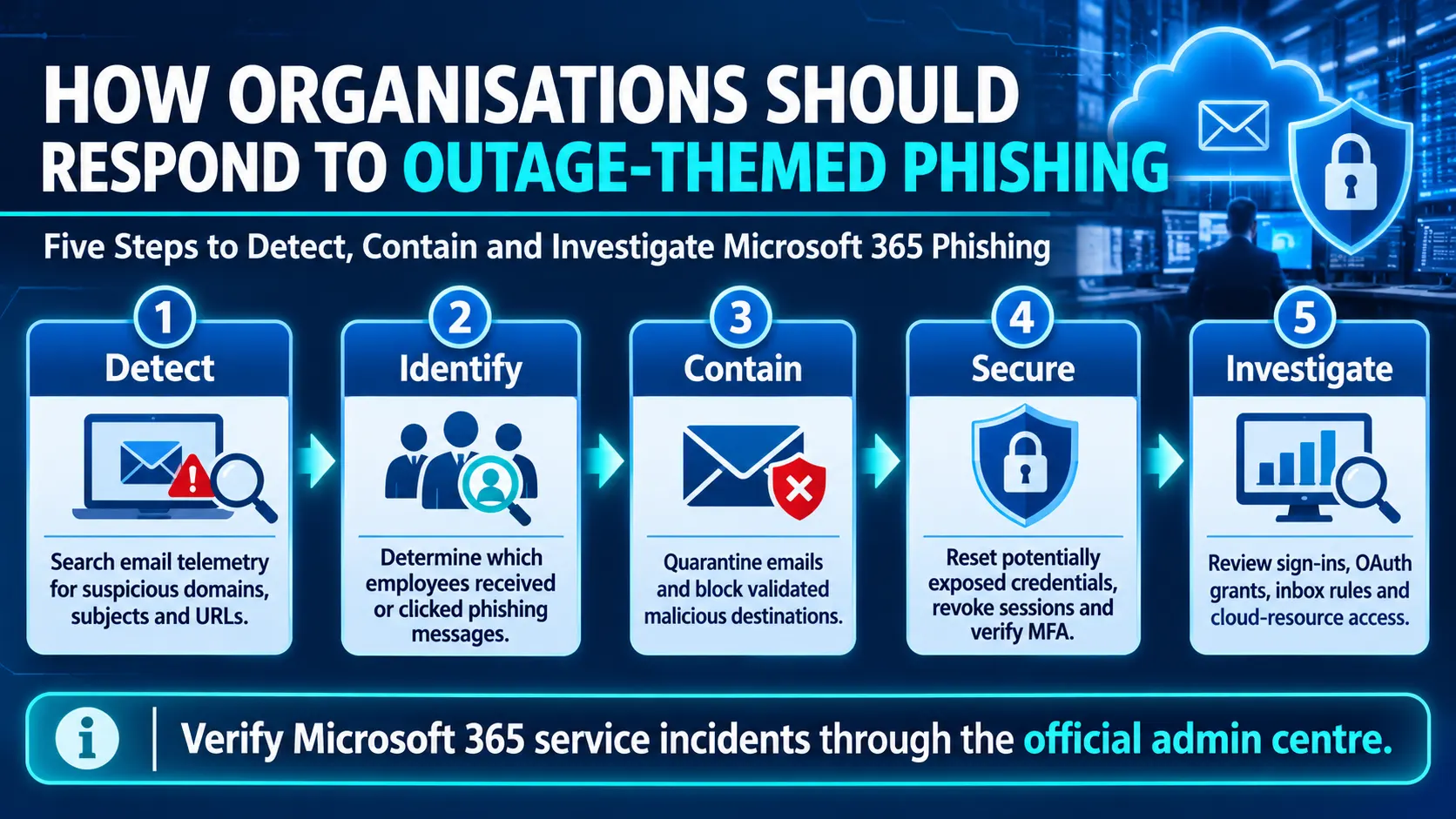
1. Search for and remove phishing emails
Security teams should search email telemetry for the identified sender domains, suspicious display names, randomised subject patterns, tracking hosts and destination URLs.
Matching messages should be quarantined or removed according to the organisation's incident response procedures.
2. Identify users who clicked suspicious links
Organisations should examine email click telemetry, proxy logs, browser activity and endpoint evidence.
The objective is to determine which users accessed the destination and whether they may have submitted corporate credentials.
3. Secure potentially compromised accounts
If an employee entered credentials into a suspicious page, Microsoft recommends:
Resetting the affected account password.
Revoking active sessions and refresh tokens.
Checking registered multifactor authentication methods.
Reviewing suspicious sign-in activity.
Investigating new inbox and forwarding rules.
Reviewing OAuth permissions and delegate access.
Checking unusual access to Exchange Online, SharePoint, OneDrive and Teams.
These steps help identify potential account compromise and suspicious activity following a phishing interaction.
4. Block or monitor malicious infrastructure
Microsoft recommends blocking or closely monitoring the identified destination domain and associated malicious URL paths.
However, organisations should avoid indiscriminately blocking shared email-delivery infrastructure.
Detection decisions should consider sender information, message content, URLs and behavioural signals together.
5. Verify service-health communications
Employees should verify Microsoft 365 service disruptions through the official Microsoft 365 admin centre rather than clicking links in unsolicited recovery notifications.
Strengthening Microsoft 365 Security Against Similar Campaigns
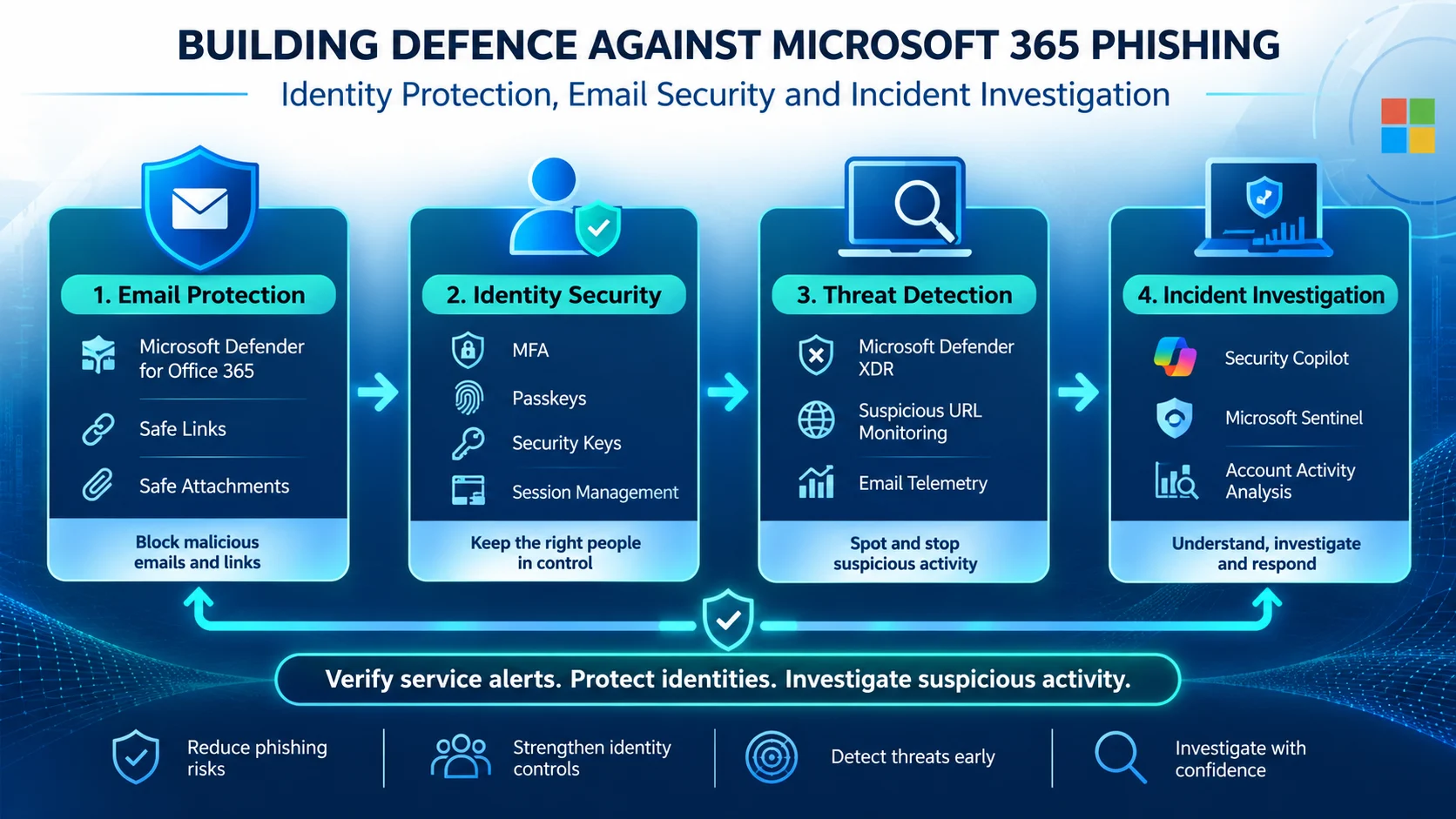
Beyond immediate incident response, Microsoft recommends several measures to reduce exposure to phishing attacks.
Security measure | Purpose |
|---|---|
Multifactor authentication (MFA) | Adds an additional authentication layer |
Passkeys and security keys | Prioritises phishing-resistant authentication |
Safe Links | Helps protect users from malicious URLs |
Safe Attachments | Helps analyse potentially malicious email attachments |
Zero-hour auto purge (ZAP) | Helps retroactively remove delivered malicious messages |
Attack simulation training | Helps employees recognise phishing techniques |
Email reporting workflow | Enables users to report suspicious messages |
Microsoft also recommends reviewing existing Microsoft Defender for Office 365 policies and encouraging employees to report suspicious messages through the organisation's established Outlook reporting process.
The company highlights the importance of phishing-resistant authentication methods, including passkeys and security keys, wherever possible.
Microsoft Security Copilot and Automated Incident Investigation
Microsoft also outlined how Security Copilot customers can use existing promptbooks to support investigations related to this campaign.
Two investigation workflows were highlighted.
Incident investigation
This workflow can summarise related alerts and incidents while identifying potentially affected users and devices.
Microsoft User analysis
This workflow can help investigate users who clicked campaign links by examining:
Sign-in activity.
Multifactor authentication changes.
Inbox and forwarding rules.
OAuth grants.
Some promptbooks require access to Microsoft product plugins, including Microsoft Defender XDR or Microsoft Sentinel.
These capabilities are intended to support security investigation and incident response. They do not establish that the campaign successfully compromised accounts.
MITRE ATT&CK Techniques Identified in the Campaign
Microsoft mapped three techniques to the observed campaign activity.
Tactic | MITRE ATT&CK technique | Campaign behaviour |
|---|---|---|
Initial Access | T1566.002 - Spearphishing Link | Emails contained malicious links directing users towards non-Microsoft destinations. |
Defense Evasion | T1036 - Masquerading | Messages impersonated Microsoft 365 service-health communications. |
Execution | T1204.001 - Malicious Link | Recipients were encouraged to select links to restore supposedly held emails. |
An important distinction is that Microsoft did not map credential capture, malware execution, command and control, or data exfiltration because the available evidence did not directly demonstrate those activities.
Indicators of Compromise (IOCs)
Security teams can use the following defanged indicators to investigate potentially affected environments.
Indicator | Type |
|---|---|
moments-notice[.]com | Domain |
planetmaison[.]com | Domain |
newbooker[.]com | Domain |
reallifeaccounting[.]com | Domain |
outagefixed[.]sbs | Domain |
outagerestored[.]sbs | Domain |
url[.]newbooker[.]com | Tracking domain |
u113727626[.]ct[.]sendgrid[.]net | Tracking domain |
162[.]120[.]17[.]69:8080 | IP and port |
These are selected indicators from Microsoft's larger list. Security teams should consult the original publication for the complete IOC set and validate indicators before applying blocks, particularly where shared service-provider infrastructure is involved.
Advanced Hunting: Investigating Suspicious Emails
Microsoft also published example Kusto Query Language (KQL) queries for Microsoft Defender XDR.
The following query can help identify messages matching the campaign's sender-domain and subject patterns.
let campaignDomains = dynamic([
"moments-notice.com",
"em4493.moments-notice.com",
"newbooker.com",
"em.newbooker.com"
]);
EmailEvents
| where SenderFromDomain in~ (campaignDomains)
or Subject matches regex
@"(?i)^(?:\[external\]\s*|\*external\*\s*)?outage\s*-\s*[a-z0-9]{6}$"
| project Timestamp, NetworkMessageId,
RecipientEmailAddress, SenderFromAddress,
SenderFromDomain, SenderDisplayName,
Subject, DeliveryAction, DeliveryLocation
| order by Timestamp desc
Microsoft also provides additional hunting queries for identifying suspicious URLs through EmailUrlInfo and investigating recipient clicks through UrlClickEvents.
The queries do not specify a time range automatically. Security teams should select an appropriate investigation period and validate the results against their own environment.
What This Development Means for Enterprise Cybersecurity
The Microsoft investigation highlights a broader industry shift towards exploiting real-world business disruptions as part of social engineering campaigns.
Traditional phishing awareness often focuses on suspicious attachments, unfamiliar senders and unexpected password requests. However, this campaign demonstrates how attackers can build their messages around familiar enterprise services and legitimate operational events.
For enterprises, this could mean placing greater emphasis on contextual phishing detection rather than relying exclusively on static email-filtering rules.
It also reinforces the importance of combining email security, identity protection, employee awareness and post-click investigation.
The most significant lesson is that a genuine service notification and a fraudulent message can appear in the same business context. Employees must therefore verify the source of an alert before taking action.
Microsoft's investigation did not establish successful credential theft or subsequent account compromise.
Organisations should treat the activity as a credible phishing threat without assuming that every recipient or organisation was compromised.
Source: Microsoft Security Blog
About the Author