
SCKit Malware Exploits ScreenConnect to Hijack MSP Remote Access and Target IT Technicians
Microsoft has uncovered SCKit, a malicious toolkit that abuses ScreenConnect access to install unauthorised remote-access clients, steal technician session cookies and spread across managed service provider networks.
Xcademia Team
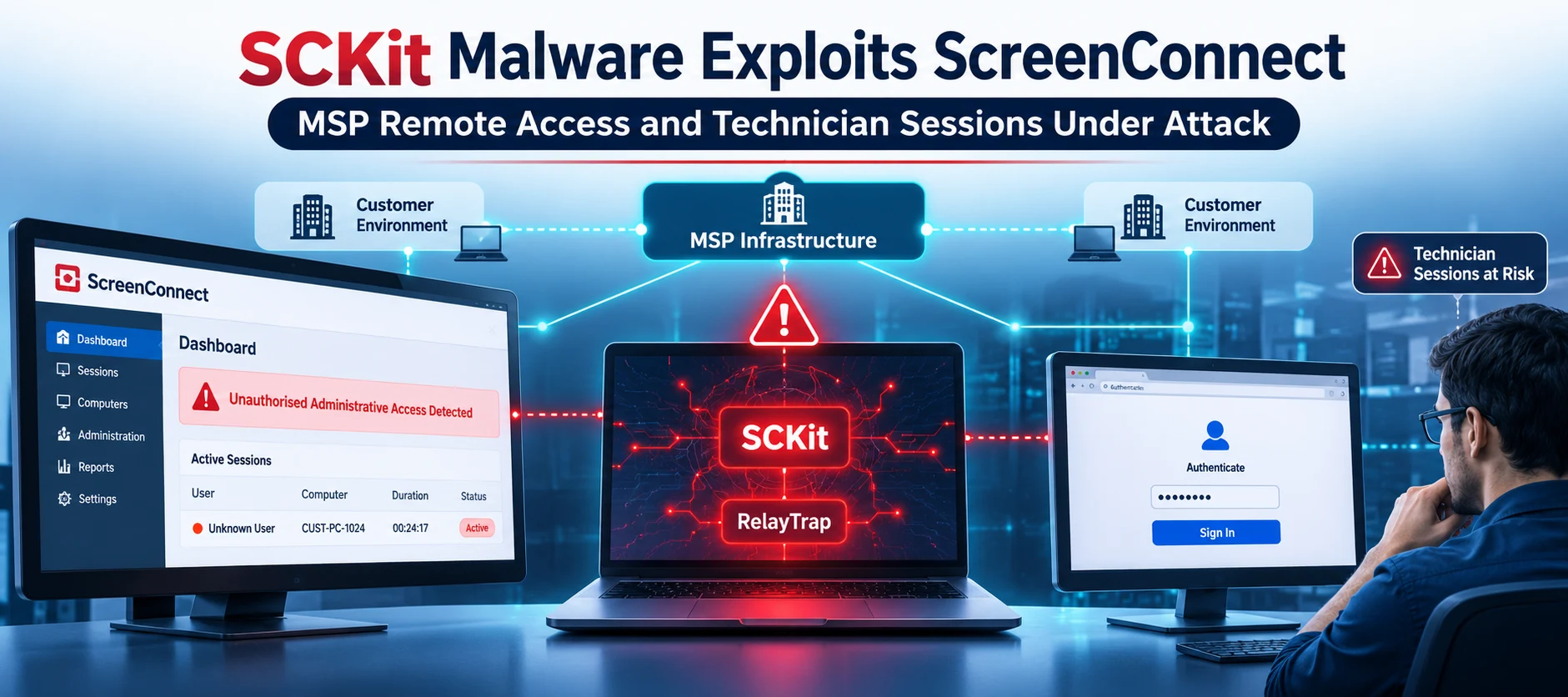
Managed Service Providers (MSPs) rely on remote-support platforms to administer customer devices, troubleshoot technical issues and maintain IT infrastructure. However, attackers are increasingly abusing these trusted administrative tools to establish unauthorised access and move deeper into enterprise environments.
On November 13, 2026, Microsoft Security Research published findings about a malicious toolkit called SCKit, which abuses ConnectWise ScreenConnect to establish additional remote-access channels, maintain persistence and target IT support technicians.
The investigation follows an active campaign reported by ConnectWise on November 11, 2026. According to Microsoft, attackers gained unauthorised access to cloud-hosted ScreenConnect instances belonging to MSPs and used those instances to deploy malicious components across customer-managed endpoints.
The toolkit goes beyond installing an unauthorised remote-support client. It also contains a worm-like component called RelayTrap, designed to target technicians connecting to compromised customer devices. The malware can attempt to compromise technician workstations, access authenticated browser sessions and use management-console privileges to distribute malicious payloads to additional managed endpoints.
Microsoft's investigation highlights how the compromise of a trusted remote-management environment can create risks for both service providers and the organisations they support.
How Attackers Abuse ScreenConnect
ScreenConnect, formerly known as ConnectWise Control, is a remote-support and access platform used by IT teams and MSPs to manage computers remotely.
Its architecture consists of three primary components:
Management instance: A cloud-hosted or on-premises server that manages sessions and provides the administrative web console.
Technician workstation: The computer used by support personnel to authenticate, access the console and initiate remote-support sessions.
Customer endpoint: The managed computer running a ScreenConnect client that receives remote commands and supports administrative access.
ScreenConnect supports two important session types:
Access sessions: Provide persistent, unattended remote access through an installed client.
Support sessions: Allow temporary interactive connections when an end user joins a support session.
The platform also supports remote commands through its management console. These commands can be delivered directly to customer endpoints without requiring the technician's workstation to act as an intermediary.
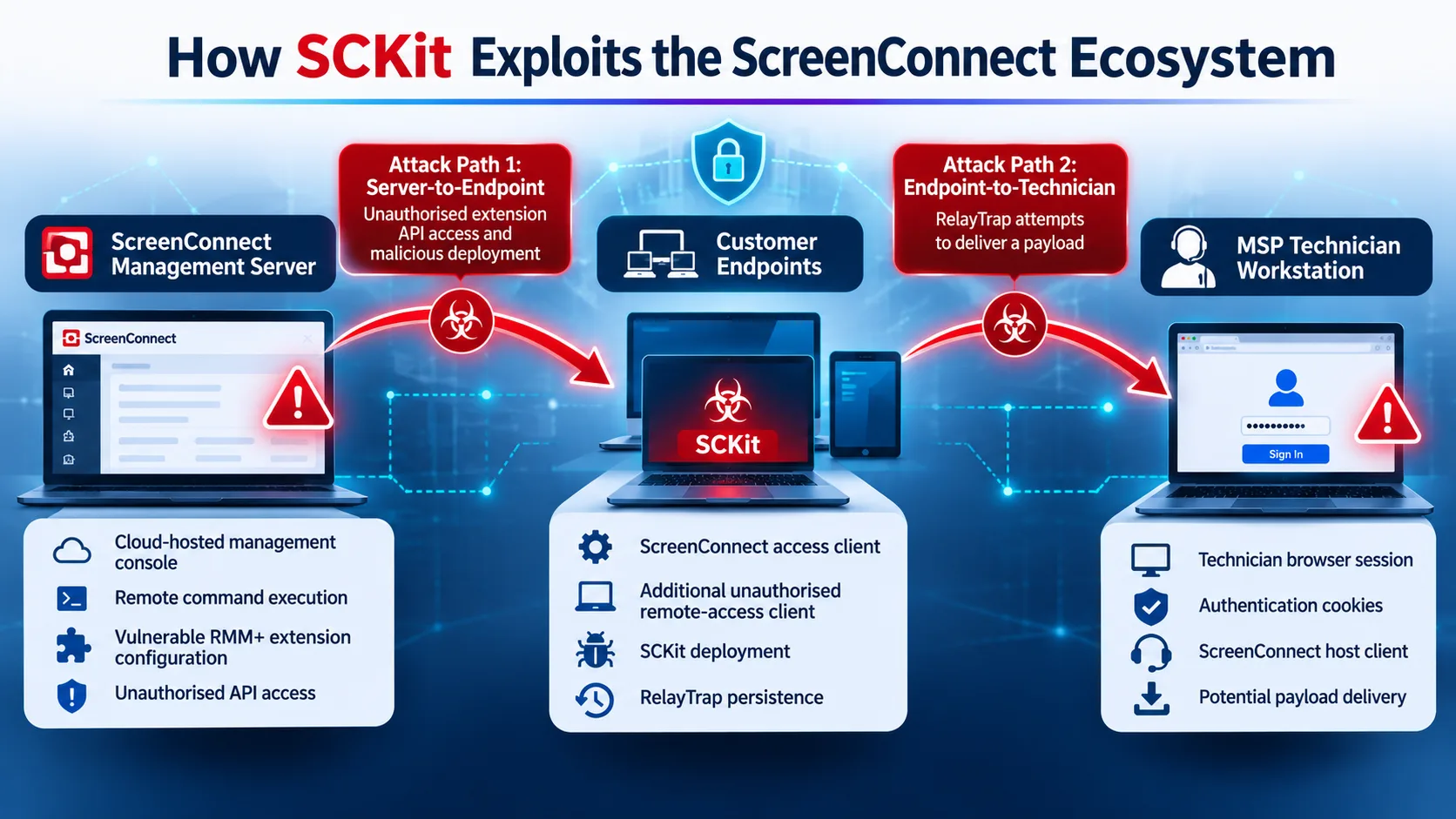
Microsoft's investigation identified two distinct attack surfaces within this environment.
Server-side access through vulnerable extensions
ConnectWise extensions provide additional functionality and integrations for ScreenConnect.
Microsoft highlighted a reported authentication weakness affecting RMM+ extension versions 1.0.31 and 1.0.32. According to the ConnectWise advisory, when an access key had not been configured, the extension could accept an empty key.
Under this configuration, an unauthorised caller could submit commands through the extension's API for execution on managed endpoints without completing the normal ScreenConnect user sign-in process.
ConnectWise was investigating extension abuse as a possible initial-access route. However, the precise entry method used in the reported campaign remained under investigation.
Microsoft also clarified that Labtech Plus is a third-party extension and should not be confused with ConnectWise Automate, formerly known as LabTech.
Endpoint-to-technician attack path
The second attack surface involves RelayTrap, a malicious component included in SCKit.
Rather than targeting only customer devices, RelayTrap is designed to exploit the connection between a compromised customer endpoint and a technician's workstation.
When a technician connects to an affected device using a vulnerable ScreenConnect host client, RelayTrap attempts to deliver a malicious launcher through the support session.
This creates a potential route for extending the compromise from customer infrastructure into the MSP's internal support environment.
Important distinction: The server-side extension access and the endpoint-to-technician propagation mechanism are separate attack paths. Securing one does not automatically eliminate the other.
SCKit Attack Chain: From Remote Commands to Persistent Access
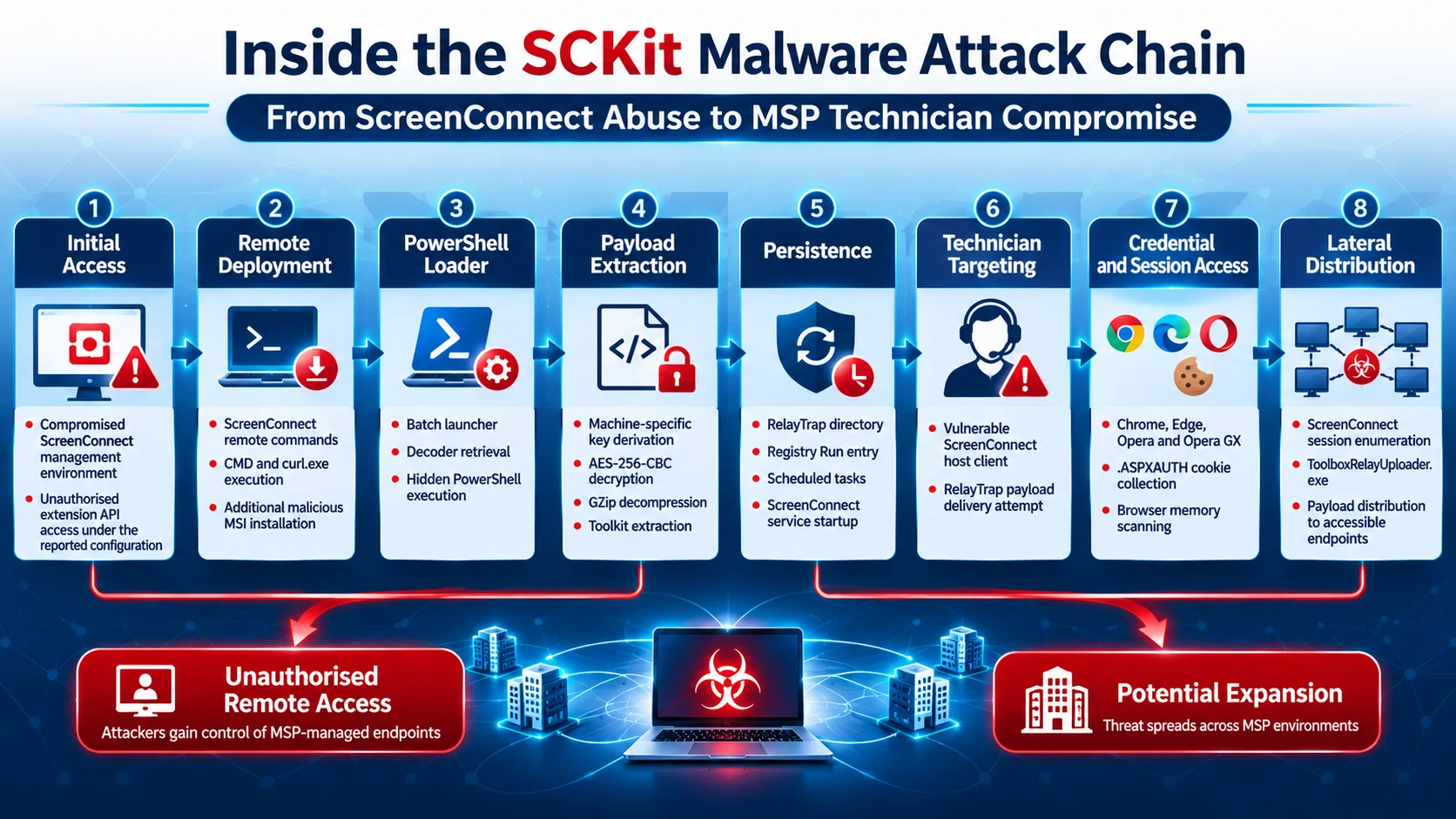
Microsoft's analysis describes a multi-stage deployment process in which attackers use an existing ScreenConnect management environment to install additional remote-access software and prepare SCKit's components.
The attack chain involves several stages.
Stage 1: Installing an unauthorised ScreenConnect client
The attacker uses the compromised MSP management instance to issue commands to an existing customer endpoint.
The commands launch Windows Command Prompt (cmd.exe), which invokes curl.exe to download a maliciously deployed ScreenConnect MSI installer from attacker-controlled infrastructure.
The installer is saved as:
C:\Windows\Temp\sc.msi
Windows Installer then installs the package silently using the /qn and /norestart parameters.
The newly installed client connects to an attacker-controlled ScreenConnect instance, creating a separate remote-access channel outside the MSP's approved management environment.
This is a critical distinction: securing the legitimate ScreenConnect console does not automatically remove the additional malicious client.
Stage 2: Downloading the PowerShell decoder
After installing the additional client, the attackers deploy a batch launcher that retrieves a PowerShell-based decoder.
Microsoft identified the following retrieval infrastructure:
ns[.]mo7sen[.]dev/EadF.php?p=4
The launcher uses PowerShell to decode a URL-safe Base64 string and create a batch file in the Windows temporary directory.
The batch file downloads the decoder and launches it in full mode.
The toolkit uses different request parameters to retrieve individual components:
Request parameter | Component | Purpose |
|---|---|---|
| Decoder | Downloads and extracts the toolkit |
| Encrypted bundle | Supplies scripts and configuration |
| SQLite utility | Supports browser-cookie queries |
| Encrypted script | Retrieves another PowerShell stage |
| Cleanup component | Removes an existing trap before possible redeployment |
The machine identifier is also included in selected requests.
Stage 3: Decrypting and extracting the toolkit
SCKit's decoder uses device-specific information to recover and decrypt its payload.
Microsoft identified several cryptographic operations in this process:
SHA-256 hashing of the Windows MachineGuid.
XOR-based secret recovery.
PBKDF2-HMAC-SHA256 key derivation.
AES-256-CBC decryption.
GZip decompression.
ZIP archive extraction.
The decoder derives its encryption key using the machine identifier and information supplied through HTTP response headers.
The extracted toolkit is placed in:
%TEMP%\SCKitBundle
In full mode, the decoder prepares a separate payload directory and stages several components, including the watcher, installer, alert script and RelayTrap source code.
It also prepares ToolboxRelayUploader.exe, which supports payload distribution through the ScreenConnect management console.
Stage 4: Deploying RelayTrap and establishing persistence
The next stage introduces RelayTrap, the component responsible for targeting connecting technicians.
SCKit creates a directory:
C:\ProgramData\RelayTrap
It establishes persistence through Windows startup and scheduled-task mechanisms.
Microsoft identified:
A machine-wide registry Run entry named
RelayTrapLiteAlert.A scheduled task that launches the RelayTrap watcher.
Automatic startup configurations for ScreenConnect services.
Additional scripts and components stored under the RelayTrap directory.
The watcher monitors installed ScreenConnect client services and examines their executable paths and connection parameters.
It can then build a corresponding RelayTrap executable using libraries from the installed ScreenConnect client.
This allows the malicious component to adapt to the local client installation rather than relying on one fixed executable.
Stage 5: Targeting technicians through support sessions
RelayTrap is designed to exploit the relationship between customer endpoints and technicians.
When a technician connects to an affected customer device using a vulnerable ScreenConnect host client, RelayTrap attempts to deliver a staged batch launcher through the session.
That launcher retrieves the SCKit decoder and attempts to extend the toolkit's deployment to the technician workstation.
Microsoft notes that this is the toolkit's propagation design. The documented behaviour should not be interpreted as confirmation that every connecting technician was successfully infected.
Stage 6: Stealing authenticated browser sessions
One of SCKit's most significant capabilities is its attempt to access authenticated ScreenConnect browser sessions.
The malware searches profiles belonging to:
Google Chrome
Microsoft Edge
Opera
Opera GX
It specifically looks for authentication cookies named .ASPXAUTH.
Microsoft identified two collection techniques:
Browser database access: The toolkit copies browser cookie databases and supporting files, using a Volume Shadow Copy fallback when database files are locked.
Browser memory scanning: An embedded C# component examines browser processes and searches memory for authentication cookie strings and associated host information.
The malware also contains decryption routines using Chromium's master key, Windows Data Protection API (DPAPI) and AES-GCM for relevant cookie formats.
These techniques are intended to obtain authenticated session material that could provide access to the technician's ScreenConnect management console.
Stage 7: Distributing payloads through the management console
The toolkit includes a console-distribution component designed to combine authentication cookies with the required anti-forgery and access tokens.
It can then:
Enumerate accessible ScreenConnect sessions.
Upload a malicious payload using ToolboxRelayUploader.exe.
Queue execution through the Shared Toolbox.
Remove the uploaded Toolbox item after distribution.
The potential impact depends on the permissions associated with the compromised technician account.
An account with access to multiple customer sessions could expose a wider managed environment to malicious activity.
Stage 8: Cleanup and possible redeployment
SCKit also includes a cleanup mechanism.
Its cleanup component can remove scheduled tasks, services, processes, registry entries and associated files.
However, Microsoft identified an important behaviour: after cleanup, the decoder can start the bundled dropper again unless the -NoReArm option is specified.
This means that the toolkit's cleanup functionality is not necessarily a complete removal mechanism. It can also support redeployment.
Why SCKit Creates a Serious Risk for Managed Service Providers
The significance of SCKit lies in its ability to target multiple layers of a remote-management environment.
A conventional endpoint investigation might focus on identifying and removing malicious software from the original compromised device. However, SCKit introduces additional investigation requirements because it targets the management infrastructure and the technicians who operate it.
Three areas deserve particular attention.
Compromise of trusted administrative infrastructure
MSPs often use centralised management platforms to administer multiple customer environments.
When attackers gain access to a management instance, they may be able to issue commands to devices already connected to that environment.
The risk increases when unauthorised clients establish independent connections to attacker-controlled infrastructure.
Even after the legitimate management console is secured, these additional clients may remain active.
Exposure of technician authentication sessions
Technician browser sessions represent another important security boundary.
SCKit's attempts to collect .ASPXAUTH cookies demonstrate how attackers can target authenticated sessions rather than relying exclusively on password theft.
If session material is exposed, password changes alone may not invalidate existing sessions.
Organisations therefore need to review and revoke potentially exposed sessions, including associated identity-provider sessions.
Potential expansion across customer environments
The toolkit's console-distribution functionality introduces the possibility of reaching additional managed devices through compromised technician access.
However, this capability depends on the permissions and sessions available to the compromised account.
Microsoft's research documents the toolkit's distribution design. It does not establish that every accessible customer endpoint was successfully compromised.
For MSPs, this reinforces the importance of limiting administrative privileges and maintaining visibility into remote-management activity.
Microsoft Identifies Multiple Detection Opportunities
Microsoft provided detection guidance for organisations using Microsoft Defender XDR and Microsoft Defender for Endpoint.
The recommendations cover suspicious process execution, persistence mechanisms, browser credential access, malicious network communications and unauthorised antivirus exclusions.
The following table summarises important detection areas.
Detection area | Activity to investigate |
|---|---|
Execution | Suspicious CMD, PowerShell and ScreenConnect commands |
Persistence | RelayTrap registry entries and scheduled tasks |
Remote access | Unauthorised ScreenConnect client installations |
Defence evasion | Unexpected Microsoft Defender Antivirus exclusions |
Credential access |
|
Command and control | Connections to identified campaign infrastructure |
Payload distribution | Unexpected Shared Toolbox uploads and execution |
Important Microsoft Defender detection names
Microsoft identified several relevant detection names.
Execution and remote-access activity:
Suspicious command execution via ScreenConnect
Suspicious installation of remote management software
Persistence and defence evasion:
Trojan:PowerShell/RelayPersist.FC!MTB
Trojan:PowerShell/SCRelayTrap.EC!MTB
Suspicious Scheduled Task Process Launched
Suspicious Microsoft Defender Antivirus exclusion
Credential access:
Possible theft of passwords and other sensitive web browser information
Suspicious DPAPI Activity
Trojan:BAT/Tikise.A
Trojan:PowerShell/Tikise.A
Broader malicious activity:
HackTool:Win32/ToolboxRelayUploader
Trojan:PowerShell/ScreenConnect.SC!MTB
Trojan:PowerShell/ScreenConnect.DC!MTB
Potential human-operated malicious activity
These detection names are intended to support investigation. Security teams should correlate alerts with endpoint timelines, ScreenConnect audit records and approved administrative activity.
Recommended Mitigation and Incident Response Measures
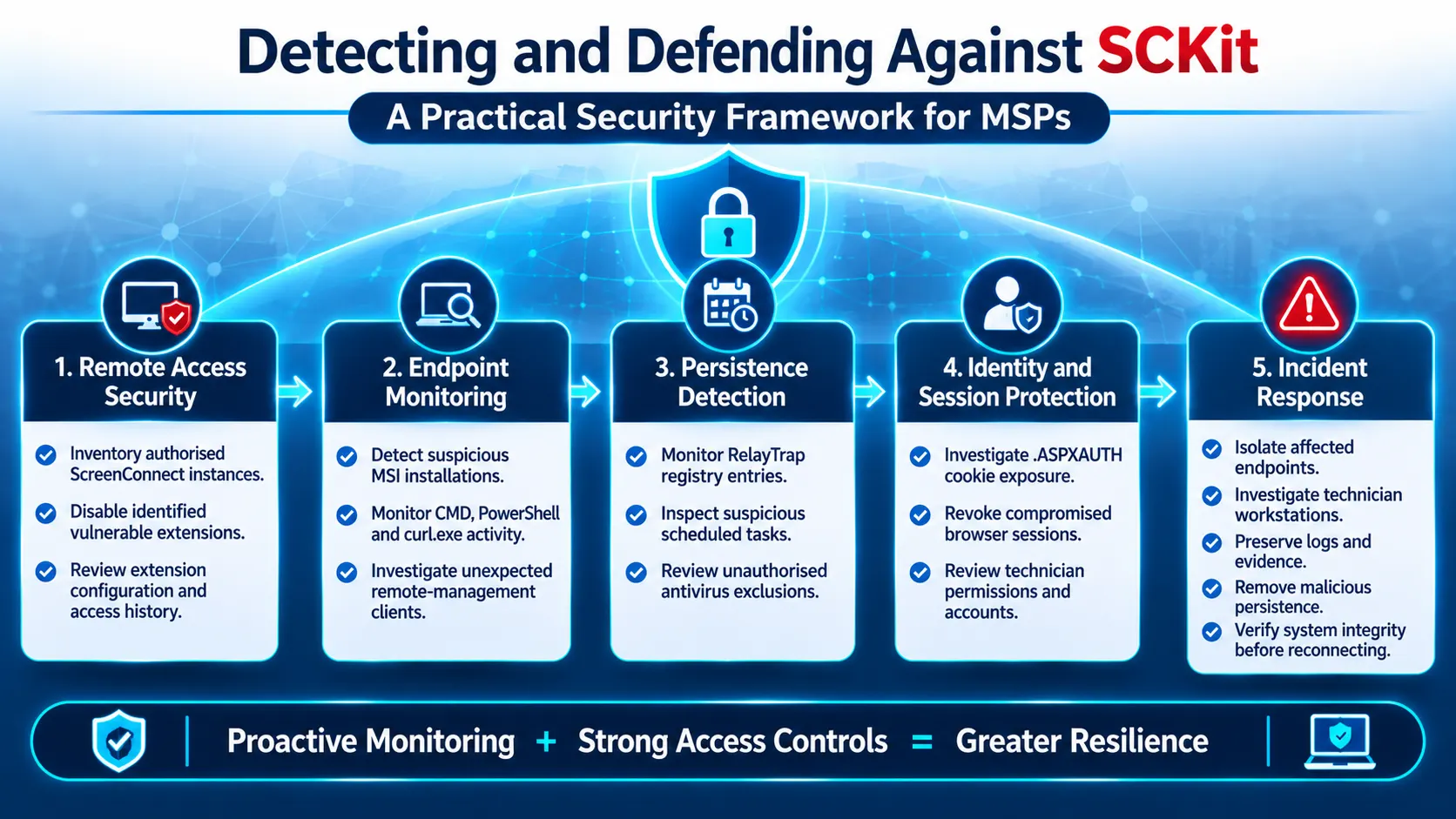
Microsoft recommends treating the ScreenConnect management environment, customer endpoints and technician workstations as separate investigation areas.
Organisations should not assume that securing the management console alone removes an existing compromise.
The following measures are particularly important.
1. Disable the identified extensions
Keep the following extensions disabled and follow ConnectWise's security advisory:
Labtech Plus
RMM Plus
RMM+
RMM Plus Password Link
RMM+ Password Link
Review their installation history, configuration and associated administrative activity.
2. Update ScreenConnect technician clients
ConnectWise states that ScreenConnect client version 26.6.5 and later blocks the toolkit's attempted endpoint-to-technician transfer technique.
The fix for CVE-2026-84869 was released on September 8, 2026.
Organisations should verify technician client versions independently. Updating a cloud-hosted management console does not automatically update every installed technician client.
3. Investigate through an independent channel
If an endpoint is suspected of compromise, avoid relying on the potentially compromised ScreenConnect environment for investigation.
Use Microsoft Defender for Endpoint Live Response or another approved out-of-band management method.
Include both customer endpoints and technician workstations in the investigation.
4. Revoke exposed sessions and rotate credentials
From a clean device:
Invalidate affected ScreenConnect web sessions.
Revoke associated identity-provider sessions.
Rotate potentially exposed credentials.
Review technician accounts and permissions.
Investigate suspicious administrative activity.
Password changes alone may not invalidate existing authenticated sessions.
5. Remove malicious persistence
Security teams should investigate and remove:
Unauthorised ScreenConnect clients.
Suspicious scheduled tasks.
RelayTrap registry Run entries.
Malicious scripts and staged files.
Unauthorised Microsoft Defender exclusions.
Do not use cleanup scripts recovered from the SCKit toolkit as remediation tools.
6. Verify endpoint integrity
Before restoring network connectivity, confirm that:
Only approved ScreenConnect clients remain installed.
Remote connections point to authorised management infrastructure.
Malicious tasks and scripts have not reappeared.
Antivirus protection and security settings are effective.
No unauthorised persistence mechanisms remain.
Microsoft also recommends rebuilding devices when their integrity cannot be established.
Keep Microsoft Defender Antivirus, cloud-delivered protection and tamper protection enabled.
Indicators of Compromise (IOCs)
Microsoft published network indicators, file hashes and client identifiers to help organisations investigate potential SCKit infections.
Security teams can use these indicators alongside endpoint telemetry and behavioural detection.
Network indicators
Indicator | Type | Identified role |
|---|---|---|
| Domain | Decoder and toolkit retrieval |
| Domain | Unauthorised ScreenConnect infrastructure |
| Domain | Campaign infrastructure |
| Domain | Associated ScreenConnect relay |
| Domain | Associated ScreenConnect relay |
| IPv4 | Unauthorised ScreenConnect server |
| IPv4 | Associated unauthorised panel |
Selected file hashes
SHA-256 indicators published by Microsoft
SHA-256 | File |
|---|---|
| sc.msi |
| Staged toolkit ZIP |
| ToolboxRelayUploader.exe |
| RelayTrap.cs |
Unauthorised ScreenConnect client identifiers
2588ef5c15954b10ed630cc2c873b091
These indicators should be treated as investigation leads rather than definitive proof of compromise. Microsoft also notes that some toolkit components are dynamically generated, meaning file hashes alone may not identify every variant.
For the complete indicator list, refer to the original Microsoft investigation.
Advanced Hunting: Identifying SCKit Activity
Microsoft also provides Microsoft Defender XDR Advanced Hunting queries for investigating the campaign.
The queries use a 14-day lookback by default, with a separate 30-day lookback for generated PowerShell loader artefacts. Organisations should adjust the investigation window according to their available telemetry and retention.
The recommended hunting areas include:
Hunting focus | Data source | Investigation objective |
|---|---|---|
Network connections | DeviceNetworkEvents | Identify connections to campaign domains and IP addresses |
Suspicious commands | DeviceProcessEvents | Find SCKit, RelayTrap and loader execution |
File hashes | DeviceFileEvents | Locate identified installers and toolkit files |
Registry changes | DeviceRegistryEvents | Identify RelayTrap persistence |
Scheduled tasks | DeviceEvents | Investigate RelayTrap and TrapWatch tasks |
Antivirus exclusions | DeviceRegistryEvents | Identify suspicious security-setting changes |
Microsoft also provides queries for identifying temporary PowerShell files matching the following naming pattern:
k<32-hex>.ps1
These files may help investigators identify generated loader artefacts even when known hashes or network indicators are unavailable.
Security teams can access the original hunting queries and supporting technical details in Microsoft's research publication.
What This Means for the Cybersecurity Industry
The SCKit investigation highlights a broader security challenge: legitimate remote-management infrastructure can become an attack vector when administrative access, endpoint clients or technician sessions are compromised.
For MSPs, the consequences can extend beyond an individual customer device. Remote-management platforms connect service providers to multiple organisations, making their security configuration and identity controls particularly important.
Three industry lessons stand out.
Remote-management software needs continuous oversight.
Organisations should maintain an inventory of approved remote-management tools, management instances, extensions and client installations. Unauthorised software should not be allowed to blend into normal IT administration.
Technician workstations deserve stronger protection.
Support personnel operate with access to customer environments. Their browser sessions, authentication credentials and management-console permissions should be treated as high-value security assets.
Incident response must extend beyond the original endpoint.
Investigations should include management servers, technician workstations, browser sessions, remote-access clients and downstream managed devices.
For enterprises that depend on outsourced IT operations, the findings also highlight the importance of reviewing the security practices of their service providers.
These are broader industry implications drawn from Microsoft's findings, rather than additional capabilities or incidents confirmed by the announcement.
Conclusion
Microsoft's SCKit investigation demonstrates how attackers can abuse trusted remote-support infrastructure to establish unauthorised access, maintain persistence and target the technicians responsible for managing customer systems.
The toolkit's combination of additional ScreenConnect clients, PowerShell-based deployment, RelayTrap persistence, browser-session targeting and management-console payload distribution makes it particularly relevant to MSP security teams.
The most important defensive lesson is that removing an unauthorised remote-access client is not sufficient to establish that an environment is clean.
Organisations must investigate the complete access chain, revoke potentially exposed sessions, examine technician workstations, remove malicious persistence and verify every affected endpoint before restoring normal operations.
For MSPs and enterprise security teams, securing remote-management infrastructure should be treated as a core component of identity security and endpoint protection.
Source: Microsoft Security Blog
About the Author