
Microsoft Exposes Fake Software Downloads That Monetize Victims' Devices
Microsoft has identified a fake-download campaign using trojanized installers to deploy proxyware, distributed-computing software and unwanted utilities, potentially monetizing victims' devices without informed consent.
Xcademia Team
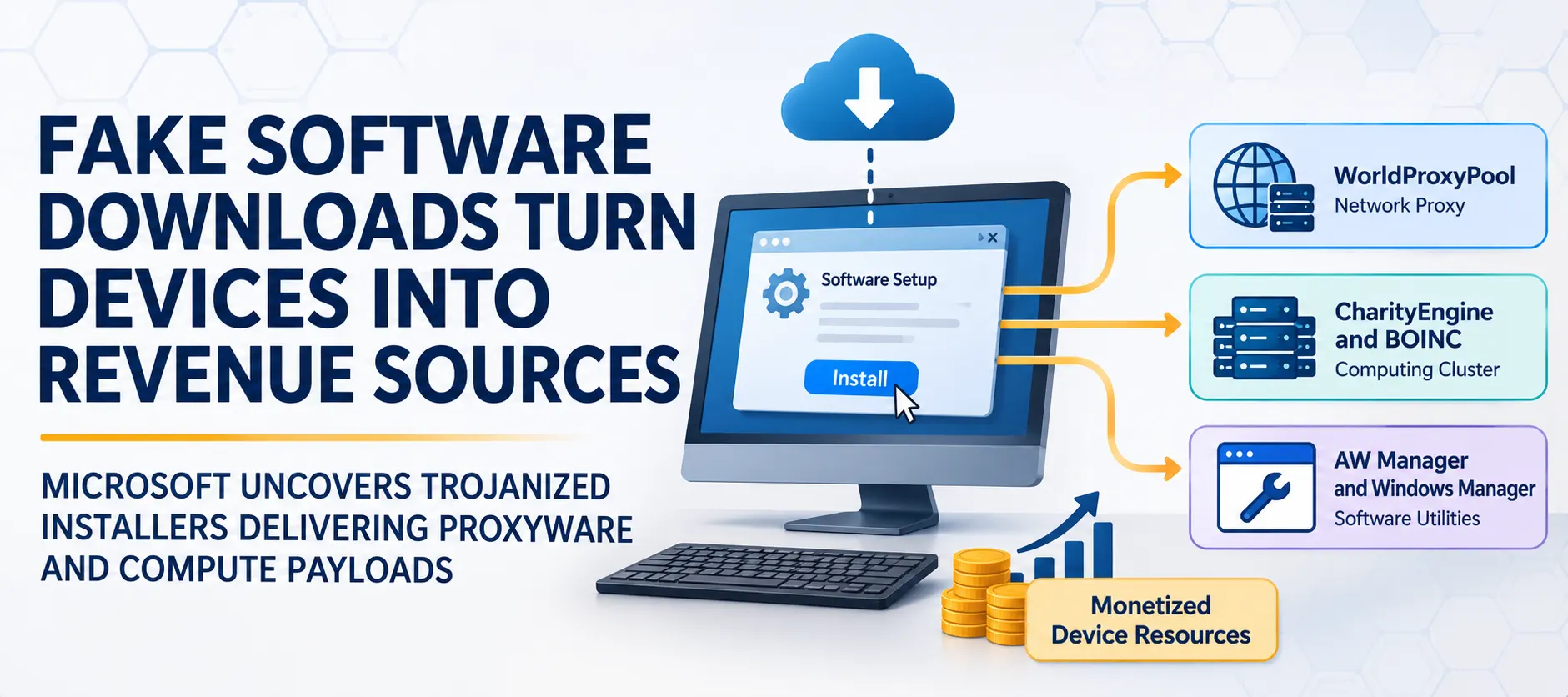
Cybercriminals are using fake software downloads to turn users' devices into sources of revenue through proxy traffic, distributed computing and bundled utility applications, according to new research from Microsoft Security Research.
The campaign targets people searching for cracked commercial software, free games, activators, plugins, executors and unofficial utilities. It uses trojanized Inno Setup-style installers to deliver multiple software offers during a single installation session.
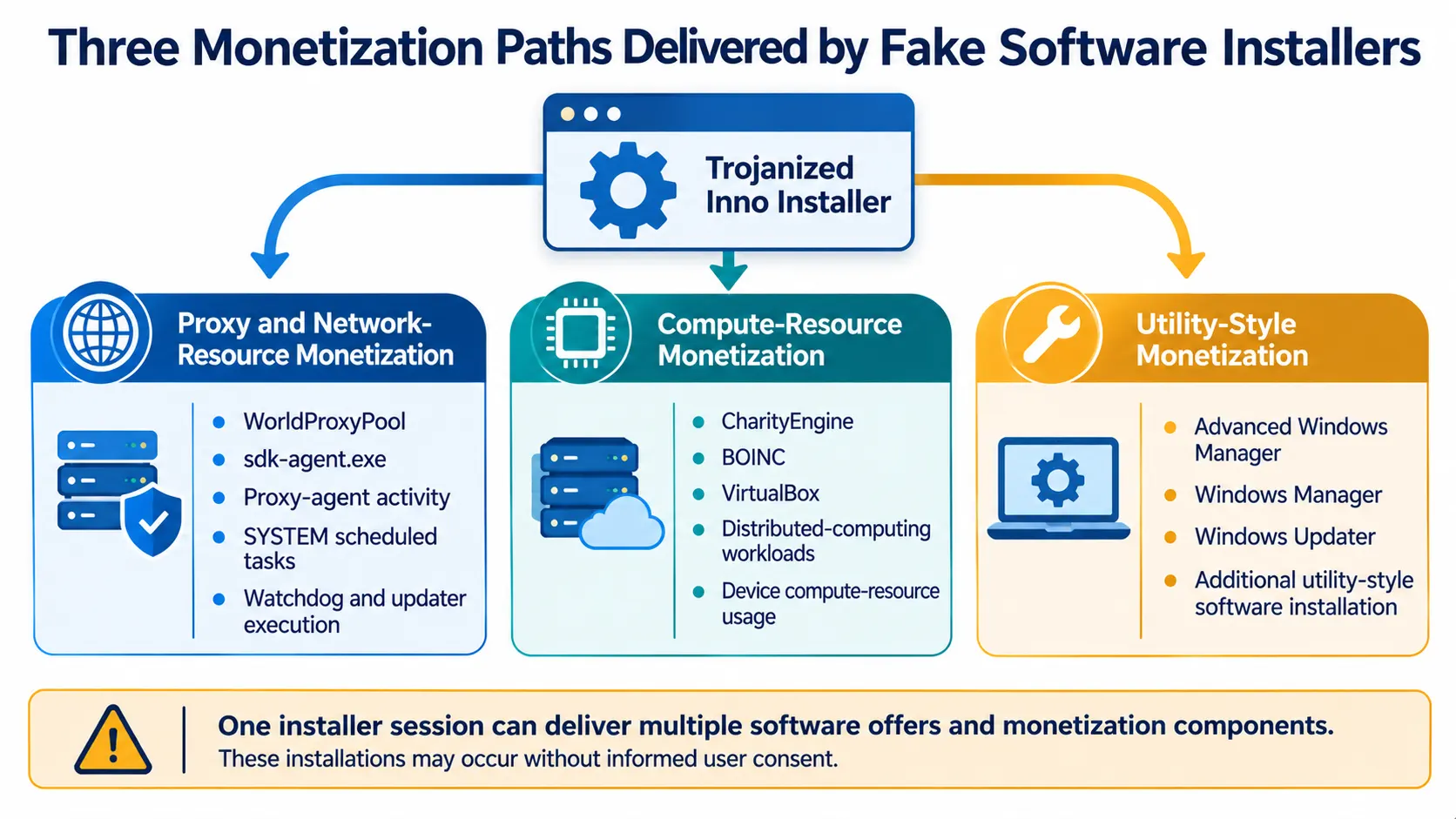
Microsoft's investigation identified three downstream monetization branches:
Proxy and network-resource monetization: WorldProxyPool routes third-party internet traffic through an affected device.
Compute-resource monetization: CharityEngine and Berkeley Open Infrastructure for Network Computing (BOINC) use device resources for distributed computing.
Utility-style software monetization: Advanced Windows (AW) Manager and Windows Manager introduce additional applications and updater-style components associated with adware-style monetization.
Microsoft notes that some of these products and components can have legitimate uses. The security concern is their installation through deceptive software bundles, often without users' informed knowledge or consent.
The campaign also uses a delivery system that tracks individual software offers and records whether each installation attempt succeeds or fails. This allows different payloads to be attempted independently within the same installer session.
How the Fake-Download Campaign Works
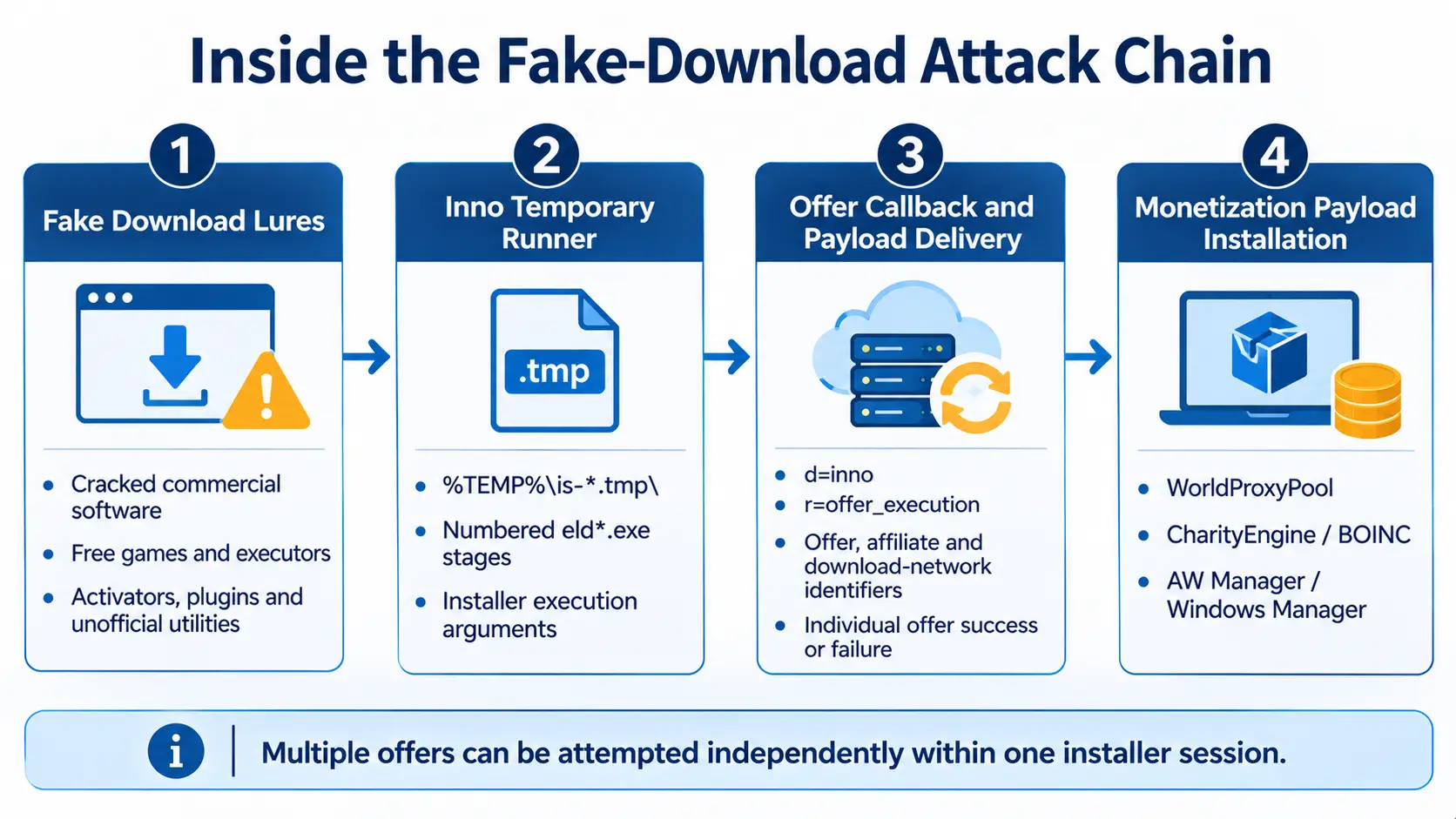
Microsoft describes a four-stage attack chain that begins with deceptive download lures and progresses through installer execution, callback-based offer delivery and final software installation.
1. Fake Software Downloads Attract Users
The campaign begins when users download and execute installers promoted as cracked software, free games, plugins, activators or unofficial utilities.
Microsoft observed lures associated with several products and tools, including:
Echo Client
FabFilter Total Bundle
Navicat Premium crack
Cue Club
Auto-clicker utilities
Deadpool Apunka Games
Command & Conquer: Red Alert 2
TFT Unlock Tool
clownfishvoicechanger
Download pages can look polished and legitimate. Microsoft documented an example utility download page featuring product screenshots, feature descriptions, and repeated download buttons.
The objective is to persuade users to execute an installer that appears to provide the requested software.
2. Inno Setup-Style Installers Stage Temporary Runners
After execution, the fake installer launches an Inno Setup-style temporary runner from a directory matching:
%TEMP%\is-*.tmp\
The runner then starts additional numbered executable stages. Microsoft observed filenames such as:
eld0.exeeld1.exeeld3.exeeld4.exeeld5.exeset_*.exe
Some executions also included files named FirstFast[1].exe and SecondRunner[1].exe.
Command-line arguments such as /SL5, /SPAWNWND and /FIRSTWND, combined with the temporary directory and staged filenames, provide useful investigation indicators.
Microsoft uses an Echo Client installation as a representative example of this execution sequence. However, the number of stages and downstream outcomes varied between installer sessions.
3. Callback Requests Control Individual Software Offers
After staging, the temporary runner contacts rotating infrastructure using a recurring URL structure.
The callback pattern includes parameters such as:
d=innor=offer_executionsisoadnspot
These values help coordinate offer selection, affiliate and download-network information, placement and session tracking.
A simplified example of the observed request structure is:
http://<rotating-domain>/<path>?sis=<session>&fz=<size>&d=inno&r=offer_execution&ko=no&o=<offer>&a=<affiliate>&dn=<download-network>&spot=<placement>&t=<timestamp>&cr=Microsoft also observed failed-offer callbacks using:
r=offer_execution_fail
Some failed requests included local error messages indicating that an operation did not complete because a file contained a virus or potentially unwanted software.
An important detail is that these callbacks do not always occur before payload execution. In some endpoint detection and response traces, child payloads launched before or around the callback request.
Microsoft also found that different offers could succeed or fail independently within a single installer session. A failed first offer therefore did not necessarily stop the remaining installation sequence.
4. Payloads Install Software for Monetization
After the offer-delivery stage, the campaign launches downstream installers or components using unattended installation switches, including:
/qn/S/quiet/norestart
Microsoft identified three monetization branches delivered through this infrastructure: WorldProxyPool, CharityEngine/BOINC and AW Manager/Windows Manager.
Three Monetization Branches Identified by Microsoft
The campaign's final installation stage can introduce different software depending on the offer selected. Microsoft confirmed three downstream monetization branches.
Branch A: WorldProxyPool Turns Devices into Proxy Resources
One branch installs WorldProxyPool, which uses an affected device as a proxy and network resource.
In the investigated activity, a staged eld4.exe payload created three scheduled tasks under the Windows Task Scheduler. These tasks operated with SYSTEM privileges and supported agent startup, watchdog execution and software updates.
The components were installed under:
C:\Program Files\WorldProxyPool\
Microsoft identified the following scheduled tasks:
Scheduled task | Observed purpose |
|---|---|
| Starts |
| Runs a hidden, noninteractive PowerShell watchdog script every five minutes. |
| Runs |
The installer also used schtasks.exe /Run to start the agent task immediately.
Subsequent task launches were handled by the Windows Task Scheduler service, which executed the agent and watchdog components in the service context.
This recurring execution supports continued proxy-agent, watchdog and updater activity, consistent with network-resource monetization.
Branch B: CharityEngine and BOINC Use Compute Resources
A second branch installs distributed-computing software associated with CharityEngine and BOINC.
Microsoft observed components installed under:
C:\Program Files\BOINC\C:\ProgramData\BOINC\
The investigated chain included executables and supporting components such as:
charityengine.exeboinc.exeboinctray.exeboinc.scrboincscr.exece11.exewrapper_2022110901_windows_x86_64.exeVirtualBox-7.2.8-r173730.msi
The components supported BOINC execution, compute-wrapper activity, GPU or compute-capability checks, CharityEngine project communication and VirtualBox installation.
Microsoft's process-tree analysis traced the execution from an Inno staged payload through CharityEngine, VirtualBox and BOINC installation. The chain also launched a compute wrapper that started cell.exe.
The security concern is that device processing resources can be used for distributed computing without the user knowingly agreeing to the installation and activity.
Branch C: AW Manager and Windows Manager Install Utility Software
The third branch delivers Advanced Windows Manager or Windows Manager applications.
In one observed process tree, the Inno runner launched eld3.exe, which then initiated an installation involving:
Windows Manager – Postback Johan.msi
The chain installed components including:
AdvancedWindowsManager.exeWindows Updater.exe
Microsoft observed installation paths resembling:
%APPDATA%\AW Manager\Windows Manager 1.0.0\
and:
C:\Program Files (x86)\AW Manager\Windows Manager\
The process activity included command-driven installation through msiexec.exe, launching Windows Manager with an autostart option and terminating AdvancedWindowsManager processes through taskkill.exe.
Microsoft categorises this branch as adware-style utility monetization.
How the Campaign Tracks Offers and Rotates Infrastructure
Microsoft found that the campaign frequently changed its callback domains while retaining a recurring request structure.
This makes individual domains less reliable as long-term detection indicators. The more durable signals are the combination of Inno temporary execution, staged filenames, callback parameters and related installation activity.
The investigation identified several offer and download-network combinations, including:
Offer ID | Download-network ID | Observed association |
|---|---|---|
|
| Primary first-stage offer commonly attempted at the start of the installer flow |
|
| CharityEngine/BOINC compute-monetization branch |
|
| WorldProxyPool proxyware branch |
|
| Recurring follow-on offer |
|
| Secondary offer branch |
|
| Later campaign offer |
|
| Low-volume offer branch |
|
| Additional offer in the campaign rotation |
|
| Later high-volume offer |
Microsoft cautions that some callback parameters have meanings that are not fully confirmed. For example, the exact server-side meaning of fields such as dn, paw, t, ko and cr was not established.
The company therefore treats these interpretations as assessments based on observed telemetry correlations rather than confirmed definitions.
This distinction matters when building detection rules. Security teams should not assume that every parameter has a fully understood meaning or that a single callback proves a complete infection.
Detection and Protection Guidance
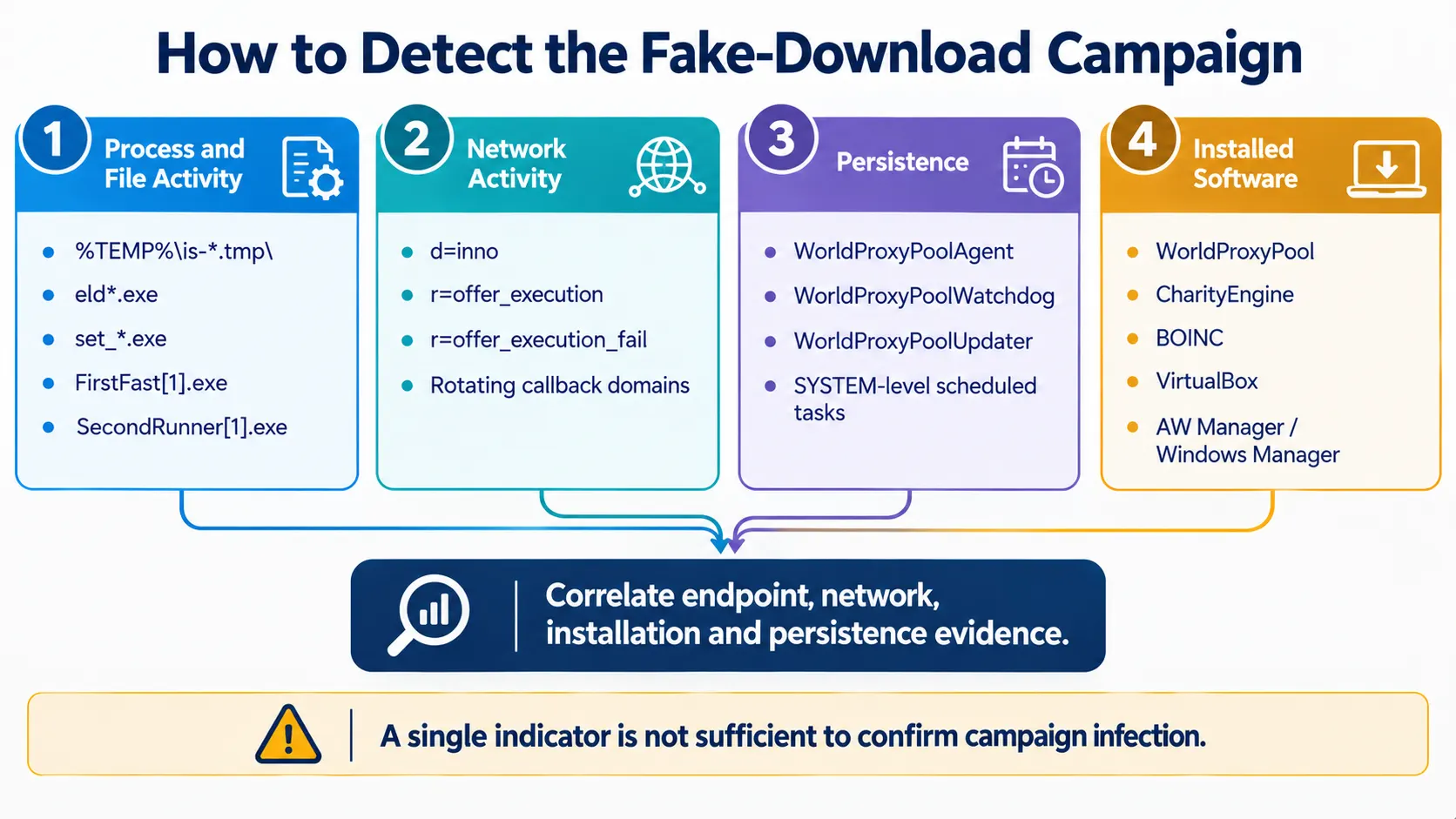
Microsoft recommends combining preventive controls with investigation of suspicious installer execution, callback activity, scheduled tasks and unexpected software installations.
Prevent Installation from Untrusted Sources
Users should avoid cracked software, key generators, unofficial game installers and activation tools. These are common delivery mechanisms for malware, potentially unwanted applications and monetization campaigns.
Organisations should also establish controls around software downloads and installation from untrusted sources.
Enable Microsoft Defender Protection Features
Microsoft recommends reviewing the following protections:
Cloud-delivered protection: Verify that Microsoft Defender Antivirus cloud-delivered protection is enabled to improve detection of emerging malware and potentially unwanted applications.
Tamper protection: Keep tamper protection enabled to help prevent unauthorised changes to Microsoft Defender security settings.
Reputation-based protection: Configure reputation-based protection to help block known malicious and untrusted applications and downloads.
Attack Surface Reduction rules: Evaluate rules that block executable files unless they meet prevalence, age or trusted-list criteria.
These controls are intended to reduce exposure to deceptive installers and suspicious software.
Investigate Inno Temporary Directories
Security teams should review execution from paths matching:
%TEMP%\is-*.tmp\
Particular attention should be given to staged executable names such as:
eld*.exeset_*.exeFirstFast[1].exeSecondRunner[1].exe
These indicators should be correlated with the parent process, file activity, network requests and installation outcomes.
Monitor Offer-Execution Callbacks
Microsoft recommends investigating outbound requests containing:
d=innor=offer_executionr=offer_execution_fail
These callbacks can help identify and correlate individual offer attempts. However, defenders should not rely on callback detection alone because payload execution may occur before or around the callback.
Review Scheduled Tasks and Installed Software
Unexpected scheduled tasks should be investigated, especially when they run with SYSTEM privileges or perform recurring watchdog and updater functions.
Microsoft specifically recommends reviewing devices for unexpected installations of:
WorldProxyPool
CharityEngine
BOINC
VirtualBox
Other applications that users did not intentionally install
The presence of an individual application does not independently confirm this campaign. Investigators should correlate software inventory with installer, process, network and persistence evidence.
Microsoft Defender Detection and Investigation
Microsoft reports that Defender detects and blocks campaign-linked payloads through cloud protection, machine-learning classifications, network inspection and behaviour monitoring.
The research identifies several relevant detection names and behaviours.
Activity | Reported Microsoft detection or coverage |
|---|---|
Fake installer execution |
|
Suspicious Inno offer behaviour |
|
Staging and payload delivery | OfferLoader detections and suspicious-file observations |
Persistence | Suspicious scheduled-task activity and Task Scheduler process launches |
Resource monetization |
|
Other suspicious behaviour |
|
Microsoft also reported endpoint observations involving Wacatac, Kepavll and Egairtigado detections or prevention events.
The company says customers with provisioned access can use Microsoft Security Copilot within Defender to investigate incidents, hunt for threats and work with relevant threat intelligence.
Security Copilot promptbooks mentioned in the research include:
Incident investigation
Microsoft User analysis
Threat actor profile
Threat Intelligence 360 report based on Microsoft Defender Threat Intelligence
Vulnerability impact assessment
Some promptbooks require access to Microsoft Defender XDR, Microsoft Sentinel or related Microsoft security plugins.
Advanced Hunting Queries for Microsoft Defender XDR
Microsoft provides advanced hunting queries to help customers identify related activity in their environments.
The following examples are reproduced from the research.
Detect Inno Offer-Execution Callbacks
DeviceNetworkEvents
| where RemoteUrl has "d=inno"
| where RemoteUrl has_any ("r=offer_execution", "r=offer_execution_fail")
| project Timestamp, DeviceName, RemoteUrl, InitiatingProcessFileName
This query searches network events for the recurring Inno callback pattern and records the device, URL and initiating process.
Find Payload Execution from Inno Temporary Directories
DeviceProcessEvents
| where FolderPath has @"\AppData\Local\Temp\is-"
| where FileName matches regex @"(?i)^(eld[0-9]+|set_[0-9]+|FirstFast(?:\[1\])?|SecondRunner(?:\[1\])?)\.exe$"
| project Timestamp, DeviceName, FileName, FolderPath, InitiatingProcessFileName, SHA256
This query identifies staged executable names running from Inno-style temporary directories.
Hunt for Observed Campaign Infrastructure
DeviceNetworkEvents
| where RemoteUrl has_any (
    "orbittrack.cfd",
    "prairielink.cfd",
    "willowbox.xyz",
    "stonestation.cfd",
    "foldlodge.xyz",
    "friendsanchor.xyz",
    "fallport.cfd",
    "wishcourt.cfd",
    "cratebase.cfd",
    "belieftrack.cfd",
    "beliefdesk.xyz",
    "companyharbor.xyz",
    "signalpane.cfd",
    "inkact.xyz",
    "wishgrove.cfd"
)
| project Timestamp, DeviceName, RemoteUrl, RemotePort, InitiatingProcessFileName
Microsoft advises treating each callback as an individual offer result. Analysts should group events by device and time window, then correlate callback activity with temporary execution, staged filenames, scheduled-task creation and monetization software.
A domain-only match is an investigative lead, not confirmation of infection.
The queries should also be validated against the current Microsoft Defender XDR schema before deployment.
MITRE ATT&CK Techniques Observed
Microsoft maps the investigated activity to several MITRE ATT&CK techniques based on behaviours documented in the research.
Tactic | Technique | Observed behaviour |
|---|---|---|
Execution | T1204.002 - User Execution: Malicious File | Users launch installers presented as cracked software, games, activators, plugins or unofficial utilities. |
Persistence | T1053.005 - Scheduled Task/Job: Scheduled Task | WorldProxyPool creates SYSTEM-level startup, watchdog and updater tasks. |
Defense evasion | T1036 - Masquerading | Installers use names and branding associated with cracked commercial software or unofficial bundles. |
Defense evasion | T1564.003 - Hide Artifacts: Hidden Window | The WorldProxyPool watchdog runs PowerShell with hidden, noninteractive options. |
Command and control | T1071.001 - Application Layer Protocol: Web Protocols | Installers send HTTP callbacks to rotating infrastructure. |
Command and control | T1105 - Ingress Tool Transfer | The campaign retrieves staged executables and supporting components from threat actor-controlled, cloud-storage and CDN-hosted locations. |
Impact | T1496 - Resource Hijacking | CharityEngine/BOINC and WorldProxyPool use victim compute and network resources for monetization. |
These mappings are limited to behaviours described in Microsoft's investigation. They should not be interpreted as evidence of additional techniques that the research did not document.
Indicators of Compromise
Microsoft published indicators that defenders can use to support investigation and threat hunting.
Callback Domains
The following domains are listed in Microsoft's IOC table:
Indicator | Type | Observed role |
|---|---|---|
| Domain | Offer-execution callback infrastructure |
| Domain | Offer-execution callback infrastructure |
| Domain | Offer-execution callback infrastructure |
| Domain | Offer-execution callback infrastructure |
| Domain | Offer-execution callback infrastructure |
Microsoft's advanced hunting query also includes additional observed domains. The infrastructure rotates, so these indicators should be used alongside the more durable execution and callback patterns.
File Paths and Scheduled Tasks
Indicator | Type | Description |
|---|---|---|
| File path | Recurring staged payload pattern |
| File path | WorldProxyPool proxyware component |
| Scheduled task | SYSTEM-level agent startup |
| Scheduled task | SYSTEM-level recurring watchdog |
| Scheduled task | SYSTEM-level hourly updater |
SHA-256 Hashes
The following hashes are reproduced from Microsoft's IOC list:
SHA-256 | Component |
|---|---|
| Inno second-stage runner |
| Earlier Inno loader |
| Earlier Inno second-stage runner |
| Inno eld0 / first-stage payload |
| Inno eld0 / eld1 first-stage payload |
| Inno eld0 first-stage payload |
| Later Inno eld2-eld5 payload |
What Organisations Should Take Away
Microsoft's investigation highlights how deceptive software distribution can create risks beyond traditional malware installation.
The campaign uses familiar download lures to persuade users to run installers. It then stages additional executables, contacts rotating callback infrastructure and attempts multiple software offers. Depending on the offer, the affected device can become a proxy resource, a distributed-computing participant or a host for additional utility-style applications.
For organisations, the findings reinforce several practical priorities:
Restrict the use of cracked software and unofficial installers.
Enable and maintain endpoint security protections.
Monitor execution from Inno temporary directories.
Correlate callback requests with process and file activity.
Investigate unexpected SYSTEM-level scheduled tasks.
Review software inventory for applications users did not knowingly install.
Use advanced hunting to connect network, process and persistence evidence.
The campaign also demonstrates why security teams should not rely exclusively on domain blocklists. Callback infrastructure can rotate, while recurring installer behaviours and execution patterns may remain more useful for identifying related activity.
Conclusion
Microsoft's research exposes a fake-download campaign that uses trojanized installers to deliver multiple monetization components during a single installation session.
By disguising installers as cracked software, games, plugins and unofficial utilities, the operators encourage users to execute software that can introduce proxy agents, distributed-computing components and additional utility applications.
The central risk is not limited to conventional malware. Devices can also be turned into resources that generate value for others through network traffic, computing capacity or software monetization, often without informed user consent.
For defenders, identifying the full installation chain is essential. Monitoring temporary execution paths, offer callbacks, staged payloads, scheduled tasks and unexpected software installations can help reveal activity that a domain-only or file-only detection approach may miss.
Source: Microsoft Security Blog
About the Author