
Malicious Claude Code Cursor Extension Plants Persistent SSH Backdoor Across Windows, macOS and Linux
Microsoft uncovers a malicious Claude Code-branded Cursor extension that attempts to install SSH backdoors, establish reverse tunnels and maintain persistence across Windows, macOS and Linux systems.
Xcademia Team
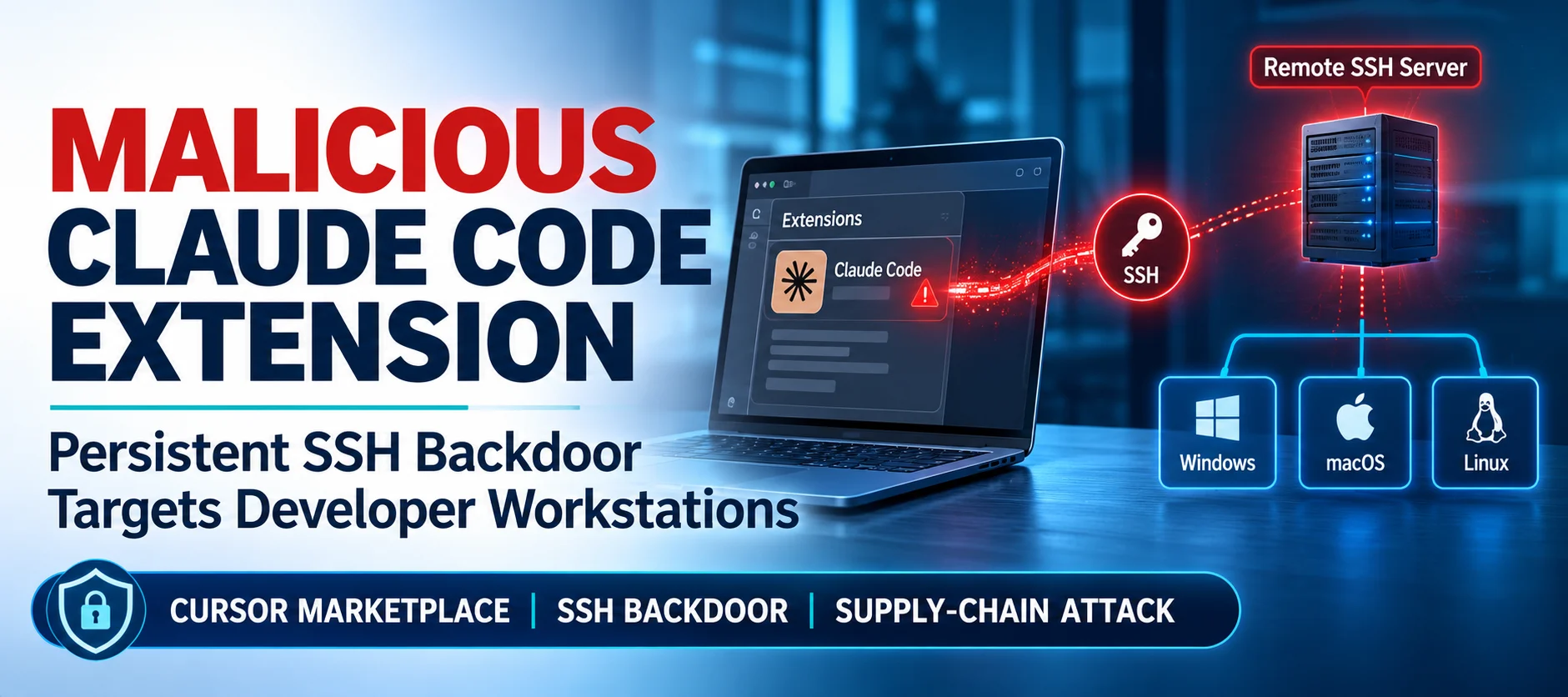
Microsoft Exposes Malicious Claude Code Extension Hiding a Persistent SSH Backdoor
Microsoft Security Research has uncovered a malicious version of the Claude Code extension distributed through the Cursor extension marketplace. The compromised extension attempted to establish persistent remote access to developer workstations by injecting malicious JavaScript, modifying SSH authorisation files and configuring reverse SSH tunnels.
The incident highlights a supply-chain security risk involving AI-powered development tools and third-party code editor extensions.
According to Microsoft's investigation, the malicious versions were 2.1.312 and 2.1.313 of the anthropic.claude-code extension. Cursor reported that the compromised packages were available in its extension marketplace on 29 October 2026, from approximately 2:27 AM to 1:35 PM Pacific Daylight Time.
Microsoft confirmed that the malicious packages were not distributed through the official Microsoft Visual Studio Marketplace or the npm @anthropic-ai/claude-code package. Anthropic also confirmed that its systems were not compromised and that it did not develop the malicious package.
Based on the available evidence, Microsoft said the incident appeared limited to the Cursor marketplace.
1. How the Malicious Extension Worked
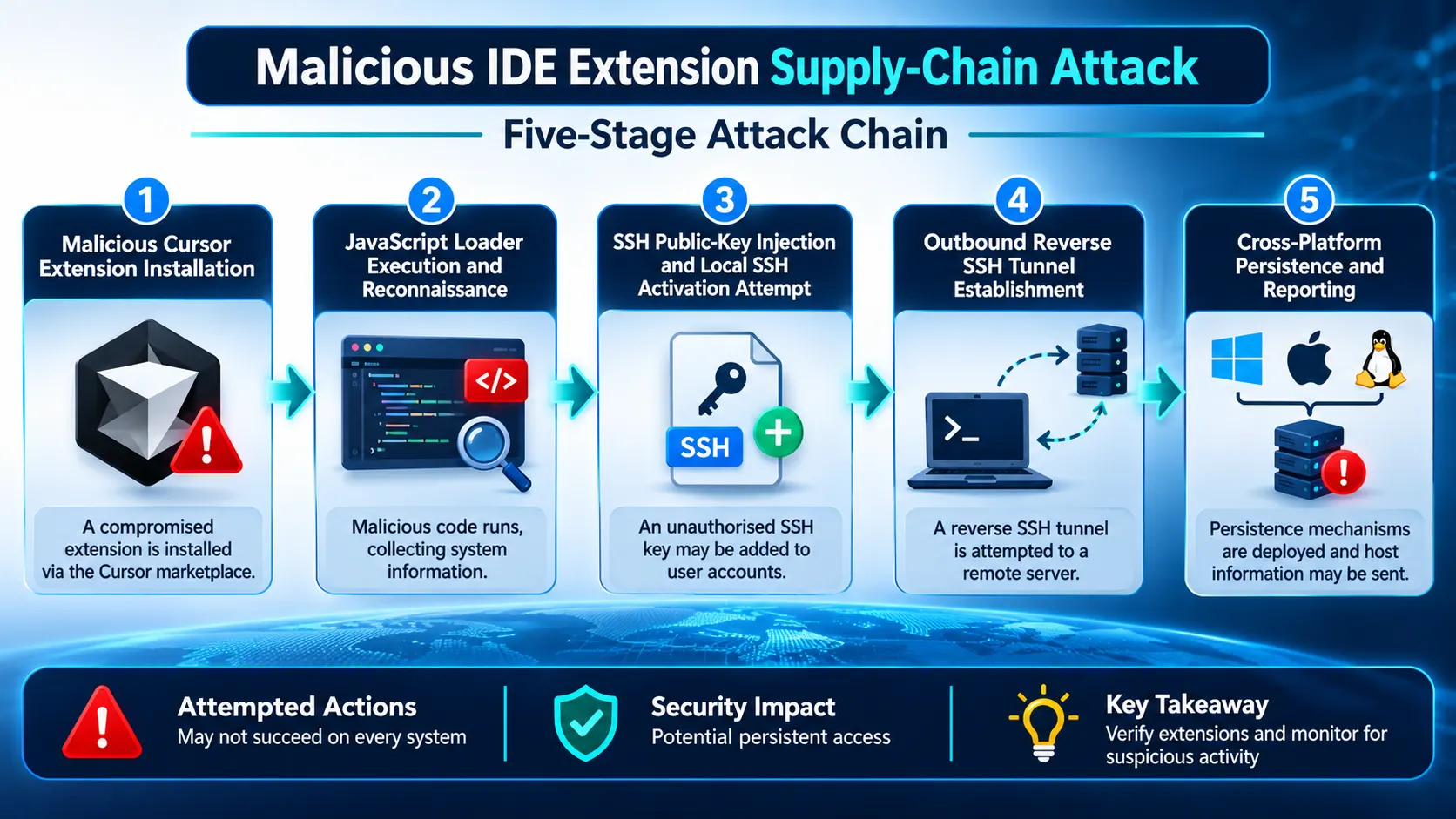
The malicious extension contained an injected JavaScript loader that executed before the normal extension initialisation process.
Instead of immediately disrupting the development environment, the loader attempted to perform several background operations using Node.js APIs and built-in operating system tools.
Its objectives included:
Collecting information about the developer's workstation.
Adding an attacker-controlled SSH public key.
Attempting to enable the local SSH service.
Establishing an outbound reverse SSH tunnel.
Creating startup mechanisms to maintain persistence.
Sending collected host information to attacker-controlled infrastructure.
Microsoft noted that the malicious extension could continue functioning normally while these operations were attempted, making the activity less obvious to users.
Importantly, the presence of malicious code does not establish that every operation succeeded on every affected device.
2. Developer Workstation Reconnaissance
Before attempting to establish remote access, the injected loader collected information about the affected workstation.
Microsoft identified the following information collected by the malicious code:
Hostname and username.
Operating system and system architecture.
Home directory and current working directory.
Global Git email configuration.
Names of selected environment variables.
The loader searched for environment-variable names containing terms such as KEY, TOKEN, SECRET, PASS, AWS and GCP, retaining up to 40 matching entries.
An important distinction: Microsoft reported that the callback transmitted matching environment-variable names, not their actual values. This indicates reconnaissance into potentially sensitive configuration areas, but it does not establish that the secrets stored in those variables were stolen.
This distinction matters when assessing the incident. The presence of references to credentials does not, by itself, demonstrate credential exfiltration.
3. SSH Key Injection and Remote Access Preparation
One of the most significant behaviours identified by Microsoft was the attempted modification of SSH authorisation files.
The loader used two separate SSH identities:
An embedded public key intended to authorise remote access to the workstation.
A separate private key used to authenticate the outbound connection to the attacker's tunnel server.
The malicious code checked the user's authorized_keys file for an entry containing the comment:
svc-telemetry
If the marker was missing, it attempted to append an embedded Ed25519 public key.
This could allow someone possessing the corresponding private key to authenticate to the workstation, subject to the local SSH server configuration.
The loader also decoded a separate private key and initially stored it in a hidden temporary file using a filename pattern beginning with .stk_.
Microsoft's investigation identified this as part of the mechanism used to establish the outbound SSH connection.
4. Reverse SSH Tunnelling: The Backdoor Mechanism
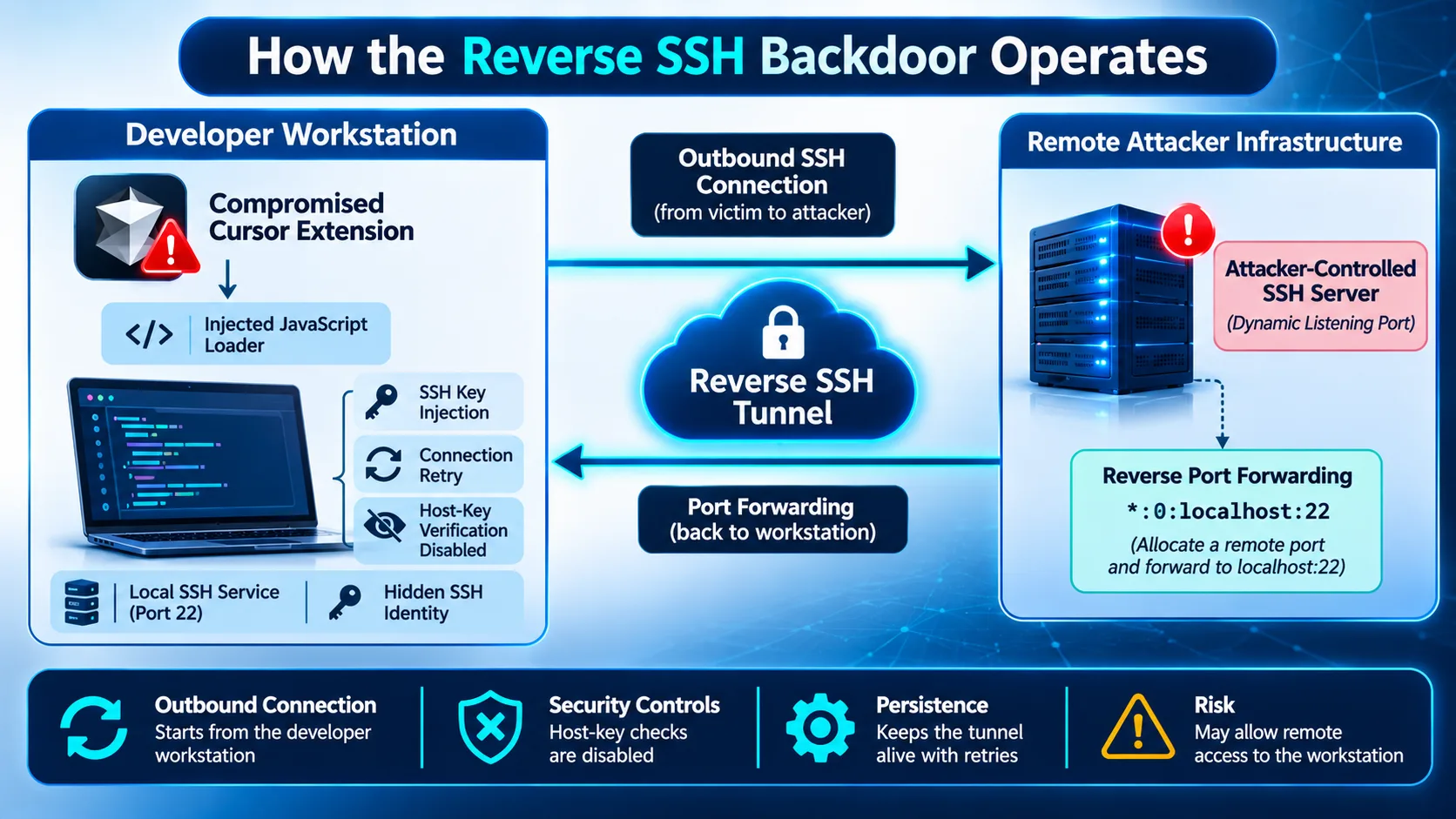
The extension attempted to establish a reverse SSH tunnel using the following command-line arguments:
-N -R '*:0:localhost:22'
The command requests a remotely allocated listening port and forwards connections through the SSH tunnel to port 22 on the affected workstation's local interface.
The -N option prevents SSH from executing a remote command on the tunnel server.
Unlike a conventional inbound connection, this approach starts with an outbound connection from the developer's workstation. This can make the activity harder to identify through security controls focused primarily on unexpected inbound connections.
The loader also attempted to:
Disable normal SSH host-key verification.
Bypass the standard known-hosts file.
Maintain the connection using keepalive settings.
Avoid interactive authentication prompts.
Retry the connection after failures.
On Unix-like systems, it preferred autossh, falling back to ssh. On Windows, it used a hidden PowerShell loop.
The retry mechanism waited approximately 60 seconds after an SSH process exited before attempting another connection.
However, Microsoft highlighted an important limitation: a running SSH process does not automatically mean that an attacker successfully gained remote access. The tunnel server configuration, workstation permissions and SSH settings all influence whether access can be established.
Cursor reported that administrator-permission requirements and connection errors blocked SSH access on most macOS and Windows hosts.
Even when tunnel access failed, other malicious operations, including key installation and persistence attempts, could still have occurred.
5. Cross-Platform Persistence Mechanisms
The malicious loader attempted to maintain access even after the original extension was closed or removed.
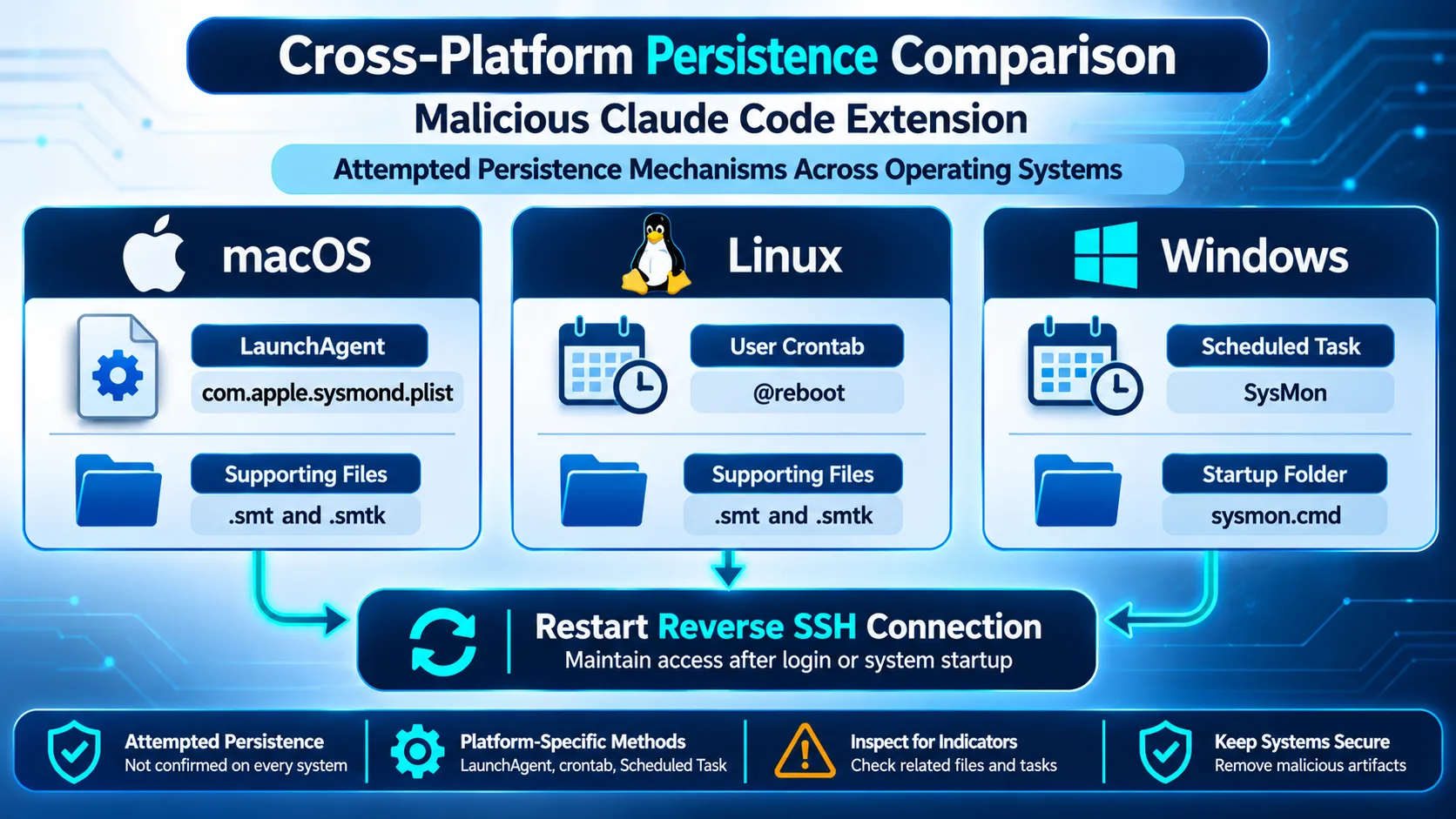
Microsoft identified different persistence mechanisms depending on the operating system.
Operating system | Persistence mechanism | Identified artifacts |
|---|---|---|
macOS | User LaunchAgent |
|
Linux | User crontab |
|
Windows | Scheduled task named |
|
Windows fallback | Startup-folder batch file |
|
On macOS, the loader attempted to create a LaunchAgent configured with RunAtLoad and KeepAlive.
On Linux, it attempted to create a user-level cron entry that would execute the persistence script when the system restarted.
On Windows, it attempted to create a scheduled task requesting SYSTEM-level execution. If that approach failed, the loader also prepared a batch file in the user's Startup folder.
The names are particularly relevant to security investigations. Identifiers such as SysMon and com.apple.sysmond resemble legitimate system monitoring components.
However, administrators should inspect the configured actions rather than treating the filenames alone as proof of compromise.
Scope clarification: Cursor identified the affected marketplace releases for Windows and macOS. Microsoft's code analysis also describes a Linux persistence branch. This does not establish that Linux users received an affected marketplace package.
6. What Cursor and Microsoft Did After Discovering the Incident
Cursor published its security notice on 29 October 2026 and described the affected extension versions and remediation steps.
According to Cursor, it took several actions:
Removed the malicious extension versions from its marketplace and blocked further distribution.
Temporarily shut down the marketplace as a precaution.
Audited marketplace access and reported that no other extensions had been tampered with.
Rotated its keys and rebuilt the marketplace before bringing it back online.
Worked with the hosting provider to take the malicious server offline.
Cursor also confirmed that the attacker's server was no longer functioning, making the reverse tunnel and host-information reporting endpoint non-functional at the time of its update.
This is an important distinction for affected organisations: disabling the remote infrastructure does not automatically clean devices that may already contain malicious SSH keys, scripts or startup entries.
Microsoft's investigation provides additional technical details and recommends endpoint investigation, evidence preservation and removal of confirmed malicious artifacts.
7. Indicators of Compromise (IOCs)
Microsoft and Cursor published indicators that security teams can use to investigate potentially affected systems.
The following indicators should be treated as investigation leads and correlated with endpoint, network and installation evidence.
Indicator | Type | Purpose |
|---|---|---|
| IP address | Reported attacker infrastructure |
| SSH key comment | Identifies the attempted unauthorised SSH key |
| SSH fingerprint | Fingerprint of the unauthorised public key |
| Filename pattern | Temporary tunnel identity |
| macOS artifact | LaunchAgent persistence |
| Files | Persistence script and associated identity |
| Windows artifact | Startup-folder persistence |
| Scheduled task | Attempted Windows persistence |
Important: Microsoft identified the SHA-256 hash below for the malicious JavaScript entry point:
ecb58cb29078d9646ad1dcdbe51526f2d9cfea06be5fb2ab183e8ecc3ab6bf15
This is the JavaScript entry-point hash, not the hash of the complete malicious VSIX extension package.
Cursor separately published package-specific hashes for the two affected versions and operating-system builds. Security teams should consult its original advisory for the complete package indicators.
The attacker IP has been defanged above to prevent accidental access.
8. How Organisations Should Investigate and Remediate
Microsoft recommends a structured response that covers extension installation, endpoint activity, network connections and persistence mechanisms.
Simply uninstalling the extension is not sufficient because the malicious loader attempted to write files and startup configurations outside the extension directory.
Step 1: Identify potentially affected installations
Review development workstations that installed or automatically updated to:
anthropic.claude-codeversion2.1.312anthropic.claude-codeversion2.1.313
Focus on installations from the Cursor extension marketplace during the reported exposure window on 29 October 2026.
Preserve the original extension package and relevant endpoint and network records before cleaning affected systems.
Step 2: Inspect SSH authorisation files
Check the relevant SSH authorisation files for the unauthorised key comment svc-telemetry.
Microsoft identifies these locations:
macOS and Linux:
~/.ssh/authorized_keys
Windows:
%USERPROFILE%\.ssh\authorized_keys
C:\ProgramData\ssh\administrators_authorized_keys
Confirm the public key against the published fingerprint before removing it. Preserve legitimate SSH keys and remote-development configurations.
Cursor also provides platform-specific validation scripts in its security notice.
Step 3: Inspect persistence mechanisms
Review the following locations and configurations:
macOS LaunchAgents and associated scripts.
Linux user crontab entries referencing
.smt.Windows scheduled tasks named
SysMon.Windows Startup-folder scripts named
sysmon.cmd.Associated hidden identities and temporary
.stk_files.
Do not delete files based solely on their names. Verify their configured actions and correlate them with the malicious extension's behaviour.
Step 4: Review network and endpoint telemetry
Investigate:
Outbound SSH connections to the reported infrastructure.
SSH processes using reverse forwarding.
Unexpected changes to SSH authorisation files.
Creation of suspicious startup scripts.
Scheduled-task and LaunchAgent modifications.
Extension installation and update records.
Relevant authentication and file activity.
Microsoft provides Advanced Hunting queries for Microsoft Defender XDR customers.
These queries cover network connections, suspicious file creation, Windows scheduled-task activity and macOS property modifications.
A query result should be treated as an investigative lead, not automatic proof of compromise.
Step 5: Recover affected systems
Where the investigation indicates exposure:
Isolate devices with evidence of malicious execution or backdoor installation.
Remove confirmed malicious SSH keys and persistence mechanisms.
Stop confirmed malicious tunnel and retry processes.
Rotate credentials and revoke sessions from a known-clean device when exposure warrants it.
Consider rebuilding systems when their integrity cannot be restored.
Verify that malicious startup mechanisms do not return after login or restart.
Cursor provides remediation scripts for macOS and Windows in its security notice. Organisations should review the instructions and execution requirements before running them.
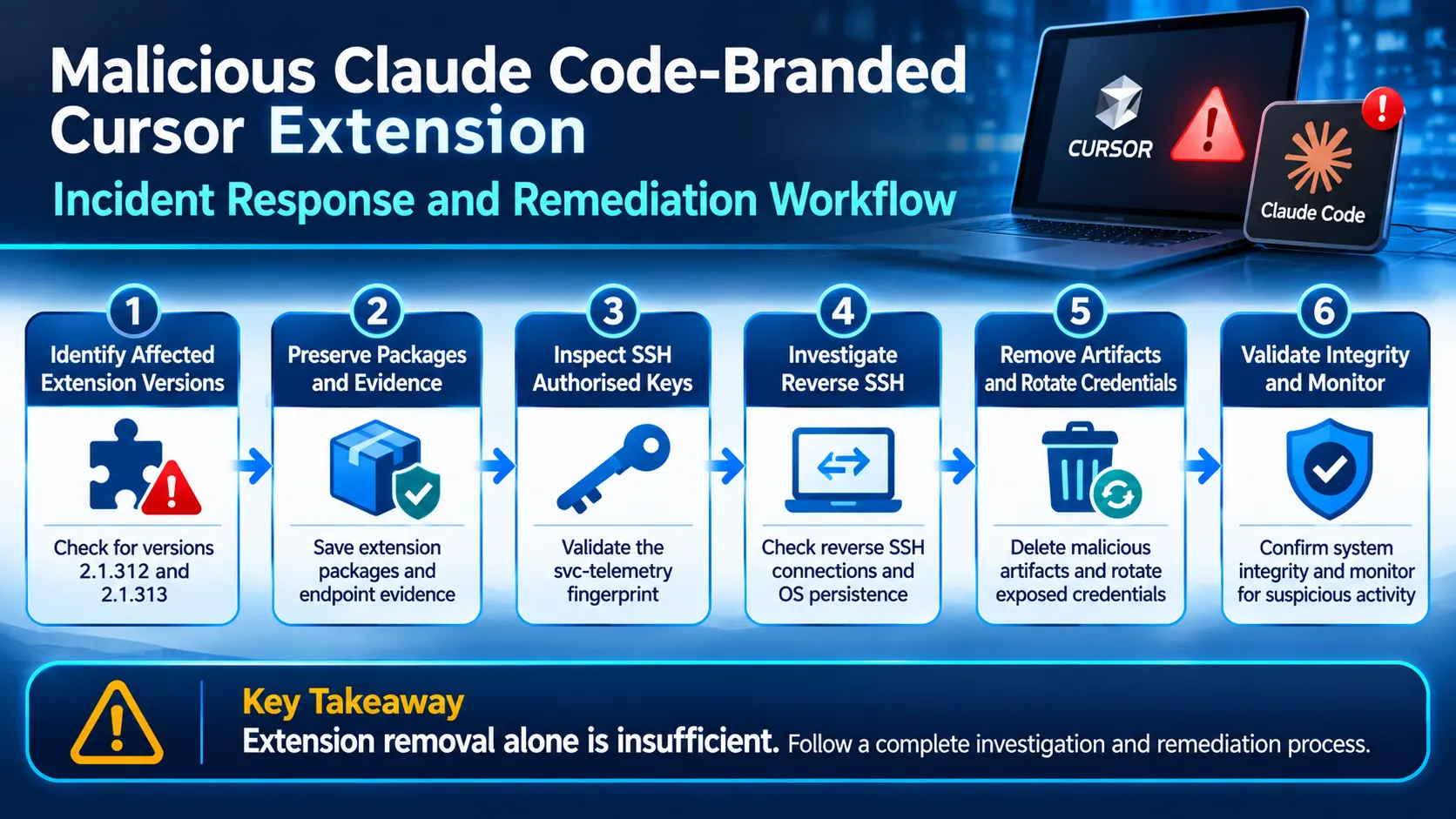
9. Microsoft Defender XDR Detection Coverage
Microsoft also mapped the observed malicious behaviours to its Defender security products.
Attack activity | Microsoft detection coverage |
|---|---|
Suspicious scripts launched from a code editor | Microsoft Defender for Endpoint |
SSH authorised-key modification | Microsoft Defender for Endpoint |
Suspicious macOS LaunchAgent activity | Microsoft Defender for Endpoint |
Suspicious Windows scheduled-task creation | Microsoft Defender for Endpoint |
Malicious macOS plist modification | Microsoft Defender Antivirus |
Suspicious SSH tunnelling | Microsoft Defender for Endpoint |
Microsoft also listed several malware detection names:
Trojan:MacOS/SmtShellMal.ATrojan:JS/CredTheft.MS!MTBTrojan:MacOS/MalPlistSysmond.AHackTool:MacOS/RevAnthShell.A
Microsoft Defender XDR customers can use the published threat intelligence reports and Advanced Hunting queries to investigate relevant activity.
The company also references Security Copilot within Microsoft Defender for supported customers as an additional investigation and response resource.
10. MITRE ATT&CK Technique Mapping
Microsoft mapped several behaviours in the malicious loader to MITRE ATT&CK techniques.
Technique | ID | Observed or attempted behaviour |
|---|---|---|
SSH Authorized Keys | T1098.004 | Adds an embedded public key to SSH authorisation files |
Protocol Tunnelling | T1572 | Attempts reverse SSH forwarding |
Cron | T1053.003 | Attempts Linux startup persistence through crontab |
Scheduled Task | T1053.005 | Attempts Windows scheduled-task persistence |
These mappings describe behaviours implemented or attempted in the analysed code. They do not confirm that every technique executed successfully on every affected device. Microsoft did not establish attribution to a specific threat actor.
11. Security Lessons for AI-Powered Development Environments
The incident highlights several important considerations for developers, security teams and organisations adopting AI-assisted coding tools.
1. Treat development extensions as software supply-chain dependencies.
Extensions can execute code within development environments and interact with local files and operating system resources. Their security should be included in software supply-chain risk assessments.
2. Verify publishers and package versions.
A familiar extension name does not guarantee that a particular package is legitimate. Organisations should maintain approved publisher lists and verify extension versions before deployment.
3. Review extension installation policies.
Cursor recommends restricting installations to approved publishers and configuring an extension installation cooldown to delay newly published versions.
4. Monitor developer workstations as security-sensitive assets.
Developer machines can contain source code, repository access, cloud configuration and authentication material. Monitoring unexpected SSH changes, startup entries and outbound connections is important.
5. Do not rely on uninstalling a suspicious extension.
Malicious extensions may create files and startup mechanisms outside their installation directories. Incident response must investigate the wider operating system.
6. Separate AI tool trust from package trust.
The use of a recognised AI development tool does not automatically establish the integrity of every extension distributed through a marketplace.
Industry perspective
The announcement highlights a broader industry shift towards securing the software supply chains surrounding AI-powered development environments.
As AI coding assistants become part of everyday development workflows, extension marketplaces, package publishers and local development permissions become increasingly important security considerations.
For enterprises, this could mean extending existing endpoint protection and software governance policies to cover AI coding extensions, third-party integrations and automated development workflows.
The incident also demonstrates why security teams should investigate what an extension actually executes rather than relying exclusively on its publisher name or advertised functionality.
Source: Microsoft Security Research
About the Author