
Cisco Secure Email Gateway Flaw CVE-2026-76519 Under Active Exploitation
Cisco warns that CVE-2026-76519, a critical vulnerability rated 9.8, is being actively exploited. The flaw could enable unauthenticated attackers to write arbitrary files and execute commands as root on affected Secure Email Gateway appliances.
Xcademia Team
Cisco has disclosed a critical security vulnerability in Cisco Secure Email Gateway that could allow remote attackers to write arbitrary files to the underlying operating system and execute commands with root privileges. Tracked as CVE-2026-76519, the vulnerability carries a CVSS score of 9.8 out of 10.
In a security advisory published on 14 October 2026, Cisco confirmed that its Product Security Incident Response Team became aware of active exploitation in October. The company has released software updates to address the issue and states that no workaround is available.
The vulnerability affects specific Cisco Secure Email Gateway deployments running vulnerable Cisco AsyncOS Software when particular Advanced Malware Protection settings and Content Scanner Tools versions are present.
CVE-2026-76519: Key Vulnerability Details
The vulnerability affects the Advanced Malware Protection (AMP) feature in Cisco Secure Email Gateway. Cisco attributes the issue to improper handling of email attachments when the File Reputation service is enabled.
Detail | Information |
|---|---|
Vulnerability | CVE-2026-76519 |
Affected product | Cisco Secure Email Gateway |
Severity | Critical |
CVSS score | 9.8 |
Vulnerability type | Arbitrary file write |
CWE classification | CWE-23 |
Authentication required | No |
Exploitation status | Active exploitation reported by Cisco |
Workaround | None available |
Fixed software | Available |
The vulnerability is particularly serious because a successful attack could provide root-level command execution on the underlying operating system. This level of access could affect the confidentiality, integrity and availability of the compromised appliance.
Cisco identified the issue through internal security scanning. Additional details about the attackers, the number of compromised devices and the full scope of exploitation were not disclosed in the announcement.
How the Vulnerability Could Be Exploited
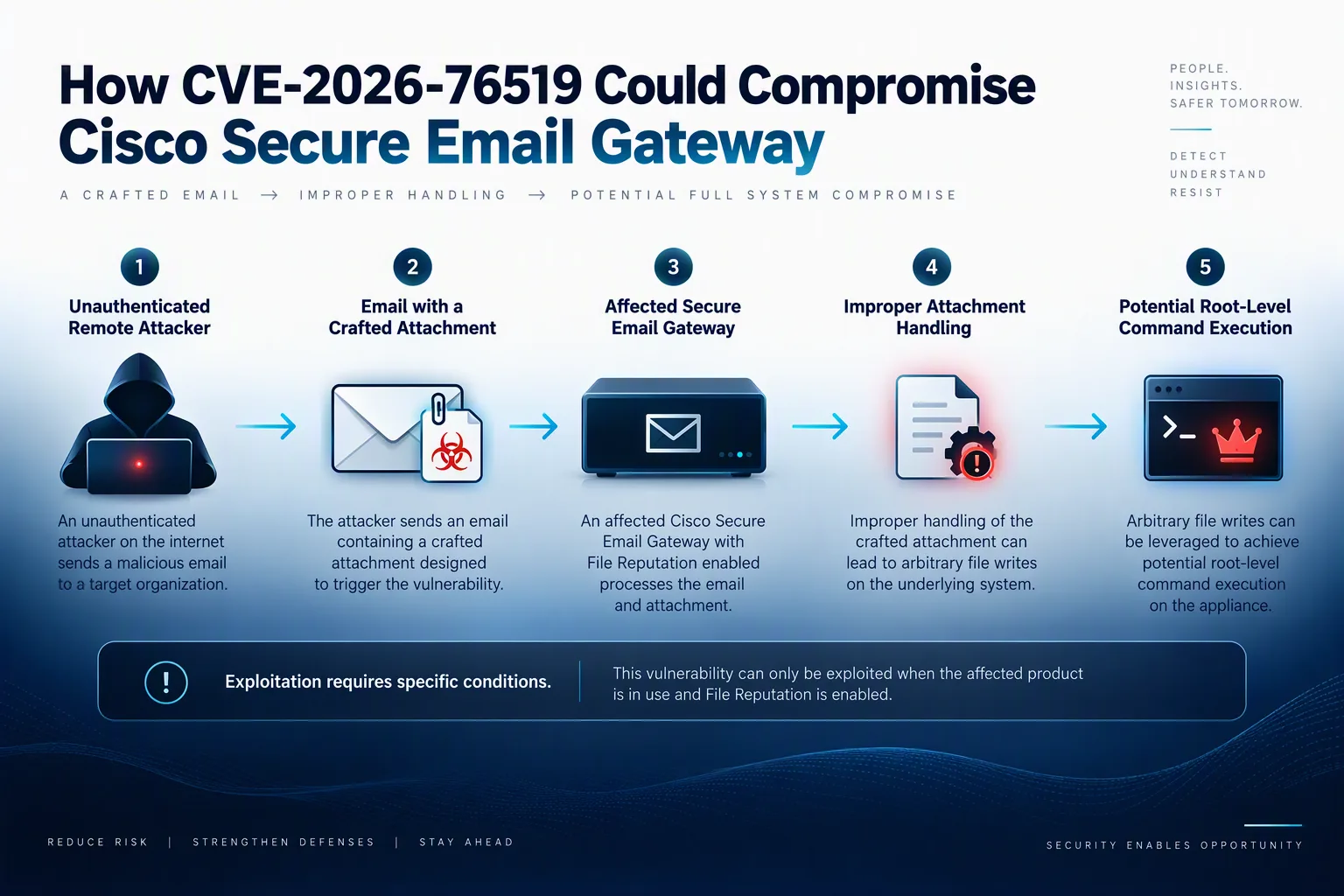
According to Cisco, exploitation involves sending an email containing a specially crafted attachment through an affected device. When the relevant File Reputation service is enabled, improper attachment handling can create an opportunity for arbitrary file writes.
A successful exploit could allow an unauthenticated remote attacker to write files to the underlying operating system and execute commands with root privileges.
This makes the issue more than a conventional email-filtering weakness. An appliance intended to help protect an organisation's email environment could itself become an entry point for operating-system-level compromise.
Which Cisco Secure Email Gateway Deployments Are Affected?
Cisco states that the vulnerability affects physical and virtual Cisco Secure Email Gateway appliances running vulnerable releases of Cisco AsyncOS Software when both of the following conditions are met:
The File Reputation service, part of Cisco AMP, is enabled and assigned to a mail policy.
The Content Scanner Tools version is earlier than 25.3.0.5525.
Administrators should verify both conditions rather than assuming that every installation is vulnerable.
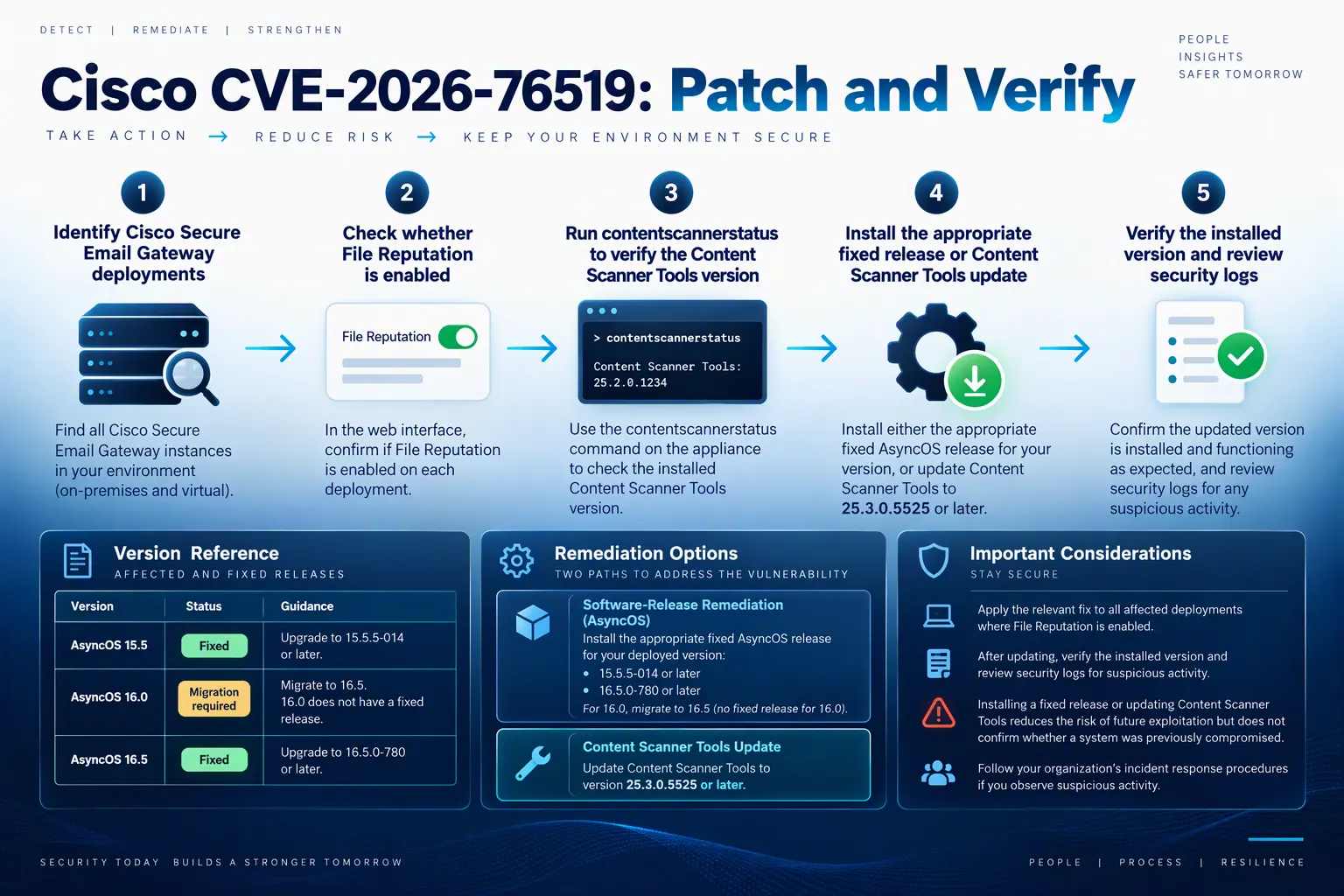
How to check the File Reputation setting
Sign in to the appliance's web-based management interface.
Navigate to Mail Policies > Incoming Mail Policies > Advanced Malware Protection or Mail Policies > Outgoing Mail Policies > Advanced Malware Protection.
Select the relevant mail policy and inspect the Enable File Reputation checkbox.
If the checkbox is selected, File Reputation is enabled for that policy.
How to check the Content Scanner Tools version
Run the following command from the appliance's command-line interface:
contentscannerstatusReview the reported Content Scanner Tools version and compare it with Cisco's fixed-version guidance.
Cisco has confirmed that Cisco Secure Email and Web Manager and Cisco Secure Web Appliance are not affected by this specific vulnerability.
Cisco Releases Security Fixes
Cisco has published fixed software versions and an updated Content Scanner Tools package. The appropriate remediation depends on the installed AsyncOS release and the appliance's update configuration.
Fixed release guidance
Cisco AsyncOS release | Cisco's stated guidance |
|---|---|
15.5 | Upgrade to 15.5.5-014 |
16.0 | Migrate to a fixed release |
16.5 | Upgrade to 16.5.0-780 |
Cisco recommends that customers running AsyncOS releases earlier than 16.5 migrate to release 16.5.0-780.
The company also confirms that Content Scanner Tools version 25.3.0.5525 and later contains the fix. This update is distributed to licensed and supported Cisco AsyncOS releases through the Content Scanner Tools package.
Updating Content Scanner Tools does not require a software upgrade or product restart. Customers who have automatic updates enabled do not need to take separate action once the fixed package has been applied. Those who have disabled automatic updates should apply the update manually.
To request a manual update, Cisco provides the following command:
contentscannerupdateAdministrators should verify that the updated version has actually been installed. For release-specific instructions, consult the official Cisco security advisory.
How Organisations Should Investigate Potential Exploitation
Applying the available fix is important, but organisations should also assess whether affected appliances were compromised before remediation.
Cisco provides a command for checking relevant system security messages:
grep "System Security" system_logsThe advisory identifies several possible results and their recommended responses:
Suspected compromise indicator was found: Cisco classifies this as a compromise indication and directs administrators to follow the advisory's recommendations.
Security scan did not complete: Contact Cisco Technical Assistance Center (TAC) for further support.
No compromise indicator was found: Cisco states that no compromise was detected by this check and recommends upgrading to a fixed release where applicable.
A clean result should not be treated as definitive proof that an appliance has never been compromised. Cisco warns that attackers with root privileges may remove or conceal evidence and indicators of compromise.
The company also recommends examining network and firewall logs outside the affected appliance. Investigators should look for suspicious activity, including unexpected uploads from the appliance to external IP addresses or downloads from malicious IP addresses.
For clustered deployments, administrators should check the logs of each cluster member.
Recovery Guidance for Suspected Compromise
Cisco's recommendations differ according to deployment type.
On-premises physical appliances
If exploitation is suspected on a physical appliance, Cisco recommends contacting TAC for assistance. The company advises enabling remote access to help expedite its investigation, following the support guidance in the advisory.
On-premises virtual appliances
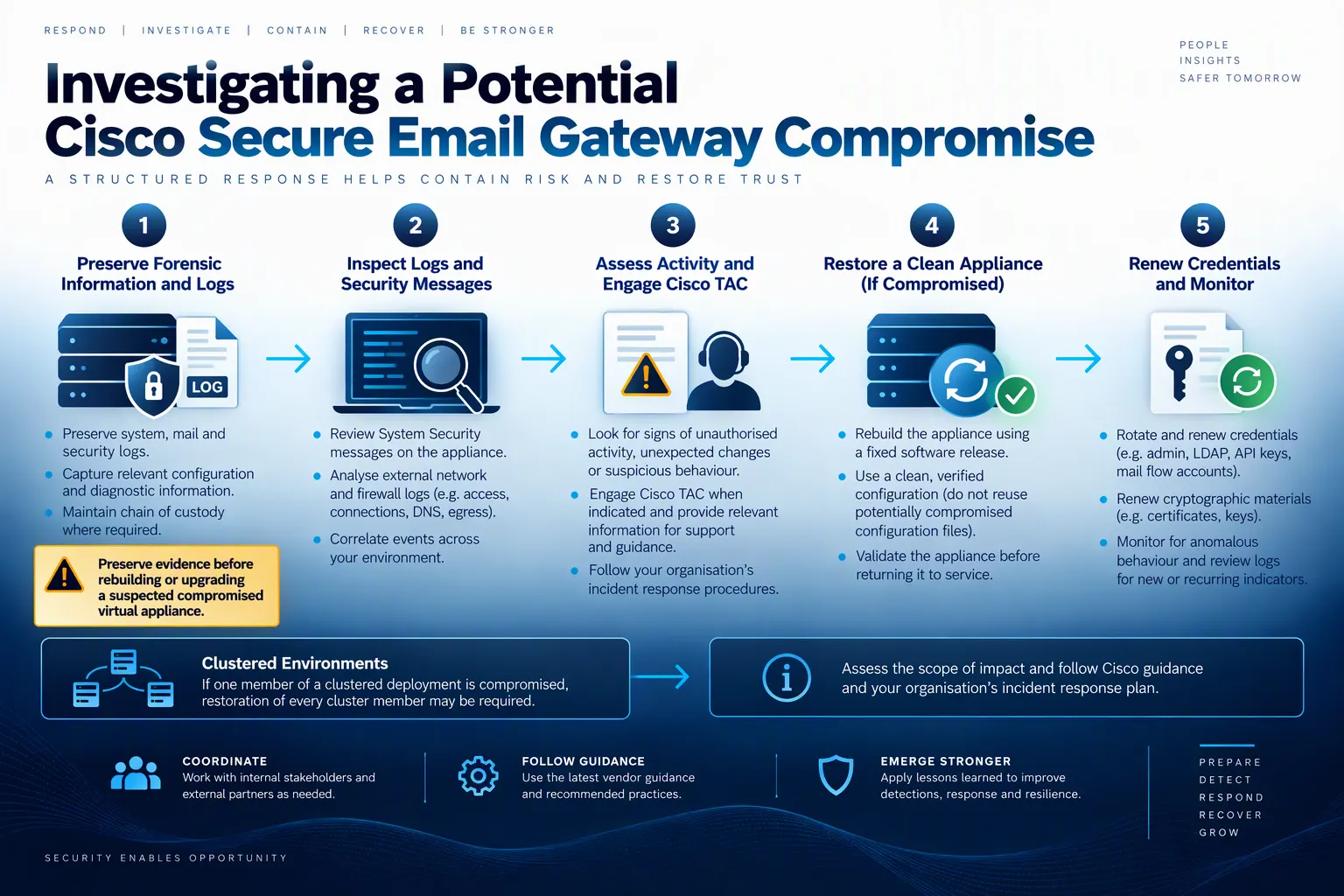
For a virtual appliance that may have been compromised, Cisco recommends a structured recovery process:
Preserve forensic information in accordance with the organisation's incident-handling policies. Record evidence before proceeding because upgrading a compromised instance can destroy forensic data and logs.
Deploy a new virtual machine running a fixed software release.
Rebuild the appliance configuration without importing previous configuration files.
Renew credentials and cryptographic materials installed on the appliance.
Continue monitoring for anomalous behaviour.
Cisco also warns that Secure Email Gateway appliances can operate in clusters and use SSH key pairs for authentication between members. If an attacker obtains private SSH keys from a compromised appliance, other cluster members could also be exposed.
Consequently, Cisco recommends restoring every member of a cluster containing at least one compromised appliance to a secure configuration.
Cisco Secure Email Cloud Gateway
Cisco says it has investigated its cloud environment and directly contacted customers whose devices showed indicators of possible compromise. The company is conducting remediation and recovery operations and has deployed mitigations within its management.
Customers who have been contacted are advised to restore a secure configuration and renew installed credentials and cryptographic materials where possible. Cisco states that customers using Cisco Secure Email Cloud Gateway do not need to take action to deploy the Content Scanner Tools fix because a fixed version has already been deployed through its standard upgrade processes.
Additional Security Hardening Recommendations
Alongside addressing CVE-2026-76519, Cisco recommends reviewing the broader security configuration of email gateway appliances.
Key measures include:
Upgrade to the latest applicable Cisco AsyncOS release.
Prevent direct internet access to the appliance where possible. If internet access is required, restrict access to known, trusted hosts.
Separate mail-processing and management functionality onto individual network interfaces.
Place appliances behind a firewall or other suitable filtering device and restrict management traffic.
Send logs to an external logging server where possible and retain them for investigations.
Disable HTTP on the main administrator portal and disable network services that are not required.
Use strong authentication and enforce appropriate access controls for administrator accounts.
Replace default administrator passwords and apply least-privilege access.
Use appropriate SSL/TLS certificates.
These measures complement patching and incident response. They do not replace the need to install the fix or investigate possible prior exploitation.
What This Means for Security Teams
The advisory highlights a broader security challenge: infrastructure that processes potentially malicious content can itself become a target. Email security gateways sit at an important boundary between external senders and internal systems, making their software maintenance and management interfaces significant parts of an organisation's security posture.
For security teams, the immediate priority is to identify affected deployments, verify the installed Content Scanner Tools version, apply the appropriate fix and assess possible compromise.
Organisations should also ensure that their incident-response plans account for appliances operating in clusters. Where root-level access may have been obtained, remediation may require more than updating a single device.
Analysis: The incident reinforces the importance of treating security appliances as critical infrastructure rather than assuming that their protective role makes them inherently safe. Patch management, externally retained logs, restricted management access and tested recovery procedures all contribute to reducing the potential impact of appliance vulnerabilities.
Conclusion
CVE-2026-76519 is a critical Cisco Secure Email Gateway vulnerability with a CVSS score of 9.8. Cisco has confirmed active exploitation, released software fixes and stated that no workaround is available.
Organisations using potentially affected physical or virtual appliances should verify their configuration and Content Scanner Tools version, install the appropriate fix and investigate suspicious activity. If compromise is suspected, administrators should preserve forensic evidence and follow Cisco's recovery guidance before rebuilding or upgrading affected systems.
Source: Cisco Security Advisory
About the Author