
OPSSHIELD Reveals cPGuard Update Channel Breach Affecting Thousands of Servers
OPSSHIELD says attackers compromised its infrastructure and pushed a malicious cPGuard update to customer servers. The incident exposed root-level credentials and affected billing portal records, prompting urgent updates and credential rotation.
Xcademia Team
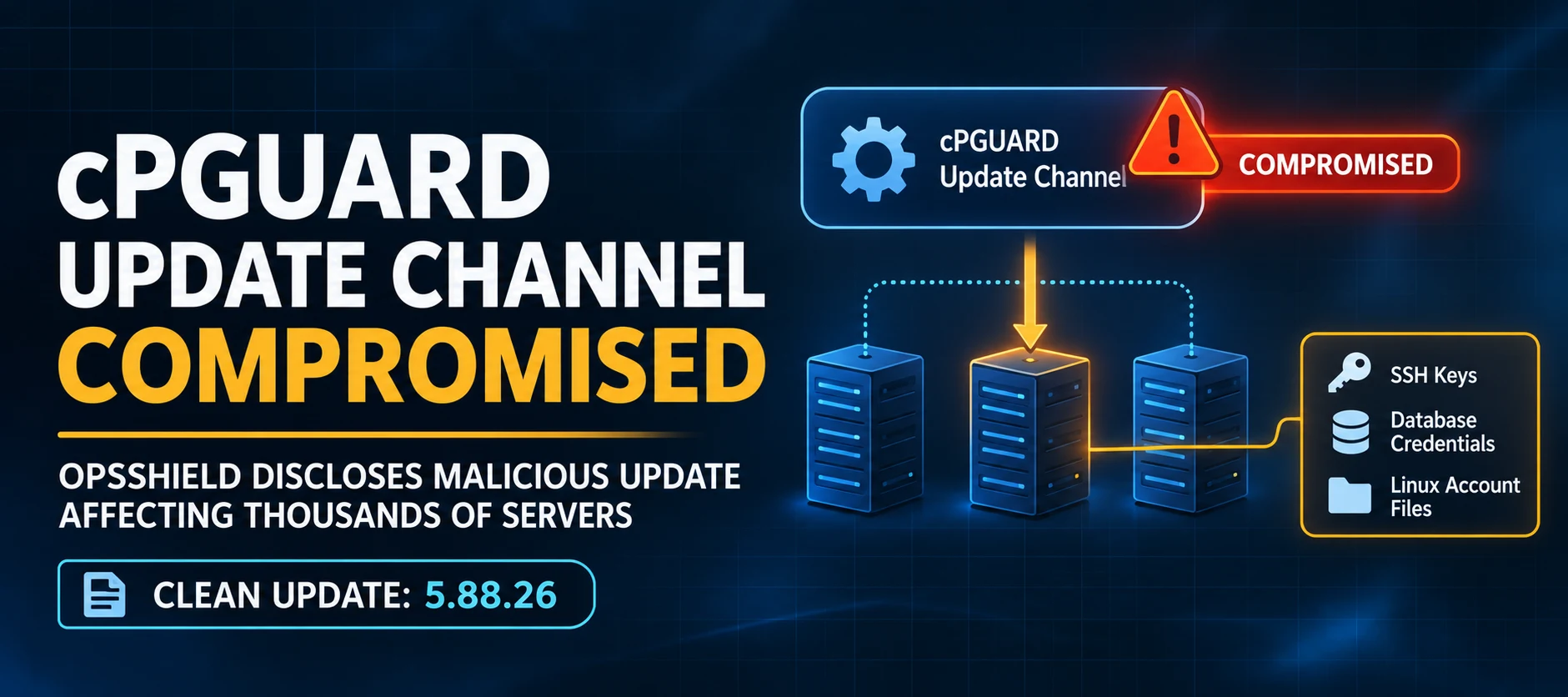
OPSSHIELD has disclosed a security incident in which an attacker compromised part of its infrastructure and used the cPGuard software update channel to distribute a malicious update to customer servers.
The attacker gained access to the company's billing and licensing infrastructure, obtained update distribution credentials and published a fake cPGuard update on 2 November 2026. The script ran with root privileges on affected servers and collected sensitive files, including Linux password hashes, SSH keys, database credentials and shell history.
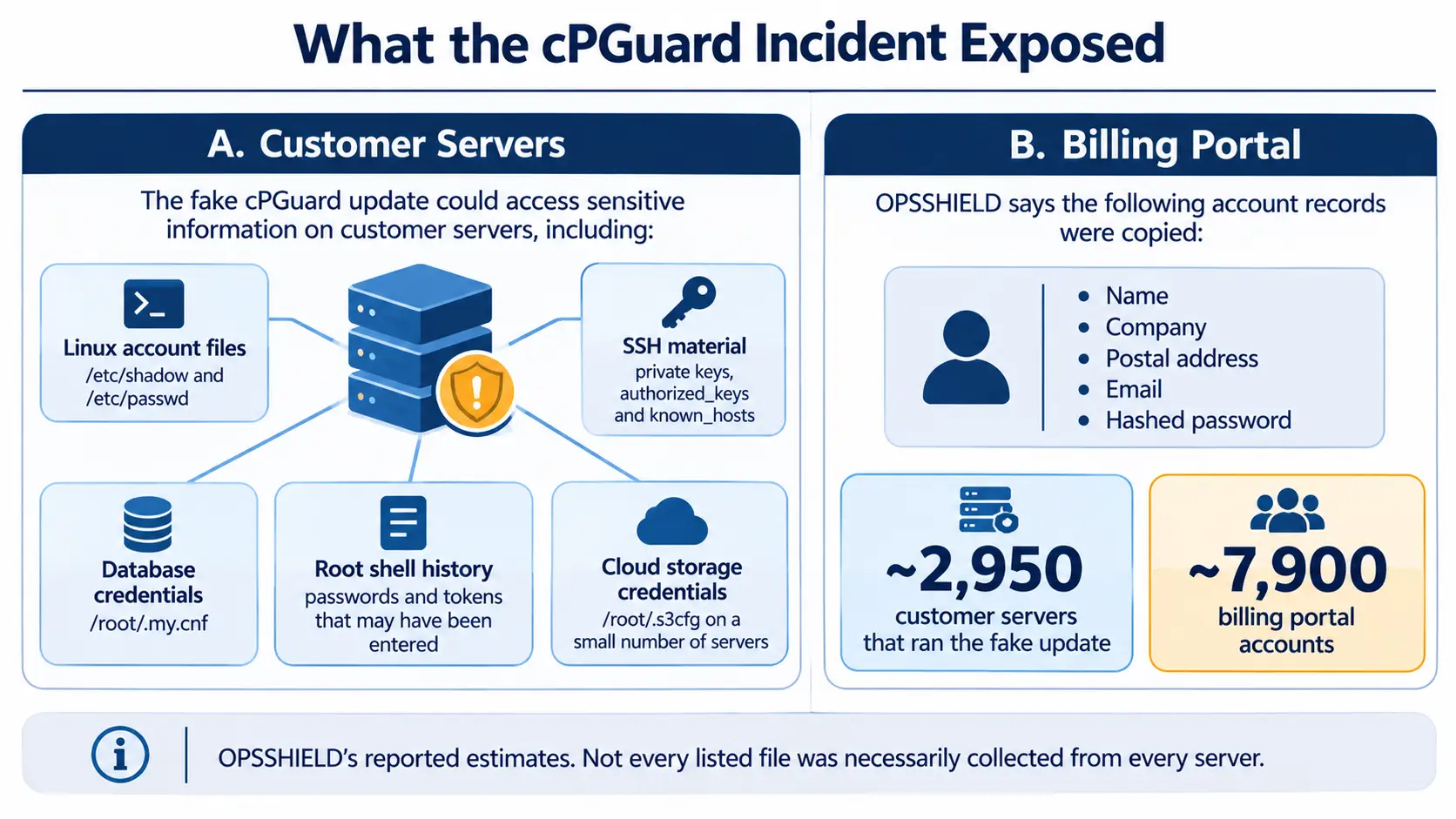
In its latest incident disclosure, published on 3 November, OPSSHIELD estimates that approximately 2,950 customer servers ran the malicious update. The company also says the attacker copied records belonging to approximately 7,900 billing portal accounts.
OPSSHIELD has released a clean cPGuard update, version 5.88.26, and is urging administrators to update their installations, replace exposed credentials and review systems that may have trusted affected servers.
How the cPGuard Update Channel Was Compromised
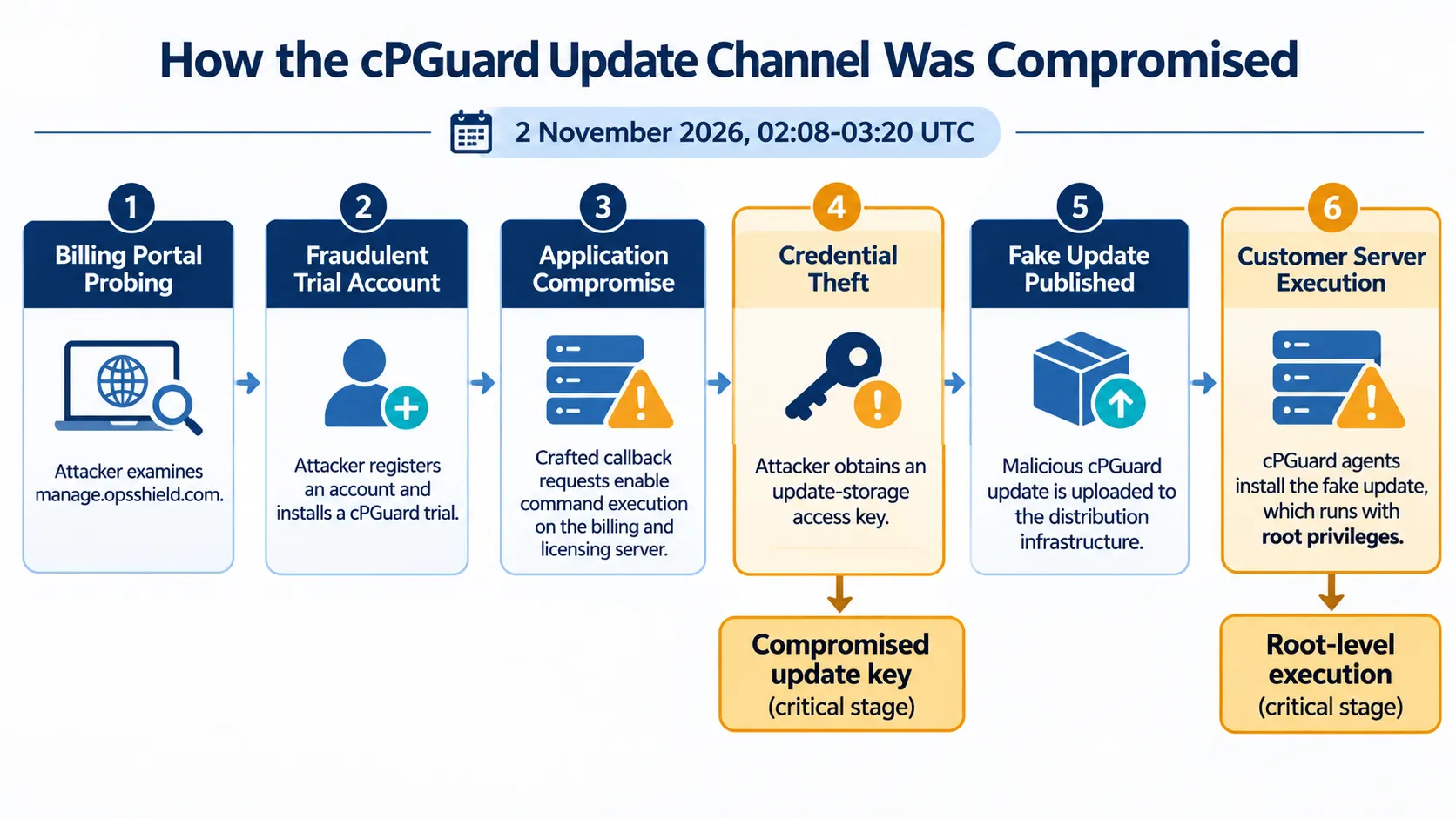
According to OPSSHIELD's incident timeline, the attacker began probing the company's billing portal, manage.opsshield.com, on 1 November 2026.
The attacker subsequently registered a customer account using a false identity and ordered a free cPGuard trial. After installing the trial on a server, the attacker studied how the cPGuard agent communicated with the licensing system.
OPSSHIELD says cPGuard flagged and banned the account twice. Later, the attacker sent crafted requests to callback pages on the billing portal and gained the ability to execute commands on the billing and licensing server.
The attacker then collected data from the compromised infrastructure and used a stolen access key to upload a fake update to the company's update storage.
The incident disclosure records the following sequence:
1 November, 15:38 UTC: The attacker began probing the billing portal.
1 November, 16:34 UTC: The attacker registered a customer account and ordered a free trial.
1 November, 21:17 UTC: The attacker installed the trial to examine communication with the licensing system.
1 November, 22:58 UTC: The attacker gained command execution on the billing and licensing server.
2 November, 02:04-02:09 UTC: The attacker uploaded a fake cPGuard update using a stolen access key.
2 November, 02:08-03:20 UTC: cPGuard agents installed and executed the fake update on customer servers.
2 November: OPSSHIELD revoked the stolen update key and published clean version 5.88.26.
OPSSHIELD says it has not identified the exact request that enabled the initial access. The company has patched two possible entry points and is reviewing the related application code and vendor components. It also says it has ruled out SSH, the control panel, FTP and API tokens as the entry point.
What the Malicious Update Collected
The fake update was a short script designed to collect sensitive files from servers where it executed. OPSSHIELD says the script sent the collected information to infrastructure controlled by the attacker.
The files and data identified in the disclosure include:
/etc/shadowand/etc/passwd, containing local account password hashes and account information./root/.ssh, containing root SSH private keys, authorized keys and known-hosts information./root/.my.cnf, which may contain the MySQL root password.Root shell history, which can contain previously entered passwords and access tokens.
/root/.s3cfg, containing cloud storage credentials on a small number of servers.
The earlier advisory also identified root MariaDB/MySQL configuration, root SSH authorization files and known-hosts files among the collected data.
The exposure matters because these files can provide access beyond the original server. Stolen SSH private keys may be trusted by other systems, while database passwords, cloud storage keys and tokens in shell history may allow access to additional services.
OPSSHIELD says the fake update also left a hidden root shell and supporting files on affected systems. The company identified the backdoor shell at /var/tmp/.cpg91511_sh and related staged files.
The company has not stated that every listed file was collected from every affected server. Administrators should therefore treat the exposure as a potential compromise of root-level secrets rather than assume that every credential was necessarily taken.
Approximately 2,950 Servers and 7,900 Billing Accounts Affected
OPSSHIELD's latest disclosure provides a broader impact estimate than its earlier advisory.
Affected area | Reported impact |
|---|---|
Customer servers that ran the fake update | Approximately 2,950 |
Billing portal accounts | Approximately 7,900 |
Billing portal information | Name, company, postal address, email and hashed password |
The company says the billing portal passwords were stored as bcrypt hashes rather than plaintext passwords. Nevertheless, it is asking users to reset their manage.opsshield.com passwords as a precaution.
OPSSHIELD advises customers whose cPGuard installations were online between 02:08 and 03:20 UTC on 2 November to assume that root-level secrets may be known to the attacker.
The company says servers that were not online during this window did not receive the fake update. However, administrators should still reset their billing portal passwords.
The earlier advisory had reported a preliminary estimate of 32 collected files retrieved from its server, each corresponding to a customer server. The later disclosure provides a wider incident assessment, estimating that around 2,950 customer servers ran the fake update. These figures describe different stages of the investigation and should not be treated as equivalent measures of the total impact.
OPSSHIELD's Response and the Clean Update
After identifying the compromise, OPSSHIELD revoked the stolen update-storage key and other cloud API tokens and access keys associated with its account.
The company says it also removed the attacker's SSH key, cloned servers and snapshots from its cloud account, strengthened login protection and replaced passwords and SSH keys used across its own servers.
Its response includes several additional measures:
Resetting billing portal login sessions.
Rotating billing system and reseller API keys.
Re-issuing cPGuard license key pairs.
Rebuilding billing, licensing and internal management servers from clean images.
Improving PHP and web firewall settings.
Expanding request logging to record future suspicious activity.
Closing the attacker's fraudulent customer account and trial license.
OPSSHIELD published clean cPGuard version 5.88.26 to remove the attacker's tools. A follow-up update also removes the scheduled task associated with the incident.
The earlier advisory identified version 5.88.25 or later as the corrective release. The newer incident disclosure identifies version 5.88.26 as the clean update and should be followed for the latest remediation guidance.
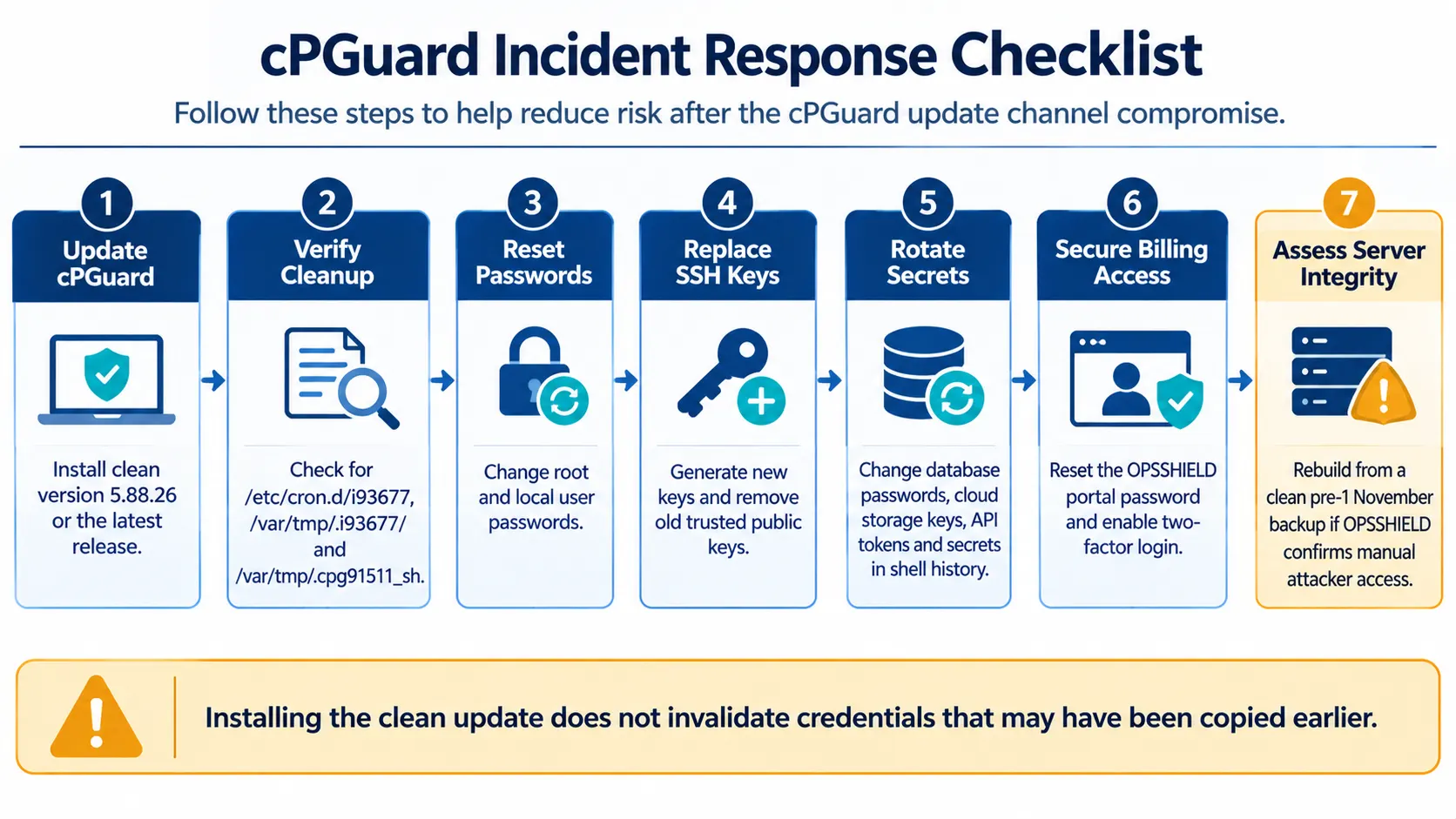
What cPGuard Administrators Should Do
OPSSHIELD is asking administrators to take action even if they have already installed a newer cPGuard release.
1. Update cPGuard
Install the latest available cPGuard version and verify that the update has completed successfully.
The earlier advisory provides these commands:
cpgcli update --startTo check the installed version:
cpgcli --versionThe latest incident disclosure identifies version 5.88.26 as the clean release.
2. Check for Incident-Related Files
Administrators should check whether the following paths remain on their systems:
/etc/cron.d/i93677
/var/tmp/.i93677/
/var/tmp/.cpg91511_sh
OPSSHIELD says the corrective update removes the known backdoor and related files. If these files remain, administrators should follow the company's remediation guidance and contact support if they need assistance.
The absence of these files does not prove that the malicious script never ran. The earlier advisory explicitly warns that cleanup removes known artifacts but does not establish whether data was previously collected.
3. Reset Local Account Passwords
Change the root password and passwords for all local user accounts.
The earlier advisory recommends performing password resets from a trusted recovery environment. Administrators should also change any passwords reused on other systems from a trusted device.
4. Replace SSH Keys
Generate new root SSH keys and remove the old public keys from every system that trusted them.
Administrators should review authorized_keys files for unfamiliar entries and examine other servers that could have been accessed using the affected SSH keys.
5. Rotate Database and Cloud Credentials
Change the MySQL root password and other database credentials stored in /root/.my.cnf.
Rotate passwords, API keys and tokens that may have appeared in root shell history. Administrators should also replace cloud storage keys found in /root/.s3cfg.
6. Secure the OPSSHIELD Billing Account
Reset the manage.opsshield.com account password and enable two-factor login.
OPSSHIELD recommends this precaution for customers even if their cPGuard server was offline during the malicious update window.
7. Rebuild Where OPSSHIELD Identifies Direct Server Access
The latest disclosure says that if OPSSHIELD has informed a customer that the attacker logged in to their server manually, that server should be rebuilt from a clean backup taken before 1 November.
This is more specific than the earlier advisory's provisional guidance, which did not recommend a full rebuild as a routine response. Administrators should follow the latest incident disclosure and seek an individual assessment where server integrity cannot be established.
Indicators of Compromise Shared by OPSSHIELD
OPSSHIELD has published indicators to help hosting providers and security teams investigate potential exposure.
Indicator type | Value |
|---|---|
Attacker IP address |
|
Probe and web-shell files |
|
Suspicious URL pattern |
|
Scheduled task |
|
Related directory |
|
Hidden root shell |
|
Fake update scripts |
|
The disclosure also lists four SHA-256 hashes associated with the fake update scripts:
2c2acd988da531d133d0e17f245c49bf15781278f837543d18c95e8410eabd38

ffd7a47f65fa1244429baa936ae94be54676b53d2f88bc39564f24e22011de8a

d73919af84bf46de941db85e27fd1abc65701ef9ce6cf33bb27c5397f4a41c26

6add0201e9a3d02de772d561d05e0da86eb1c538686753b7adcc3aedf7366f77
OPSSHIELD notes that some additional indicators, including files and implants found on its own internal server, relate to its infrastructure rather than confirmed customer-server infections. The company also warns that certain implants can hide from standard system tools, so security teams may need to examine affected systems from a trusted boot environment or use known-good static binaries.
Why the Incident Matters for Software Update Security
The cPGuard incident demonstrates how compromise of a software vendor's infrastructure can turn a trusted update mechanism into a distribution channel for malicious code.
In this case, the attacker did not need to exploit each customer server independently. By obtaining access to the update distribution process, the attacker could send a malicious update through a mechanism administrators normally rely on to maintain their systems.
The impact also extended beyond the servers that ran the fake update. OPSSHIELD says its billing portal was compromised and customer account records were copied, creating a separate response requirement for portal users.
For hosting providers and server administrators, the incident highlights the importance of treating software supply-chain security as an operational risk. Update authenticity, protection of distribution credentials, monitoring of vendor infrastructure and rapid credential rotation all matter when trusted software delivery systems are compromised.
OPSSHIELD says its investigation and remediation work are continuing. Administrators should follow the company's latest incident disclosure for updates and contact its support team if they cannot determine whether their systems were affected.
Source: OPSSHIELD
About the Author