
Google Cloud Details Serverless Apache Spark Architecture, Tuning and AI Troubleshooting
Google Cloud outlines serverless Apache Spark deployment choices, DCU optimization and AI-assisted troubleshooting with Gemini Cloud Assist.
Xcademia Team
Google Cloud outlines a serverless approach to Apache Spark
Apache Spark remains a major framework for processing large datasets, but running Spark workloads can require significant infrastructure management. Cluster provisioning, configuration, resource allocation and capacity planning can all add operational work for data engineering teams.
Google Cloud is addressing this through its Managed Service for Apache Spark, which provides both managed cluster and serverless deployment options.
In an August 20, 2026 Google Cloud Blog post, Lior Ginzberg, Data & Analytics Customer Engineer at Google Cloud, presents a three-part guide covering Spark deployment choices, serverless performance and cost optimization, and AI-assisted troubleshooting with Gemini Cloud Assist.
The guide does not position serverless Spark as a universal replacement for managed clusters. Instead, it outlines different deployment models based on workload characteristics, ecosystem requirements and infrastructure needs.
It also explains how teams can move from interactive development to automated production batches, tune resource allocation and investigate failed Spark applications using natural-language assistance.
Choosing between managed Spark clusters and serverless
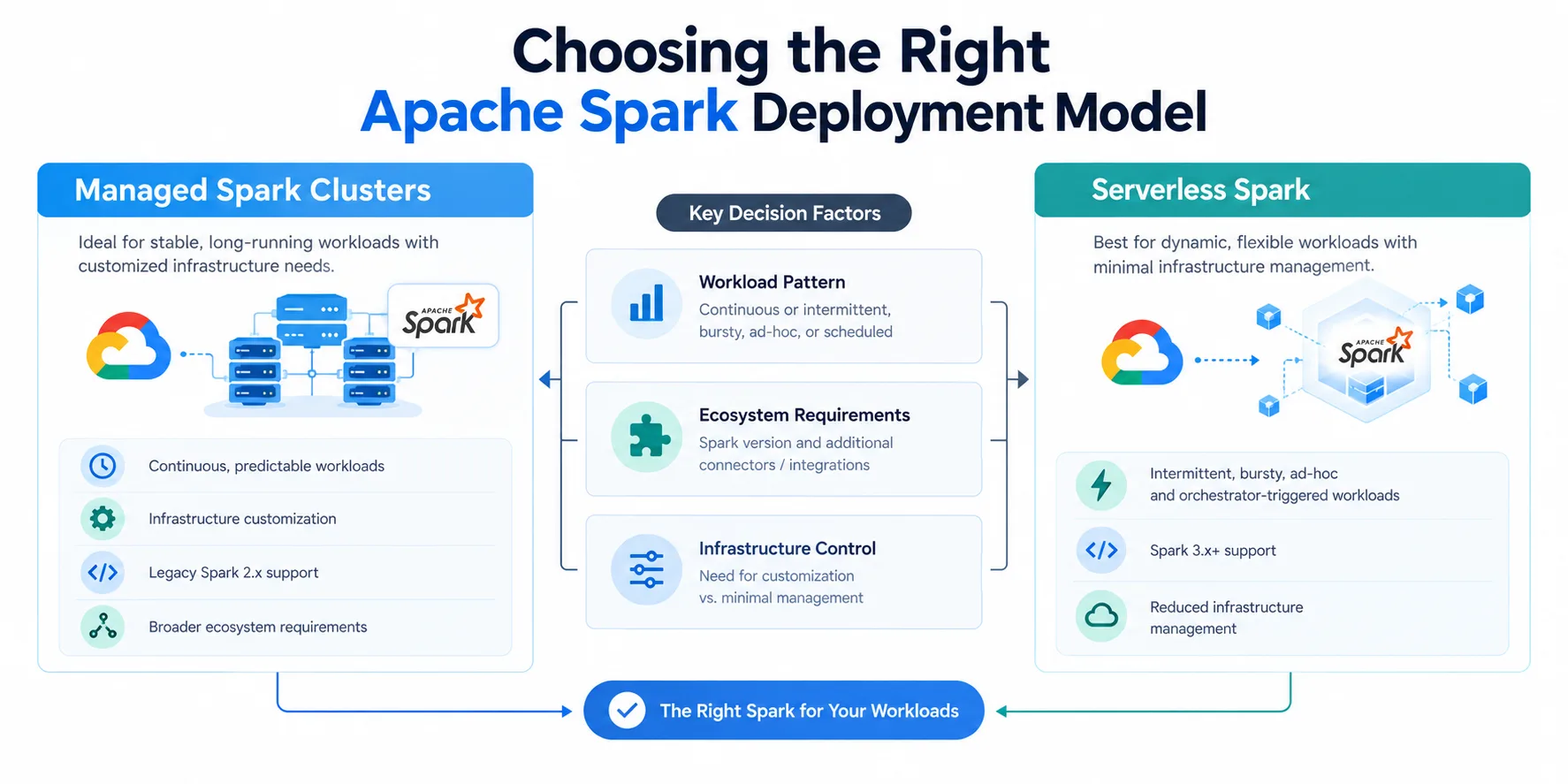
The first architectural decision is whether a Spark workload should run on a traditional managed cluster or serverless infrastructure.
Google Cloud identifies several factors that can influence this decision, including workload frequency, latency requirements, ecosystem dependencies and infrastructure customization.
When managed clusters may make sense
For continuous and highly predictable workloads, a permanently running managed cluster can sometimes provide a more predictable operating model.
Google Cloud specifically discusses continuous streaming or batch pipelines with consistently high utilization and workloads where accumulated startup time could affect service-level objectives.
Managed clusters also provide greater infrastructure-level control.
Organizations that require deep operating-system customization, custom initialization actions, root SSH access, specific local SSD configurations or custom machine shapes may need the cluster-based model.
The same applies to workloads dependent on ecosystem components that are not supported by the serverless model described in the source, including Apache Flink, Presto/Trino, Hive LLAP and Apache HBase.
Google Cloud also notes that legacy Spark 2.x codebases require managed clusters under the described architecture.
When serverless can be a better fit
Serverless Spark is presented as an option for intermittent, bursty, ad-hoc and orchestrator-triggered workloads.
Instead of maintaining a dedicated cluster, the service provides compute resources for application execution.
This can reduce the infrastructure management involved in running workloads whose demand varies significantly over time.
The source also notes that serverless is optimized for Apache Spark 3.x and later codebases.
Serverless therefore offers less infrastructure-level customization in exchange for a managed execution environment.
Google Cloud notes that custom Docker container images can still be used to package application-level libraries.
Serverless interactive sessions versus serverless batches
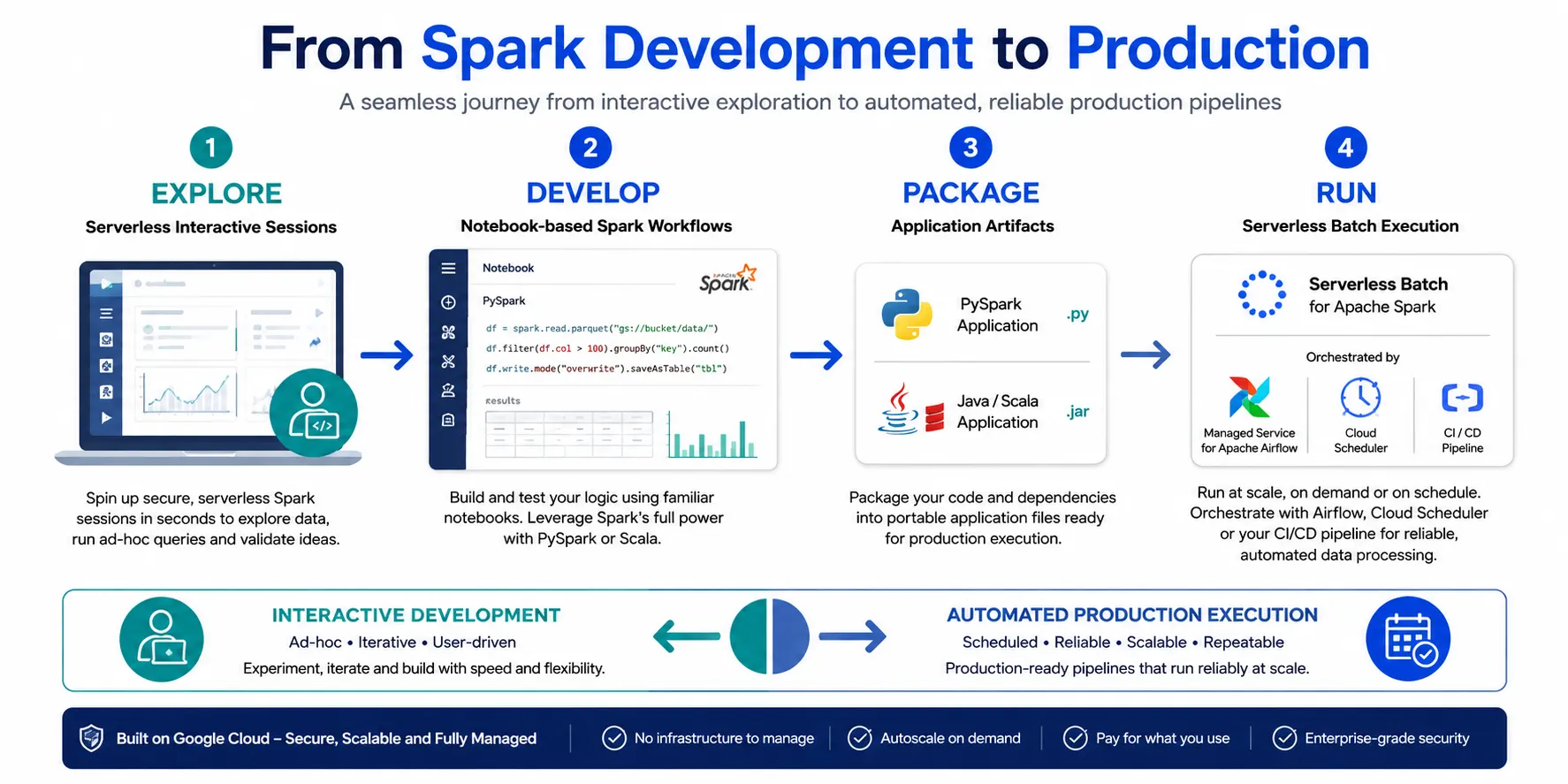
Once an organization chooses serverless Spark, Google Cloud describes two execution models: interactive sessions and batches.
The distinction largely comes down to development versus automated production execution.
Serverless interactive sessions
Interactive sessions are designed for exploratory and iterative work.
Developers can execute code incrementally, inspect intermediate DataFrames, modify variables and generate visualizations while working with their data.
Google Cloud describes these sessions as human-in-the-loop environments.
Developers can work through notebook and development interfaces such as Colab, Gemini Enterprise Agent Platform Workbench, Antigravity and Jupyter notebooks.
Because compute resources remain available to support immediate interaction, inactive sessions can incur compute charges.
This makes interactive sessions better suited to development and investigation rather than unattended production execution.
Serverless batches
Serverless batches are designed for automated, non-interactive workloads.
Developers package completed PySpark scripts or Java/Scala application files and submit them for execution.
The workloads can be managed by orchestration systems such as Managed Service for Apache Airflow, Cloud Scheduler or CI/CD pipelines.
According to Google Cloud, serverless batch resources are provisioned on demand for the duration of the run and shut down after completion.
This model is therefore designed around automated production processing rather than continuous human interaction.
From development to production
Google Cloud presents interactive sessions and batches as complementary parts of a development lifecycle.
A developer can begin by opening a serverless interactive session to explore datasets, clean schemas and prototype transformations.
After validating the logic, the code can be packaged into a Python script and scheduled as a serverless batch for production execution.
Google Cloud specifically describes Managed Service for Apache Airflow as an orchestration option for this transition.
The model separates exploratory development from automated production processing while keeping both workflows within the same broader Spark environment.
Serverless Spark still requires performance tuning
Moving to serverless infrastructure does not eliminate the need for application optimization.
Google Cloud notes that production pipelines running with default settings can encounter performance bottlenecks or inefficient resource usage.
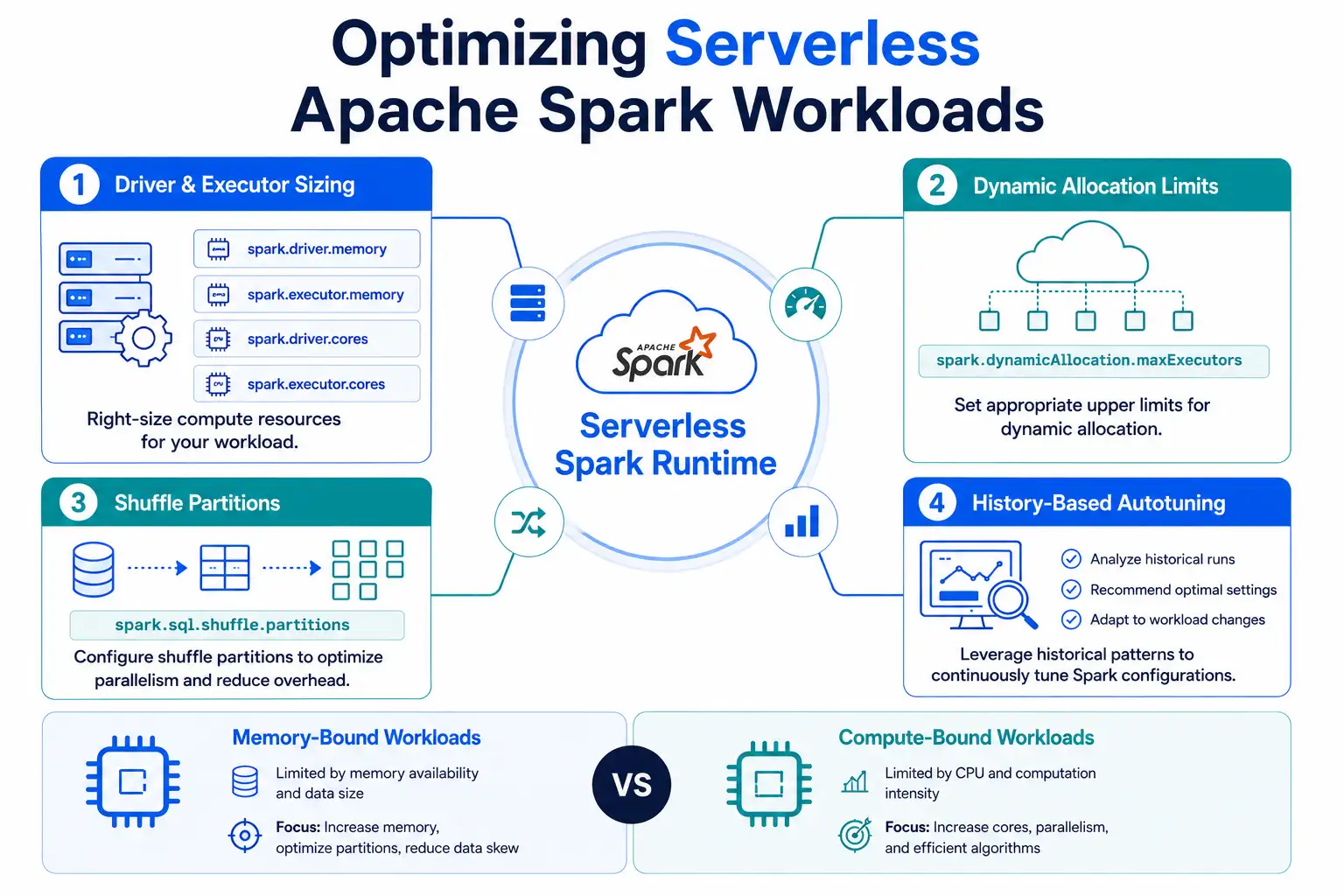
Resource allocation is configured through Spark runtime properties, and the source focuses on several areas that teams can tune.
These include driver and executor resources, dynamic allocation limits and shuffle configuration.
Google Cloud also highlights history-based autotuning as a mechanism that can apply optimizations based on previous executions.
History-based autotuning
Google Cloud recently introduced history-based autotuning for Managed Service for Apache Spark.
For recurring serverless batch workloads, the system groups executions into what Google calls cohorts.
The autotuner can then analyze telemetry and statistics from previous runs associated with the same cohort to identify potential bottlenecks and apply optimizations based on historical execution behavior.
This is intended to reduce the amount of manual tuning required for recurring workloads.
However, the source does not provide a universal performance improvement percentage from autotuning.
Tuning driver and executor resources
Google Cloud notes that serverless batches use generic default resource specifications and explains why workloads may require explicit configuration.
The source gives a default configuration of four cores and 16,000 MB of memory.
Different workload characteristics can require different resource profiles.
Memory-bound workloads
Applications processing large or highly uncompressed data volumes may encounter out-of-memory errors if available heap capacity is insufficient.
Google Cloud recommends examining driver and executor memory settings in these situations.
The relevant properties include:
spark.driver.memoryspark.executor.memory
These settings allow teams to adjust heap allocation according to workload requirements.
Compute-bound workloads
Other applications may be more constrained by CPU than memory.
Google Cloud gives processing-intensive workloads such as mathematical modeling and heavy tokenization as examples.
For these applications, teams can adjust:
spark.driver.coresspark.executor.cores
The objective is to better align CPU allocation with the actual processing requirements of the application.
Google Cloud also notes that increasing cores automatically provisions a proportional baseline of memory according to the vCPU-to-memory ratio. This is why the source recommends considering both core and memory settings when tuning resource shapes.
Setting boundaries for dynamic allocation
Serverless Spark can dynamically adjust the number of active executors according to pending work.
While this provides elasticity, unrestricted scaling can also increase resource consumption if an application behaves unexpectedly.
Google Cloud recommends setting an explicit upper boundary through:
spark.dynamicAllocation.maxExecutors
This creates a defined ceiling for executor scaling.
The appropriate ceiling depends on workload priorities.
For SLA-sensitive applications, a higher maximum can provide greater room for resource scaling.
For lower-priority workloads such as nightly batches, a lower ceiling can provide tighter control over resource consumption, potentially at the expense of longer execution times.
The key consideration is balancing execution time against resource consumption rather than assuming that maximum scaling always produces the best outcome.
Managing shuffle partitions
Shuffle operations occur when Spark needs to redistribute data across executors.
Operations such as groupBy(), join() and distinct() can generate shuffle activity.
Google Cloud highlights spark.sql.shuffle.partitions as an important tuning property for these workloads.
The source notes that Spark uses 200 as the default number of shuffle partitions.
If partitions become too large relative to available executor memory, Spark may spill data to disk.
That can affect execution behavior and introduce additional shuffle storage usage.
Google Cloud suggests dynamically adjusting partition counts according to total data size and provides roughly 100 MB to 200 MB per partition as a rule of thumb for data held in memory.
The source also emphasizes that this may require multiple iterations before an appropriate configuration is found.
The recommendation should therefore be treated as a starting point rather than a universal setting for every Spark workload.
Additional serverless runtime configuration properties are available in Google's Managed Service for Apache Spark documentation.
AI-assisted troubleshooting with Gemini Cloud Assist
The third part of Google's guide focuses on operational troubleshooting.
Production Spark failures can require engineers to examine application logs, driver information and executor activity to determine what went wrong.
Google Cloud integrates Gemini Cloud Assist into the Google Cloud console to provide a natural-language troubleshooting workflow.
The source demonstrates the approach through a PySpark ETL example that reads transaction data from Google Cloud Storage, performs transformations and encounters multiple failures.
The example progresses through three troubleshooting stages.
Stage 1: Finding missing runtime parameters
The first execution attempt ends with a generic failure message:
"Application failed with exit code 1."
Instead of manually navigating through multiple logging interfaces, the engineer can locate the relevant log and use the Investigate log option.
This opens a conversation interface where Gemini Cloud Assist analyzes driver telemetry and system logs.
In Google's example, the assistant identifies that required runtime arguments were missing from the submission.
One of those arguments is the source Google Cloud Storage bucket path.
The assistant also identifies the relevant lines in the PySpark script that expect those arguments.
This illustrates how natural-language troubleshooting can connect a generic application failure with the configuration and code responsible for it.
Stage 2: Identifying schema and data-type problems
After the missing arguments are corrected, the pipeline encounters another problem.
The source example involves a TypeError caused by a division operation:
df['amount'] / df['transaction_id']
The problem occurs because the relevant fields were inferred as strings rather than numeric values.
Gemini Cloud Assist identifies the DataFrame transformation associated with the failure.
The example also shows the assistant examining the underlying Google Cloud Storage data and identifying non-numeric anomalies in fields expected to contain numerical values.
This is significant because the problem is not limited to application code.
The source data itself contributes to the failure.
Stage 3: Generating a code fix
After identifying the problem, the engineer can ask Gemini Cloud Assist to suggest a code change.
The source uses the following example request:
"Suggest how to rewrite the code to divide the amount by quantity instead of transaction_id. In addition, add logic to skip invalid records without failing the process."
Gemini Cloud Assist generates revised PySpark code using type handling and null-management techniques, including functions such as coalesce and try_cast.
The revised approach is designed to prevent invalid source records from causing the entire batch to fail.
In Google's example, the subsequent execution completes successfully.
This example is presented as a demonstration of the troubleshooting workflow rather than a quantified benchmark of AI-assisted debugging performance.
What the architecture means for data teams
Google Cloud's approach brings together three different aspects of Spark operations.
The first is deployment architecture.
Teams can choose between managed clusters and serverless execution based on workload patterns, ecosystem requirements and infrastructure control needs.
The second is resource optimization.
Serverless removes much of the infrastructure management, but teams still need to understand resource allocation, dynamic scaling and shuffle behavior.
The third is operational troubleshooting.
Gemini Cloud Assist introduces a natural-language interface for investigating application failures and identifying potential causes.
Together, these areas represent a broader shift toward managed data infrastructure combined with increasingly automated operational tooling.
Serverless does not mean configuration-free
One of the most important points in Google's guide is that serverless infrastructure does not remove the need for Spark engineering.
The infrastructure layer is managed, but application behavior still depends on code, data characteristics and runtime configuration.
Teams may still need to tune:
Driver resources
Executor resources
Dynamic allocation limits
Shuffle partitions
Application logic
Data handling
Runtime parameters
The model shifts more infrastructure management away from data engineering teams while leaving application-level configuration and optimization responsibilities in place.
The broader shift toward AI-assisted data operations
The development also reflects a wider movement toward AI-assisted cloud operations.
As data pipelines become more complex, engineers increasingly need to understand not only infrastructure behavior but also application code, schemas, logs and data quality.
Gemini Cloud Assist brings these elements into a conversational troubleshooting workflow within Google Cloud.
For enterprises, this could make investigation easier for engineers who need to move between logs, configuration and application code.
However, AI-generated troubleshooting recommendations still require engineering validation before they are applied to production systems.
The source does not provide independent measurements showing how much troubleshooting time organizations save through Gemini Cloud Assist.
What enterprises should consider
Organizations evaluating serverless Apache Spark should start with their workload characteristics rather than the deployment model itself.
Questions to consider include:
Is the workload continuous or intermittent?
Are execution requirements predictable?
Does the application depend on ecosystem components requiring managed clusters?
Does the workload need OS-level or VM-level customization?
Is the application interactive or fully automated?
How much driver and executor capacity does it require?
How aggressively should executors be allowed to scale?
Does the workload generate substantial shuffle activity?
Can recurring workloads benefit from history-based autotuning?
What troubleshooting information is available when production jobs fail?
These considerations can help teams determine where serverless Spark fits within a broader data platform architecture.
Conclusion
Google Cloud's latest guide presents serverless Apache Spark as one option within a broader set of Spark deployment models.
Managed clusters remain relevant for workloads that require persistent infrastructure, deeper customization or ecosystem components outside the serverless model. Serverless Spark is positioned for workloads where managed execution and elastic infrastructure can reduce operational overhead.
The guide also emphasizes that serverless workloads still require thoughtful resource configuration.
Driver and executor sizing, dynamic allocation limits and shuffle partition settings can influence application behavior and resource consumption.
Finally, Gemini Cloud Assist adds an AI-assisted troubleshooting layer to the Spark workflow. Google's example shows the tool identifying missing runtime parameters, tracing a schema-related error to a specific transformation and generating a potential code correction.
The broader development reflects a move toward managed cloud data infrastructure where teams spend less time operating clusters and more time designing, optimizing and troubleshooting data applications.
For enterprises considering serverless Spark, the key is to match the deployment model to workload requirements while maintaining disciplined application and resource configuration.
Source: Google Cloud Blog
About the Author