
AWS Adds DNS-Based IP Validation to Network Firewall
AWS introduces Route 53 Resolved IP Validation for Network Firewall, enabling domain-based filtering for non-web traffic and helping prevent SNI spoofing without requiring TLS inspection.
Xcademia Team
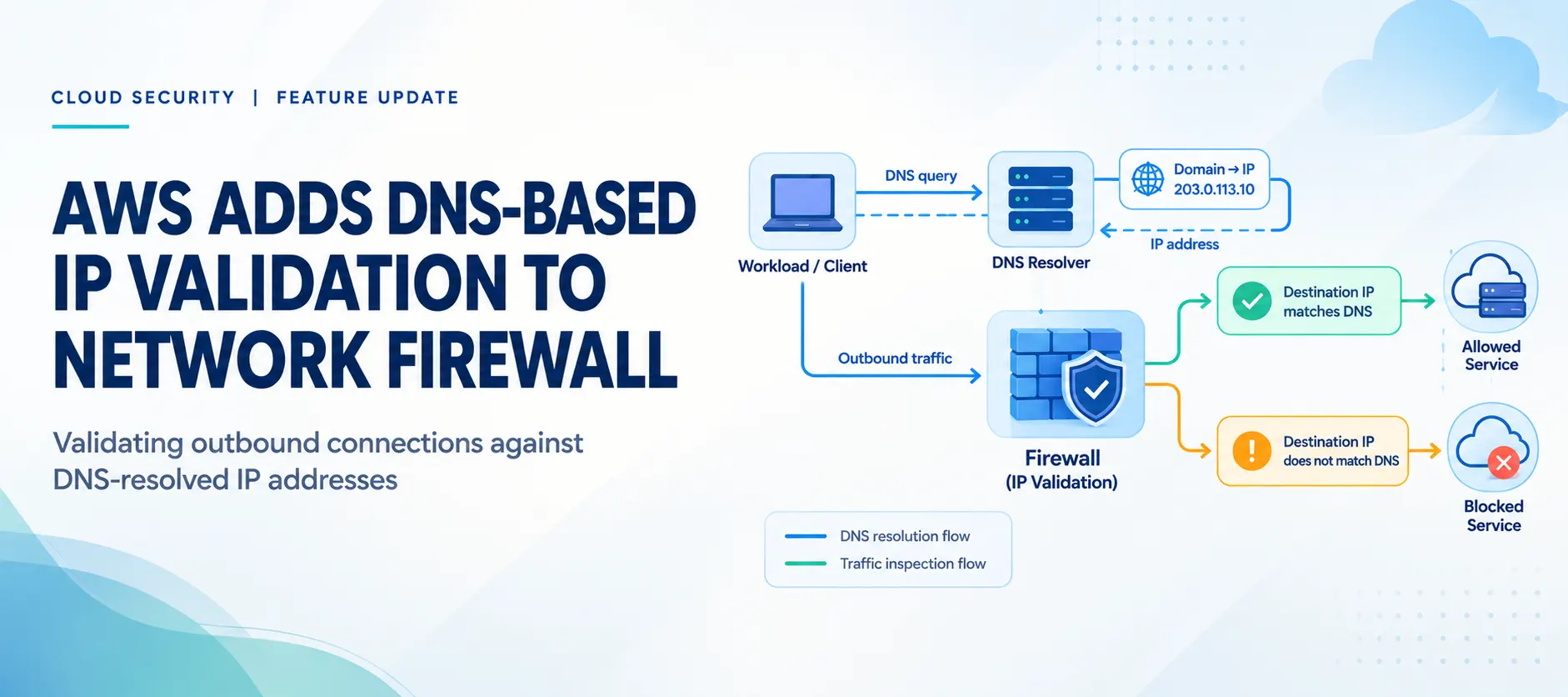
AWS has introduced Route 53 Resolved IP Validation for AWS Network Firewall, a feature designed to help organizations validate outbound connections against IP addresses returned by Amazon Route 53 Resolver.
The feature enables domain-based filtering for traffic beyond standard web protocols, including Secure File Transfer Protocol (SFTP), Secure Shell (SSH), and MySQL connections. It also helps security teams enforce domain-to-IP consistency for TLS traffic without requiring TLS inspection.
The capability uses DNS resolution information from Route 53 Resolver to check whether the destination IP address of a new outbound connection has been returned for a domain name. Administrators can then configure Network Firewall to alert on or block connections that do not meet the validation requirements.
AWS announced the feature on October 21, 2026. It is available in commercial AWS Regions where both AWS Network Firewall and Route 53 Resolver DNS Firewall are available, excluding AWS GovCloud (US) and China Regions.
How Route 53 Resolved IP Validation Works
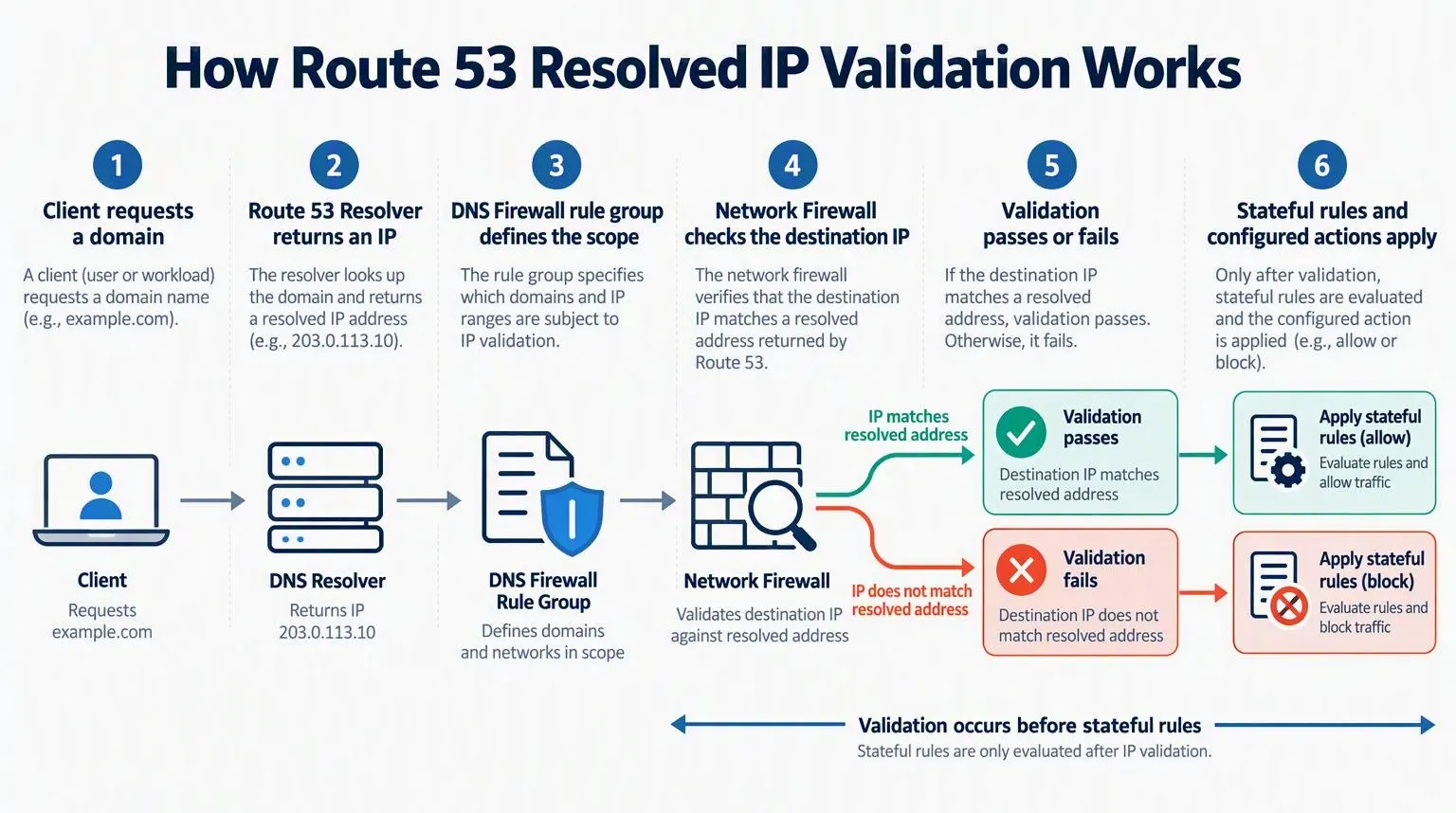
The feature connects DNS resolution information with Network Firewall's outbound traffic inspection process. Rather than relying only on destination IP addresses or TLS server names, the firewall can use IP addresses returned by Route 53 Resolver as an additional validation signal.
The validation process
A client requests a domain: An application in a VPC looks up a domain name through Route 53 Resolver.
Route 53 Resolver returns an address: The resolver provides the IP address associated with the requested domain.
The resolved address is shared: Route 53 Resolver makes the returned address available to AWS Network Firewall through the configured DNS Firewall rule group.
The client starts a connection: The application initiates an outbound connection to a destination IP address.
Network Firewall checks the destination: The firewall validates the destination IP against its resolved-address information before applying stateful rules.
The configured action is applied: Depending on the policy, the firewall can alert on, drop, or reject a connection that fails validation.
Stateful rules evaluate eligible traffic: Connections that pass validation continue through the applicable stateful inspection rules.
Security teams review the results: Flow logs and CloudWatch metrics help administrators investigate validation failures and identify traffic that needs attention.
The validation check applies to the first packet of each new connection. It does not replace the firewall's existing stateful inspection rules. Instead, it adds a destination-validation step before those rules are evaluated.
The Three Main Configuration Components
Route 53 Resolved IP Validation relies on three configuration elements working together.
1. Route 53 Resolver DNS Firewall rule group
The DNS Firewall rule group defines the scope of DNS answers that Network Firewall can use for validation. Administrators associate the rule group with the relevant VPCs so that the feature can use the corresponding Route 53 Resolver responses.
Only DNS answers from Route 53 Resolver count toward validation. This includes queries handled through Resolver endpoints or forwarding rules, provided the configuration meets the feature's requirements.
2. Network Firewall policy validation setting
The Network Firewall policy setting enables resolved IP validation and determines how the firewall handles connections that fail the check.
Administrators can configure the validation action to Alert, Drop, or Reject. Starting with Alert mode allows teams to observe the effects before enforcing blocking actions.
The policy also includes a DNS expiry exception policy, which controls how connections are handled when the relevant DNS information has expired. AWS recommends the Continue option for long-lived sessions.
3. Stateful rules using resolved-domain matching
Administrators can create stateful rules that use the aws_route_53_resolved_domain keyword to match destination IP addresses associated with a specified domain.
This allows domain-based filtering for protocols that do not rely on HTTP or HTTPS. For example, a rule can permit SFTP traffic to an approved partner domain without requiring administrators to maintain a static list of the partner's IP addresses.
Deployment Requirements and Limitations
Before enabling the feature, organizations need to account for DNS configuration, routing, and availability-zone placement.
DNS resolution: The client must use Route 53 Resolver for the relevant domain lookup. Direct connections to IP addresses that have not been returned by the resolver will fail validation unless covered by the configured bypass destination IP ranges.
DNS Firewall association: The relevant DNS Firewall rule group must be associated with the VPCs whose resolver answers should be considered.
Availability-zone alignment: In distributed deployments, clients must reach the Network Firewall endpoint in their own Availability Zone. Routing a client through an endpoint in another Availability Zone can cause validation failures.
Centralized deployments: The feature also supports centralized deployments where Network Firewall is natively attached to AWS Transit Gateway.
Bypass ranges: Administrators can add destination IP ranges for legitimate direct-IP connections that should not be subject to resolved IP validation.
Validation order: The validation check runs before stateful rules. A stateful Pass rule does not bypass a failed validation check.
The resolved-address cache also has implications for how administrators interpret results. An address returned for a domain by a client in an associated VPC can pass validation for other clients within the feature's applicable scope in the same Availability Zone.
Enabling the Feature in Alert Mode
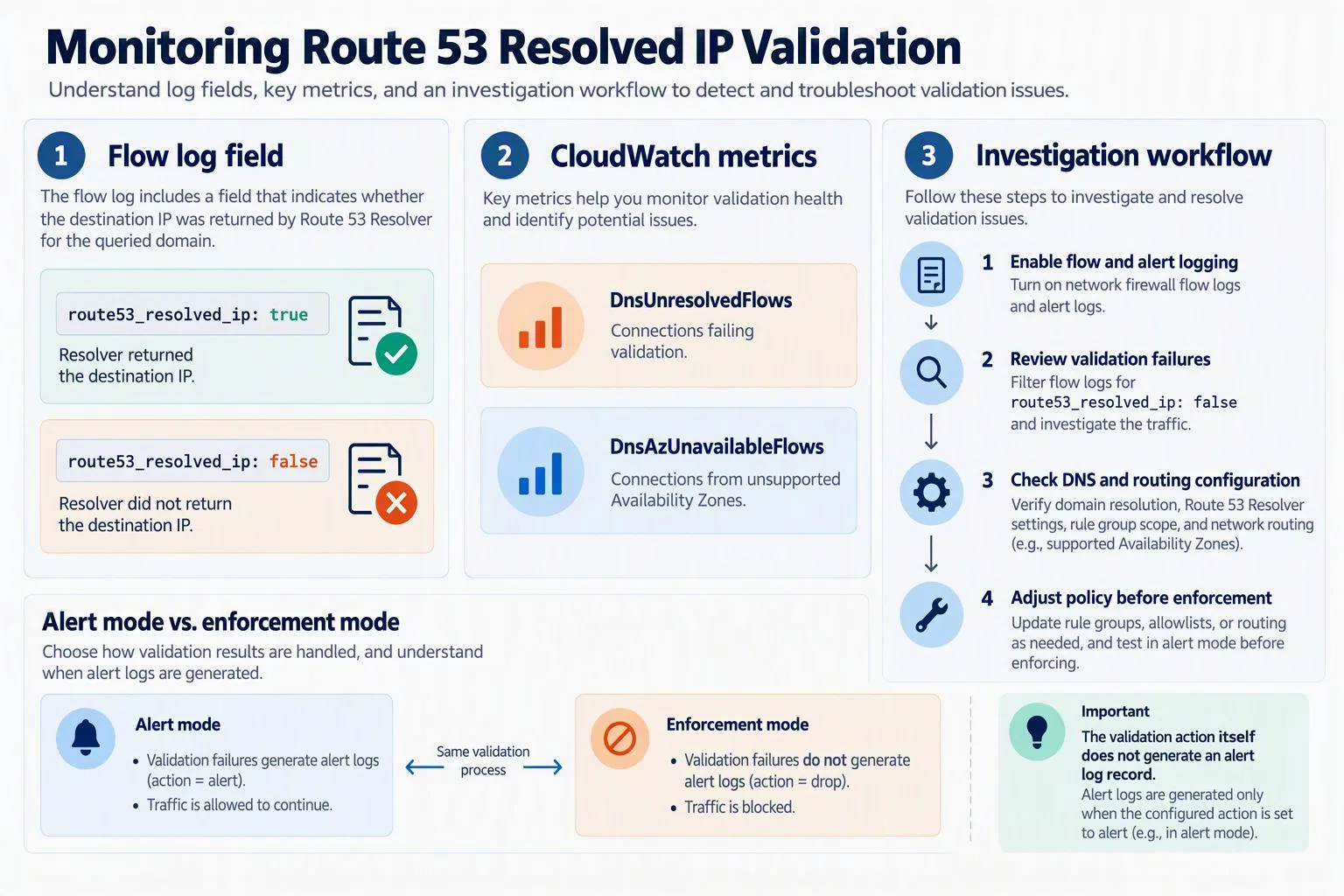
AWS recommends starting with Alert mode before enforcing validation. This gives security teams an opportunity to observe the traffic that may be affected and adjust the configuration.
A typical setup involves the following steps:
Create or select a DNS Firewall rule group. Associate it with the VPCs whose Route 53 Resolver answers should be used for validation.
Open the Network Firewall policy. In the AWS console, navigate to Network Firewall, select Firewall policies, and open the policy to configure.
Enable resolved IP validation. Under Traffic inspection, locate Route 53 Resolved IP validation and edit the setting.
Choose Alert as the initial action. This allows the team to monitor validation failures without blocking connections through the validation action itself.
Select the DNS Firewall rule group. Use the rule group associated with the relevant VPCs.
Configure the DNS expiry exception policy. Choose the appropriate behavior for connections when DNS information expires. AWS recommends Continue for long-lived sessions.
Review source IP ranges. The default configuration checks the firewall VPC and additional attached VPCs. Add the relevant client CIDR ranges where required, such as spoke VPCs connected through Transit Gateway.
Configure bypass destination ranges. Add legitimate destinations that use direct IP connections rather than Route 53 Resolver-based domain lookups.
AWS recommends allowing approximately 24 hours for client DNS caches to refresh before moving to enforcement. Teams should use this period to examine flow logs, review metrics, and investigate unexpected validation failures.
Monitoring Validation Results Through Logs and Metrics
Enabling the feature is only part of the deployment. Administrators also need to understand where validation results appear and which signals indicate a problem.
The route53_resolved_ip field
Network Firewall flow logs can include the route53_resolved_ip field:
truemeans Route 53 Resolver returned the destination address for a domain name.falsemeans Route 53 Resolver did not return the destination address for a domain name.
The field can also appear in alert log records generated by a rule or the default action. However, the validation action itself does not generate an alert log record. In Alert mode, a connection that fails validation is not blocked by the validation action, although a subsequent stateful rule or default action can still block it.
Pass rules only generate alert log records for allowed connections when they contain the alert; option.
Example 1: A destination address passes validation
The following shortened example shows a UDP connection to port 123 where the destination address has been returned by Route 53 Resolver.
{
  "firewall_name": "egress-firewall",
  "availability_zone": "us-east-1a",
  "event": {
    "event_type": "alert",
    "src_ip": "10.0.1.10",
    "dest_ip": "203.0.113.10",
    "dest_port": 123,
    "proto": "UDP",
    "app_proto": "ntp",
    "route53_resolved_ip": true,
    "verdict": {
      "action": "alert"
    },
    "alert": {
      "action": "allowed",
      "signature_id": 3,
      "signature": "aws:alert_established action"
    }
  }
}
The important field is route53_resolved_ip: true. It indicates that the destination address passed the resolved-IP check. The record's alert and verdict fields describe the logging and traffic action associated with this event.
Example 2: A TLS destination fails validation
The next example represents a TLS connection to port 443 presenting the server name api.partner.example.com, while the destination IP was not returned by Route 53 Resolver for that domain.
{
  "firewall_name": "egress-firewall",
  "availability_zone": "us-east-1a",
  "event": {
    "event_type": "alert",
    "src_ip": "10.0.1.10",
    "dest_ip": "198.51.100.7",
    "dest_port": 443,
    "proto": "TCP",
    "app_proto": "tls",
    "tls": {
      "sni": "api.partner.example.com"
    },
    "route53_resolved_ip": false,
    "verdict": {
      "action": "drop"
    },
    "alert": {
      "action": "blocked"
    }
  }
}
Here, route53_resolved_ip: false indicates that the destination did not pass the resolved-address check. The drop action shown in this example reflects the configured stateful policy behavior. In Alert mode, the validation action itself does not block the connection.
CloudWatch metrics
AWS also provides CloudWatch metrics to help teams monitor validation behavior:
DnsUnresolvedFlowscounts connections that fail the resolved-IP check.DnsAzUnavailableFlowscounts connections from an Availability Zone where the feature is unavailable.
After enforcement is enabled, blocked connections can appear in flow logs with route53_resolved_ip: false rather than in alert logs generated by the validation action. Monitoring both logs and metrics is therefore important when assessing the effect of the policy.
Use Case 1: Allowing SFTP to an Approved Partner Domain
Organizations often need to permit file transfers to external partners whose IP addresses can change. Maintaining static IP lists for these destinations can add administrative work.
Route 53 Resolved IP Validation can help by allowing administrators to combine a destination-domain rule with resolver-based IP validation.
For example, an organization may want to allow SFTP connections to files.partner.example.com over TCP port 22.
A stateful rule can specify TCP traffic, destination port 22, the approved domain, and a Pass action. The equivalent Suricata rule is:
pass tcp any any -> any 22 (alert; msg:"Allow TCP/22 to files.partner.example.com"; aws_route_53_resolved_domain:"files.partner.example.com"; sid:1;)The aws_route_53_resolved_domain keyword matches the destination address against the resolved address for the specified domain. The alert; option allows the rule to generate an alert log record for the permitted connection.
When the partner's domain resolves to a new address, the new address can become available through the resolver-based validation process. This reduces the need to maintain a static IP list manually.
There is an important cache consideration: previously resolved addresses can remain in the cache longer than the DNS time-to-live (TTL). An older address may therefore continue to pass validation for a period of time.
Use Case 2: Helping Prevent TLS SNI Spoofing
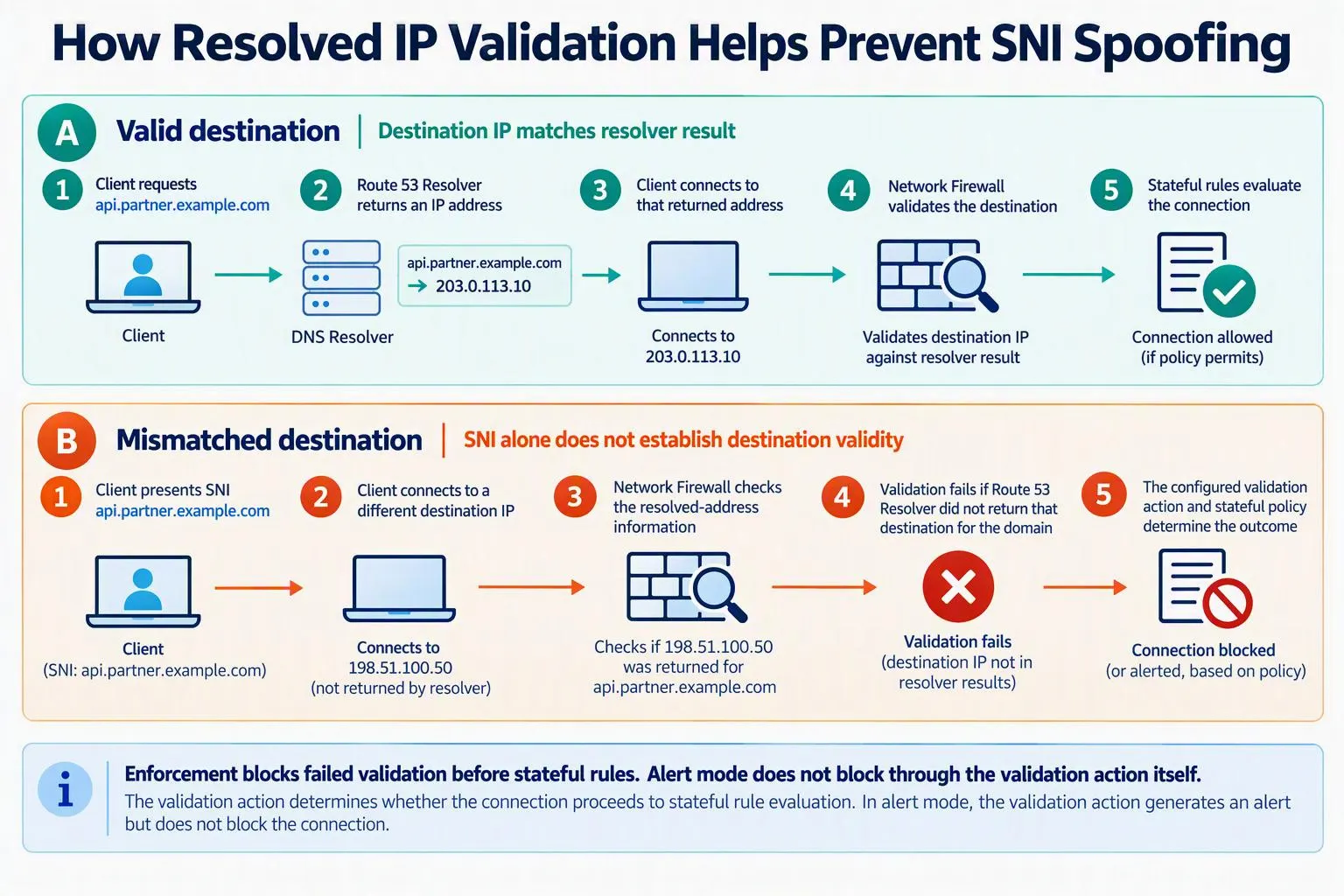
Server Name Indication (SNI) is a TLS extension that allows a client to indicate the hostname it wants to reach during a TLS handshake. In some situations, a client may present an approved hostname while connecting to an IP address that Route 53 Resolver did not return for that hostname.
Resolved IP validation adds a check that helps address this mismatch without requiring TLS inspection.
For example, a security team may want to allow connections to api.partner.example.com over TCP port 443. A stateful rule can use the resolved-domain keyword:
pass tls any any -> any 443 (aws_route_53_resolved_domain:"api.partner.example.com"; sid:2;)This rule matches the destination address against the address resolved for the specified domain. It does not, by itself, verify that the SNI presented by the client exactly matches the approved hostname.
To require an exact SNI match as well, administrators can add the following condition to the same rule:
tls.sni; content:"api.partner.example.com"; startswith; endswith; nocase;The startswith and endswith modifiers ensure that the content match applies to the entire SNI value rather than merely matching the hostname as a substring.
If a client presents an approved SNI but connects to an address that Route 53 Resolver did not return for that domain, the connection fails resolved-IP validation. With enforcement configured, the firewall can block the connection before stateful rules are evaluated.
In Alert mode, the validation action does not block it. The connection continues to stateful rule evaluation, where a configured rule or default action may still drop it.
Another distinction matters: if Route 53 Resolver returned the destination address for a different domain, the address may pass the IP validation check. The stateful rules must still determine whether the connection is permitted.
Organizations should also consider shared hosting and content delivery networks. If an IP address serves multiple domains, allowing traffic to that address does not necessarily restrict the connection to a single hostname. Adding the SNI condition helps enforce the intended hostname requirement.
Best Practices for Deployment
AWS's guidance highlights several operational considerations for organizations deploying resolved IP validation.
Start with a limited scope
Begin with a small set of approved domains and clients. Use Alert mode to identify legitimate connections that may fail validation before enabling blocking actions across a wider environment.
Review DNS paths
Resolved IP validation depends on Route 53 Resolver information. Organizations should understand which resolvers clients use and account for legitimate direct-IP connections through the configured bypass destination ranges.
AWS also recommends blocking outbound UDP and TCP port 53 traffic to unauthorized DNS resolvers through Network Firewall. Organizations should consider other DNS paths, including DNS-over-HTTPS (DoH) and DNS-over-TLS (DoT), in their broader DNS security controls. Resolved IP validation alone does not prevent clients from using other DNS services.
Keep DNS Firewall protections in place
DNS Firewall rule groups can support domain-based controls, including threat-domain protections and rules intended to identify suspicious DNS activity. These controls serve a different purpose from resolved IP validation and should be considered as part of the overall DNS security strategy.
Enable logging and monitoring
Turn on flow and alert logging and monitor DnsUnresolvedFlows and DnsAzUnavailableFlows. Investigate unexpected failures before moving from Alert mode to enforcement.
Remember that the validation action itself does not generate an alert log record. Flow logs and CloudWatch metrics are important sources of information when evaluating validation results.
Review stateful rule behavior
Pass rules without the alert; option do not generate alert log records for permitted connections. Teams that need visibility into allowed traffic should configure logging appropriately and verify that their rules behave as intended.
Availability and Pricing
Route 53 Resolved IP Validation is available at no additional charge in commercial AWS Regions where both AWS Network Firewall and Route 53 Resolver DNS Firewall are available. AWS GovCloud (US) and China Regions are excluded.
An empty DNS Firewall rule group does not incur DNS Firewall charges. Standard DNS Firewall pricing applies when rules are added. Existing Network Firewall and related service charges remain subject to their normal pricing terms.
Organizations should consult the official AWS pricing pages for the current details:
What This Means for Cloud Security Teams
The announcement highlights a broader industry shift toward combining DNS context with network-level security controls. Domain names are often easier for security teams to manage than changing destination IP addresses, but domain-based policies need a reliable way to connect a hostname to the actual destination of a connection.
Route 53 Resolved IP Validation provides an additional control for that purpose. It can support domain-based policies for non-web protocols and help detect TLS connections where the presented hostname does not align with the resolved destination address.
For enterprises, the practical value will depend on how consistently applications use Route 53 Resolver, how traffic is routed across Availability Zones, and whether firewall policies account for legitimate direct-IP connections and shared destination infrastructure.
The feature does not remove the need for stateful inspection, DNS security controls, logging, or careful policy design. Instead, it adds another validation layer that organizations can introduce gradually, observe, and then enforce where appropriate.
Conclusion
AWS Route 53 Resolved IP Validation gives Network Firewall users a way to check outbound destination IP addresses against information returned by Route 53 Resolver. It supports domain-based filtering beyond web traffic and provides an additional control for identifying potential mismatches between TLS server names and destination addresses.
A careful rollout is important. Organizations should begin in Alert mode, review flow logs and CloudWatch metrics, verify DNS and Availability Zone routing, and then decide where enforcement is appropriate.
Source: AWS Security Blog
About the Author