
WordPress XSS Campaign Creates Hidden Admin Accounts and Multiple Backdoors
A new WordPress campaign is using stored XSS vulnerabilities in two plugins to compromise administrator sessions, install malicious plugins, create hidden admin accounts and establish multiple persistence mechanisms.
Xcademia Team
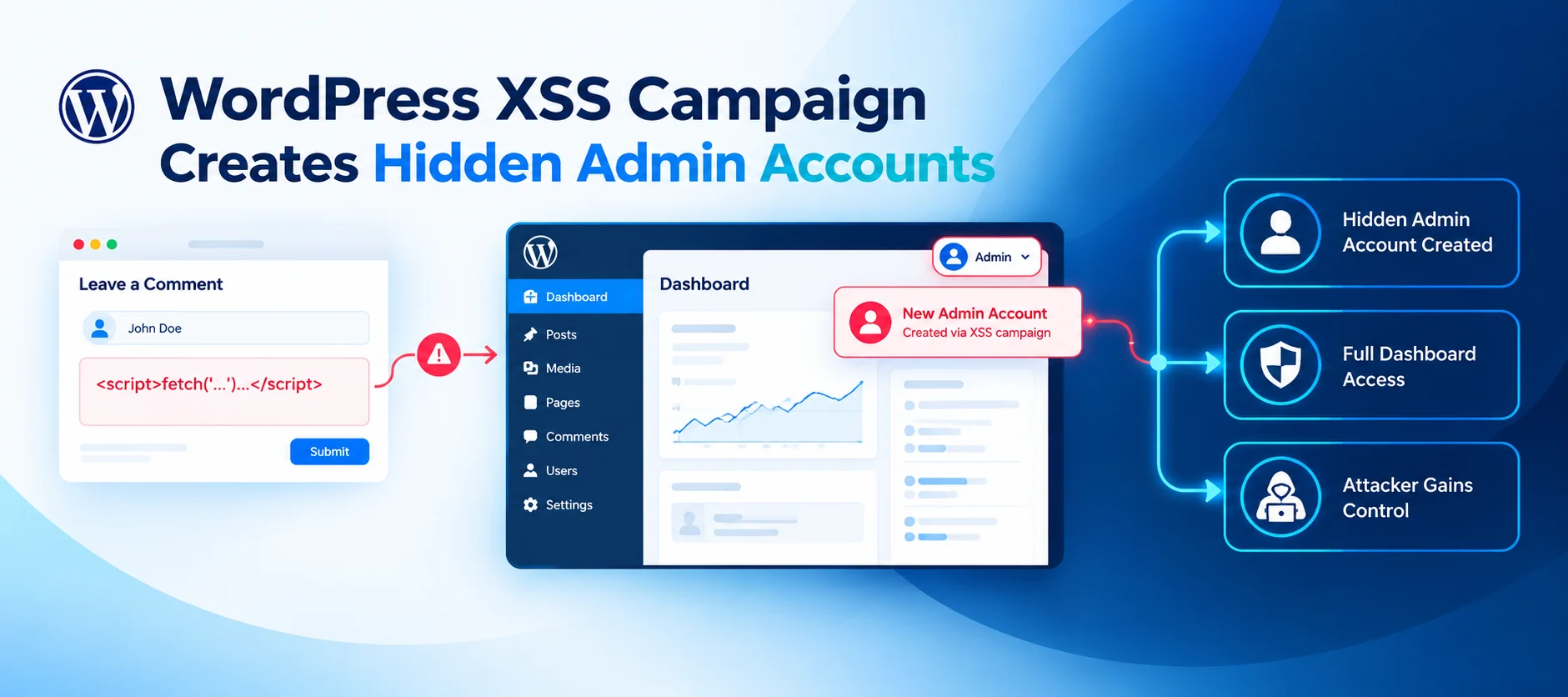
A newly observed WordPress campaign is exploiting stored Cross-Site Scripting vulnerabilities to turn legitimate administrator sessions into a pathway for persistent compromise.
According to security research published by Patchstack on October 6, 2026, attackers have used the same JavaScript payload against two separate WordPress vulnerabilities affecting WPC Product Bundles for WooCommerce and Ninja Forms. The campaign was first observed on October 4, with the same payload appearing through a second vulnerability the following day.
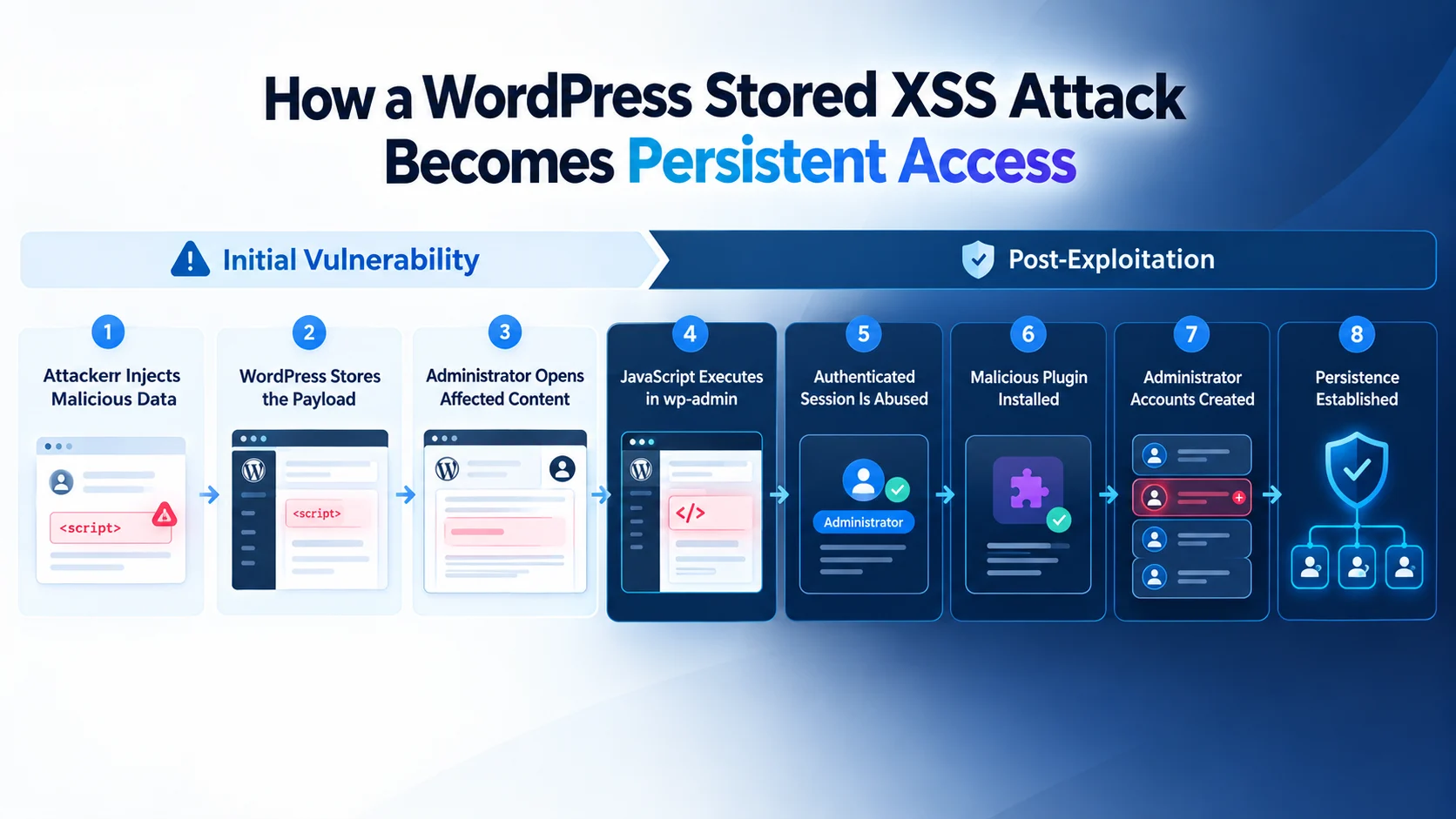
The campaign is notable because the initial XSS is only the entry point. Once the malicious JavaScript executes in an administrator's browser, it can use the existing authenticated WordPress session to perform privileged actions, including installing a malicious plugin and creating administrator accounts.
Patchstack's analysis found that the resulting malware establishes several independent ways to regain access, including a hidden administrator account, a backdoor login mechanism and an unauthenticated file-management component.
Two vulnerabilities are delivering the same payload
Patchstack linked the campaign to two stored XSS vulnerabilities:
Vulnerability | Affected component | Reported affected version | CVSS |
|---|---|---|---|
CVE-2026-93836 | WPC Product Bundles for WooCommerce | Up to 8.6.6 | 7.1 |
CVE-2026-94504 | Ninja Forms | Up to 3.15.3 | 7.1 |
In the first case, attackers injected JavaScript through data associated with WooCommerce product bundles. The malicious value was later stored in order metadata and rendered in an administrative context.
The second attack targeted Ninja Forms. Patchstack reported that attacker-controlled textarea submissions could be rendered without sufficient HTML encoding in the legacy administrative submission editor. When an administrator viewed an affected submission, the injected JavaScript could execute within the WordPress administrative origin.
The delivery methods differ between the two vulnerabilities, but the second-stage JavaScript is the same. This is an important characteristic of the campaign because it means the attackers do not need to develop a separate post-exploitation mechanism for every vulnerable plugin.
Instead, different XSS flaws can serve as delivery mechanisms for the same central payload.
The payload does not need to steal the administrator's cookie
One of the more important technical details in Patchstack's analysis is that the malware does not need to directly steal the administrator's WordPress cookie.
The malicious JavaScript executes within the security context of the affected WordPress site. As a result, requests made by the browser to the site's administrative interface can automatically carry the existing authenticated session.
Patchstack reported that the script loads privileged WordPress pages, retrieves the CSRF nonces required for administrative actions and then uses those legitimate administrative mechanisms to perform actions on behalf of the logged-in administrator.
This distinction matters for defenders. Traditional cookie-theft protections do not necessarily prevent this type of attack because the malicious JavaScript does not need to read the authentication cookie.
Instead, it operates through the authenticated browser session.
The broader attack sequence can therefore be represented as:
Attacker submits malicious data → WordPress stores it → administrator views the data → JavaScript executes in wp-admin → attacker-controlled actions are performed through the administrator's session → persistence is installed.
The campaign's central payload communicates with attacker infrastructure
Patchstack identified imgcdn1.com as the infrastructure used to deliver and coordinate the campaign.
The observed components included:
x.js, the browser-based post-exploitation payloadc.php, used for command and status-related communicationA package endpoint used to deliver the malicious WordPress plugin
An endpoint used to provide administrator credentials
Reporting functionality for communicating compromise status
The payload also stores execution state locally in the browser, allowing it to track whether stages such as plugin installation and administrator creation have already completed.
Patchstack said the domain was registered on October 1, 2026, and was observed being used during exploitation shortly afterwards. The research also linked the infrastructure to both vulnerabilities observed in the campaign.
A malicious plugin provides another layer of persistence
After gaining access to the administrator's authenticated session, the JavaScript can use WordPress's own plugin installation functionality to install a malicious plugin.
Patchstack identified the plugin slug as wp-smart-thumbnails, presenting itself as "WP Smart Thumbnails" version 1.2.4 by "MediaPress Labs".
The package contained a dropper, a persistence installer and decoy files. Patchstack reported that the apparent thumbnail functionality was not genuine and that the main plugin file instead contained the malicious components.
The plugin also uses multiple layers of obfuscation to conceal its functionality.
One component acts as a file manager. Patchstack found that the file manager lacked authentication and could list, upload, delete, rename, create directories, read and save files.
Although the component did not contain conventional command-execution functions such as system() or exec(), its ability to write attacker-controlled files to writable locations could still allow further malicious code to be placed on the server.
The hidden administrator is designed to evade normal WordPress administration
The campaign's most significant persistence mechanism is a hidden administrator account.
Patchstack found that the persistence installer creates an administrator account using usernames that can resemble ordinary operational accounts, such as support, updater, maintenance or backup.
The account is then concealed through a must-use plugin.
Must-use plugins are particularly relevant because they are loaded automatically by WordPress and are not managed through the normal Plugins screen. In this campaign, the malicious code uses WordPress hooks to remove the unauthorized administrator from user listings and administrator filters.
That means the account can exist with administrator privileges while remaining invisible through the standard WordPress Users interface.
This creates a significant detection problem.
A site administrator checking the WordPress dashboard may see no suspicious account even though the database contains an additional privileged user.
Patchstack also reported that the persistence components are deliberately obfuscated and that their file timestamps are modified to make them appear much older than they actually are. This can reduce the value of simple investigations based on recently modified files.
A second backdoor can authenticate as the original administrator
The campaign does not stop with the hidden account.
Patchstack identified another persistence mechanism that creates a special login URL using a token. The token is stored in a WordPress option and is handled by another must-use plugin.
According to the analysis, the mechanism is associated with the site's oldest administrator rather than the hidden administrator. Someone possessing the relevant login URL could therefore obtain an authenticated session associated with that existing administrator account.
This gives defenders another reason not to assume that deleting an unauthorized user is enough to clean an affected installation.
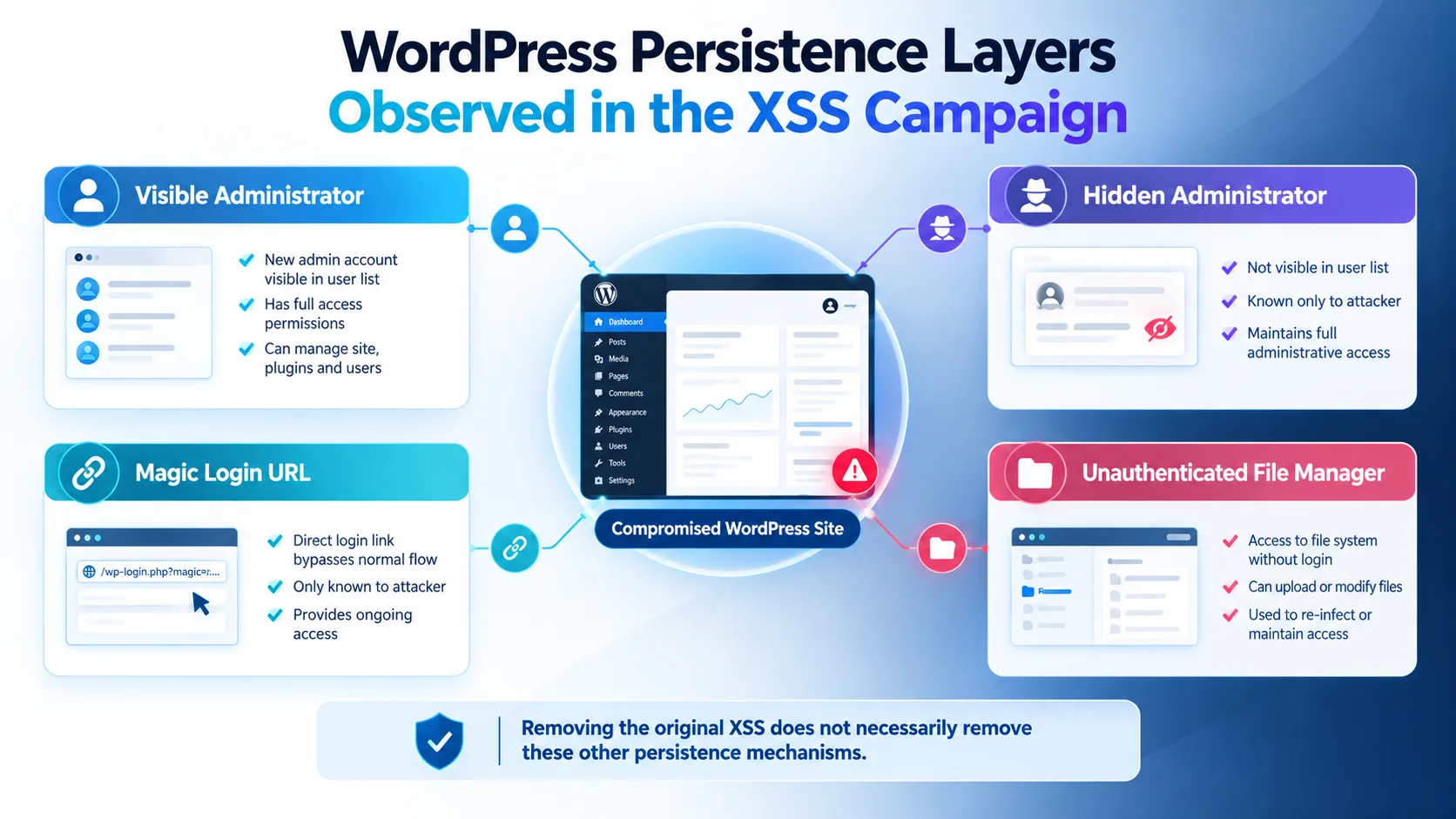
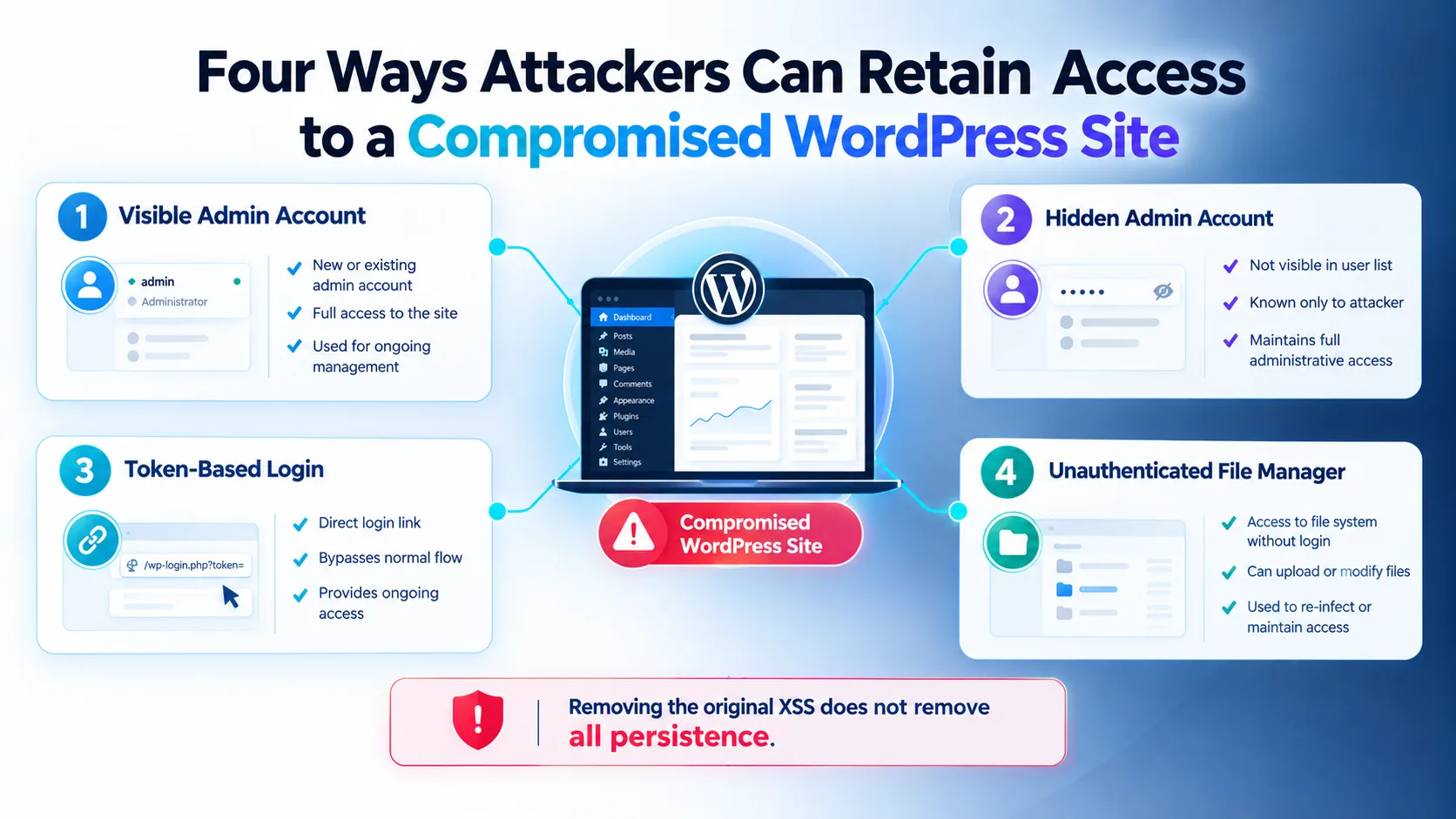
Four separate routes can remain after the initial XSS
Patchstack's investigation identified four independent access mechanisms following a successful execution of the stored XSS:
A visible administrator account created through normal WordPress administration functionality.
A hidden administrator account concealed through a must-use plugin.
A token-based login mechanism capable of authenticating as the site's oldest administrator.
An unauthenticated file manager contained within the malicious plugin.
The important security lesson is that removing the vulnerable plugin alone does not necessarily remove these persistence mechanisms.
Why stored XSS is particularly useful in this campaign
Stored XSS has an important advantage from an attacker's perspective.
The attacker does not necessarily need to persuade an administrator to visit a malicious external website. Instead, the malicious content is stored inside the WordPress application and can execute when an administrator performs a normal administrative task.
In the cases analysed by Patchstack, this involved administrators viewing WooCommerce orders or Ninja Forms submissions.
The campaign therefore turns routine administrative activity into the trigger for the second stage of the attack.
This also explains why the campaign is not tightly tied to one plugin.
Once JavaScript executes inside an authenticated WordPress administrative context, the same post-exploitation process can potentially be reused against different stored XSS vulnerabilities.
For defenders, this shifts the focus from simply asking whether a particular plugin is vulnerable to asking whether stored XSS could execute in a privileged administrative context.
The campaign was observed across two plugin ecosystems
Patchstack reported exploitation attempts against WPC Product Bundles for WooCommerce on October 4 and Ninja Forms on October 5.
The researchers said the first observed request occurred on October 4 at 10:39 UTC. They also reported several source IP addresses associated with the observed activity and noted that multiple addresses were Tor exit nodes.
Patchstack said the affected plugins have significantly different installation bases, with WPC Product Bundles reported at more than 30,000 active installations and Ninja Forms at more than 500,000.
However, the research did not establish that all installations of either plugin were compromised. It specifically described exploitation observed through the campaign's telemetry.
Patchstack also cautioned that the two confirmed vulnerabilities should not be interpreted as the final number of possible delivery mechanisms.
Detection and mitigation
Patchstack recommends updating the affected plugins.
For WPC Product Bundles for WooCommerce, the upstream changelog identifies version 8.6.7 as containing the security fix after the affected 8.6.6 release.
For Ninja Forms, users should update to 3.15.4 or later, which includes strengthened output escaping in the affected administrative submission screen.
For potentially compromised sites, patching alone should not be treated as sufficient.
Patchstack recommends reviewing historical HTTP and application logs for references to the campaign's infrastructure, including:
imgcdn1.com/fz/x.js/fz/c.php
Administrators should also investigate the presence of:
/wp-content/plugins/wp-smart-thumbnails/emer-run.phpUnexpected files under
/wp-content/mu-plugins/The WordPress options
fz_emer_done_v1andfz_emer_login_tokensUnexpected
_wploginparameters in requests towp-login.php
The researchers specifically warn that the hidden administrator may not appear in the WordPress dashboard. Direct database inspection can therefore reveal accounts that are not visible through the normal Users interface.
File timestamps also should not be treated as definitive evidence of whether a file is malicious. Patchstack reported that the campaign deliberately backdates dropped files, meaning content and location are more useful investigation signals than modification time alone.
If successful XSS execution is confirmed, Patchstack recommends removing unauthorised accounts and malicious plugins, clearing the dropped must-use plugins and associated options, rotating privileged credentials and WordPress authentication salts, and reviewing the filesystem and database for additional modifications.
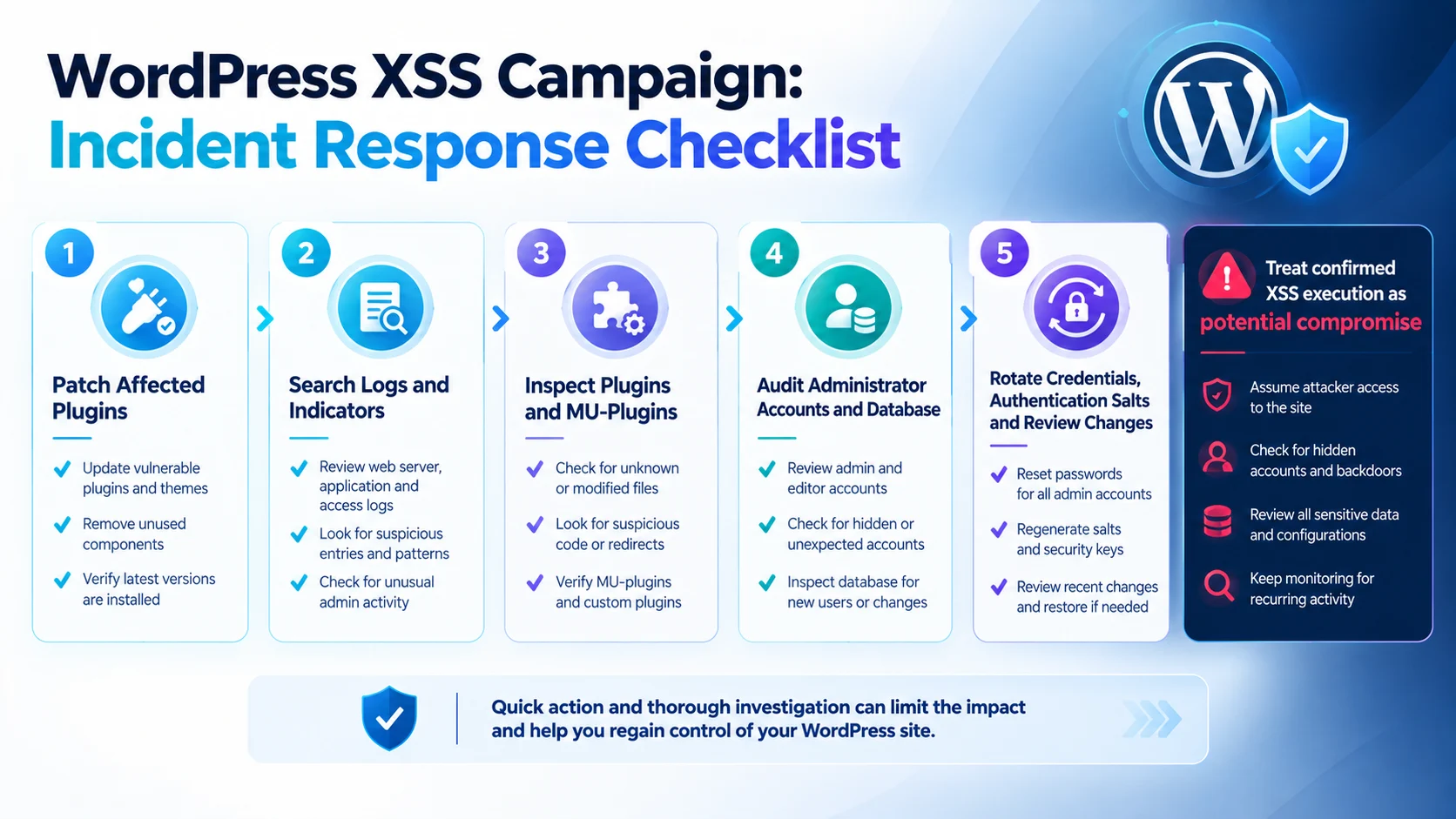
What this campaign means for WordPress security
Editorial analysis: The campaign highlights a broader security issue around the relationship between application vulnerabilities and post-exploitation persistence.
A stored XSS vulnerability may initially appear narrower than a direct remote-code-execution flaw because its impact depends on where the injected content is rendered. However, when that content executes inside a privileged administrative context, the browser itself can become an execution environment for attacker-controlled actions.
For enterprises and WordPress operators, this reinforces the importance of treating administrative interfaces as high-value security boundaries.
It also shows why incident response should not end after removing the original vulnerable component. If an attacker has already executed JavaScript through an administrator's session, defenders need to consider what happened after that execution.
In this campaign, Patchstack found evidence of multiple persistence mechanisms specifically designed to survive removal of the initial vulnerability.
Key indicators reported by Patchstack
The following indicators come from Patchstack's analysis of the observed campaign and should not be considered exhaustive indicators for exploitation of the underlying vulnerabilities.
Indicator | Reported value |
|---|---|
Payload |
|
C2 |
|
Malicious plugin |
|
Plugin identity | "WP Smart Thumbnails" 1.2.4 |
Persistence installer |
|
MU-plugin pattern |
|
Additional MU-plugin |
|
WordPress option |
|
WordPress option |
|
Login parameter |
|
Webshell title | "Moon, tell me if I could" |
Local Storage prefix |
|
Patchstack also published hashes and observed source IP addresses as part of its malware indicators. Security teams investigating an affected environment should use the complete original indicator set from the source rather than relying only on the abbreviated indicators above.
Conclusion
The WordPress campaign analysed by Patchstack demonstrates how a stored XSS vulnerability can become the starting point for a much broader compromise.
The attackers observed so far have used two different WordPress vulnerabilities to deliver the same post-exploitation JavaScript. Once that JavaScript runs in an administrator's browser, it can use the authenticated session to install malicious components and establish several persistence mechanisms.
The hidden administrator account is particularly significant because it can evade the normal WordPress Users interface. The additional token-based login mechanism and unauthenticated file manager provide further routes back into an affected site.
For WordPress administrators, the immediate priority is to update the affected plugins and investigate systems where the malicious payload may have executed. For security teams, the incident reinforces the need to investigate persistence, privileged accounts, application logs, database changes and must-use plugins rather than treating XSS remediation as the end of the incident.
The campaign remains under observation, and Patchstack said additional affected plugins may be identified as monitoring continues.
Source: Patchstack
About the Author