
Microsoft Warns of Phishing Campaign Abusing RMM Tools for Persistent Access
Microsoft has identified phishing campaigns that abuse legitimate RMM software to establish remote access, deploy ScreenConnect, and support follow-on credential-access and information-collection activity.
Xcademia Team
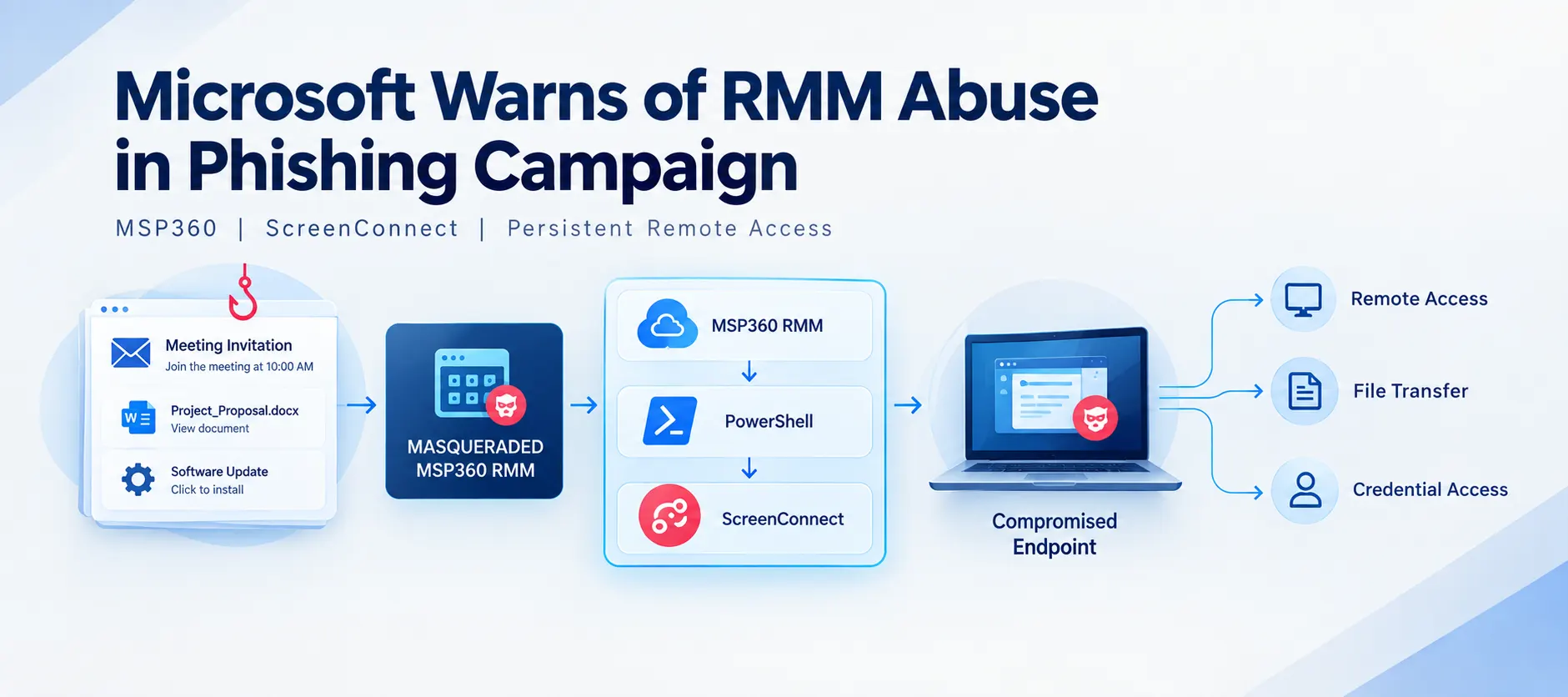
Microsoft Defender Experts observed phishing campaigns in July 2026 that used legitimate remote monitoring and management (RMM) software to establish persistent access to compromised systems.
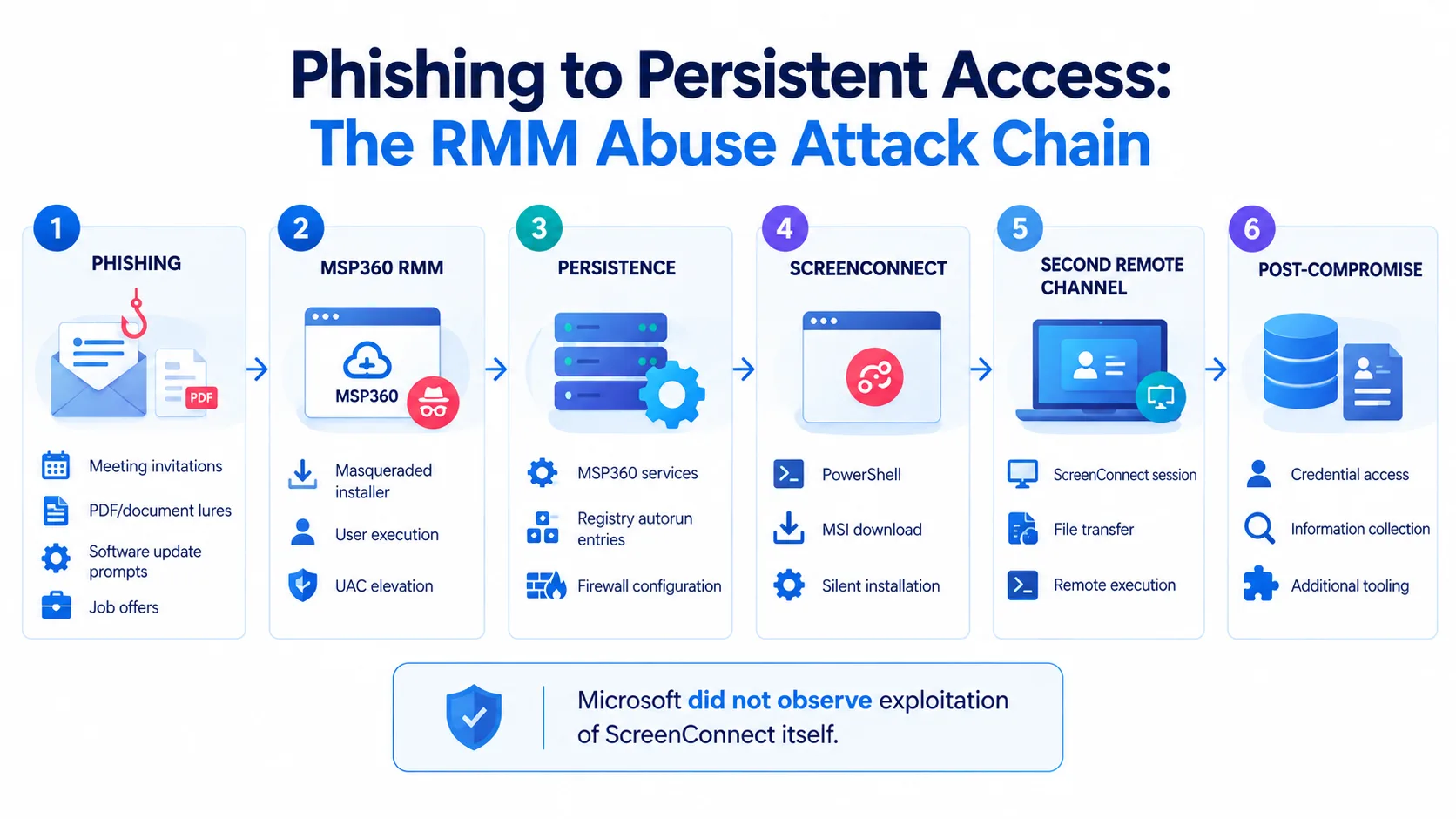
According to Microsoft, the campaigns targeted organizations across multiple industries and distributed a masqueraded MSP360 RMM v2.5.0.67 installer through meeting invitations, PDF-themed lures, software update prompts, and other social-engineering themes.
The downloaded files were presented as legitimate business documents or software installers, but the underlying payload was the MSP360 RMM installer.
After successful User Account Control (UAC) elevation, the installer established MSP360 services on affected devices. Microsoft then observed the MSP360 agent launching PowerShell to download and silently install a ConnectWise ScreenConnect client.
Microsoft says it did not observe exploitation of ScreenConnect itself.
Instead, the attackers abused legitimately obtained remote administration software to establish an additional remote-access channel.
The combination of MSP360 and ScreenConnect gave the threat actor redundant remote administration capabilities that were subsequently used to transfer and execute additional tools and conduct post-compromise activity.
Microsoft did not attribute the activity to a named threat actor.
The Attack Chain at a Glance
The observed intrusion followed a multi-stage sequence:
Phishing lure
↓
Masqueraded MSP360 installer
↓
User execution and UAC elevation
↓
MSP360 services and persistence
↓
PowerShell launched by MSP360 agent
↓
ScreenConnect downloaded and installed
↓
Second remote-access channel established
↓
Additional tools transferred and executed
↓
Credential access and information collection activity
Microsoft says this approach allows legitimate administrative software to blend into normal IT activity, potentially making malicious activity more difficult to distinguish from authorized remote administration.
Phishing Campaigns Used Multiple Social-Engineering Themes
Microsoft observed multiple phishing themes designed to make the malicious installer appear relevant to routine workplace activity.
Observed themes included:
Workplace meeting requests
Zoom and Google Meet installation prompts
Adobe Acrobat and PDF reader updates
RSVP invitations and electronic cards
Job offer documents
Document review and signature requests
DHL and package-delivery messages
The campaigns also used filenames designed to resemble legitimate applications, documents, or business content.
Examples identified by Microsoft included filenames containing references to:
VIP e-card invitations
Zoom installation
Adobe Acrobat
RSVP invitations
Government statements
The important characteristic was not the specific filename, but the attempt to make the executable appear to be a legitimate document or software package.
Microsoft identified the MSP360 installer in the observed samples with the following SHA256 hash:
108ef7e628d7a20bd6241a5b57149e27a6061f467123eb64061975559f8f73dc
Microsoft notes that the observed MSP360 sample was digitally signed with a certificate that has since been revoked.
Legitimate Cloud Services Were Also Used for Payload Delivery
The campaigns did not rely exclusively on attacker-controlled infrastructure.
Microsoft observed payloads distributed through attacker-controlled domains, compromised websites, and legitimate cloud-hosting services.
The legitimate services identified in the research included:
Amazon S3
Cloudflare R2
Dropbox
GitLab
Supabase
According to Microsoft, this infrastructure diversity allowed the actor to rotate delivery locations while continuing to distribute the same MSP360 installer through different filenames and lure themes.
The use of legitimate hosting services also illustrates why security teams cannot rely solely on the reputation of a hosting provider when investigating suspicious downloads.
The security signal can instead come from the combination of the delivery context, filename, execution behavior, parent-child process relationships, and subsequent remote-management activity.
MSP360 Installation Established the Initial Foothold
After a victim executed the downloaded installer, Microsoft observed the binary running from the user's Downloads directory under a deceptive filename.
The installer dropped several installation components and initiated an elevation workflow.
When UAC elevation succeeded, the installation continued with elevated privileges and deployed MSP360 components and services.
Microsoft observed the installer using Windows eventcreate.exe to record installation status messages and placing MSP360 components under:
C:\Program Files\RMM Agent\
The installer also checked installed .NET runtimes using:
dotnet -list-runtimes
For persistence, Microsoft observed the installation registering two Windows services:
RMM.Agent.exeRMM.Agent.Launcher.exe
The installer also created registry-based autorun entries for MSP360 user-interface components.
In addition, Microsoft observed a Windows Firewall inbound allow rule for the MSP360 agent involving UDP port 48678.
Not every execution resulted in a successful deployment.
Microsoft observed cases where UAC elevation was denied or aborted. In those instances, the installation terminated before the MSP360 persistence and remote-management components were fully deployed.
MSP360 Was Used to Deploy ScreenConnect
The next stage of the observed attack involved the MSP360 agent itself.
Following successful installation, RMM.Agent.exe launched PowerShell.
Microsoft observed PowerShell modifying the execution policy for the current session and using Invoke-WebRequest to retrieve an MSI package named ClientSetup.msi.
The package was then installed silently with msiexec.exe using the /qn option.
This resulted in the deployment of a ConnectWise ScreenConnect client.
Microsoft observed components including:
ScreenConnect.ClientService.exeScreenConnect.WindowsClient.exeSupporting ScreenConnect components
The newly installed ScreenConnect service subsequently communicated with actor-controlled infrastructure.
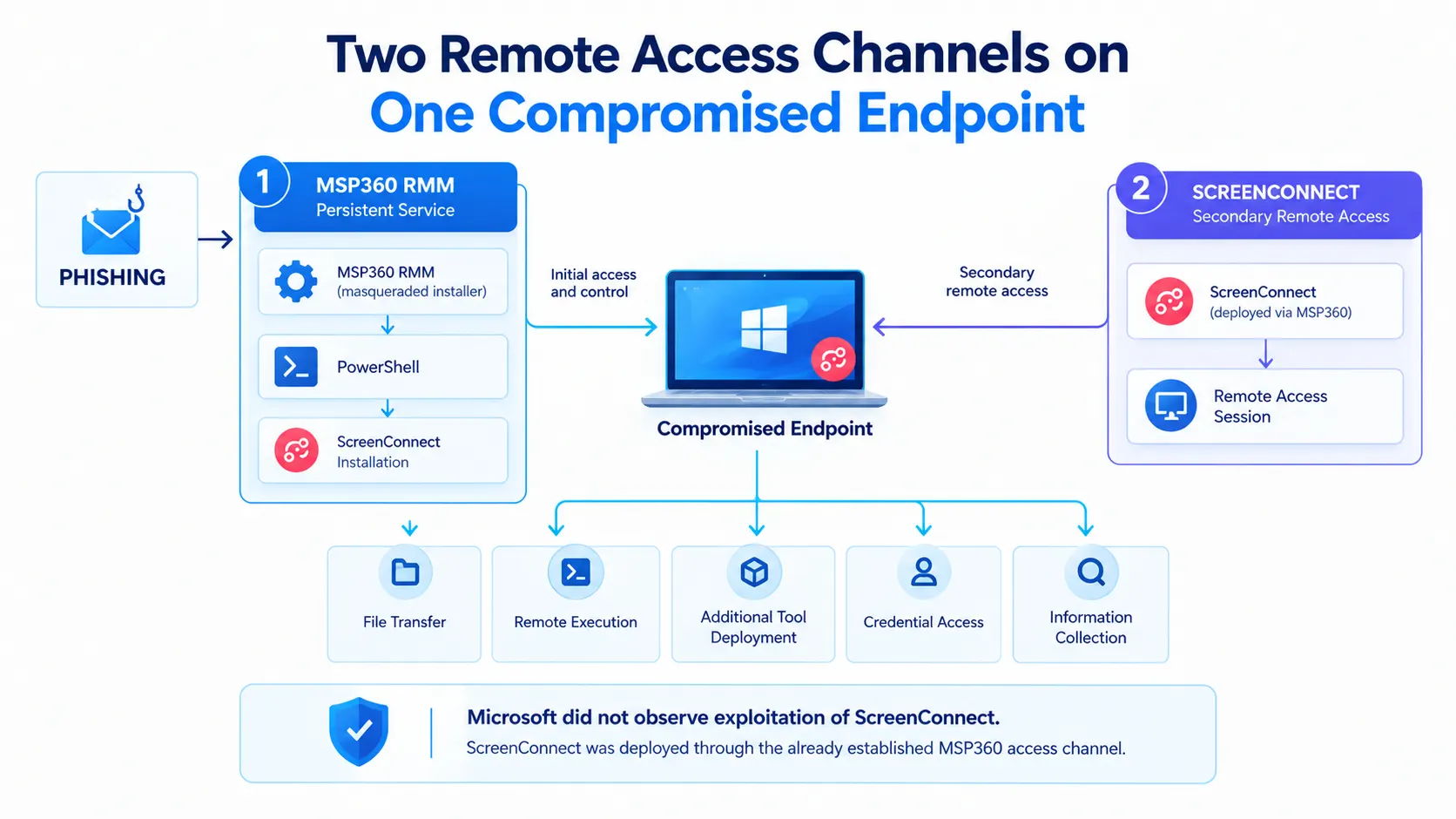
This created a second remote-access channel independent of MSP360.
Microsoft specifically emphasizes that the activity did not involve exploitation of ScreenConnect software. Instead, the attackers first obtained remote administration capability through MSP360 and then used that access to install ScreenConnect.
ScreenConnect Became the Follow-On Access Channel
Once ScreenConnect was established, Microsoft observed the threat actor using its capabilities to transfer and stage additional executables.
The files were placed in ScreenConnect temporary directories under user profiles, including:
C:\Users\%user%\OneDrive\Documents\ScreenConnect\Temp\
and
C:\Users\%user%\Documents\ScreenConnect\Temp\
Microsoft identified numerous tools in this activity.
Some filenames were designed to resemble legitimate Windows, Microsoft Defender, security, or Phone Link components. Examples included names referencing:
Windows updates
Windows Security
Defender
Phone Link
Passwords
Browser passwords
Camera
Mouse utilities
Microsoft says several of the observed tools were associated with credential access, information collection, execution of additional payloads, and attempts to reduce defender visibility.
The tools were executed through ScreenConnect's RunFile functionality, which allows files to be transferred to and executed on managed endpoints.
This gave the threat actor another mechanism for deploying and managing tools after the initial RMM compromise.
Microsoft Observed Similar Abuse of Faronics Deploy
The activity was not limited to MSP360.
Microsoft also observed separate activity in July involving FaronicsDeployAgent.exe, another legitimate deployment and remote-access application.
In that case, the threat actor used Faronics Deploy as the initial remote-management platform and subsequently used it to download and install ScreenConnect.
Microsoft says this demonstrates that the technique of using legitimate remote administration software as an initial access or post-compromise mechanism was not limited to one RMM product.
The broader technique involves abusing trusted administrative software to establish remote access and then using that access to deploy additional tooling.
Why RMM Software Is Attractive to Attackers
Remote monitoring and management software is designed to give administrators extensive control over managed endpoints.
Depending on the product and configuration, these capabilities can include remote command execution, software deployment, file transfer, and persistent service-based access.
Those same capabilities can become useful to attackers after unauthorized installation.
In the activity Microsoft observed, legitimate RMM functionality provided a channel for:
Establishing persistent access
Executing commands
Downloading additional software
Installing ScreenConnect
Transferring files
Executing follow-on tools
Supporting credential-access activity
Collecting information from affected systems
The key security issue is therefore not that legitimate RMM software is inherently malicious.
Instead, the concern is unauthorized RMM deployment and use.
An RMM tool installed and operated through an approved administrative process is different from the same software being introduced through phishing and then used by an unauthorized actor.
Microsoft Recommendations for Defending Against RMM Abuse
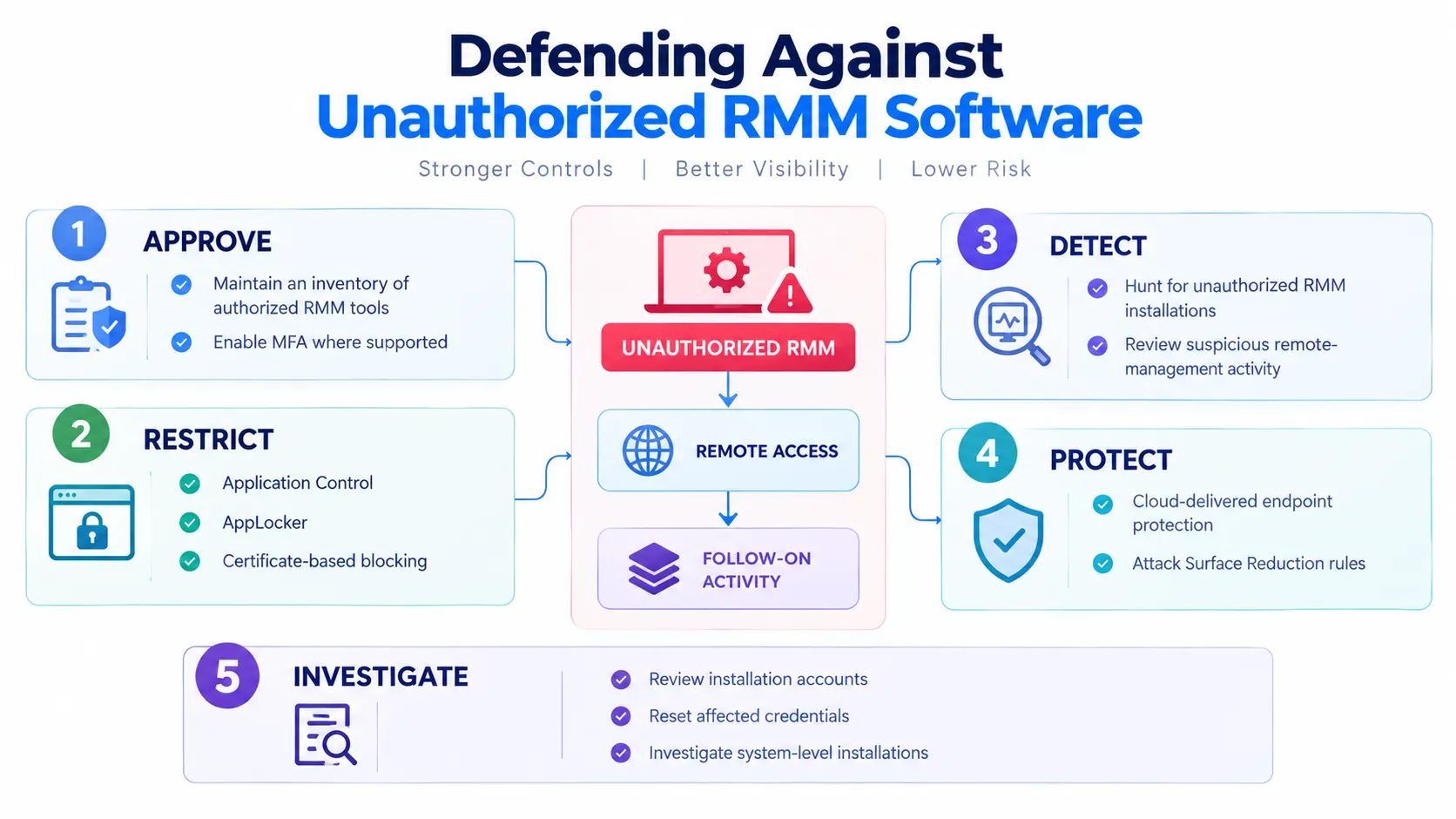
Microsoft recommends several measures to reduce exposure to unauthorized RMM activity.
Govern approved RMM tools
Organizations should maintain an inventory of approved RMM platforms and apply appropriate security controls.
Microsoft specifically recommends enforcing available security settings, including multifactor authentication where supported.
Restrict unauthorized software
Microsoft recommends using Windows application-control capabilities to restrict unapproved IT management tools.
Application Control for Windows and AppLocker can use publisher information and certificate-based rules to establish which software is trusted.
Microsoft Defender for Endpoint also provides functionality to block specific signed applications through certificate-based controls.
Search for unauthorized RMM installations
Microsoft recommends actively searching for unapproved RMM software.
If an unauthorized installation is discovered, organizations should investigate how the software was installed and consider resetting passwords for accounts used to install the RMM services.
If a system-level account was used, Microsoft says additional investigation may be warranted.
Strengthen endpoint protection
Microsoft recommends enabling cloud-delivered protection in Microsoft Defender Antivirus, or the equivalent capability in another antivirus product.
The company says cloud-based machine-learning protection can help address rapidly evolving attacker tools and techniques.
Review attack surface reduction controls
Microsoft also recommends enabling or auditing relevant attack surface reduction rules.
The guidance includes:
Use advanced protection against ransomware
Block process creations originating from PsExec and WMI commands
Microsoft notes that the latter rule can create compatibility issues on some server systems and recommends deploying it to other applicable systems to help prevent lateral movement originating from PsExec and WMI.
Microsoft Defender XDR Detection Coverage
Microsoft also provided detection coverage associated with the observed activity.
The research identifies several stages where Microsoft Defender products can detect suspicious behavior.
Tactic | Observed activity | Microsoft coverage |
|---|---|---|
Initial access | Masqueraded MSP360 RMM v2.5.0.67 | Microsoft Defender Antivirus, including SupportScam/RogueMSP.MU!MTB |
Execution | RMM software execution | Microsoft Defender for Endpoint detections for suspicious and uncommon remote-management software |
Persistence | RMM-based persistence | Microsoft Defender for Endpoint detections involving anomalous ASEP registry activity and suspicious files registered as services |
Credential Access | Potential credential-access activity after RMM deployment | Microsoft Defender for Endpoint detection for possible theft of passwords and sensitive browser information |
Microsoft says Defender XDR coordinates detection, prevention, investigation, and response across endpoints, identities, email, and applications.
Microsoft Provides Advanced Hunting Queries
The research also includes Microsoft Defender XDR advanced hunting queries for security teams investigating this activity.
The queries are designed to help identify several specific behaviors:
MSP360 presence
Searches for the observed MSP360 RMM SHA256 hash.MSP360 remote command execution
Looks for PowerShell activity associated with the MSP360 agent and MSI installation behavior.ScreenConnect network activity
Correlates suspicious network connections from ScreenConnect clients with URLs identified through related PowerShell activity.Payloads launched through ScreenConnect
Searches for process activity associated with ScreenConnect'sRunFilefunctionality and temporary directories.
Security teams can use Microsoft's original hunting queries and adapt them to their own telemetry and environment.
MITRE ATT&CK Techniques Observed
Microsoft mapped the observed activity to multiple MITRE ATT&CK techniques.
The campaign included:
Resource Development
T1583.001 - Acquire Infrastructure: Domains
T1583.006 - Acquire Infrastructure: Web Services
Initial Access
T1566.002 - Phishing: Spearphishing Link
T1204 - User Execution
Execution
T1059.001 - PowerShell
T1059.003 - Windows Command Shell
T1218.007 - Msiexec
Persistence
T1543.003 - Windows Service
T1547.001 - Registry Run Keys / Startup Folder
Defense Evasion
T1036 - Masquerading
T1036.005 - Match Legitimate Name or Location
T1112 - Modify Registry
Command and Control
T1219 - Remote Access Software
T1105 - Ingress Tool Transfer
T1071.001 - Web Protocols
T1573 - Encrypted Channel
T1102 - Web Service
Discovery
T1082 - System Information Discovery
Collection
T1005 - Data from Local System
The combination shows how the intrusion moved from phishing and user execution into persistence, remote access, tool transfer, and post-compromise activity.
Indicators of Compromise
Microsoft's research includes a broader set of indicators associated with the campaign.
The primary MSP360 installer identified in the report has the SHA256:
108ef7e628d7a20bd6241a5b57149e27a6061f467123eb64061975559f8f73dc
Microsoft also provides hashes for MSP360 agent services, domains contacted by ScreenConnect clients, and hashes for utilities transferred or executed during post-compromise activity.
Because the full IOC set is lengthy and can change as investigations develop, security teams should use the original Microsoft Security Blog publication as the authoritative reference for the complete IOC list and hunting material.
The Broader Security Lesson: Trusted Tools Can Become an Access Path
Microsoft's research highlights a security challenge that goes beyond a single RMM product.
Remote administration software exists to provide trusted administrative capabilities. When an attacker obtains the ability to install and control such software, those same capabilities can become part of the attack chain.
In this campaign, phishing provided the initial delivery mechanism. MSP360 established the first remote-management channel, and ScreenConnect created a second channel after being installed through that access.
The result was not a vulnerability exploitation chain against the remote-access products themselves. It was an abuse of legitimate administrative functionality after unauthorized installation.
For security teams, this places greater importance on understanding which remote-management tools are authorized, where they are installed, which accounts can deploy them, and what processes initiate them.
Microsoft's recommendations therefore focus heavily on software governance, application control, endpoint detection, and hunting for unexpected RMM installations.
What Microsoft Has Not Disclosed
Microsoft did not publicly attribute the campaigns to a named threat actor.
The research also does not establish a single victim organization or provide a quantified number of affected organizations.
Microsoft describes the campaigns as targeting organizations across multiple industries, but the announcement does not provide a complete victim count.
Additional details were not disclosed in the announcement.
Conclusion
Microsoft has detailed a phishing campaign in which attackers abused legitimate remote monitoring and management software to establish persistent access and deploy additional remote-access capabilities.
The observed chain began with socially engineered phishing lures that delivered a masqueraded MSP360 installer. Successful execution and UAC elevation allowed MSP360 services and persistence mechanisms to be established.
The MSP360 agent then launched PowerShell, downloaded an MSI package, and silently installed ConnectWise ScreenConnect.
Microsoft did not observe exploitation of ScreenConnect itself. Instead, ScreenConnect was used as a secondary remote-access channel after being installed through the MSP360 foothold.
The attackers subsequently used ScreenConnect to transfer and execute additional tools associated with credential access, information collection, and other post-compromise activity.
Microsoft recommends that organizations govern approved RMM software, restrict unauthorized administrative tools, monitor for unexpected installations, strengthen endpoint protection, and investigate suspicious remote-management activity.
The research also demonstrates why security monitoring needs to consider the context and behavior surrounding legitimate administrative software, rather than treating trusted software as inherently safe.
Source: Microsoft Security Blog
About the Author