
Microsoft Details How Hackers Use Agentic AI to Exploit Exposed GitHub Secrets
Microsoft reveals how threat actors use agentic AI to discover exposed GitHub credentials, access Azure resources, and automate cloud attacks. One observed operation reached Azure Key Vault data exfiltration in five minutes.
Xcademia Team
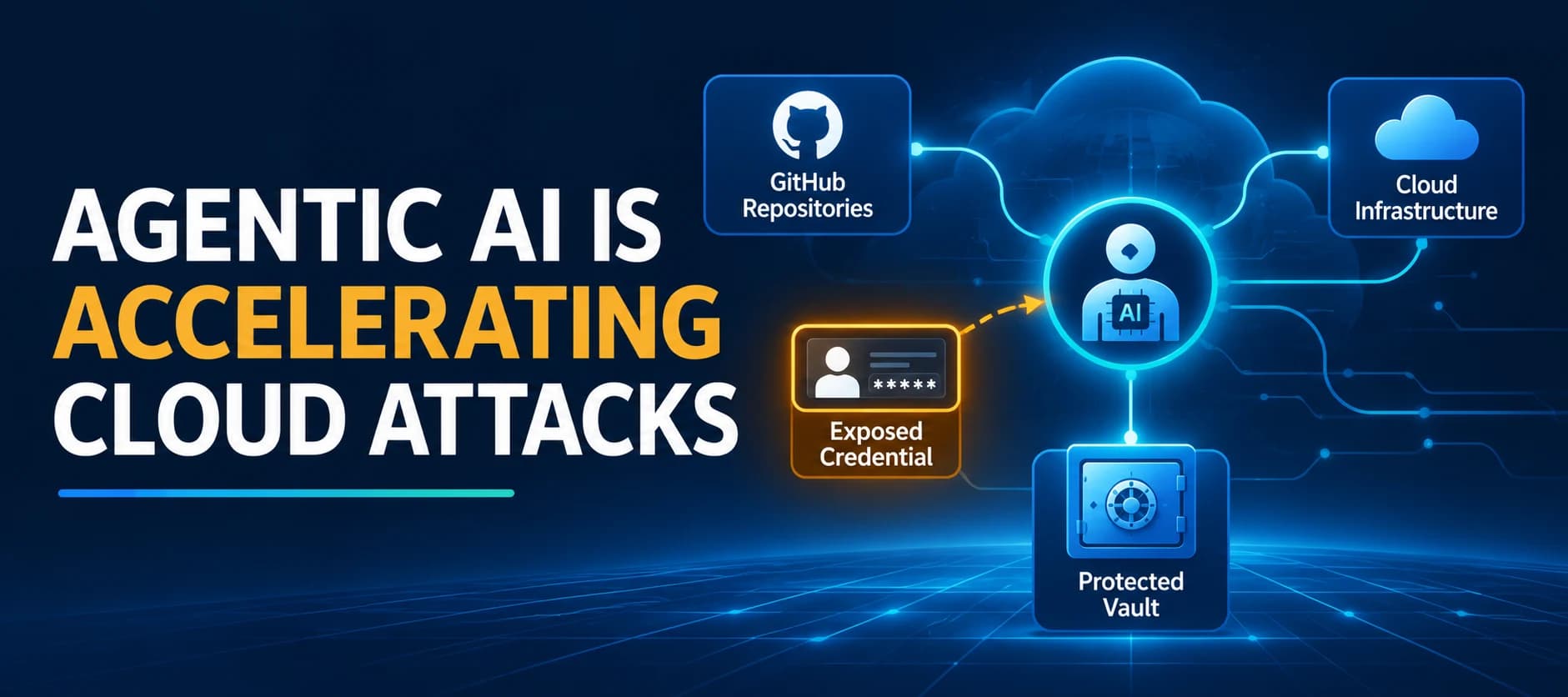
Threat actors are increasingly using agentic artificial intelligence to automate credential discovery and cloud attacks, according to new research from Microsoft Threat Intelligence and Microsoft Security Research.
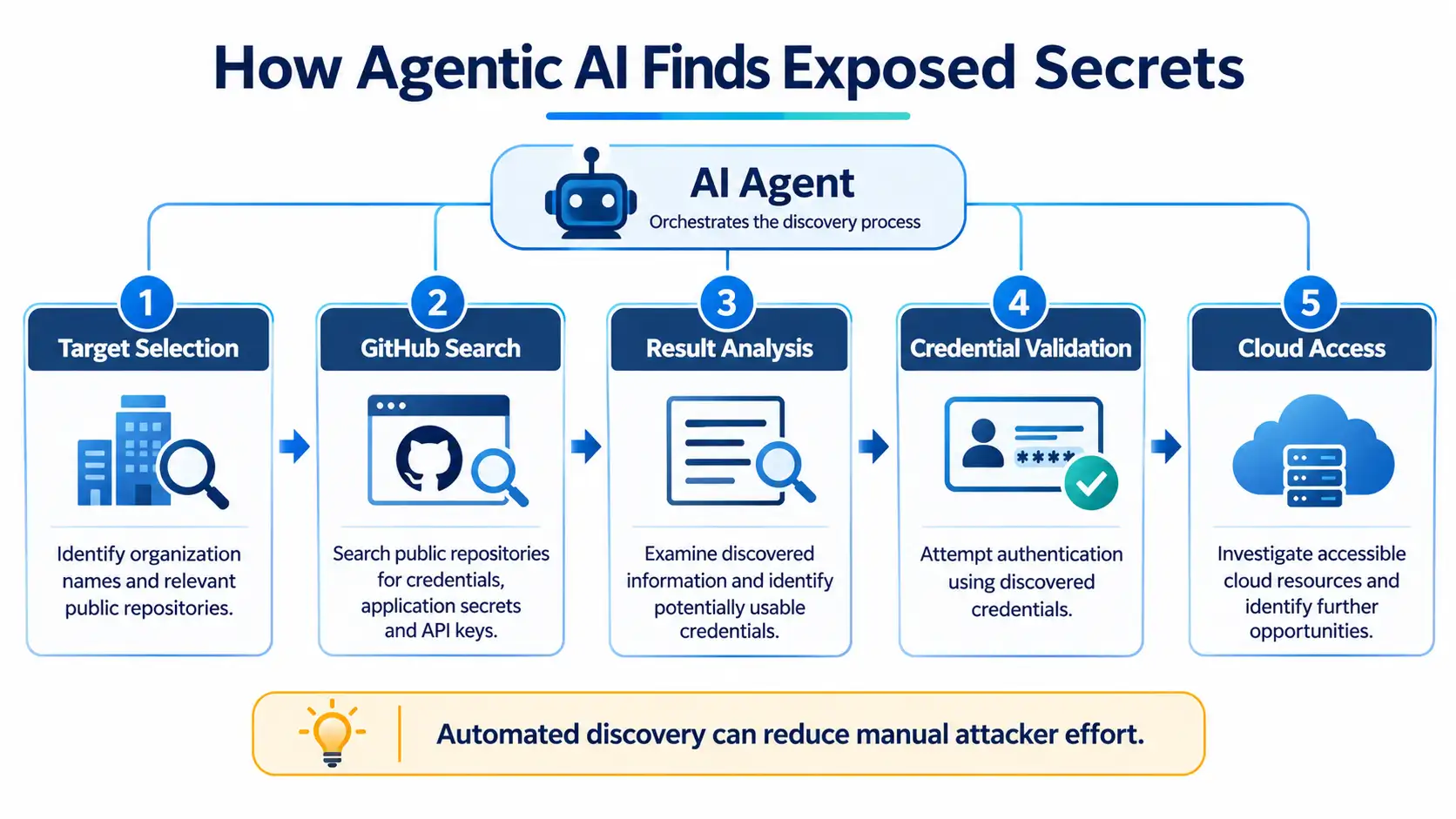
In a security report published on November 5, 2026, Microsoft revealed that attackers are using an agentic AI offensive framework called ARTEX to search public GitHub repositories for exposed credentials, application secrets, and AI inference-related API keys. The discovered authentication material can then be used to access cloud environments, identify additional resources, and extract sensitive organizational data.
Unlike traditional credential discovery operations that require considerable manual investigation, agentic AI frameworks can automate multiple stages of an attack. They can search repositories, analyse discovered secrets, authenticate to cloud services, and conduct follow-on operations with reduced hands-on-keyboard activity.
One particularly concerning incident documented by Microsoft involved an AI agent progressing from searching GitHub for exposed client secrets to exfiltrating data from Azure Key Vault in just five minutes.
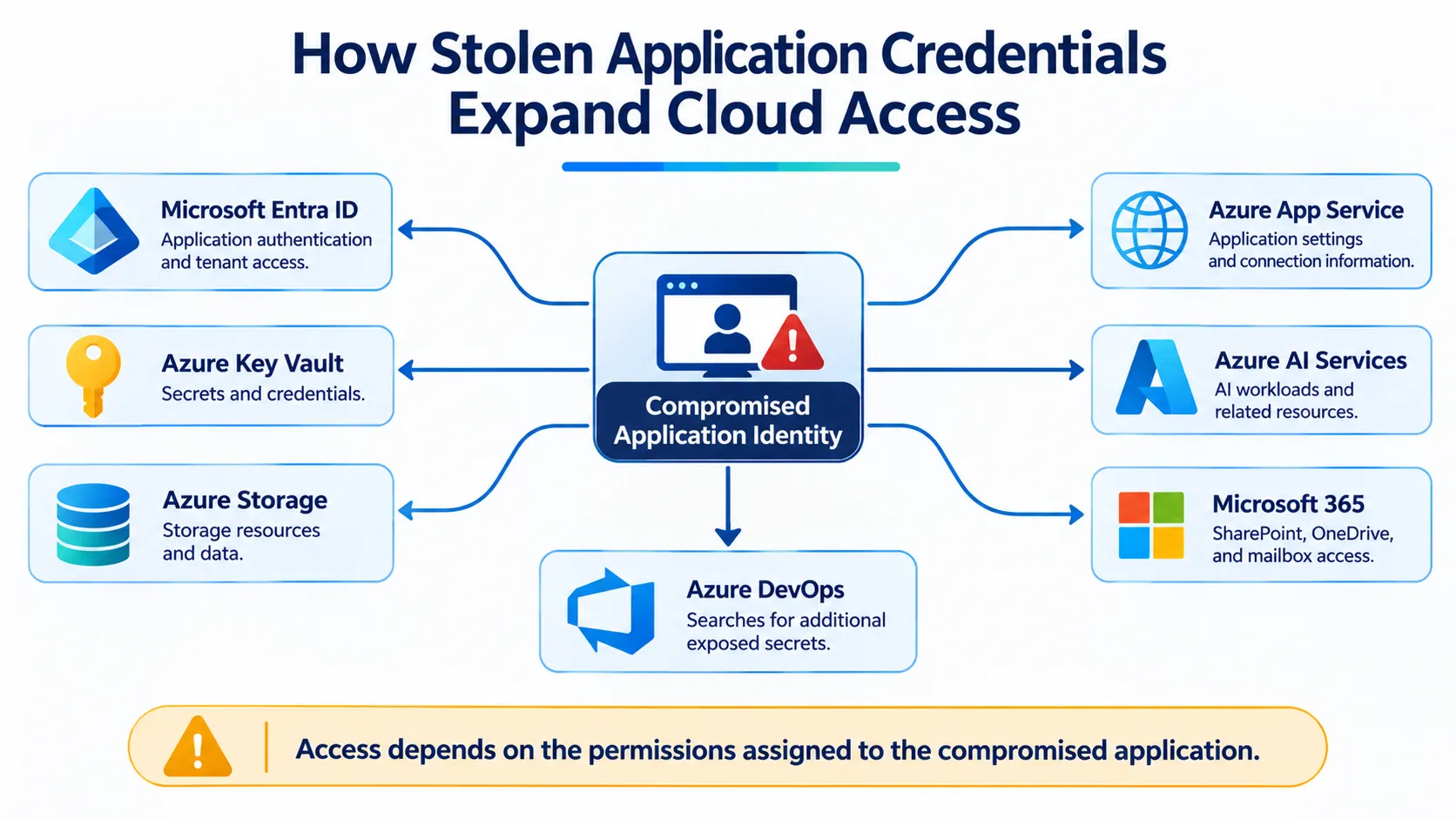
Microsoft's investigation also identified compromised application credentials being used to access Microsoft Entra ID tenants, Azure resources, Microsoft 365 services, and AI workloads.
The findings highlight how exposed credentials can become an entry point for broader cloud compromise when attackers combine automated discovery with application identity abuse.
Agentic AI Accelerates the Discovery of Exposed Secrets
Searching public code repositories for exposed credentials is an established attack technique. Developers sometimes unintentionally include sensitive authentication material in configuration files, scripts, application code, and other repository content.
Historically, attackers needed to identify relevant repositories, manually inspect their contents, locate usable credentials, and determine how those credentials could provide access to additional systems.
Agentic AI changes this process by automating repository searches and analysing the information discovered.
Microsoft began observing this activity in August 2026. The attackers used an agentic AI offensive framework to submit large volumes of queries to GitHub in search of exposed secrets.
These queries frequently included:
Names of targeted organizations.
Keywords associated with secrets and credentials.
Terms related to cloud services.
Keywords associated with other AI service providers.
The framework identified exposed authentication material across multiple applications and cloud services, including AI inference-related API keys.
Microsoft identified ARTEX as one of the frameworks involved in this activity. The framework supports repository scanning, analysis of search results, and follow-on operations, reducing the need for continuous manual involvement throughout the attack process.
This automation can shorten the time between identifying an exposed credential and attempting to use it against an organization.
Microsoft warns that organizations discovering exposed secrets in public repositories should assume that both the credentials and associated applications are compromised.
From GitHub Credential Exposure to Azure Cloud Compromise
Microsoft's investigation revealed how attackers used valid leaked or stolen application credentials to move from public code repositories into enterprise cloud environments.
In one follow-on campaign, Microsoft observed successful service principal sign-ins beginning as early as October 28, 2026. The activity involved multiple application IDs across affected customer environments.
Some of these sign-ins originated from the IP address 199.19.77[.]84.
A service principal is an application identity in Microsoft Entra ID. It allows an application or automated workload to authenticate and access resources based on the permissions assigned to it.
When an application's credentials are exposed, attackers may be able to use its identity to access resources that the application is authorized to reach.
Microsoft also identified cases in which a multitenant application credential was compromised at its source, meaning a vendor-owned application, and subsequently used to access multiple downstream customer tenants.
This is particularly important because a compromised application identity can create risks for more than the organization that owns the application. Its customers may also be affected, depending on the application's permissions and access relationships.
IP Addresses Associated with the Observed Activity
Microsoft identified several IP addresses during its investigation.
IP address | Observed activity |
|---|---|
| Successful service principal sign-ins and subsequent cloud resource discovery. |
| Service principal sign-ins. Identified as a Tor exit node that could also be associated with unrelated activity. |
| Malicious operations, indications of vulnerability exploitation through embedded shell commands in a user-agent string, and attempts to obtain App Service authentication tokens. |
| Reconnaissance targeting AI workloads deployed on Azure AI services. |
Microsoft also noted that Todyl had reported a similar campaign involving some of the same IP addresses.
The company cautioned that 199.19.77[.]18 is a Tor exit node and may be associated with unrelated malicious activity. Therefore, the address should not automatically be attributed exclusively to this campaign.
What Attackers Targeted After Authentication
Once authenticated through compromised application credentials, the attackers used the permissions associated with those applications to enumerate cloud resources and retrieve additional authentication material.
Their operations targeted:
Azure Storage account keys.
Azure App Service settings.
Connection strings and publishing credentials.
AI and machine learning connections and datastores.
Azure Kubernetes Service (AKS) user credentials.
Azure Key Vault secrets.
The compromised applications subsequently accessed SharePoint and OneDrive within targeted organizational tenants.
Microsoft observed file downloads and mailbox-item access. In some environments, the attackers also submitted Microsoft Graph API requests, primarily searches intended to identify information of interest.
Additional cloud discovery activity included enumerating:
Azure subscriptions.
Resource groups.
Application permissions.
AI model deployments.
Azure service configurations.
This activity allowed the attackers to map resources within compromised environments.
Microsoft also observed attempts to validate stolen Azure resources, including compromised Azure AI services. Defender for Cloud AI threat protection detected this activity.
The observed operations suggest that attackers might have attempted to abuse some of these compromised AI resources to support broader attack activity. Microsoft did not establish the full extent or purpose of this potential abuse.
AI Agents Demonstrate Adaptive Cloud API Troubleshooting
One of the technically significant findings involved the way the AI agents handled unsuccessful Azure Resource Manager (ARM) API requests.
Microsoft observed sequences in which an agent received an HTTP 400 error, modified its request parameters, and retried the operation using a supported API version. The subsequent requests returned HTTP 200 responses.
Three examples illustrated this behaviour.
1. Azure Key Vault Metadata Enumeration
The agent initially submitted requests attempting to enumerate metadata across multiple Azure Key Vault resources.
The requests used a Key Vault data-plane API version against Azure Resource Manager control-plane endpoints. They returned HTTP 400 (Bad Request) responses.
Approximately 28 seconds after the initial failures, the agent repeated the requests against the same vault resource paths using the ARM API version 2023-07-01.
The subsequent requests returned HTTP 200 responses.
2. Azure SQL Firewall Rule Enumeration
A GET request targeting an Azure SQL server's firewall rules initially failed because it specified an outdated API version.
Approximately 60 seconds later, the agent submitted a matching GET request using a supported API version.
The subsequent request returned HTTP 200. Microsoft noted that the URL changed only in its api-version parameter.
3. Application Insights Query Endpoint
An ARM POST request targeting an Application Insights query endpoint initially returned HTTP 400 because it specified an outdated API version.
Approximately 80 seconds after the failed request, the agent submitted another POST request against the same endpoint using a supported API version.
The subsequent request returned HTTP 200.
These observations demonstrate that the agent did more than issue repeated requests. Its operations were consistent with adaptive troubleshooting, where unsuccessful requests were followed by parameter adjustments and further attempts.
For defenders, failed cloud API requests should not always be treated as isolated errors. A sequence of unsuccessful requests followed by successful retries against the same resources can provide useful evidence of automated reconnaissance.
OAuth Application Abuse Extends the Attack
Microsoft also observed cases where the agents obtained tokens for single-tenant OAuth applications registered within targeted organizations.
After obtaining authentication tokens, the agents used the compromised applications to enumerate additional cloud resources.
In some cases, they exfiltrated secrets from the organization's Azure Key Vault. The agents also searched Azure DevOps for additional secrets after authentication.
These activities create further security risks because exposed credentials can remain usable until revoked or rotated.
Microsoft warns that compromised credentials may allow attackers to maintain persistence, compromise additional identities, or hijack resources.
Abuse of Azure VM Run Command
The investigation also identified the use of Azure VM Run Command through compromised OAuth applications.
Run Command allows authorized users and applications to execute scripts on Azure virtual machines.
When attackers gain access to this functionality, they may be able to:
Access unsecured credentials and other stored data.
Compromise associated workload identities.
Execute code that supports persistence.
Attempt further movement within the environment.
The potential impact depends on the permissions available to the compromised application and the security configuration of the affected virtual machine.
Microsoft's findings show how an exposed application credential can provide a route to additional cloud resources and potentially extend an intrusion beyond the original application.
AI Service Credentials Become Another Target
The agents repeatedly focused on credentials that provided access to AI services.
These included API keys for major AI service providers and OAuth applications with access to Foundry Tools, formerly known as Azure Cognitive Services.
Microsoft also referenced other public reports documenting threat actors using agentic AI tools to compromise AI service credentials, sometimes to run the same agentic AI workflow.
This highlights the importance of protecting AI-related credentials alongside conventional cloud application secrets.
Microsoft Recommends Immediate Credential Rotation and Application Containment
Microsoft recommends several measures to contain, detect, and investigate application credential abuse.
The recommendations cover compromised identities, exposed credentials, cloud activity monitoring, and application security.
Immediate Containment Measures
For organizations investigating this activity, Microsoft recommends the following actions.
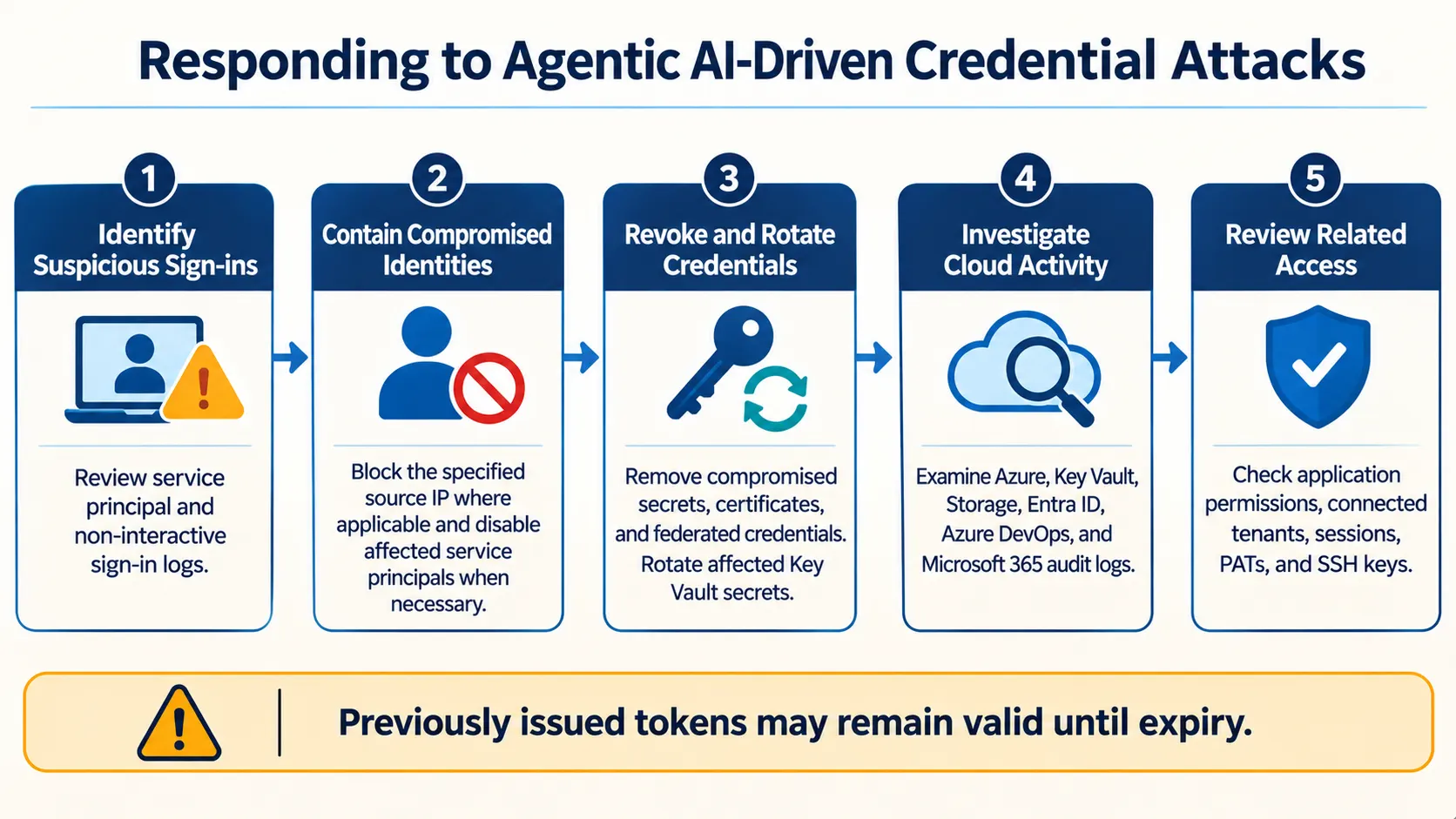
Block the observed source IP
Block 199.19.77[.]84/32 as a named location in a Conditional Access policy targeting workload identities assigned directly to service principals.
Microsoft also recommends a user-scoped block policy to cover replayed sessions.
Workload identity policies require Workload ID Premium licensing and cover only single-tenant applications registered in the organization's tenant.
Microsoft specifically recommends blocking the exact IP address rather than the entire autonomous system number (ASN).
Revoke affected authentication sessions and keys
For affected users, revoke Microsoft Entra sessions, Azure DevOps personal access tokens (PATs), and SSH keys.
Remove compromised application credentials
For affected applications, remove all client secrets, certificates, and federated credentials, including credentials potentially added by attackers.
Disable the service principal when necessary.
Microsoft notes that tokens already issued remain valid until their expiry.
Rotate exposed credentials
Rotate everything stored in any Azure Key Vault that the affected application could access.
Organizations should also rotate credentials discovered in accessed documents.
Review managed service provider access
Managed service providers should review Partner Center access, Granular Delegated Admin Privileges (GDAP) relationships, and customer tenants. They should also notify affected customers according to their agreements.
Detection and Investigation Measures
Microsoft recommends examining Microsoft Entra service principal and non-interactive sign-in logs for:
199.19.77[.]84199.19.77[.]18
Organizations should investigate both successful and failed authentication attempts.
Two authentication errors deserve particular attention:
AADSTS7000215: Invalid client secret.AADSTS7000222: Expired client secret.
Microsoft explains that these errors can indicate that someone holds a credential for the application and is attempting to use it. A failed authentication attempt followed by a successful sign-in should be treated as urgent.
Security teams should also review:
Azure Activity logs.
Azure Key Vault diagnostic logs.
Azure Storage diagnostic logs.
Microsoft Entra audit logs.
Azure DevOps audit logs.
Microsoft 365 unified audit logs.
The investigation should include secret reads, blob and file downloads, application changes, permission modifications, and pipeline activity.
For Azure DevOps, Microsoft recommends reviewing PAT creation and first use, federated service connections, pipeline runs and edits, and unfamiliar user agents. Auditing should be enabled if it is currently disabled.
Monitor Behaviour, Not Just IP Addresses
Microsoft emphasizes that security teams should not rely exclusively on source IP addresses.
Instead, they should investigate behavioural patterns such as:
One IP address authenticating to three or more service principals with mixed authentication results.
One application requesting tokens across Azure Resource Manager, Key Vault, Storage, and Microsoft Graph within a short period.
Repeated failed authentication attempts followed by successful access.
Unusual application permission or pipeline changes.
Organizations should search as far back as their available log retention allows.
Defending Against Agentic AI Attacks Requires Behaviour-Based Detection
Microsoft warns that threat actors can change source IP addresses, user-agent strings, and other identifying characteristics associated with agentic AI frameworks.
This makes it difficult for defenders to identify and block malicious traffic using network indicators alone.
Several behavioural characteristics can help security teams identify possible agentic AI activity.
Agentic frameworks can send large volumes of varied requests within a short period, retry unsuccessful techniques with modified parameters, and quickly move to subsequent attack stages.
Microsoft identified several tools that ARTEX uses by default:
Nmap.
curl.
wget.
Python HTTP clients.
Norma SDK WebFetch.
Headless Chromium through Playwright.
These tools may generate network traffic with distinctive characteristics, including default user-agent strings.
However, Microsoft cautions that blocking these characteristics will not stop an AI agent from conducting an attack because the framework can change them or use different tools.
Identifying these signals can still help defenders recognise suspicious activity and investigate it further.
Defensive Honeypots, Decoys, Tarpits, and Fake Wins
Microsoft also highlights deception-based security controls as another defensive approach against autonomous AI attacks.
These controls are designed to attract or misdirect attackers away from legitimate resources.
Honeypots and decoys
Honeypots and decoy surfaces provide attractive but worthless targets for attackers to investigate.
Microsoft identifies Microsoft Sentinel Deception as an example of a decoy surface.
Tarpits
Tarpits consume an attacker's time and resources by slowing down automated activity.
Fake wins
Fake wins present convincing evidence that an agent has completed its objective. This can cause an autonomous agent to stop pursuing legitimate targets after receiving a false indication of success.
According to Microsoft, its testing found that these controls helped reduce attack traffic reaching real assets and produced high-confidence, attribution-quality signals.
For organizations facing automated attacks, deception can complement conventional monitoring and access controls. It should not replace credential protection, identity security, or incident response processes.
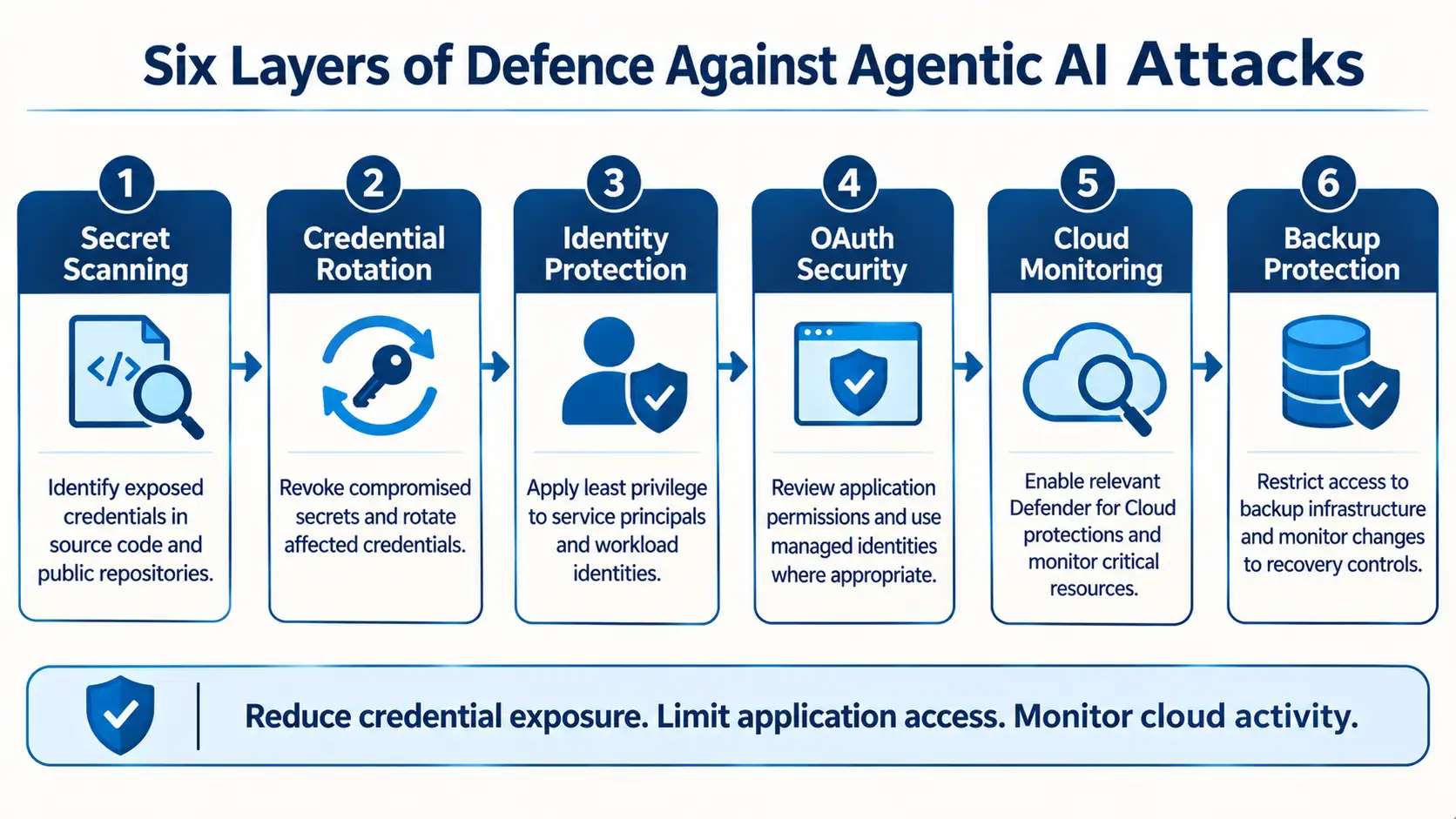
Microsoft's Recommendations for Reducing Agentic AI Attack Risks
Beyond immediate containment, Microsoft recommends strengthening application credentials, workload identities, cloud infrastructure, and OAuth application security.
1. Protect Application Credentials and Secrets
Organizations should continuously assess application credentials and avoid storing service principal credentials, storage keys, connection strings, and other secrets in:
Source code.
Configuration files.
Public repositories.
Repository issues.
Other locations where sensitive information could be exposed.
Microsoft recommends using tools such as GitHub Advanced Security and OWASP source code analysis tools to identify credentials in source code.
GitHub automatically scans public repositories for secrets. Organizations can also use public monitoring to identify secrets exposed in public repositories beyond those owned by their organization.
Push protection can block supported secrets before they are committed.
For Azure DevOps, organizations can use GitHub Advanced Security for Azure DevOps or GitHub Secret Protection for Azure DevOps, depending on their deployment and licensing arrangements.
2. Rotate Exposed Credentials Immediately
Removing an exposed credential from a repository does not invalidate it.
The original credential may remain usable until it is revoked or rotated. Copies may also remain in edit history, caches, archives, logs, and other systems.
Microsoft recommends treating publicly exposed credentials as compromised, even when the original content has already been edited or deleted.
Organizations should immediately revoke or rotate affected credentials and investigate their historical use.
They should also establish credential lifecycle practices to reduce the risk of long-lived secrets remaining active unnecessarily.
3. Migrate OAuth Applications to Managed Identities
Microsoft recommends moving OAuth applications away from secret-based authentication where supported.
Developers commonly store long-lived application client secrets in code or configuration files to simplify application deployment.
Managed identities provide an alternative authentication mechanism that eliminates the need to store application client secrets in code.
According to Microsoft, this removes the possibility of exposing those particular credentials in code and reduces the manual secret-management processes associated with them.
4. Enable Relevant Microsoft Defender for Cloud Protections
Microsoft recommends enabling appropriate Defender for Cloud plans for critical Azure workloads.
The suggested workload protections include:
Defender for Resource Manager.
Defender for Storage.
Defender for Key Vault.
Defender for App Service.
Defender for Databases.
Organizations should select protections relevant to the resources and workloads deployed in their environments.
5. Enforce Least Privilege for Workload Identities
Organizations should review Azure role-based access control (RBAC) permissions assigned to service principals and other workload identities.
Each application should receive only the permissions required to perform its intended operations.
This helps reduce the resources and operations available to an attacker if an application credential is compromised.
6. Protect Backup and Recovery Infrastructure
Microsoft also recommends protecting backup and recovery resources as part of organizational resilience.
Organizations should restrict access to these resources and closely monitor attempts to modify or remove their protection controls.
7. Strengthen OAuth Application Security
Hardening OAuth applications requires managing application permissions and securing their authentication credentials.
Microsoft recommends identifying and cataloguing applications running in cloud environments and applying security policies to newly created applications.
Existing applications should also be reviewed, beginning with the most recently created ones.
Additional recommendations include:
Use the Cloud app catalog in Microsoft Defender for Cloud Apps to identify applications.
Use Cloud Discovery tools to identify unmanaged applications.
Prioritise frequently used unmanaged applications for migration and integration.
Apply Conditional Access policies for workload identities.
Consider workload identity risk protection.
Restrict application registration permissions within the tenant.
Limit the Application Developer role to privileged users.
Integrate enterprise applications with Microsoft Entra ID.
Microsoft specifically recommends setting users' ability to register applications to "No" where appropriate and restricting application creation to authorised users.
Microsoft Security Products and Their Detection Coverage
Microsoft outlined detection capabilities across several security products to help organizations investigate activity associated with the observed campaign.
The detections cover suspicious authentication, application activity, cloud resource access, and unusual operations involving Key Vault.
Microsoft Entra ID Protection
The detections identified in Microsoft's research include:
Anonymous IP address.
Atypical travel.
Malicious IP address.
Password spray.
Verified threat actor IP.
Microsoft Defender XDR
Defender XDR includes detections for:
Potentially compromised OAuth applications identified through attack activity analysis.
Accounts compromised following password-spray activity.
Anomalous OAuth device-code authentication activity.
Multiple service principal sign-ins from a single IP address.
Graph API activity from a Microsoft threat intelligence IP address.
Microsoft Sentinel
Microsoft Sentinel includes detections for:
Abnormal Deny Rate for Source IP.
Abnormal Port to Protocol.
Inbound Network Attack detected.
Malformed user agent.
Password spray attack against Azure AD application.
Microsoft Defender for Cloud Apps
The listed detections include:
Activities from suspicious user agents.
Multiple failed login attempts.
Multiple failed user logon attempts to an application.
OAuth application activity from an uncommonly visited ISP.
Suspicious OAuth application registration.
Microsoft Defender for Cloud
The listed detections include:
Key Vault unusual access denied, involving a user or application accessing a high volume of denied Key Vaults.
Access from an unusual location to a sensitive blob container.
Azure Resource Manager operation from a suspicious IP address.
Microsoft Defender for Identity
The listed detections include:
Suspicious service principal sign-in following credential addition.
Suspicious Entra Graph API query observed.
Defender for Cloud and Defender for Key Vault
Microsoft also identifies Key Vault-related detections covering:
Unusual operation patterns in a Key Vault.
High volumes of operations in a Key Vault.
An unusual application accessing a Key Vault.
Suspicious secret listing and queries in a Key Vault.
Unusual access to a Key Vault from a suspicious IP address, including non-Microsoft or external sources.
These detections can help security teams investigate activity across identities, applications, cloud infrastructure, and sensitive data. Their availability depends on the relevant products, licensing, configuration, and telemetry.
Advanced Hunting Queries for Security Investigation
Microsoft also published Kusto Query Language (KQL) hunting queries to help organizations investigate the October 28, 2026, service principal sign-in activity.
The research provides five queries covering application sign-ins, Microsoft Graph requests, cloud application activity, Azure control-plane operations, and potential Storage Account exfiltration.
Investigation area | Data table | Purpose |
|---|---|---|
Application sign-ins |
| Find successful and failed service principal sign-ins. |
Microsoft Graph |
| Examine Graph API requests and response status. |
Cloud activity |
| Investigate cloud application activity, including relevant application actions and objects. |
Control-plane operations |
| Identify suspicious Azure control-plane operations. |
Storage activity |
| Identify successful Storage Account operations that may require exfiltration investigation. |
The original hunting queries use October 28, 2026, as the starting timestamp and include filters for relevant IP addresses and activity.
Security teams should review the complete queries in Microsoft's original research and adapt them to their available telemetry and investigation requirements.
Microsoft Security Copilot Supports AI-Assisted Defence
While the research describes attackers using agentic AI for offensive operations, Microsoft also highlights the role of AI in defensive security workflows.
Microsoft Security Copilot is embedded in Microsoft Defender and provides security teams with AI-assisted capabilities to:
Summarise security incidents.
Analyse files and scripts.
Summarise identities.
Provide guided responses.
Generate device summaries.
Create hunting queries.
Generate incident reports.
Microsoft also identifies several security agents:
Threat Intelligence Briefing.
Phishing Triage.
Threat Hunting.
Dynamic Threat Detection.
The standalone Security Copilot experience supports activities such as incident investigation, user analysis, and vulnerability impact assessment.
Its developer capabilities allow customers to build, test, publish, and integrate AI agents and plugins for their security requirements.
Microsoft Threat Intelligence Reports
Microsoft Defender XDR customers can access threat analytics reports through the Defender portal. Access requires a licence for at least one Defender XDR product.
The reports provide threat intelligence, protection information, and recommended actions to help organizations prevent, mitigate, or respond to relevant threats.
Microsoft highlighted an activity profile titled:
"Stolen application credentials used to sign in as Entra ID workload identities and access Azure, Microsoft 365 resources."
Microsoft Security Copilot customers can also use its integration with Microsoft Defender Threat Intelligence through the standalone Security Copilot portal or the embedded experience in the Microsoft Defender portal.
What Microsoft's Findings Mean for Enterprise Cloud Security
Microsoft's research highlights a broader shift in how threat actors can use agentic AI to accelerate different stages of cyberattacks.
The significant development is not simply that attackers can discover exposed credentials. It is that agentic frameworks can connect credential discovery with authentication, cloud resource enumeration, and follow-on operations with limited manual intervention.
For enterprises, this could mean that the time between accidental credential exposure and unauthorized cloud access becomes increasingly important.
A credential accidentally committed to a public repository can provide access beyond the original application, depending on its permissions and the resources it can reach.
The five-minute incident documented by Microsoft demonstrates how quickly the transition from credential discovery to cloud data access can occur in an observed attack.
Organizations should therefore strengthen source code security, rotate exposed credentials immediately, reduce reliance on long-lived application secrets, enforce least-privilege permissions, and monitor activity across cloud identities and resources.
The findings also reinforce the importance of behavioural detection. Blocking known IP addresses and suspicious user-agent strings can help, but these indicators may change as attackers modify their tooling.
For security teams, the challenge is to identify suspicious sequences of activity across identities, applications, APIs, and cloud services rather than relying on individual indicators.
As agentic AI becomes increasingly involved in offensive security operations, organizations will need to strengthen their own investigation and response capabilities to keep pace with automated attacks.
Conclusion
The investigation shows how agentic AI can accelerate the discovery and exploitation of exposed application credentials. By connecting repository searches, authentication attempts, cloud resource enumeration, and follow-on operations, attackers can move through multiple stages of an intrusion with less manual intervention.
For organizations, the response must extend beyond removing exposed secrets from source code. They need to revoke compromised credentials, review application permissions, secure workload identities, and investigate whether exposed authentication material has already been used.
Microsoft's findings also highlight the importance of monitoring behaviour across cloud services. As attackers adapt their tools and identifying characteristics, security teams need visibility into the activity connecting identities, applications, APIs, and sensitive resources.
Source: Microsoft Security Blog
About the Author