
Microsoft Details Help Desk Impersonation Attacks Exploiting AD CS ESC1 and ESC8
Microsoft investigates two intrusions that began with Teams help desk impersonation and Quick Assist access, revealing how attackers exploited AD CS ESC1 and ESC8 to obtain privileged certificates and access enterprise systems.
Xcademia Team
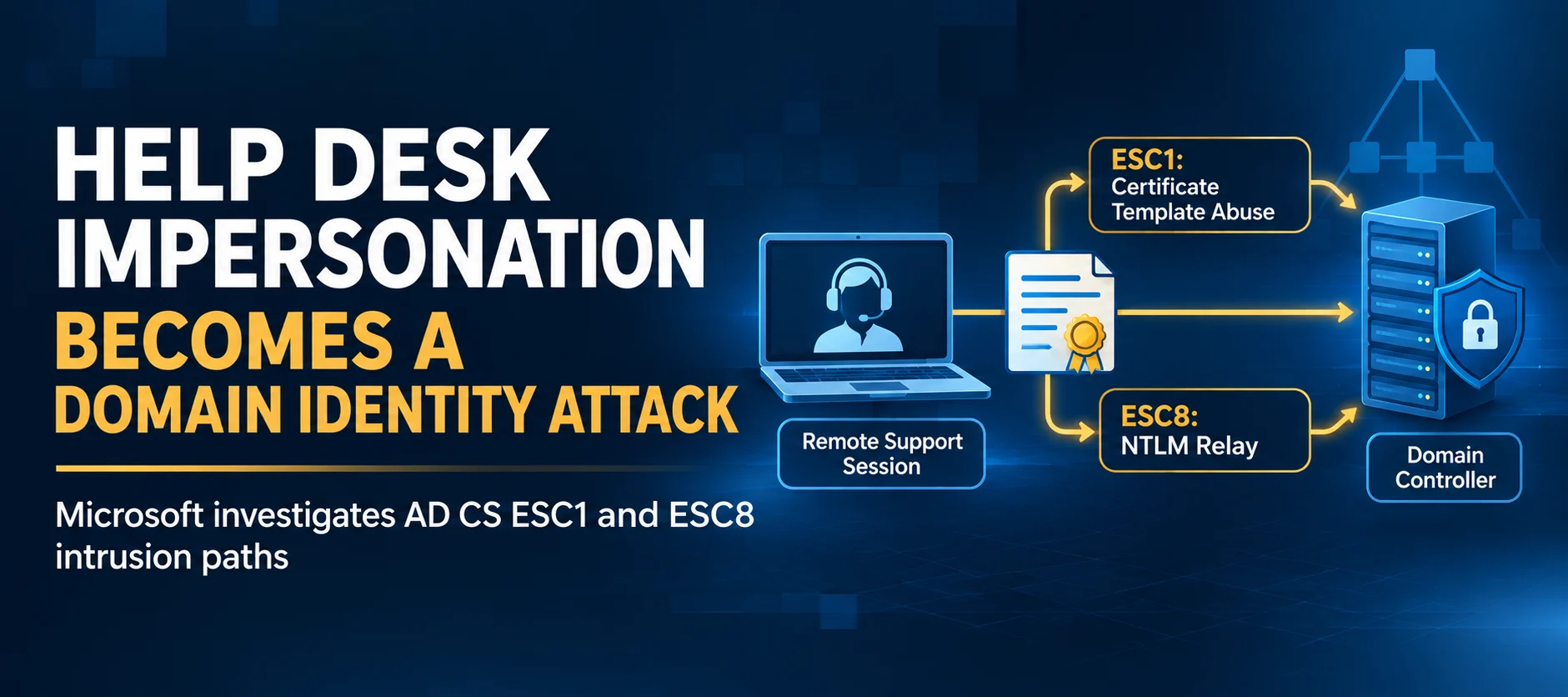
Microsoft Threat Intelligence has investigated two human-operated intrusions in which attackers impersonated IT support personnel through Microsoft Teams and persuaded employees to grant remote access to their workstations.
The incidents followed a similar initial sequence. Attackers contacted users through Teams messages and calls, posed as help desk staff, and guided them into starting remote-support sessions, primarily through Quick Assist. Once connected, they transferred archives, staged portable runtimes and executed scripts to discover systems and assess the organisation's Active Directory Certificate Services (AD CS) environment.
However, the investigations revealed two different certificate-abuse paths.
In the first incident, the attacker exploited an ESC1-vulnerable certificate template to obtain authentication certificates for privileged accounts. In the second, the attacker used PetitPotam to coerce a domain controller into authenticating to an attacker-controlled system, then relayed its NTLM authentication to AD CS Web Enrollment through ESC8.
Microsoft's findings show how social engineering and permissive certificate configurations can combine to create a path from an ordinary user workstation to privileged domain identities.
The activity was not attributed to a specific threat actor. Microsoft also clarified that the incidents did not involve exploiting a vulnerability in Microsoft Teams. Instead, the attackers relied on impersonation, user-approved remote access and weaknesses in AD CS configurations.
How the Two Intrusions Started
Both investigations began with external Teams messages and calls impersonating IT support personnel.
The attackers persuaded users to open Quick Assist and provide a connection code. This gave the attackers interactive access to the workstation without requiring a conventional malware attachment.
Across the broader activity, attackers used organisation-themed onmicrosoft.com tenant names and support-oriented display names to make external contacts appear familiar.
After gaining access, they transferred an archive into the victim's Downloads folder. Commands launched during the remote session created a KB-prefixed staging directory under the user's profile, extracted the archive and executed its contents.
The attackers used portable Python, Bun or Java runtimes to run their scripts. These tools allowed them to execute attacker-controlled code from user-writable locations.
The staged components then performed host discovery, network discovery and AD CS assessment. The compromised workstations also connected to domain infrastructure through LDAPS and SMB.
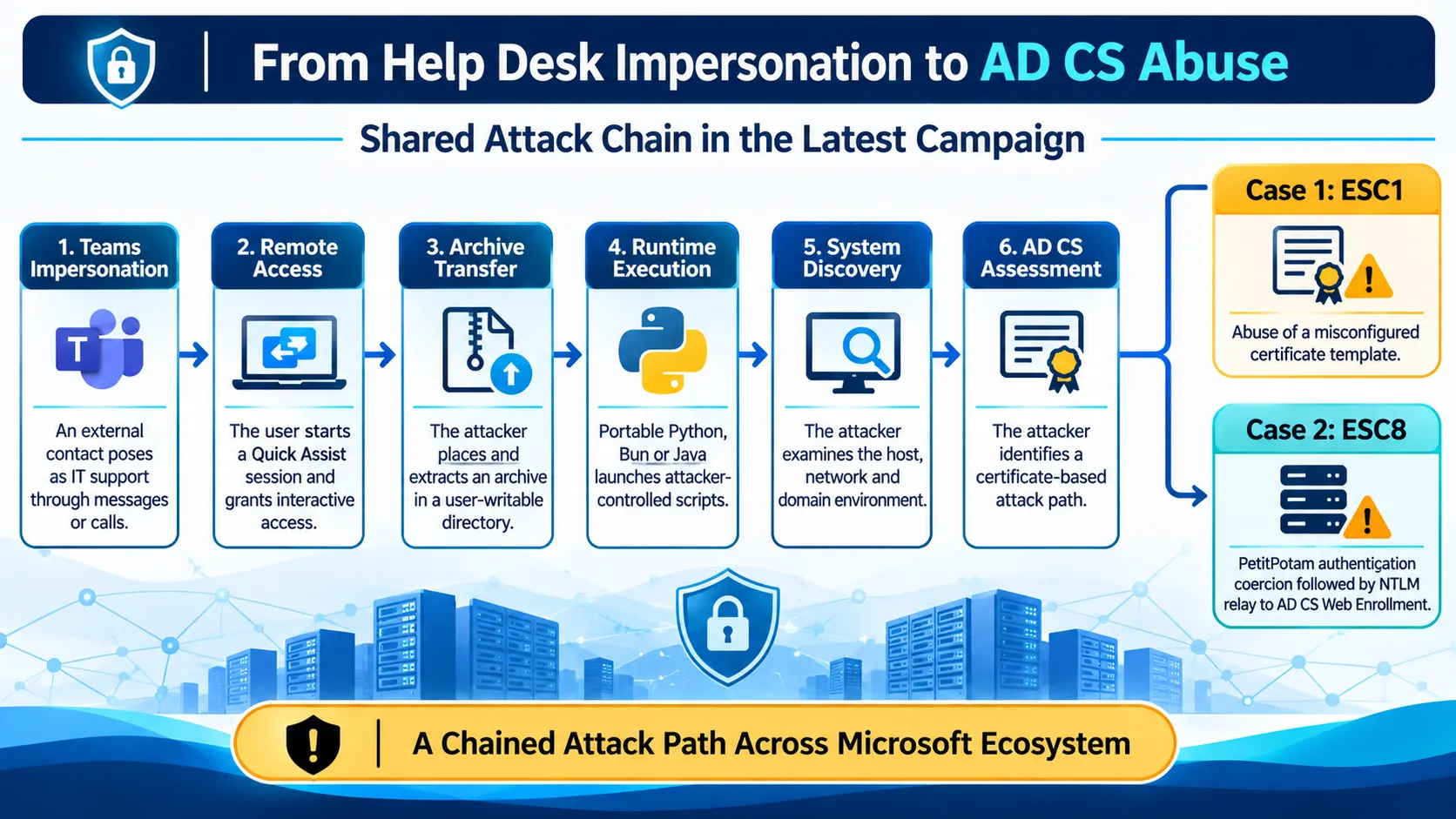
How Attackers Used Portable Runtimes to Execute Scripts
Microsoft observed different runtime and packaging choices across the investigated deployments, but the overall execution pattern remained consistent.
An archive was delivered during the remote-support session, extracted into a newly created directory under the user's profile and used to launch attacker-controlled code.
One JavaScript variant used a renamed executable that retained version metadata identifying it as the Bun runtime. Another deployment used a staged Java runtime to execute a Java source file.
The investigation highlights why filename-based detection alone is insufficient. A renamed executable can retain legitimate product and version metadata, while a portable runtime can operate from a location that is unusual for normal enterprise software deployment.
Microsoft recommends examining the full execution context, including:
The executable's signer and original filename.
Product and version metadata.
The file's location and whether the directory was recently created.
Parent and child process relationships.
Script arguments and subsequent network activity.
Whether the process followed an unexpected remote-support session.
The presence of Bun or Java alone does not establish malicious activity. Investigators should correlate runtime execution with the initiating process, account, device and subsequent directory activity.
From Workstation Discovery to Certificate Infrastructure
After staging their runtimes, the attackers queried Windows version information, network configuration and running processes.
These commands are common in legitimate administration. Their investigative value comes from the context in which they appear: a newly staged runtime, an unusual user-writable directory and an unexpected remote-support session.
The compromised workstations also communicated with domain infrastructure through LDAPS and SMB.
From this shared workstation foothold, the two incidents diverged. One used ESC1 certificate-template abuse, while the other used PetitPotam and ESC8 NTLM relay.
Case 1: ESC1 Abuse Leaves an Excluded Privileged Account Exposed
The Misconfiguration Behind ESC1 Exploitation
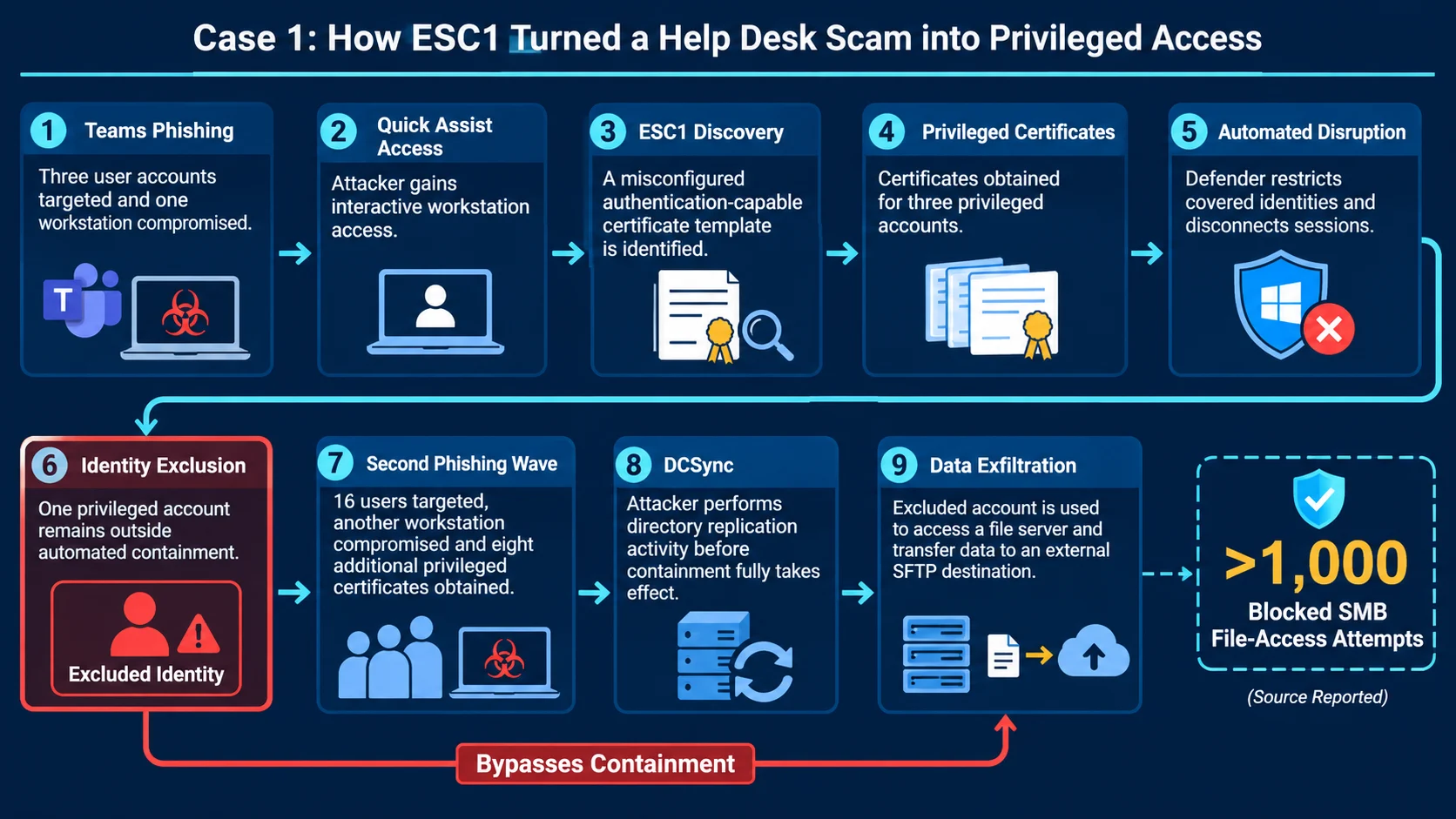
The first Teams-phishing wave targeted three user accounts and resulted in one compromised workstation.
After gaining access, the attacker examined the organisation's AD CS environment and identified a certificate template vulnerable to ESC1.
ESC1 describes a certificate-template configuration in which a requester can supply identity information in a certificate request and obtain a certificate that supports authentication. When this is combined with broad enrollment permissions and weak issuance controls, a low-privileged user may be able to request a certificate representing a privileged account.
The attacker obtained certificates for three highly privileged accounts.
Microsoft Defender attack disruption targeted the initially compromised user and the three certificate-compromised identities. It restricted remote logons and SMB access and disconnected active sessions.
However, one privileged account was excluded from automated response. That exclusion meant the account remained available to the attacker.
A Second Campaign Reaches More Users and Privileged Identities
About 90 minutes after the first disrupted session, the attacker launched a larger Teams-phishing wave targeting 16 users. This activity resulted in another compromised workstation.
The attacker again exploited the ESC1-vulnerable template, obtaining certificates for eight additional privileged accounts.
Defender attack disruption targeted the newly compromised user and the eight certificate-compromised identities.
More than 1,000 subsequent SMB file-access attempts and additional logon attempts were blocked, limiting the attacker's ability to reuse those identities for lateral movement.
How an Uncontained Account Enabled Further Attacker Activity
Within seconds of obtaining one privileged certificate, the attacker authenticated to a domain controller and performed DCSync while containment was taking effect.
Attack disruption limited additional replication and follow-on activity, but the operation had already started.
The privileged account excluded during the first disruption remained usable. The attacker continued to use it for network and remote-interactive logons, reached a file server and launched a renamed copy of Rclone using the filename SearchApp.exe.
The command recursively copied data from a file-server share to an external SFTP destination. It used 20 concurrent transfers, selected files up to three years old and excluded several file types, including executables, databases, virtual disks, media, temporary files and logs.
This case demonstrates how an identity exclusion can leave an attacker with a viable route even when automated containment successfully restricts other compromised accounts.
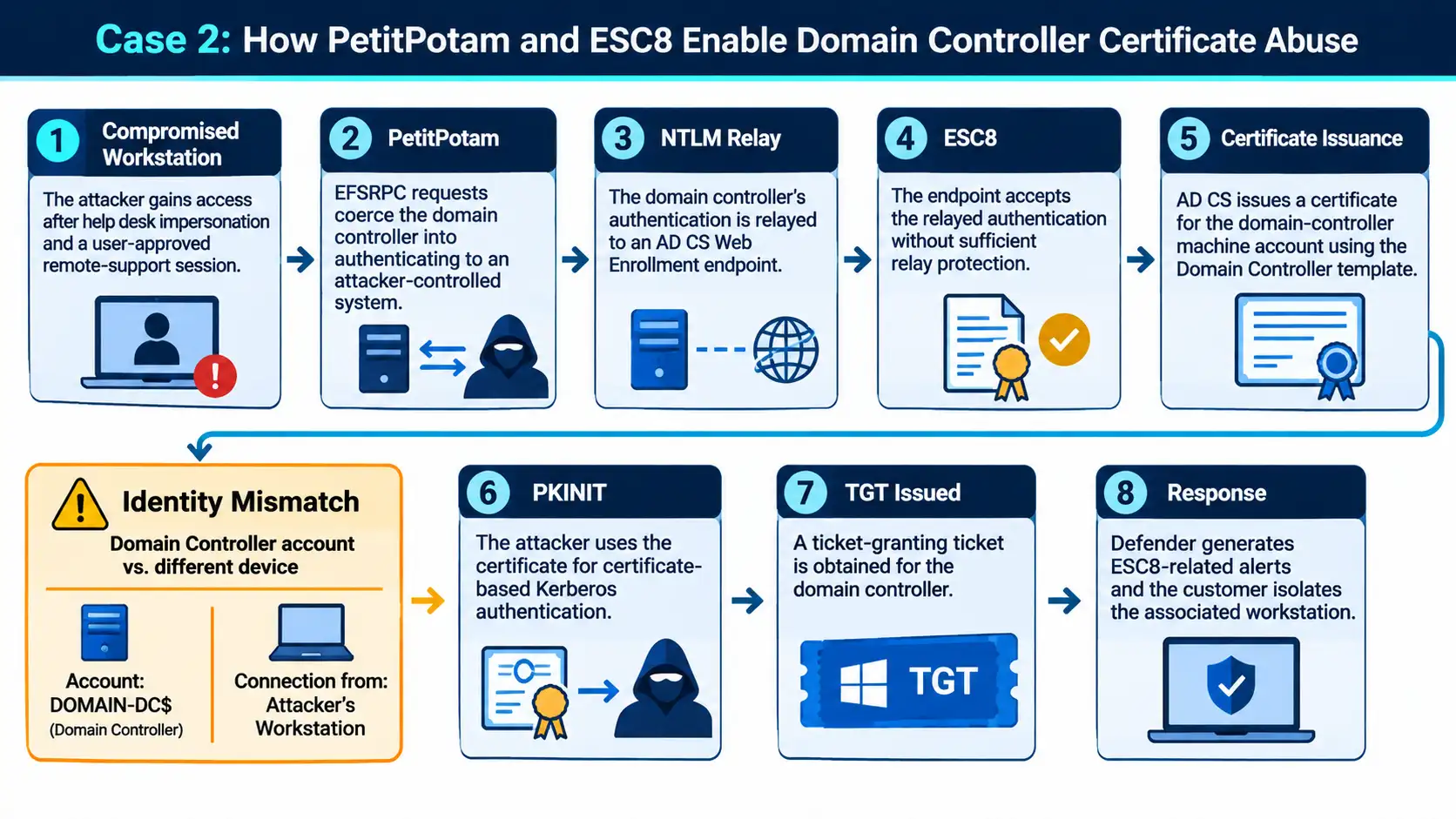
Case 2: How NTLM Relay Enabled Domain Controller Certificate Abuse
The second incident followed the same initial pattern of Teams impersonation, remote access and workstation discovery. However, the ESC1 path observed in the first case was not available in this environment.
Instead, the attacker used PetitPotam to coerce a domain controller into authenticating to an attacker-controlled system.
Forcing the Domain Controller to Authenticate
PetitPotam uses requests over the Encrypting File System Remote Protocol (EFSRPC) to cause a Windows server to authenticate to another system using its machine account.
In this incident, the attacker used the technique to make the domain controller authenticate to an attacker-controlled system. The attacker then relayed the resulting NTLM authentication to AD CS Web Enrollment without knowing the domain controller's password.
Abusing Web Enrollment Through an NTLM Relay
The relay technique is known as ESC8. It targets an AD CS Web Enrollment endpoint that accepts NTLM authentication without sufficient relay protections.
The AD CS server authenticated the domain-controller machine account even though the connection originated from another device.
Microsoft identifies this mismatch between the authenticated machine identity and the source device as an important investigation signal.
Defenders should correlate:
The domain-controller machine account.
The device that originated the connection.
The Web Enrollment request.
The Certification Authority (CA) request and issuance records.
Subsequent Kerberos activity.
After authenticating to Web Enrollment as the domain controller, the attacker requested and retrieved a certificate using the Domain Controller template.
Microsoft also identified activity involving certificate submission and retrieval endpoints under /certsrv. Access to these URLs is not malicious by itself and must be investigated alongside the authenticated identity, source device, process and CA request.
Turning the Issued Certificate into Kerberos Access
The attacker used the newly issued domain-controller certificate for Kerberos PKINIT, or Public Key Cryptography for Initial Authentication.
This resulted in a ticket-granting ticket (TGT) for the domain controller. The activity converted a relayed NTLM authentication into certificate-backed Kerberos authentication.
Microsoft identifies successful PKINIT as an important response threshold. Investigators should examine the requesting device, authenticated account, issued certificate, active Kerberos sessions and any subsequent service-ticket activity.
Certificate revocation and Kerberos ticket review must be treated as separate containment actions.
Workstation Isolation Prevents Further Observed Activity
Microsoft Defender generated alerts related to ESC8 activity. The customer then isolated the workstation associated with the certificate-enrollment and Kerberos activity.
The documented containment action in this case was customer-led device isolation. Microsoft reported that no further attack progression was observed following the isolation.
Comparing the Two Attack Paths and Their Outcomes
The two incidents began with a similar social-engineering and remote-access pattern. Their outcomes differed because of the certificate-abuse technique and the containment actions applied during each investigation.
Response element | Case 1: ESC1 | Case 2: ESC8 |
|---|---|---|
Attack path | Misconfigured certificate template used to obtain privileged authentication certificates | PetitPotam authentication coercion followed by NTLM relay to AD CS Web Enrollment |
Response mechanism | Microsoft Defender automated attack disruption targeting compromised identities | Defender alerts followed by customer-led workstation isolation |
Measured effect | Covered identities were restricted, more than 1,000 subsequent SMB attempts and additional logons were blocked, and further DCSync activity was limited | The workstation associated with certificate enrollment and Kerberos activity was isolated |
Containment issue | One privileged account was excluded from automated response and remained available | No further progression was observed following isolation |
Observed outcome | The excluded identity was later used for file-server access and data exfiltration | No subsequent attack progression was documented after customer isolation |
The first case illustrates the importance of complete identity coverage during automated response. Restricting most compromised accounts did not remove the attacker's access because one privileged identity remained available.
The second case demonstrates the value of correlating certificate enrollment and Kerberos activity with the originating device. The customer isolated the associated workstation after Defender alerts, and no further progression was observed.
Reconstructing the Attack Across Enterprise Systems
Microsoft recommends reconstructing the full attack chain across collaboration platforms, endpoint activity, identity systems and certificate infrastructure.
Individual commands, file names or network ports should not be treated as conclusive indicators on their own. Their value increases when they are correlated with the preceding remote-support interaction and subsequent certificate activity.
Trace the Initial Support Interaction
Review external Teams contacts, user interactions, call and chat timestamps, remote-session start times and the remote-support process used.
Identify whether an external contact impersonated internal IT support and whether the user was instructed to open Quick Assist or another remote-support tool.
Identify Suspicious Runtime Deployment
Inspect newly created KB-prefixed or application-like directories, archive extraction activity and portable runtime execution.
Review executable metadata, script arguments, parent-child process relationships and network connections initiated by the staged process.
Connect Endpoint Activity with Domain Communications
Identify LDAPS and SMB connections from the compromised workstation. Use endpoint and directory telemetry to determine which process initiated the communication and what activity followed.
Microsoft notes that TLS protects LDAP query content from passive network inspection. Investigators should therefore use available endpoint and directory logs rather than relying only on network traffic.
Review Certificate Requests for Privilege Abuse
Review certificate request and issuance events. Relevant details include:
Requesting account.
Certificate subject and Subject Alternative Name (SAN) values.
Certificate template.
Enrollment permissions.
Issuance requirements.
First authentication performed using the issued certificate.
The goal is to determine whether a requester obtained a certificate representing an identity with greater privileges.
Trace NTLM Relay and Certificate Issuance
Correlate EFSRPC activity with outbound authentication from the domain controller, the device that relayed the authentication, Web Enrollment access, CA request and issuance records, and subsequent PKINIT activity.
A domain-controller identity authenticating to AD CS from an unexpected device is a particularly important investigation pivot.
Check Every Compromised Identity and Device
Enumerate all compromised devices and identities, including identities represented by issued certificates.
Review automated response exclusions and confirm whether manual containment actions were completed. Revoke unauthorised certificates and separately assess active Kerberos tickets.
Security Measures to Reduce These Attack Paths
Microsoft's recommendations address the full access path, from help desk impersonation to runtime execution and certificate abuse.
Strengthen Support Verification and Remote-Access Controls
Organisations should require employees to verify unsolicited support requests through a known internal communication channel before joining a call, sharing their screen or starting a remote-control session.
Security teams should also:
Encourage users to pay attention to warnings displayed on incoming messages and calls.
Review Teams external-access and federation policies.
Limit external domains to legitimate business requirements.
Investigate newly observed organisation-themed or helpdesk-themed external tenants in context.
Restrict remote-support software to approved products, operators and workflows.
Alert when approved remote-management tools extract archives, create interpreters or launch scripts from user-writable paths.
Restrict Unapproved Runtimes and Script Execution
Portable runtimes can execute attacker-controlled code without following the normal software installation process.
Microsoft recommends using App Control for Business or equivalent application-control policies to restrict unapproved portable runtimes and script execution from user-writable locations.
Security teams should evaluate file identity using signer information, original filename, product metadata, path, parent process and behaviour. Renaming an executable does not necessarily remove its original version information.
Organisations should also test relevant attack surface reduction rules and endpoint protection policies. Microsoft cautions against assuming that controls for Windows script hosts automatically cover JavaScript executed through Bun or source files launched through Java.
Address Certificate Template and Web Enrollment Weaknesses
Microsoft recommends reviewing authentication-capable certificate templates for:
Requester-supplied subject information.
Broad enrollment permissions.
Weak issuance requirements.
Excessive certificate purposes.
Unnecessary enrollment permissions should be removed, and approval requirements should be applied where appropriate.
Organisations should also inventory AD CS Web Enrollment and Certificate Enrollment Web Service endpoints and remove endpoints that are not required.
For required enrollment web endpoints, Microsoft recommends:
Requiring HTTPS.
Enforcing Extended Protection for Authentication (EPA).
Disabling NTLM where operationally feasible.
Validating Kerberos-only authentication before broad enforcement.
HTTPS protects the confidentiality of the connection, while EPA provides channel binding that helps resist NTLM relay attacks.
Microsoft also recommends using Defender for Identity security posture assessments to identify ESC1-related certificate-template exposure and insecure IIS enrollment endpoints associated with ESC8.
Strengthen Certificate Monitoring and Incident Response
Certificate-related activity needs to be available during an investigation.
Microsoft recommends enabling the Certification Services advanced audit subcategory for both success and failure events and configuring the Certification Authority audit filter to record certificate request and issuance activity.
Security teams should preserve:
CA security events.
CA database records.
IIS and Web Enrollment logs.
Endpoint process lineage.
Identity alerts.
Teams interaction records.
If an unauthorised certificate is issued, responders should identify its serial number and thumbprint, revoke it, publish updated revocation information and confirm that relying systems can retrieve the update.
They should also review certificate-based Kerberos activity and active tickets. Revoking a certificate does not retroactively invalidate TGTs or service tickets that have already been issued.
Finally, containment exclusions should be treated as explicit incident-response decisions. If an identity or device cannot be automatically contained, teams should assign a compensating manual action and verify its completion.
Microsoft Defender Detection and Response Coverage
Microsoft Defender XDR can connect collaboration, endpoint, identity, certificate and Kerberos signals to help investigators reconstruct activity across the attack chain.
Microsoft lists the following detection coverage in its investigation. Alert names and availability depend on product configuration and enabled sensors.
Attack stage | Observed activity | Microsoft Defender coverage |
|---|---|---|
Initial access | External Teams contact impersonates IT support and initiates a remote session | Defender for Cloud Apps / Office 365 and Defender for Endpoint |
Execution | Bun or Java runs staged scripts from user-writable paths | Defender for Endpoint |
Discovery | Staged runtimes query host configuration and interact with domain infrastructure | Defender for Identity |
ESC1 credential access | Certificate requests target privileged identities | Defender for Endpoint and Defender for Identity |
NTLM relay | Domain-controller authentication reaches AD CS from another device | Defender for Endpoint |
ESC8 certificate issuance | AD CS Web Enrollment issues a machine certificate after NTLM relay | Defender for Endpoint |
PKINIT | Certificate-based Kerberos authentication succeeds and a TGT is issued | Defender for Identity |
Impact prevention | Compromised identities or devices are restricted during an incident | Defender for Endpoint and Defender for Identity |
Examples of detection names listed by Microsoft include:
Microsoft Teams chat initiated by a suspicious external user.
IT Support Teams Voice phishing following mail bombing activity.
Suspicious Teams Chat likely involved in remote management and dangerous commands.
Possible initial access from an emerging threat.
Suspicious JavaScript process.
Possible Active Directory Certificate Services enumeration.
Suspicious Active Directory Certificate Services certificate request.
Possible NTLM relay attack.
Suspicious Active Directory Certificate Services machine certificate issuance abuse (ESC8).
Suspicious certificate usage over Kerberos protocol (PKINIT).
Suspected suspicious Kerberos ticket request.
Suspected DCSync attack (replication of directory services).
Using Security Copilot and Threat Analytics During Investigations
Microsoft says Security Copilot can help analysts summarise the Teams-to-remote-access sequence, review staged runtime behaviour, correlate certificate alerts with affected identities and prepare containment tasks.
Useful investigation prompts should ask for the initiating device, remote-session context, certificate request, issued identity, PKINIT activity and any response exclusions.
The results depend on connected plugins, permissions and the evidence available to the incident.
Microsoft customers can also use Microsoft Defender XDR Threat Analytics to review relevant reports, related incidents, impacted assets and recommended actions. Microsoft suggests searching for Teams support impersonation, portable Bun or Java runtimes, AD CS certificate abuse, NTLM relay, ESC1, ESC8 and certificate-based Kerberos authentication.
KQL Queries to Identify Related Activity
Microsoft provides Kusto Query Language (KQL) queries as starting points for investigating related activity. These queries use a seven-day lookback period in the published examples. Security teams should validate field availability and expected values in their own tenants, adjust time windows and investigate matches in context.
A query match alone does not establish compromise.
Detect Suspicious External Teams Interactions
This query looks for external Teams chat creation and available impersonation-related signals.
CloudAppEvents
| where Timestamp > ago(7d)
| where Application == "Microsoft Teams"
| where
    (ActionType == "ChatCreated" and IsExternalUser == true)
    or ActionType in~ (
        "TeamsImpersonationDetected",
        "SecurityRiskInCallDetected")
| order by Timestamp desc
Identify Portable Bun and Java Execution
This query identifies Bun or Java processes executing scripts from KB-prefixed AppData directories.
DeviceProcessEvents
| where Timestamp > ago(7d)
| where ProcessVersionInfoOriginalFileName =~ "bun.exe"
    or FileName in~ ("bun.exe", "java.exe", "javaw.exe")
| where ProcessCommandLine contains ".js"
    or ProcessCommandLine contains ".java"
| where FolderPath matches regex
    @\"(?i)\\AppData\\Roaming\\KB[0-9]+\\"
| order by Timestamp desc
Track Connections from Staged Runtime Processes
This query looks for network connections from Bun or Java processes to selected ports, including HTTP, SMB, LDAPS and Kerberos.
DeviceNetworkEvents
| where Timestamp > ago(7d)
| where InitiatingProcessVersionInfoOriginalFileName =~ "bun.exe"
    or InitiatingProcessFileName in~ (
        "bun.exe", "java.exe", "javaw.exe")
| where RemotePort in (80, 445, 636, 88)
| where InitiatingProcessFolderPath matches regex
    @\"(?i)\\AppData\\Roaming\\KB[0-9]+\\"
| order by Timestamp desc
Connect NTLM Relay, Certificate and Kerberos Alerts
This query joins alert information with related evidence to help investigate NTLM relay, Certificate Services and Kerberos activity.
AlertInfo
| where Timestamp > ago(7d)
| where
    Title contains "NTLM relay"
    or Title contains "Certificate Services"
    or Title contains "PKINIT"
    or Title contains "Kerberos ticket request"
| join kind=inner (
    AlertEvidence
    | where Timestamp > ago(7d)
) on AlertId
These queries should be used alongside certificate authority records, endpoint telemetry, identity events and remote-support activity. Microsoft specifically recommends validating matches against the wider incident rather than treating an isolated result as proof of malicious behaviour.
Mapping the Attack Activity to MITRE ATT&CK
Microsoft maps the investigated activity to the following MITRE ATT&CK techniques.
Tactic | Technique | Observed activity |
|---|---|---|
Initial Access | T1566.003: Phishing - Spearphishing via Service | Teams messages used for support impersonation |
Initial Access | T1566.004: Phishing - Spearphishing Voice | A Teams call formed part of the social-engineering interaction |
Command and Control | T1219: Remote Access Software | An attacker-controlled remote-management session provided interactive access |
Execution | T1059.003: Windows Command Shell | Shell commands staged archives, launched runtimes and initiated discovery |
Execution | T1059.007: JavaScript/JScript | Bun executed attacker-supplied JavaScript modules |
Defense Evasion | T1036: Masquerading | Update-themed staging and a renamed Bun executable |
Discovery | T1082: System Information Discovery | The runtime initiated a Windows version registry query |
Discovery | T1016: System Network Configuration Discovery | The runtime initiated |
Discovery | T1057: Process Discovery | The runtime initiated |
Credential Access | T1557: Adversary-in-the-Middle | Certificate authority telemetry showed a domain-controller identity authenticating from another device, supporting NTLM relay |
Credential Access | T1649: Steal or Forge Authentication Certificates | Abusive machine-certificate issuance through AD CS Web Enrollment and subsequent certificate-based authentication |
Microsoft notes that no name-resolution poisoning was established for the activity mapped to T1557.
Published File Hashes for Threat Hunting
Microsoft published three SHA-256 hashes associated with the initial access scripts.
SHA-256 | Identified role |
|---|---|
| Initial access JavaScript |
| Initial access Python script |
| Initial access Python script |
Security teams can use these hashes as investigation pivots, while recognising that indicators should be considered alongside behavioural and environmental evidence.
What Organisations Should Take Away from These Incidents
The investigations highlight how social engineering, remote-support tools and certificate infrastructure can combine to create a high-impact intrusion path.
The initial access method did not depend on a sophisticated software exploit. Instead, attackers persuaded employees to grant interactive access through a support workflow. From there, portable runtimes enabled script execution and discovery, while AD CS misconfigurations provided routes to privileged authentication certificates.
The two cases also demonstrate that certificate-based access requires a different response from ordinary password compromise. Resetting a password or reimaging the first workstation does not revoke an already issued authentication certificate or invalidate Kerberos tickets that have already been issued.
For enterprise defenders, the findings point to three important priorities:
Treat remote-support sessions as a security boundary. Verify unsolicited support requests and monitor what approved remote-management tools execute after a session begins.
Review certificate infrastructure as part of identity security. Audit authentication-capable templates, enrollment permissions, Web Enrollment endpoints and NTLM relay protections.
Make containment coverage complete. Track every compromised account, device and issued certificate. Any automated-response exclusion should have a verified manual containment action.
The incidents show why defenders need visibility across collaboration, endpoint, identity and certificate systems. A suspicious Teams interaction may be the first visible event, but the investigation must continue through runtime execution, directory access, certificate issuance and Kerberos authentication.
Conclusion
Microsoft's investigation documents two distinct ways attackers can move from help desk impersonation to privileged Active Directory access. ESC1 allowed certificate requests representing privileged accounts, while PetitPotam and ESC8 enabled NTLM relay to AD CS Web Enrollment and certificate-based authentication as a domain controller.
The different outcomes also underline the importance of response coverage. Automated disruption restricted substantial activity in the first case, but an excluded privileged identity remained available and was later used for data exfiltration. In the second case, customer-led workstation isolation was followed by no further observed attack progression.
For organisations using AD CS, reviewing certificate templates, securing enrollment endpoints, restricting NTLM relay and preparing certificate-aware incident response are essential steps in reducing this attack path.
Source: Microsoft Security Blog
About the Author