
Google Cloud Brings gcloud and BigQuery CLI Operations to AI Agents With Remote MCP Server
Google Cloud has introduced its Cloud CLI remote MCP server in public preview, giving AI agents access to gcloud and BigQuery CLI operations through a managed, network-isolated execution environment with Google Cloud identity and governance controls.
Xcademia Team
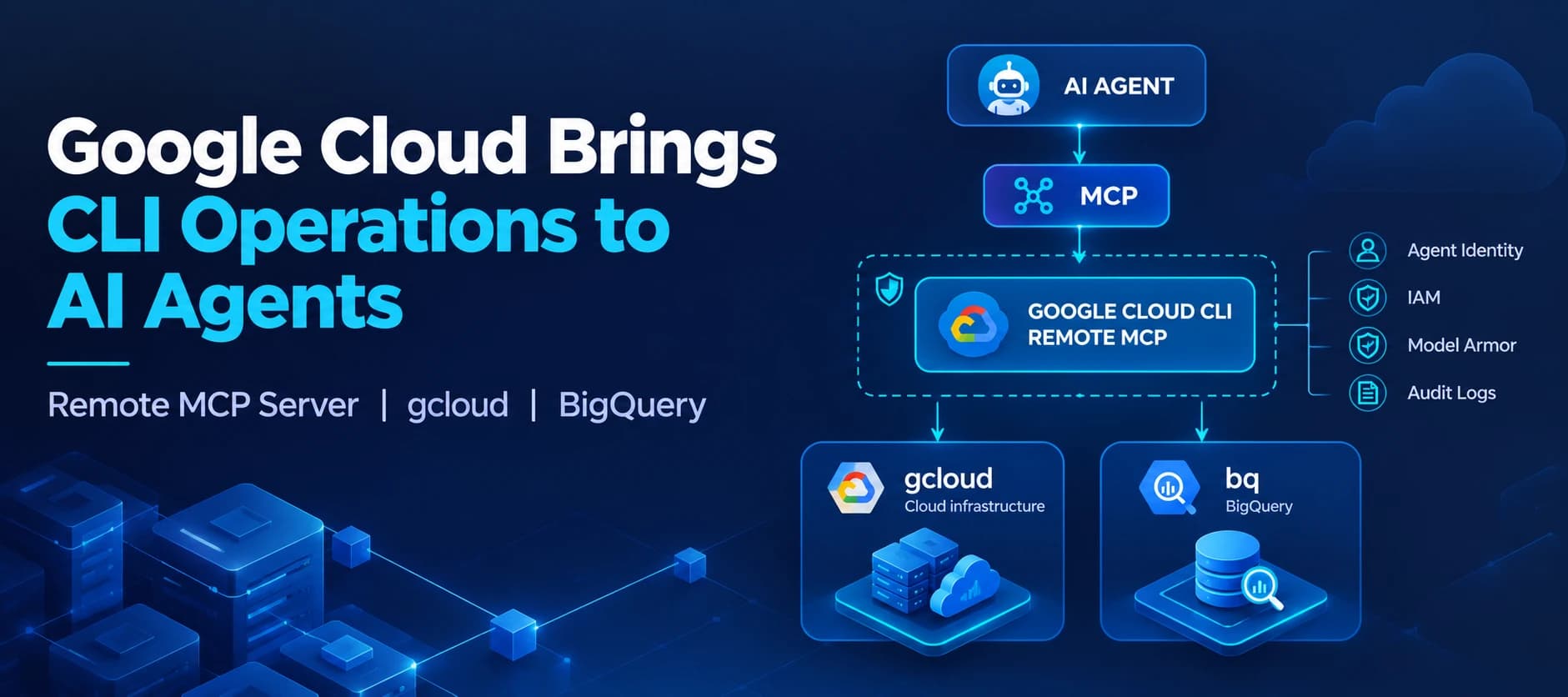
Google Cloud has introduced the Google Cloud CLI remote MCP server in public preview, giving AI agents a managed way to interact with Google Cloud infrastructure and BigQuery through command-line operations.
The server is powered by two established command-line tools:
Google Cloud says the remote MCP server packages the capabilities of hundreds of gcloud and bq commands into a single Model Context Protocol (MCP) server.
The approach is designed to let compatible AI agents perform cloud operations without requiring Google Cloud CLI binaries to be installed and maintained inside the agent's own execution environment.
Instead, the CLI capabilities are provided through a Google Cloud-hosted execution sandbox.
Why Google Cloud is putting CLI capabilities behind MCP
AI agents are increasingly being used for cloud operations, but connecting agents to backend infrastructure can require multiple integrations and API calls.
Google Cloud says CLI tools provide a different abstraction.
Instead of requiring an agent to orchestrate individual API calls for complex operations, CLI commands can package multi-step workflows, validation checks, and higher-level operations into individual commands.
Google Cloud also points to another reason for using CLI interfaces with AI agents: large language models have been extensively trained on publicly available command-line documentation, syntax, and usage examples.
The company says this can make CLI invocation intuitive and highly accurate for models.
The remote MCP server therefore combines two concepts:
CLI capabilities
gcloud + bq
↓
MCP interface
Standardized connection for compatible AI agents
↓
Remote execution
Commands run through a Google Cloud-managed environment
This gives agents access to existing CLI workflows without requiring every agent environment to package the underlying command-line software.
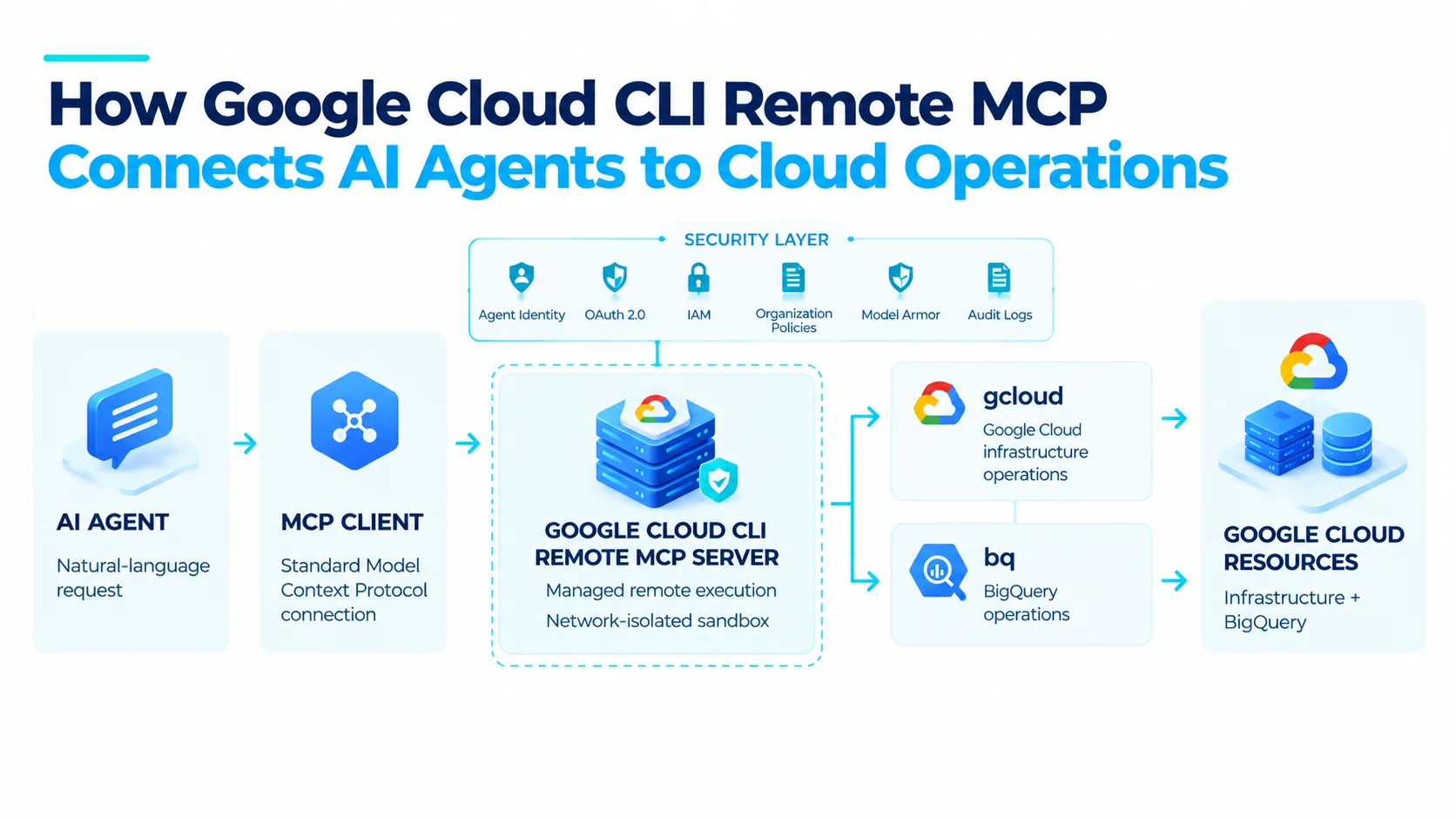
Remote MCP removes local CLI management overhead
Traditionally, an organization building an AI agent that needs Google Cloud CLI functionality would need to install and maintain the required CLI binaries inside the agent's execution environment.
That creates another layer of operational management.
Teams may need to account for CLI versions, dependencies, runtime environments, development environments, testing environments, production environments, and agent container images.
Google Cloud's remote MCP approach moves that execution environment to Google Cloud.
The company says this provides an isolated execution sandbox on Google Cloud infrastructure while eliminating the need to package and maintain the CLI locally.
This is also relevant to web-based agent platforms.
Hosted agent environments may not allow users to install or control local packages. A remote MCP endpoint can instead provide managed access to Google Cloud CLI operations from those environments.
Google Cloud specifically cites Gemini Enterprise and other hosted enterprise agent platforms as examples of environments where this model can be useful.
Security and governance are built into the remote execution model
Giving an AI agent access to infrastructure introduces an important security question: what identity and permissions does the agent use when it executes a command?
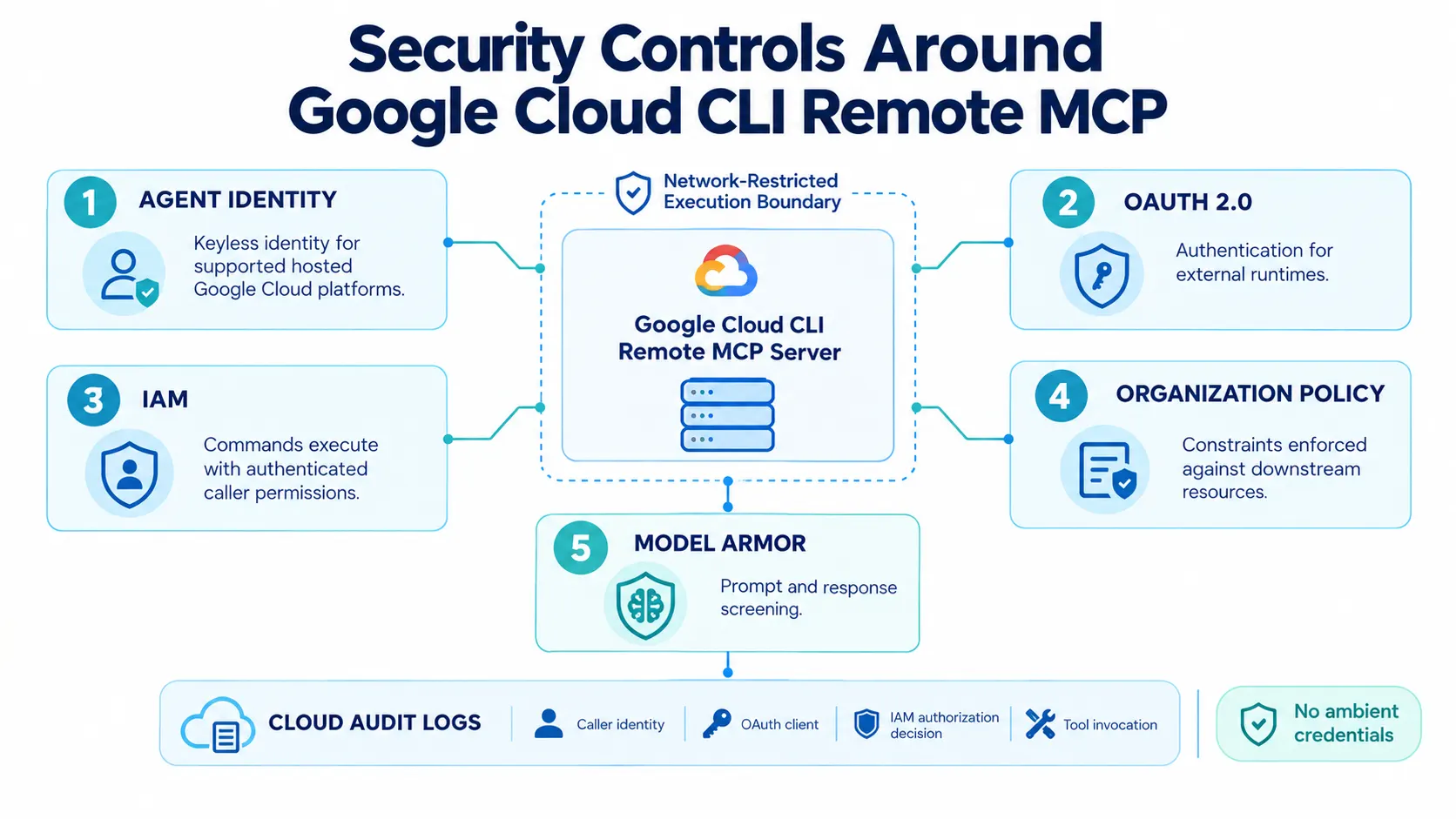
Google Cloud says the Cloud CLI remote MCP server uses standard Google Cloud identity and governance mechanisms.
Zero ambient credentials
The remote server uses a network-restricted proxy boundary with no ambient credentials.
Authentication and authorization are handled through:
This means the command execution is tied to an authenticated identity rather than relying on credentials that are simply present inside an execution environment.
IAM and organization policy enforcement
Google Cloud says every command executed through the remote MCP server runs with the permissions of the authenticated caller identity.
Standard IAM permissions and organization policy service constraints are enforced against downstream target resources.
This allows existing Google Cloud access-control mechanisms to remain part of the agent execution path.
Model Armor integration
The remote MCP server also integrates with Model Armor.
Google Cloud says this can be used to proactively screen LLM prompts and responses and help protect against risks including prompt injection and malicious inputs.
Cloud Audit Logs
The service can also be configured to log tool invocations to Cloud Audit Logs.
The relevant Data Access logs are associated with:
cloudcli.googleapis.com/mcpGoogle Cloud says security teams can gain visibility into:
Caller identities
OAuth clients
IAM authorization decisions
Tool invocation activity
The source also states that sensitive command payloads and personally identifiable information are not exposed through this logging visibility.
Connecting an AI agent to the remote MCP server
Because the Google Cloud CLI remote MCP server implements the standard Model Context Protocol, Google Cloud says compatible agent platforms and orchestration runtimes can connect through standard MCP configuration.
The source provides the following configuration example:
{
  "mcpServers": {
    "google-cloud-cli": {
      "uri": "https://cloudcli.googleapis.com/mcp",
      ...
    }
  }
}
What this code demonstrates
The configuration defines an MCP server named:
google-cloud-cliThe server points to the Google Cloud remote MCP endpoint:
https://cloudcli.googleapis.com/mcpThe mcpServers object identifies the MCP servers available to the agent or MCP-compatible client.
The ... shown in Google's example indicates additional configuration fields that may be required depending on the authentication and runtime setup.
The source does not provide a complete authentication configuration in this code snippet, so additional fields should not be invented when reproducing the example.
Once connected, Google Cloud says the agent can access gcloud and bq commands through the remote execution environment.
Authentication options
Authentication depends on how the agent platform is being used.
For hosted Google Cloud platforms, Google Cloud says authentication can use keyless Agent Identity.
For external runtimes, the source identifies OAuth 2.0 as an authentication option.
The Google Cloud documentation provides additional authentication configuration details, but the announcement itself does not provide a complete configuration example for every runtime.
Additional details were not disclosed in the announcement.
run_gcloud_command brings infrastructure operations to agents
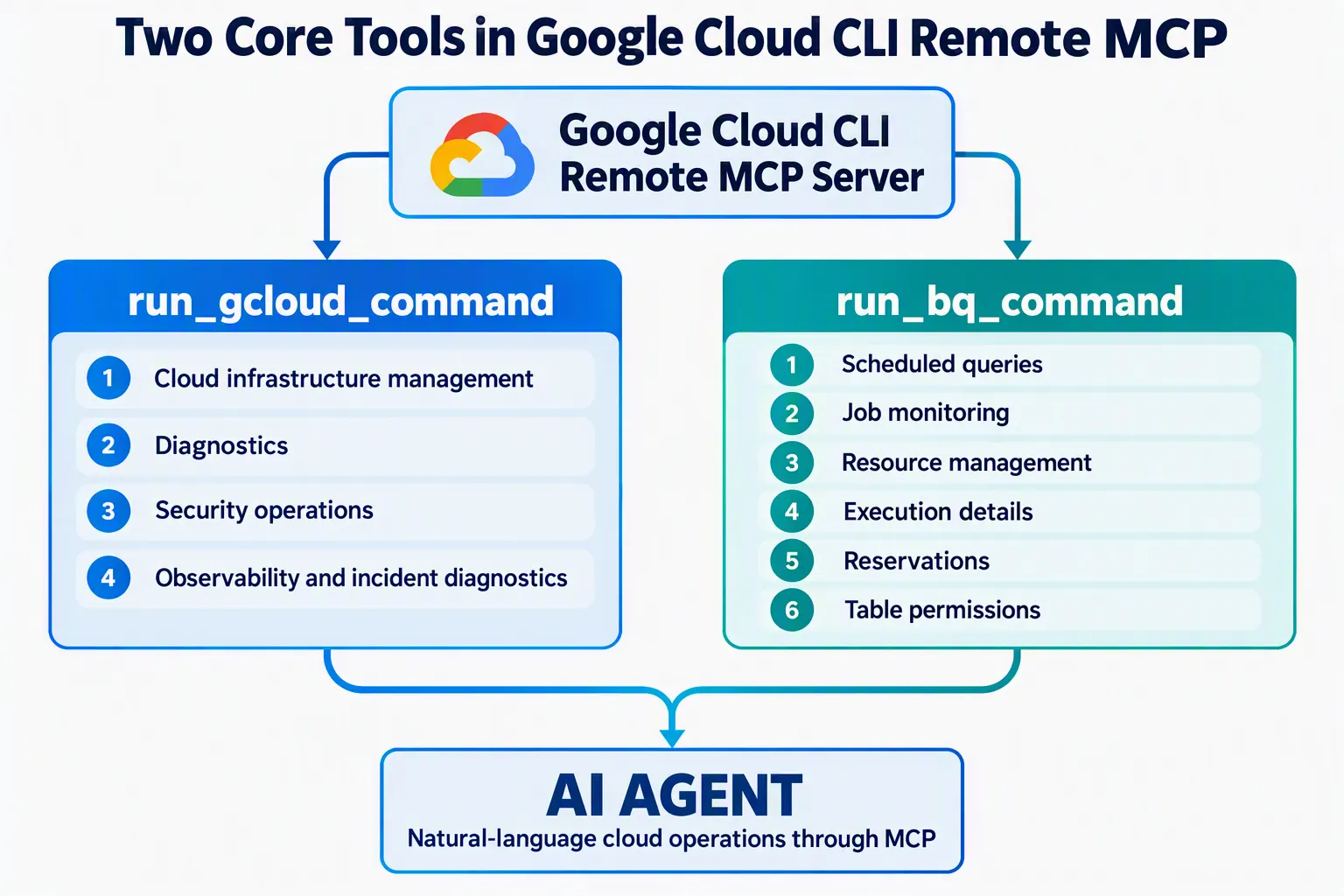
One of the two primary tools exposed by the remote MCP server is:
run_gcloud_commandGoogle Cloud says this tool gives AI agents access to the breadth of gcloud operations for managing, diagnosing, and securing Google Cloud environments.
One highlighted use case is observability and incident diagnostics.
An agent can use command execution to automate parts of an investigation, reducing the need for users to switch between different tools while diagnosing an incident.
The source demonstrates this capability through an animation showing an agent interacting with Google Cloud CLI operations.
The announcement does not provide a complete list of every gcloud command exposed through the service.
run_bq_command extends BigQuery operations
The second primary tool is:
run_bq_commandGoogle Cloud says this extends agent access beyond the capabilities already available through the BigQuery MCP server.
The existing BigQuery MCP server is positioned for data analysis and exploration.
The run_bq_command tool instead provides access to broader bq CLI functionality, including operations involving resources, jobs, permissions, and scheduling.
Scheduled queries
Agents can use BigQuery Data Transfer Service configurations to automate scheduled queries.
Job and resource management
Google Cloud says agents can gain insight into query execution details, including:
Processed data volume
Slot usage
Execution plans
The tool can also be used for managing reservations.
Access and permissions
Data administrators and resource owners can inspect and update table permissions directly through the agent.
This expands the scope of what an AI agent can do with BigQuery beyond simply asking questions about datasets.
Google Cloud CLI MCP server is available in public preview
Google Cloud says the remote MCP server is available today in public preview.
There is no additional charge for the MCP server itself.
Users pay for the Google Cloud resources they create and any applicable data transfer costs.
To get started, Google Cloud says users need to:
Enable the Cloud CLI Execution API:
cloudcli.googleapis.comGrant the required MCP Tool User IAM role:
roles/mcp.toolUserConfigure the MCP client to connect to:
cloudcli.googleapis.com/mcp
The source does not state a separate fee for the MCP server.
What the launch means for agent-based cloud management
The announcement highlights a broader industry shift toward giving AI agents access to operational interfaces rather than limiting them to conversational data retrieval.
CLI tools already encode many cloud-management workflows into structured commands.
By putting those capabilities behind MCP, Google Cloud is making them accessible through a standardized interface intended for AI agents.
The architectural model can be summarized as:
AI agent
↓
MCP
↓
Managed Google Cloud CLI execution
↓
gcloud / bq
↓
Cloud infrastructure and BigQuery
This differs from an architecture in which every agent environment must independently install CLI binaries, maintain dependencies, and construct integrations around individual cloud APIs.
For enterprises, this could mean a simpler way to connect agent workflows to existing command-line operational processes while continuing to apply Google Cloud identity, IAM, organization policies, Model Armor, and audit logging.
The practical impact will depend on how organizations configure permissions, authentication, policies, and the agent workflows themselves.
A closer look at the MCP model
The Model Context Protocol provides the interface between the agent and the remote server.
In this implementation, the MCP server acts as the bridge between natural-language agent workflows and Google Cloud CLI execution.
The architecture has three important characteristics.
Standardized connection
MCP-compatible agent platforms can connect using the standard protocol rather than requiring a separate custom integration for each agent runtime.
Remote execution
The CLI does not need to be installed inside the agent's local container or execution environment.
Existing cloud governance
The command executes using the authenticated caller's permissions, while Google Cloud's IAM and organization policy controls remain part of the authorization path.
This combination allows Google Cloud CLI functionality to be exposed to agents without treating the agent runtime itself as the place where cloud credentials and CLI dependencies must reside.
Availability and next steps
The Google Cloud CLI remote MCP server is currently in public preview.
Organizations interested in using it can configure the Cloud CLI Execution API, grant the required roles/mcp.toolUser IAM role, and connect an MCP-compatible client to the remote endpoint.
Google Cloud provides documentation covering the remote MCP server, available tools, authentication, supported MCP services, and related agent identity capabilities.
The announcement does not provide additional information about a general availability date or future pricing changes.
Additional details were not disclosed in the announcement.
Conclusion
Google Cloud's new remote MCP server brings the capabilities of gcloud and bq directly into AI-agent workflows through a managed remote execution model.
Rather than installing Google Cloud CLI binaries inside individual agent environments, teams can connect compatible agents to a Google Cloud-hosted MCP endpoint.
The service exposes two primary tools, run_gcloud_command and run_bq_command, covering cloud infrastructure operations and advanced BigQuery workflows.
Google Cloud has also built the service around its existing identity and governance framework, including Agent Identity, OAuth 2.0, IAM, organization policies, Model Armor, and Cloud Audit Logs.
For developers building cloud-connected AI agents, the launch provides another standardized route for moving from conversational assistance toward controlled execution of cloud operations.
The service is currently available in public preview, with no additional charge for the MCP server itself. Users remain responsible for the Google Cloud resources they create and applicable data transfer costs.
Source: Google Cloud Blog
About the Author