
Google Cloud Adds Granular Session Controls for Cloud Access
Google Cloud has expanded Session Controls with Terraform, gcloud and REST API support, Google Groups targeting, application-specific policies and Google Cloud Console management in preview.
Xcademia Team
Xcademia Research Team
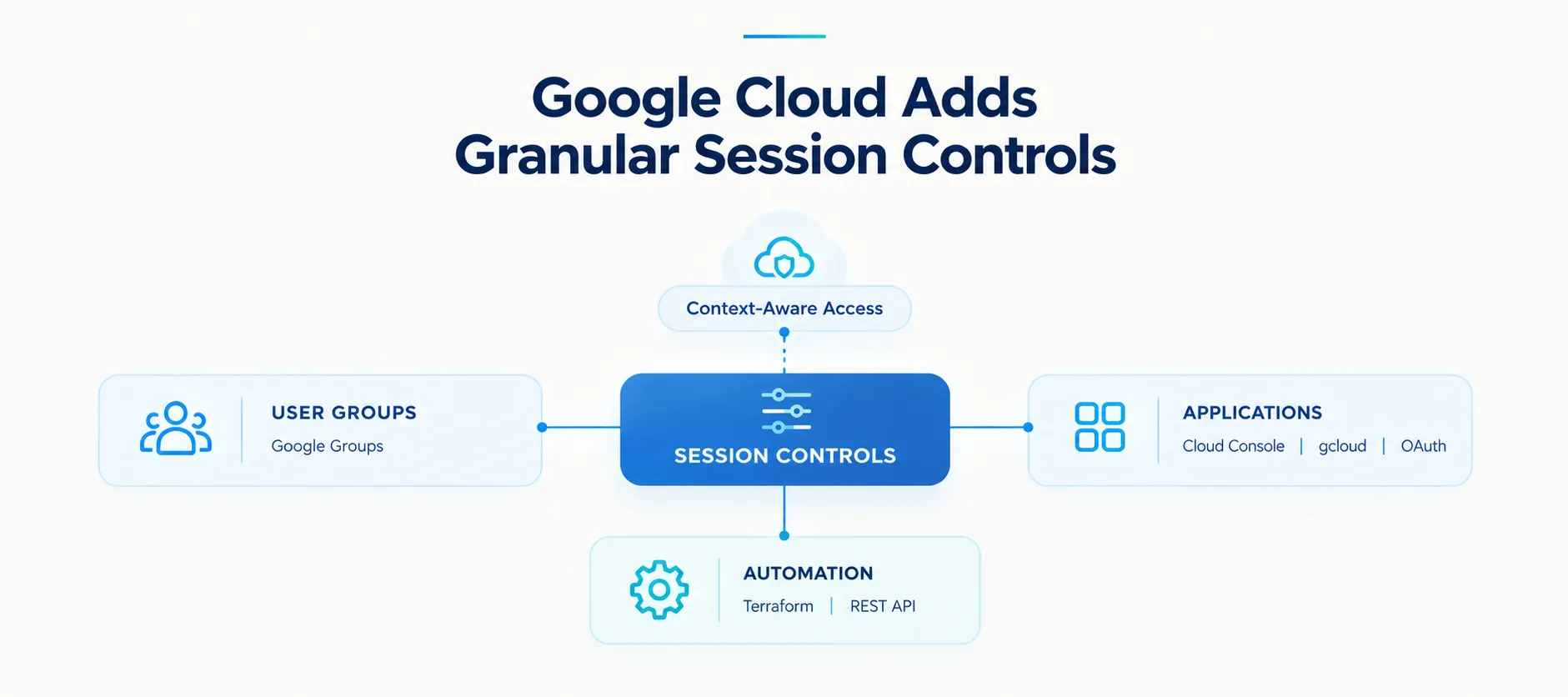
Google Cloud has expanded its Session Controls capabilities with more granular options for managing session policies across users and applications.
The update moves Session Controls from a broad administrative setting toward a more deeply integrated feature of Context-Aware Access (CAA).
Google Cloud says the changes provide administrators with more flexibility and automation while helping address credential theft and account takeover risks.
The announcement introduces four main changes:
Programmatic management through Terraform, gcloud CLI and REST APIs
User targeting through Google Groups
Application-specific session controls
Session policy management through the Google Cloud Console in preview
Google Cloud has also completed its rollout of a 16-hour default session length for customers that had not already configured their own session lengths.
Google Cloud Completes 16-Hour Default Session Rollout
Google Cloud says it has completed extending a 16-hour default session length to customers that had not previously configured their own session lengths.
The company introduced the security standard to help improve security posture and mitigate credential theft and account takeover risks.
Customers that had already configured their session lengths were not part of this default configuration rollout.
With the rollout now complete, Google Cloud is expanding Session Controls with more granular policy capabilities through Context-Aware Access.
Four Major Changes to Session Controls
1. Terraform, gcloud and REST API Support
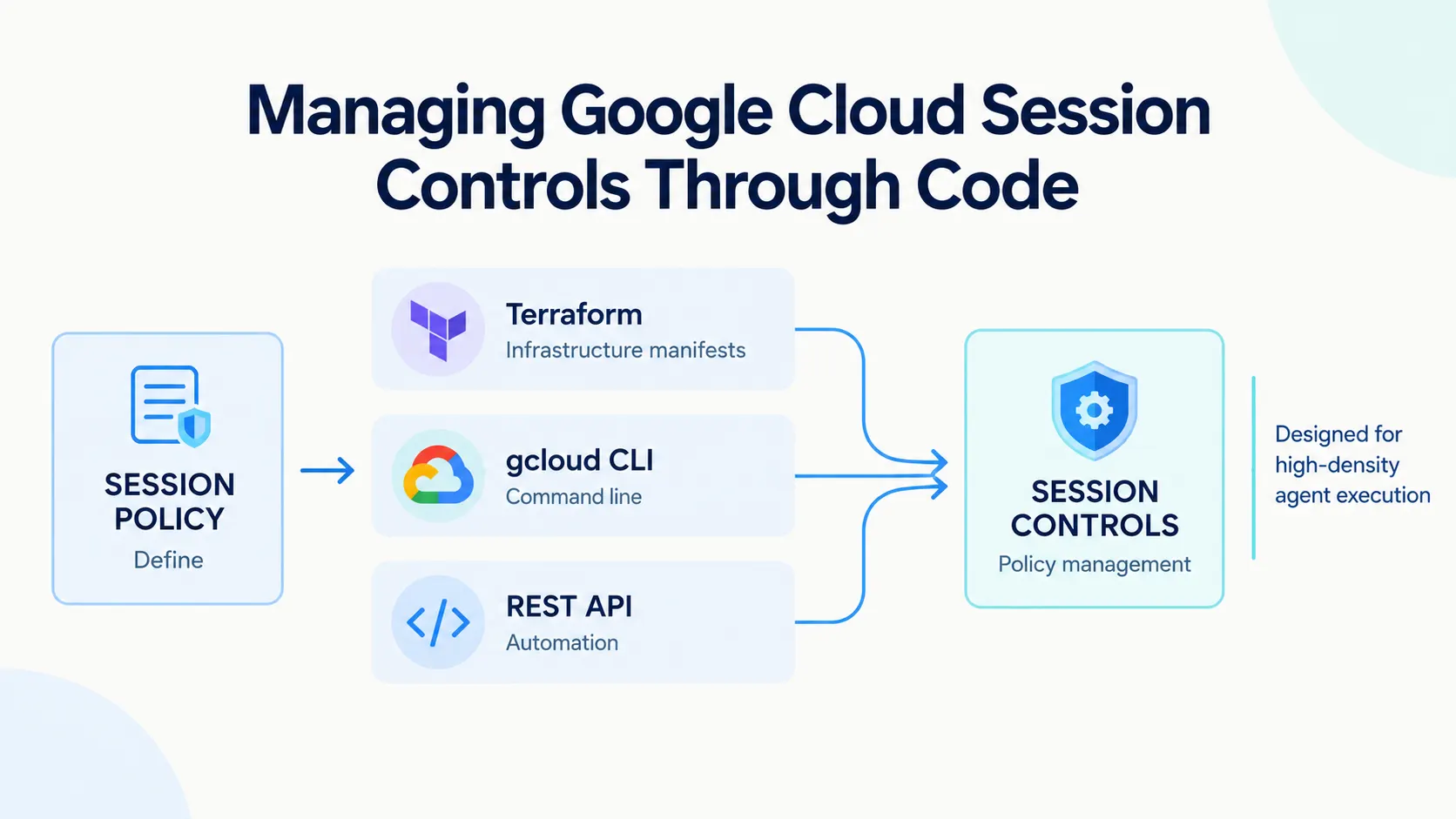
Session Controls are now generally available through Terraform, gcloud CLI and REST APIs.
The new options allow administrators to define, deploy and manage session policies programmatically.
Terraform integrates session controls into infrastructure manifests, bringing session policy configuration into infrastructure-as-code workflows.
gcloud CLI allows administrators to manage policies from the command line.
REST APIs provide a way to automate policy management across complex multi-tenant environments.
Google Cloud specifically positions these capabilities to support modern DevSecOps workflows.
2. Google Groups Enable More Precise User Targeting
Google Cloud is also changing how administrators can target Session Controls policies.
Previously, session lengths were tied to organizational units (OUs).
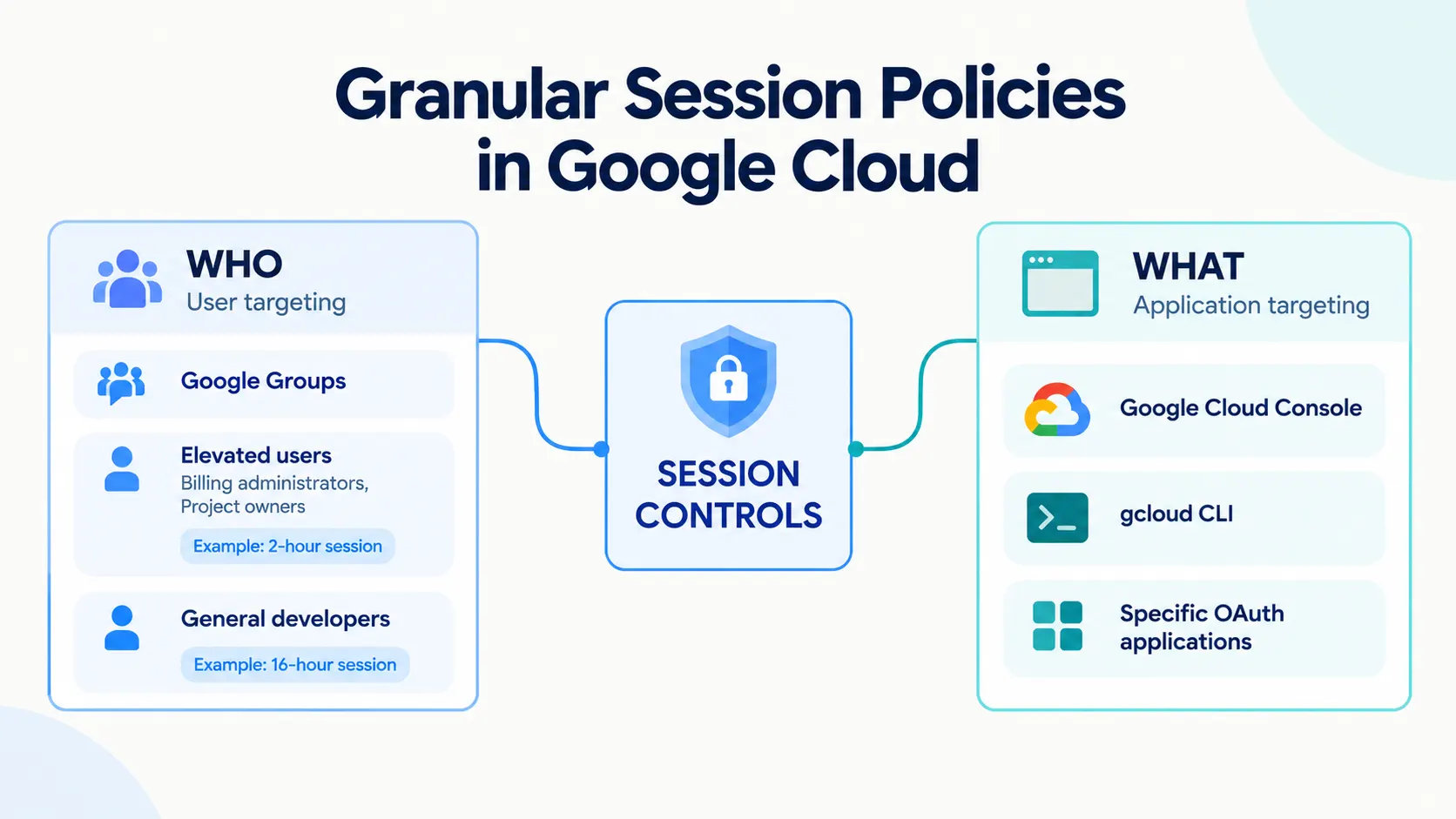
The updated Session Controls policy now supports Google Groups, and this capability is generally available.
This allows administrators to apply different session policies to specific groups of users regardless of where those users sit within the organization's hierarchy.
Google Cloud provides an example involving users with elevated privileges.
An organization could require a two-hour session for users such as billing administrators and project owners while maintaining a 16-hour session for general developers.
The example shows how session requirements can be differentiated by user group rather than applying one session duration across an entire organizational structure.
3. Session Controls Can Target Specific Applications
Google Cloud has also introduced application-specific controls.
Instead of applying a broad policy to every application requiring Google Cloud API scopes, administrators can configure Session Controls for specific applications.
The announcement identifies:
Google Cloud Console
gcloud command-line tool
Specific OAuth applications
This capability is generally available.
Google Cloud says the change can help prevent all-or-nothing scenarios.
For example, a strict policy applied to the Cloud SDK could potentially affect legitimate business intelligence or dashboarding integrations that rely on OAuth.
Application-specific controls allow administrators to configure session requirements for particular applications instead of applying one blanket policy.
4. Google Cloud Console Management Moves Into Preview
Google Cloud is also introducing a more Google Cloud-native way to manage session policies.
Historically, configuring session lengths for Google Cloud could only be done through the Google Workspace administrator console.
Google Cloud customers can now sign up to use the Google Cloud Console to manage session policies alongside other access levels and security bindings in Access Context Manager (ACM).
This capability is currently available in preview.
Google Cloud says the update gives administrators who prefer the Google Cloud Console another option for policy administration and provides a more unified experience for configuring Context-Aware Access policies.
Session Controls Become More Closely Integrated With Context-Aware Access
The broader change in the announcement is the deeper integration of Session Controls with Context-Aware Access.
The updated model gives administrators several ways to define and manage session policies:
User targeting:
Google Groups can be used to target specific groups of users.
Application targeting:
Policies can be configured for specific applications.
Programmatic management:
Terraform, gcloud CLI and REST APIs can be used to manage policies.
Cloud Console management:
Session policies can be managed through the Google Cloud Console in preview.
Google Cloud says this approach can help security teams establish tighter reauthentication boundaries where risks are highest without disrupting developer workflows.
What the New Session Controls Provide
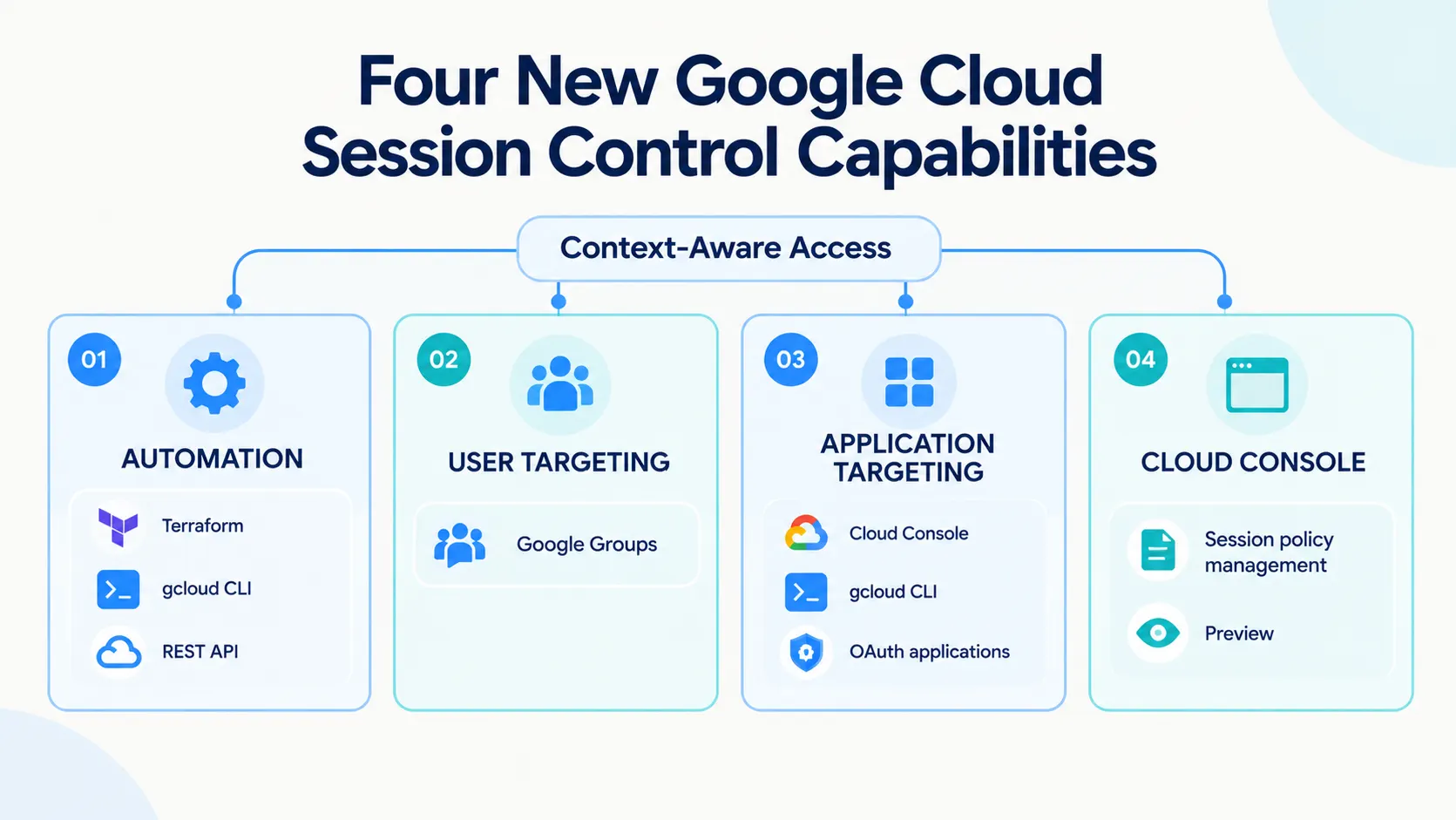
The update can be summarized across four areas:
Automation
Terraform, gcloud CLI and REST API support.
User targeting
Google Groups for more specific policy assignment.
Application targeting
Controls for the Google Cloud Console, gcloud CLI and specific OAuth applications.
Cloud-native administration
Google Cloud Console management in preview.
Together, these capabilities give administrators more ways to configure session policies according to their organizational requirements.
How to Get Started
Google Cloud directs administrators to its Session Controls documentation for instructions on configuring the controls.
The documentation covers:
Terraform
REST API
gcloud
Google Cloud says the updated controls can help security teams establish tighter reauthentication boundaries against credential theft where risks are highest while avoiding disruption to developer workflows.
The company did not provide specific measurements for security improvements, productivity changes or reductions in account takeover incidents.
Availability
The following Session Controls capabilities are generally available:
Terraform support
gcloud CLI support
REST API support
Google Groups targeting
Application-specific controls
Google Cloud Console session policy management is available in preview.
Google Cloud customers can sign up to use the preview capability and manage session policies alongside access levels and security bindings in Access Context Manager.
For configuration instructions, Google Cloud directs administrators to its Session Controls documentation.
What This Update Means
The announcement highlights a broader move toward more granular and programmable cloud access controls.
Instead of relying only on broad organizational settings, administrators can now configure session policies around specific user groups and applications while using automation tools to manage those policies.
For cloud security teams, the practical change is greater control over who receives a policy, which applications it covers and how the policy is managed.
The announcement does not provide specific data on how the update affects account takeover rates, credential theft incidents, productivity or operational costs.
Conclusion
Google Cloud's latest Session Controls update expands session management across four key areas: automation, user targeting, application targeting and Google Cloud-native administration.
Terraform, gcloud and REST APIs are now generally available for programmatic policy management. Google Groups provide more precise user targeting, while application-specific controls allow policies to be applied to the Google Cloud Console, gcloud CLI and specific OAuth applications.
Google Cloud has also completed its rollout of the 16-hour default session length for customers that had not previously configured their own session lengths.
Google Cloud Console management is currently available in preview, bringing Session Controls more closely into the Context-Aware Access administration experience.
Source: Google Cloud Blog
About the Author