
Cloudflare CASB Adds Automatic Remediation Policies for SaaS Security Findings
Cloudflare CASB now lets security teams automatically respond to SaaS security findings with supported remediation actions, webhooks, or both, reducing the need for manual intervention.
Xcademia Team
Xcademia Research Team
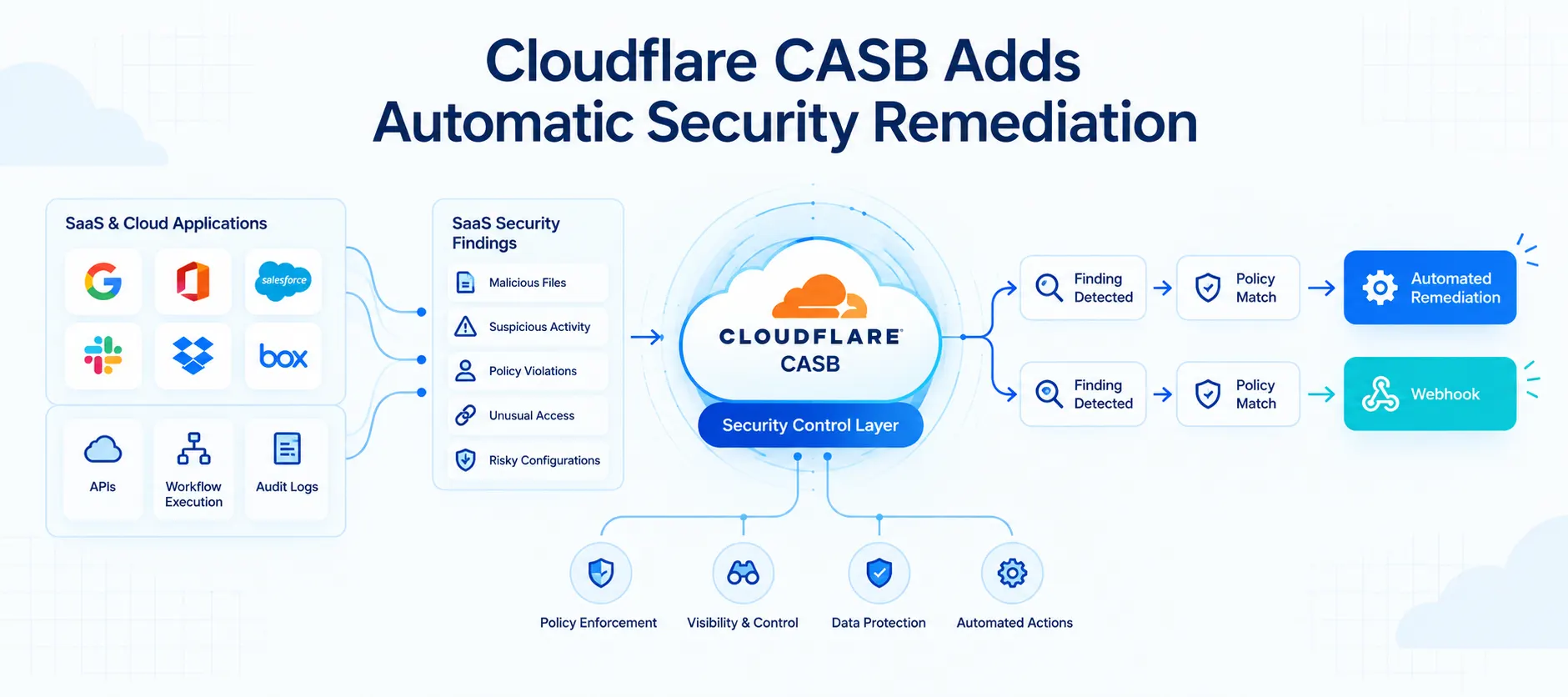
Cloudflare has introduced automatic remediation policies for Cloudflare CASB, giving security teams a way to automatically respond when new SaaS security findings are detected.
The policies allow teams to define event-driven logic that can trigger supported remediation actions, send custom webhooks, or perform both without requiring an administrator to manually initiate every response.
Cloudflare says CASB is designed to provide visibility into the security posture of SaaS applications, surfacing risks such as overshared files, dormant administrator keys and tokens, and OAuth applications with excessive permissions.
The new policy capability is designed to address a common challenge in SaaS Security Posture Management, or SSPM: identifying a security problem is only one part of the response process.
With automatic remediation policies, teams can define their response logic in advance. When a new finding matches a configured policy, CASB can execute the configured action automatically.
From Security Findings to Automated Actions
Cloudflare describes traditional SSPM tools as largely passive systems that identify problems but can still leave administrators responsible for remediation.
The company gives the example of a file-sharing policy in a Google Workspace environment. A configuration issue can produce a large number of findings, creating a gap between detection and remediation.
Cloudflare previously introduced manual remediation actions that allowed customers to resolve supported issues directly through the Cloudflare dashboard.
The new CASB policies add an automation layer to that process.
For example, an organization may prohibit public file sharing while allowing exceptions for particular users or groups that need to collaborate externally.
A CASB policy can be configured to respond when a matching public-sharing finding is detected. In Cloudflare's example, the public share is revoked automatically, with the company saying it can happen within minutes.
How Cloudflare CASB Policies Work
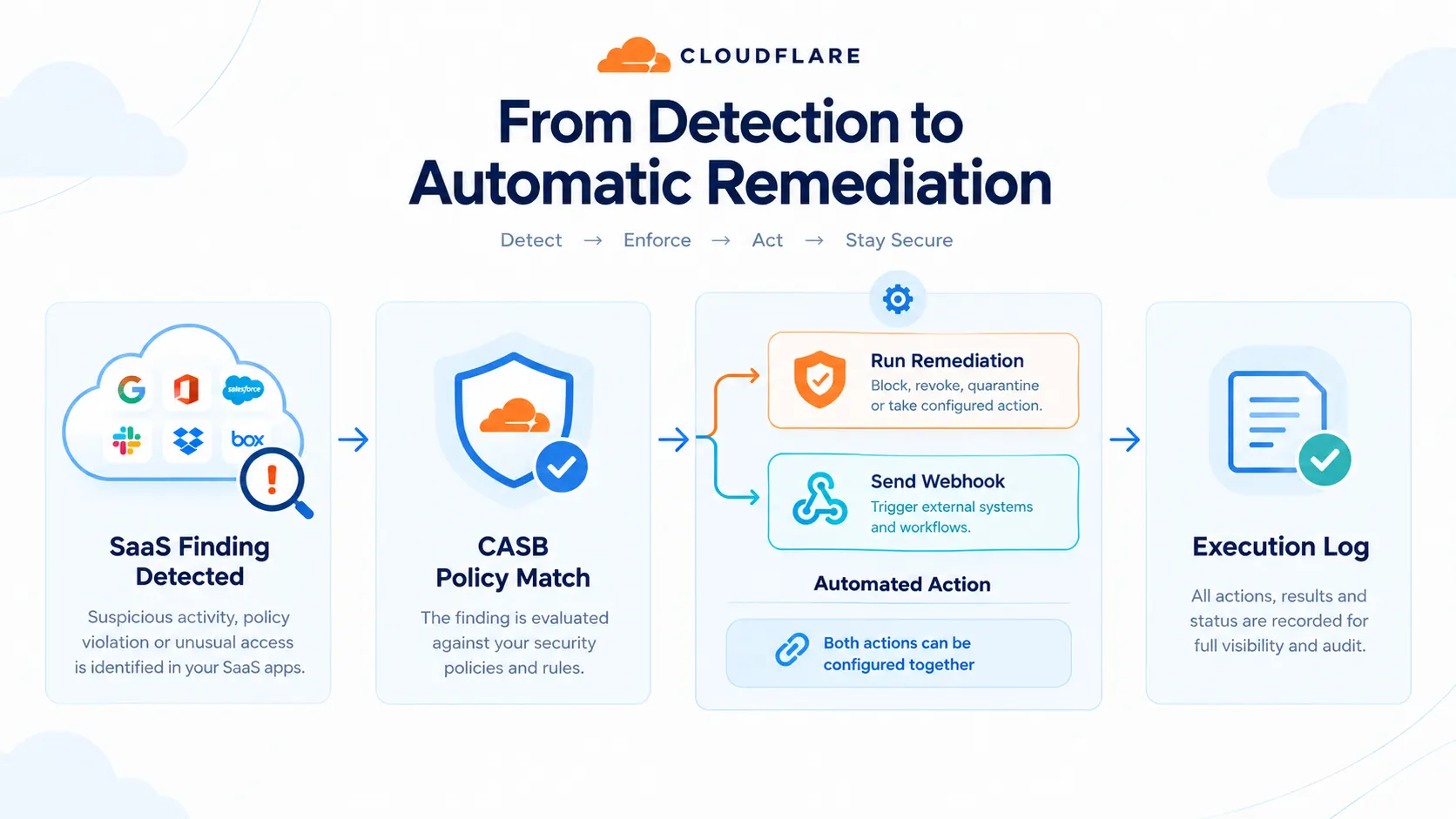
At a high level, CASB policies are automated workflows that tell the scanning service what action to take when a new finding is detected.
A configured policy can:
Trigger a remediation action
Send a webhook
Trigger both
This allows organizations to use Cloudflare's native remediation capabilities or connect CASB findings with their own automation and communication systems.
The policy engine is built directly into Cloudflare One.
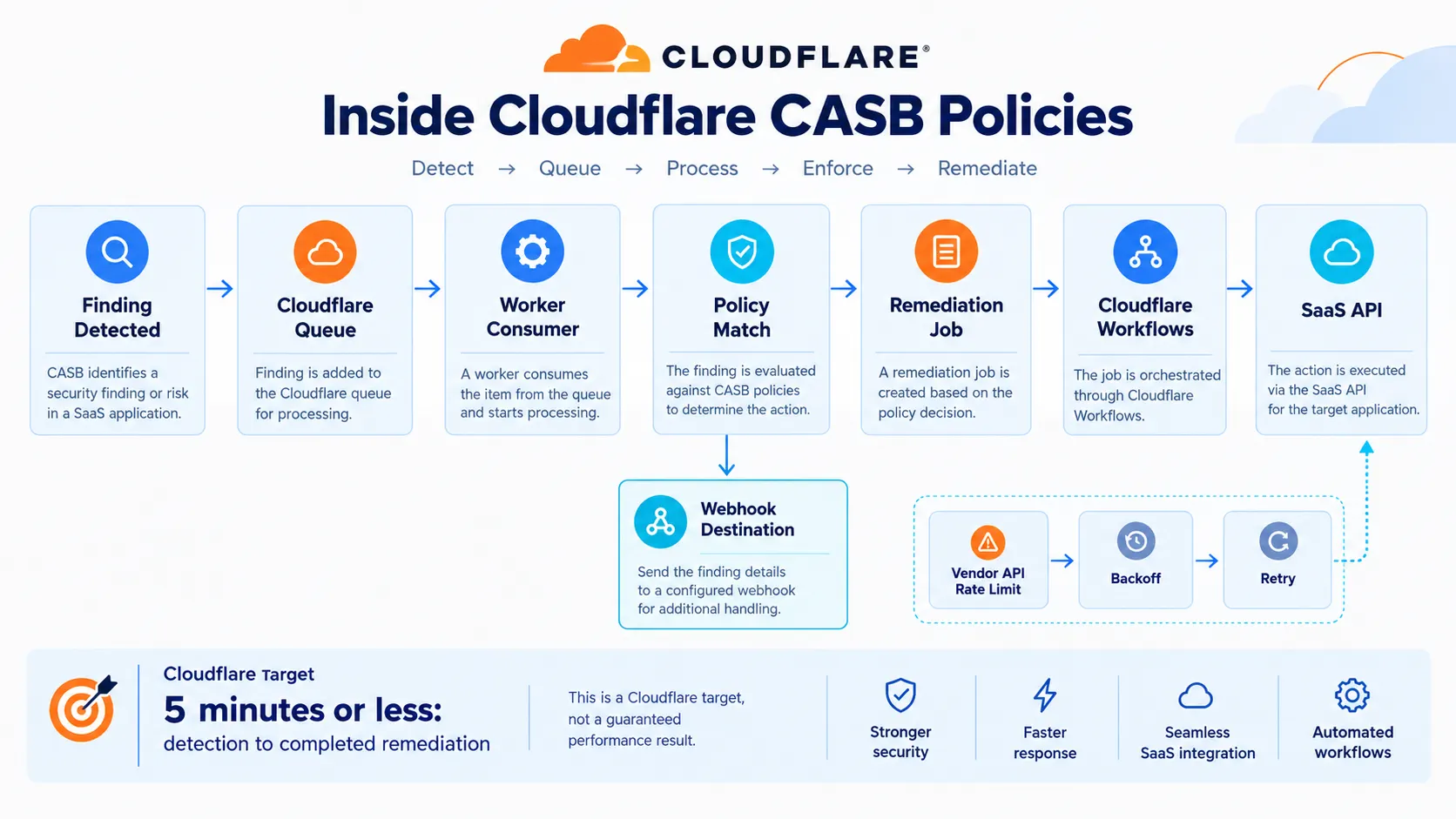
The workflow begins when the CASB findings engine detects a security finding.
The findings engine places an orchestration message into Cloudflare Queue. A Worker consumer then checks whether a configured policy matches the incoming finding.
If a match exists, the system creates the corresponding job and passes it to the remediation pipeline.
That pipeline runs on Cloudflare Workflows, which Cloudflare says provides durable, fault-tolerant execution. The company says jobs can survive process restarts and retries can be handled automatically.
Cloudflare Workflows also handle third-party API rate limits. If a vendor returns a rate-limit error, the workflow can pause for the appropriate backoff period and retry the operation.
Cloudflare states that its target from detection to completed remediation is five minutes or less. This is a target stated by Cloudflare, not an independently verified performance measurement.
Creating a CASB Policy
Cloudflare says customers can create CASB policies from the Cloudflare dashboard.
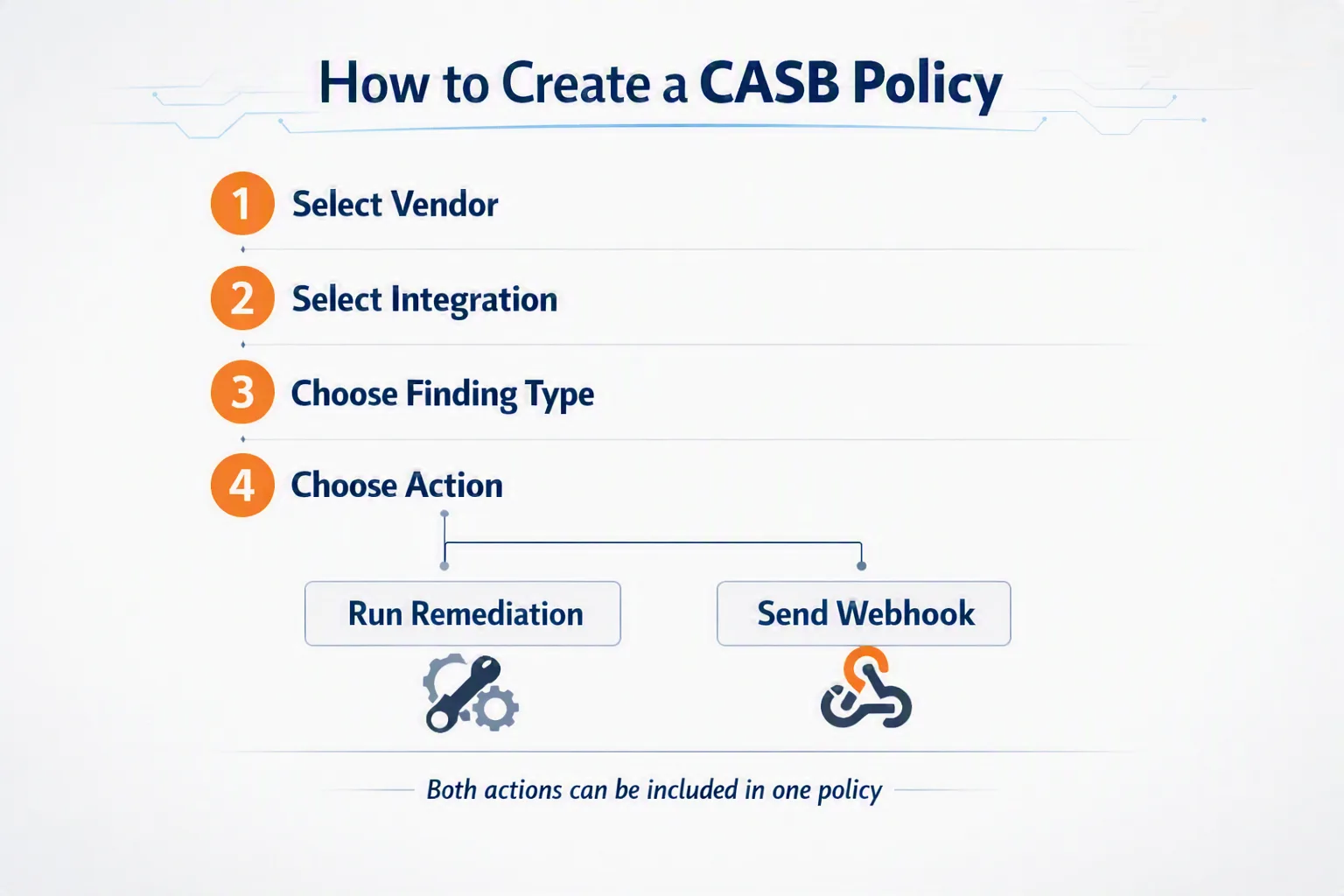
The basic configuration process involves four steps.
1. Select the Vendor
The administrator selects the vendor and the integration or tenant to which the policy should apply.
2. Select the Integration
The policy can apply to specific integrations or all integrations for the selected vendor.
3. Choose a Finding Type
The administrator selects the CASB finding type that should trigger the policy.
4. Choose an Action
After the finding type is selected, CASB shows the available actions.
Cloudflare divides these into two categories.
Run Remediations
These are first-party actions that Cloudflare performs directly against the SaaS integration API.
Cloudflare says CASB currently supports remediation actions for Microsoft and Google Workspace file and folder finding types.
These actions may require the relevant integration to be upgraded to Read-Write permissions.
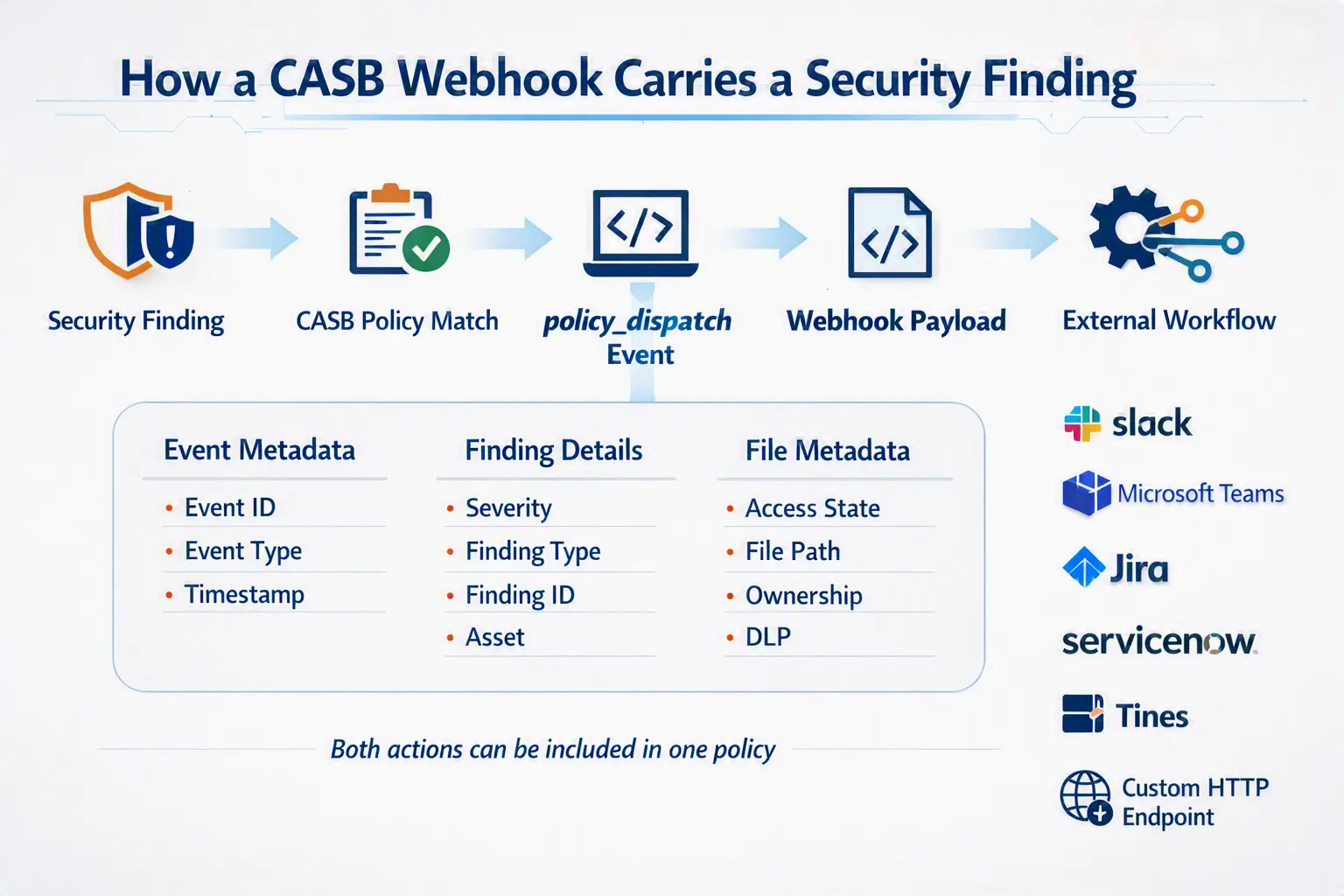
Send Webhooks
CASB can also send finding details to configured webhook destinations.
Cloudflare lists:
Slack
Microsoft Teams
Jira
ServiceNow
Tines
Custom HTTP endpoints
A policy can include both a remediation action and a webhook action.
Webhooks Connect Findings to External Workflows
Cloudflare also provides an example webhook format for CASB policy events.
The example uses the event type:
casb.finding_instance.policy_dispatchThe payload contains information about the policy dispatch, the triggering finding and the affected asset. It also includes additional metadata associated with the affected file and DLP profiles.
The example includes information such as:
Event ID
Event type
Timestamp
Destination
Finding ID
Finding severity
Finding type
Dashboard URL
Asset ID
File name
Vendor
Asset type
Access state
File path
Ownership information
DLP profile information
Cloudflare's example identifies the finding as High severity with the finding type "File publicly accessible with view access."
It also uses q3_financial_report_preview.xlsx as the example file name.
These values are part of Cloudflare's published example payload and should not be interpreted as evidence of a real customer security incident. The payload contains placeholder values such as an example vendor name and URL.
Maintaining Visibility and Auditability
Automatic remediation does not remove the need for security teams to understand what happened after a policy runs.
Cloudflare says each policy action produces two categories of logs under Insights in Cloudflare One.
Admin Activity Logs
These logs capture changes to the policy itself, including:
Who created the policy
Who edited it
Who disabled it
When those changes occurred
Cloudflare says this provides an audit trail that can help establish the sequence of events if a policy is disabled and a risk subsequently passes through.
Cloud & SaaS Security Policies Logs
A separate class of logs captures the runtime outcome of policy invocations.
These logs can show:
Which finding triggered the policy
Which file was acted on
Whether the action succeeded or failed
The specific error when an action fails
Cloudflare gives examples such as a 401 Unauthorized response or an API rate-limit response from a vendor.
For compliance use cases, Cloudflare says execution logs can connect a specific finding with the automated action and event timestamp.
This creates a record linking the original finding to the action that was performed.
Availability and Getting Started
Cloudflare says customers can find CASB Policies in the Cloud & SaaS findings section of the dashboard today.
Customers can connect or update their Microsoft 365 or Google Workspace integration with Read-Write permissions and create a remediation policy.
Cloudflare also says it plans to add support for Custom Findings in the coming weeks.
The company says Custom Findings will allow organizations to augment or define finding logic according to their own detection requirements.
Additional details were not disclosed in the announcement.
What Automatic Remediation Means for SaaS Security
The announcement highlights a broader industry shift toward connecting SaaS security detection with predefined response workflows.
A security platform can identify an exposed file or another configuration problem, but organizations still need to decide what should happen next.
CASB policies allow that response to be defined ahead of time for supported finding types.
For enterprises, this could mean fewer repetitive remediation tasks for security administrators and a more consistent way to respond to recurring SaaS findings.
The webhook capability also provides a path for connecting CASB findings with existing security operations and automation systems.
At the same time, automated remediation depends on the policies and permissions configured by the organization. Cloudflare specifically notes that supported remediation actions may require Read-Write access to the relevant SaaS integration.
The logging capability is therefore an important part of the announcement. It provides visibility into both policy configuration changes and the runtime outcome of automated actions.
The Bigger Picture
Cloudflare's CASB update moves the platform beyond a model where security findings simply appear in an administrative queue.
The new approach connects three stages:
Detection → Response → Auditability
CASB identifies the finding.
The configured policy determines the response.
Cloudflare's logging records what happened.
The underlying architecture combines CASB with Cloudflare Queue, Workers and Workflows, while webhooks provide a route into external security and operational systems.
The development reflects growing demand for security tools that can connect identified risks with predefined operational responses rather than leaving every remediation step to a human administrator.
Final Takeaway
Cloudflare CASB's automatic remediation policies extend SaaS security posture management from detection toward automated response.
The central idea is straightforward: security teams define the response once, and CASB can execute that configured response when a matching finding appears.
The combination of native remediation actions, webhook support and execution logging connects detection, response and auditability within the same workflow.
For organizations managing recurring SaaS security findings, the capability could provide a more structured way to automate supported responses while maintaining visibility into policy changes and execution outcomes.
Source: Cloudflare Blog
About the Author