
GitHub Copilot for JetBrains Adds Model Controls and Chat Improvements
GitHub Copilot for JetBrains adds enterprise-managed model defaults, diagnostic fixes, MCP startup controls, improved chat navigation, and reliability updates. The release also ends support for JetBrains IDE 2025.1.
Xcademia Team
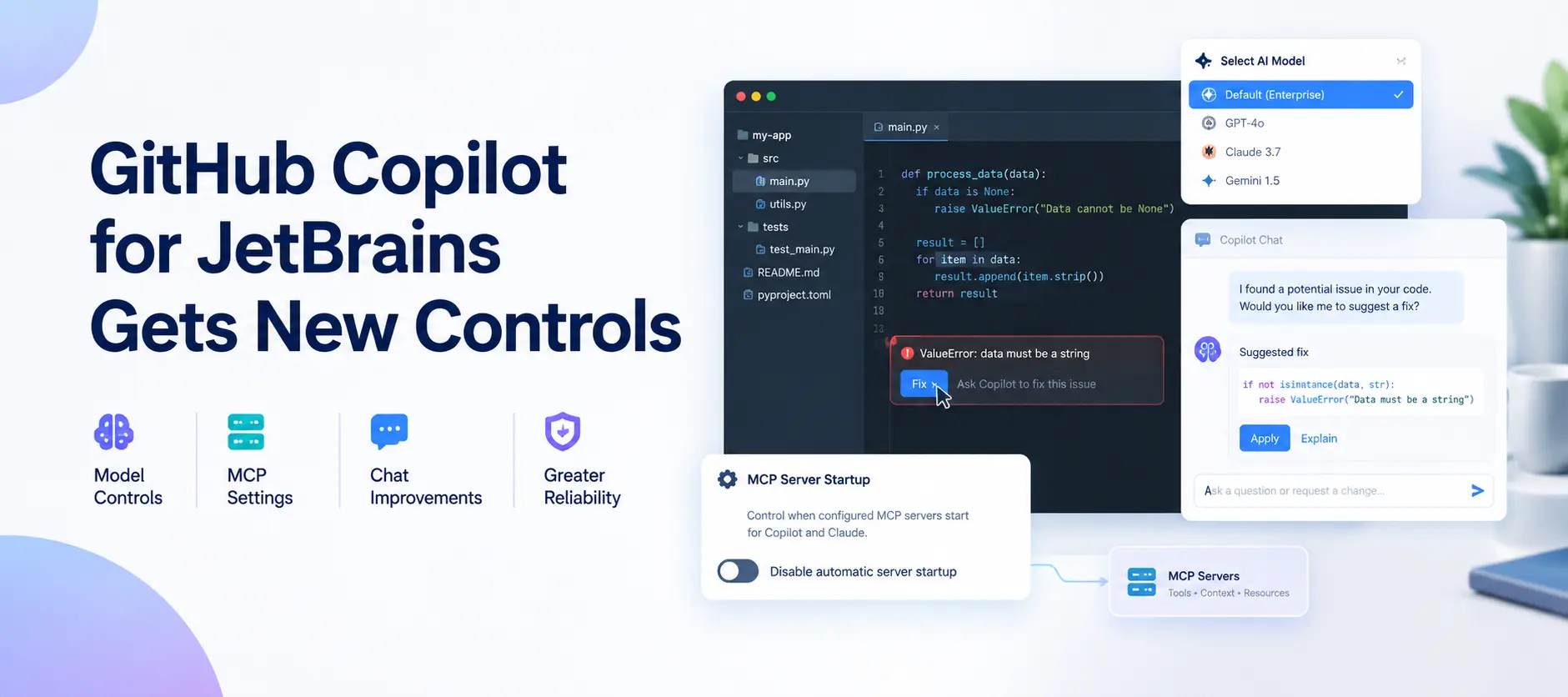
GitHub has introduced new controls and user experience improvements for GitHub Copilot in JetBrains IDEs. Announced on October 10, 2026, the update focuses on enterprise-managed AI model selection, diagnostic fixes, Model Context Protocol (MCP) configuration, chat navigation, and plugin reliability.
The release aims to make AI-assisted development easier to configure and use within existing software development workflows. Enterprise administrators gain more control over the default model used in new conversations, while developers receive improved ways to address code diagnostics, manage accounts, and navigate Copilot chats.
GitHub has also made an important compatibility change. GitHub Copilot no longer supports JetBrains IDE version 2025.1. Developers must use version 2025.2 or later to continue using the plugin.
The announcement does not introduce a new AI model. Instead, it concentrates on configuration, usability, and reliability improvements across the Copilot experience.
Enterprise Administrators Gain Control Over Default AI Models
One of the most significant changes is the introduction of enterprise-managed default model selection.
GitHub now allows enterprise administrators to use managed settings to select any available Copilot agent model as the default for new conversations.
Previously, organizations looking to establish a consistent starting model for developers had fewer options through this specific configuration. The new setting provides a way for administrators to define the default model while preserving developers' ability to make their own selections.
How does the new model control work?
The feature introduces two important elements:
Administrator control: Enterprise administrators can configure the default Copilot agent model through managed settings.
Developer flexibility: Developers can explicitly select another available model using the model picker.
This arrangement gives organizations a way to establish a preferred starting configuration without removing individual model selection.
For example, an enterprise development team may want developers to begin new Copilot conversations with an organization-selected model. With the new setting, administrators can establish that default, while developers retain the ability to choose another model when needed.
This is an illustrative example of how the setting could be used, not a customer deployment reported by GitHub.
Why does this matter for enterprise development teams?
Organizations increasingly need to manage how AI tools are configured across their development environments. A consistent default can simplify initial setup and make the starting experience more predictable for developers.
However, selecting a default model does not necessarily mean that every developer task will produce the same results. Model suitability can vary depending on the programming language, task complexity, available context, and expected output.
The announcement does not specify which model enterprises should select or provide comparative performance measurements for the available models.
For development teams, the practical consideration is to choose a default that aligns with their requirements while allowing developers to make appropriate selections for individual tasks.
GitHub Copilot Introduces Faster Fixes for Code Diagnostics
Another important improvement connects code diagnostics more directly with Copilot's assistance.
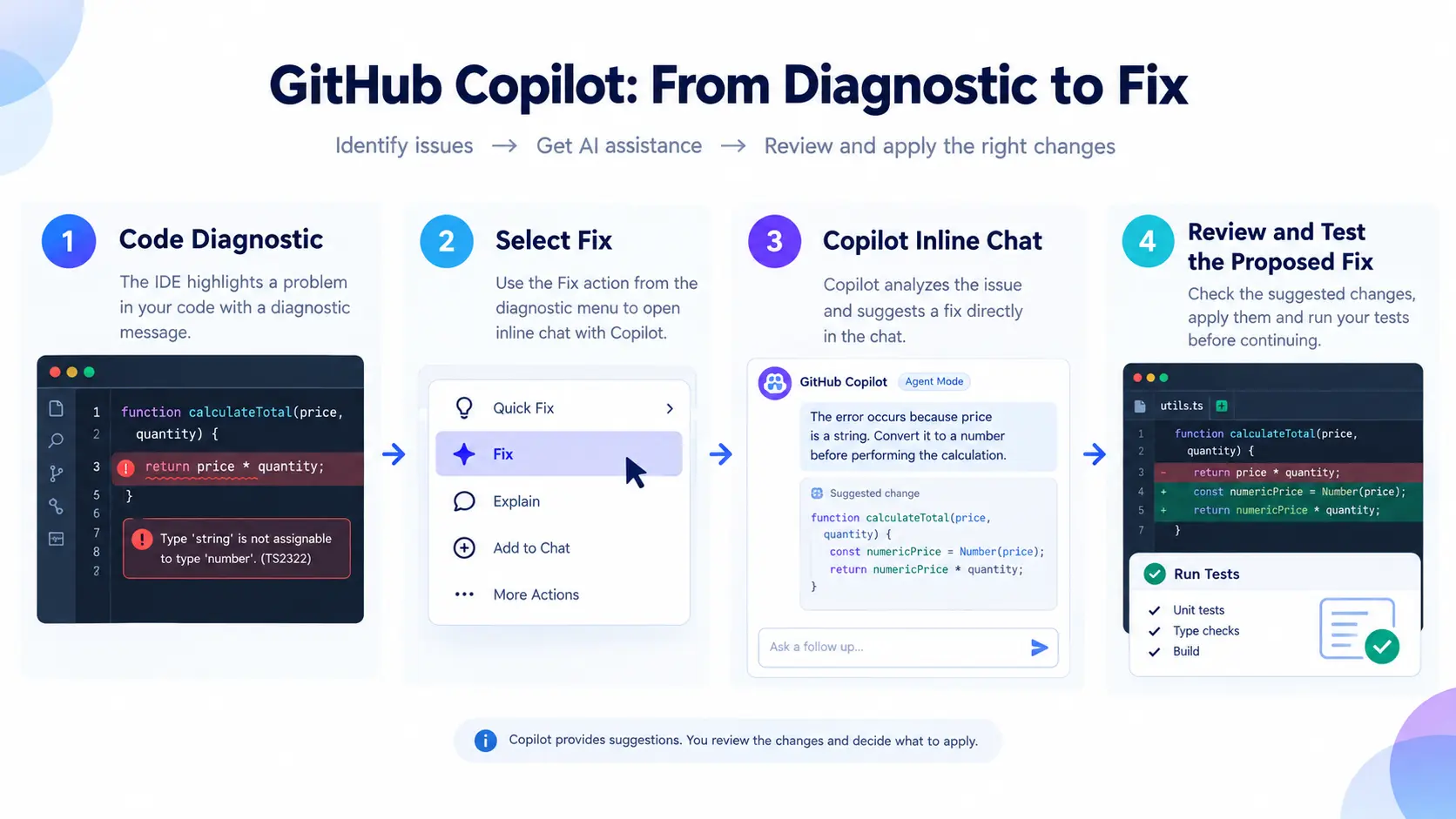
GitHub has added a Fix action to diagnostic intention menus. When a developer encounters a diagnostic issue, they can use this action to open inline chat and ask Copilot to help repair the problem.
The action uses agent mode when available. If agent mode is unavailable, it falls back to ask mode.
This provides a more direct workflow for moving from a reported issue to an AI-assisted solution.
What are code diagnostics?
Code diagnostics are messages that identify potential problems in source code. Depending on the language and development environment, they may highlight syntax errors, type mismatches, unresolved references, or other issues detected by available analysis tools.
Consider a developer working on a TypeScript application.
The IDE might report a type mismatch because a function expects a number but receives a string. Traditionally, the developer would inspect the diagnostic, investigate the relevant code, and make the necessary changes.
With the new Copilot workflow, the developer can select the Fix action from the diagnostic intention menu. Copilot then opens inline chat and helps address the reported issue.
The developer can review the proposed changes and determine whether they are appropriate.
This example illustrates the workflow. It does not imply that GitHub guarantees a correct fix for every diagnostic.
Agent mode versus ask mode
The update specifies that the Fix action uses agent mode when available and ask mode otherwise.
These modes provide different interaction patterns.
Agent mode is intended for tasks in which Copilot can work through a request using the capabilities available to it. Depending on the environment and task, this may involve examining relevant code and proposing or making changes.
Ask mode provides a conversational approach for asking questions and obtaining explanations or suggestions.
The exact capabilities available depend on the configured environment and supported functionality.
By choosing the available mode automatically for the Fix action, the workflow avoids requiring developers to manually select a mode before asking Copilot to help with a diagnostic.
What should developers keep in mind?
AI-generated code still requires review.
A proposed change may address the immediate diagnostic while affecting other parts of the application. Developers should verify that the suggested fix matches the intended behavior, review related code, and run appropriate tests.
The announcement does not provide success rates, measured time savings, or evidence that the feature eliminates manual debugging.
The primary benefit is a more direct path from identifying a problem to requesting AI assistance.
New MCP Controls Give Developers More Configuration Flexibility
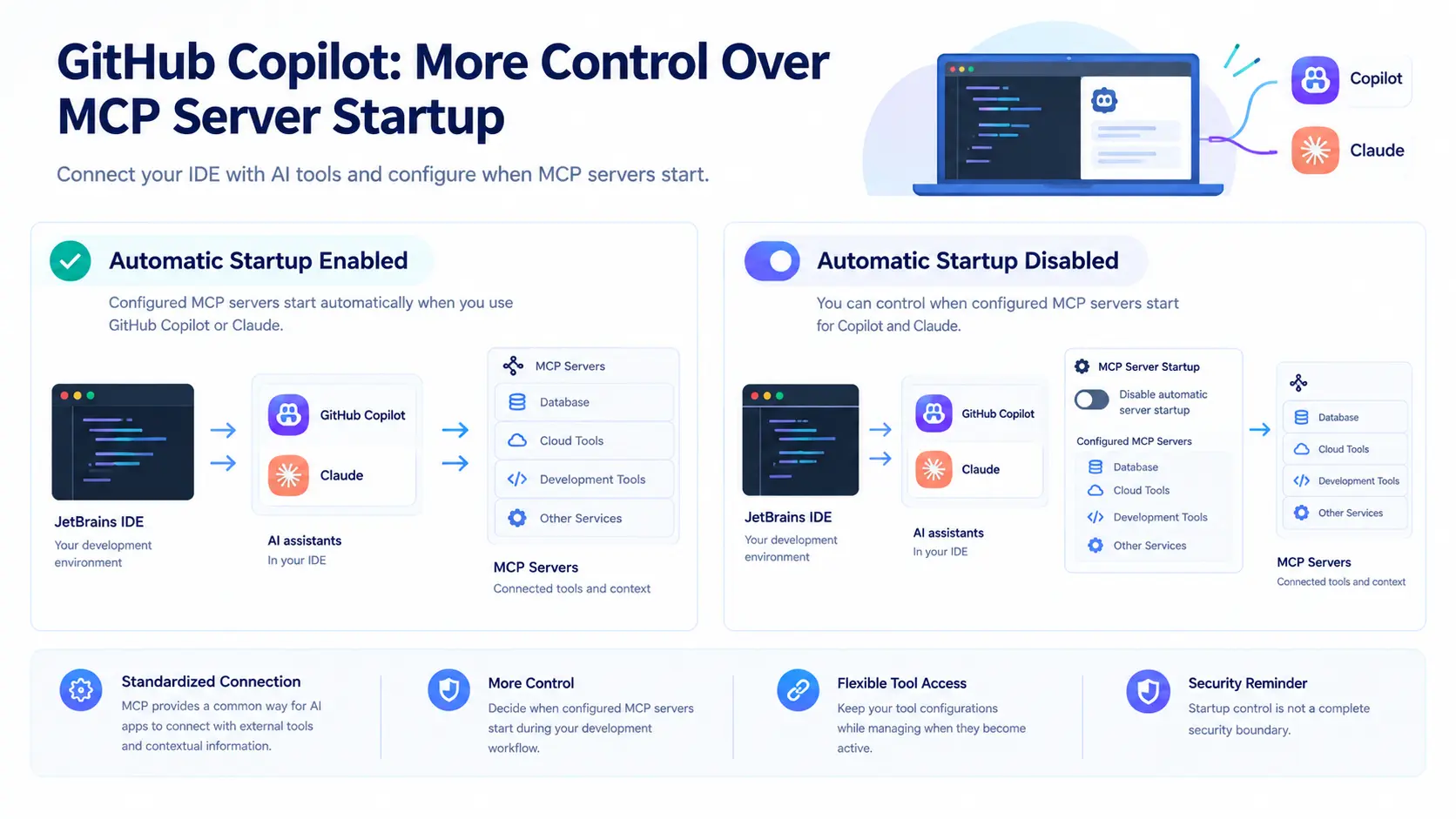
GitHub has also introduced a new setting that allows users to disable automatic MCP server startup for Copilot and Claude.
The setting gives developers more control over when configured tools become active.
To understand the significance of this change, it helps to understand the role of the Model Context Protocol.
What is the Model Context Protocol?
The Model Context Protocol, commonly known as MCP, provides a standardized way for AI applications to communicate with external tools and access contextual information through configured servers.
Depending on the implementation, these connections can allow AI applications to interact with supported services, retrieve information, or use available tools.
For developers, MCP can help connect AI-assisted workflows with resources beyond the immediate conversation.
However, the tools available to an AI application depend on its configuration and the permissions granted to those tools.
What changes with the new startup setting?
The new setting allows users to disable automatic startup for configured MCP servers used by Copilot and Claude.
This gives developers more control over when these servers start during their development workflows.
For example, a developer may have configured MCP servers for tools that are not required during every coding session. The new setting provides an option to disable their automatic startup.
This is an illustrative use case rather than a scenario specifically documented in GitHub's announcement.
The key distinction is that the setting concerns automatic server startup. GitHub's announcement does not state that disabling automatic startup removes server configurations, blocks every possible tool connection, or guarantees protection against security threats.
Why does MCP configuration matter?
As AI coding assistants become connected to more development tools, configuration becomes an important part of managing their use.
Developers need to understand which tools are available, how those tools are configured, and what access they receive.
For organizations, MCP configuration can also form part of a broader review of how AI-assisted development environments interact with internal systems and external services.
The new startup control adds flexibility, but it should not be treated as a complete security control.
Teams should continue to review tool permissions, configuration settings, and the data that connected services can access. These are general security considerations rather than additional protections announced in this release.
GitHub has not disclosed further implementation details or quantified the security impact of the new setting.
Chat Navigation and Account Management Receive Improvements
The October release also includes several changes to the everyday Copilot experience.
These improvements focus on account management, sign-in, conversation navigation, message editing, and guidance for using the agent interface.
Although these changes do not introduce a new AI model, they address the interactions developers use when working with Copilot inside their IDEs.
Clearer account controls
GitHub has improved the presentation and management of signed-in Copilot accounts.
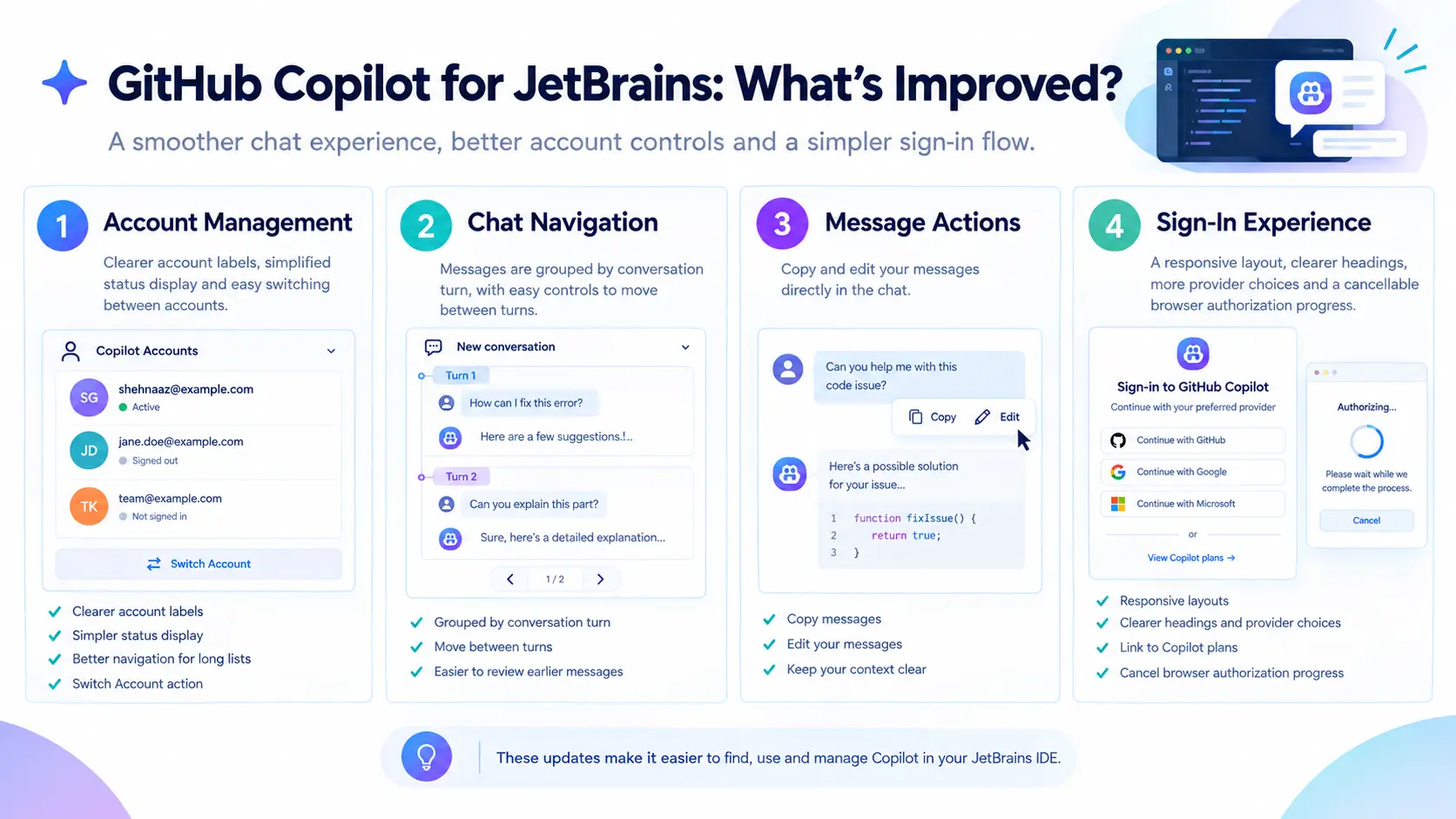
The updated interface includes clearer account labels, a simpler status display, improved navigation for long account lists, and a Switch Account action.
These changes are relevant to developers who work with multiple accounts or need to move between account contexts.
Clearer account information can help users identify the account they are currently using and access account-switching controls more easily.
The announcement does not describe additional authentication mechanisms or claim that the changes introduce new identity security protections.
Easier chat discovery and sign-in
The update introduces a one-time reminder to help new users find the Chat interface.
GitHub has also revised the sign-in experience with a responsive layout, clearer headings, improved provider choices, and a direct link to Copilot plans.
Browser authorization progress can now be cancelled.
Together, these changes address different stages of the user experience, from discovering the chat interface to completing sign-in.
For new users, clearer navigation can make it easier to locate the relevant functionality. For existing users, cancellable authorization progress provides more control when a sign-in attempt needs to be stopped.
Improved conversation navigation
Copilot chat messages are now grouped by conversation turn, with controls for moving between turns.
A conversation turn represents a portion of an interaction in which the user submits a message and Copilot responds.
In longer conversations, grouping messages by turn can make it easier to move between earlier and later parts of the discussion.
This may be useful when developers are investigating a bug, discussing implementation options, or revisiting an earlier explanation.
The release also adds actions that allow users to copy or edit their own messages.
Editing a message can be useful when a developer wants to correct a requirement, refine a question, or clarify the context provided to Copilot.
The announcement does not specify additional changes to conversation history retention or storage.
Clearer guidance in the agent interface
GitHub has updated the Copilot agent input placeholder to highlight questions, edits, context, and commands.
This change gives users clearer cues about the kinds of interactions they can initiate.
For developers who are still learning how to work with an AI coding assistant, these labels can help distinguish between asking for information, requesting code changes, providing context, and entering commands.
The interface change does not guarantee that a request will be interpreted correctly. Developers still need to describe tasks clearly and check the resulting output.
More predictable migration navigation
The release also addresses a navigation issue involving migration commands.
After a user accepts a migration command, selecting Go Back now opens a Copilot home session even when the local conversation continues.
This provides more predictable navigation when moving through that workflow.
The announcement does not provide further details about the migration process or identify additional migration capabilities introduced in this release.
Reliability Improvements Across Development Workflows
Beyond the visible interface changes, GitHub reports reliability improvements in several areas of the Copilot plugin.
These include:
Language server startup.
Switching between models and providers.
MCP configuration.
Customization refreshes.
File changes.
Worktree workflows.
The release also resolves interaction and display issues affecting model management, tool-call details, working sets, and JetBrains IDE settings.
Why reliability matters for AI coding assistants
Developers use IDEs throughout the software development process. AI assistance may be part of activities such as investigating errors, understanding existing code, drafting changes, and working across files.
When supporting features behave inconsistently, developers may need to repeat actions, troubleshoot configuration problems, or interrupt their work to restore the expected behavior.
Improvements to startup, model switching, configuration, and file-related workflows are therefore relevant to the usability of AI coding tools.
For example, reliable model switching is important when developers need to change the model used for a conversation. Consistent configuration behavior is also relevant when the development environment relies on external tools or customized settings.
These examples explain the practical relevance of the areas listed in the announcement. They are not reports of specific failures experienced by customers.
GitHub has not published quantitative measurements showing how much reliability has improved. The company also has not provided specific performance benchmarks or a breakdown of the individual fixes.
As a result, the update can be described as a collection of reported reliability improvements, but the size of their practical impact cannot be determined from the announcement alone.
JetBrains IDE 2025.1 Support Has Ended
One of the most important points for existing users is the change to supported IDE versions.
GitHub has ended support for JetBrains IDE 2025.1. Developers must use JetBrains IDE 2025.2 or later to continue using the GitHub Copilot plugin.
This requirement is particularly relevant for developers and organizations that manage their development environments centrally.
Before upgrading, users should verify their installed IDE version and confirm that the target version is compatible with their existing projects, plugins, and development requirements.
Organizations with standardized development environments may also need to review their upgrade procedures.
The announcement establishes the minimum supported IDE version but does not provide additional migration instructions or details about exceptions for older installations.
Developers can consult the official GitHub Changelog announcement and the latest version of the Copilot plugin in the JetBrains Plugins Marketplace for further information.
What This Update Means for Developers and Enterprises
The October 10 release brings together several changes that address different parts of AI-assisted development.
For enterprise administrators, managed default model selection provides a way to establish the starting model for new conversations while preserving the model picker.
For individual developers, the diagnostic Fix action creates a more direct path from a reported code issue to an AI-assisted response. Improved message editing and conversation navigation also make it easier to interact with Copilot during development.
The MCP startup setting adds another configuration option for managing when configured tools become active.
Meanwhile, the reported reliability improvements cover several areas of the plugin, including startup, model switching, configuration, and worktree workflows.
These changes reflect a broader industry shift toward integrating AI assistance into established development environments rather than treating it as a separate destination.
However, the announcement does not establish that the changes will produce measurable productivity gains for every user. The results will depend on developers' tasks, workflows, configurations, and use of the available features.
Organizations should evaluate the controls in the context of their own development requirements. Developers should also continue reviewing AI-generated code and validating changes before relying on them.
Conclusion
GitHub's latest Copilot update for JetBrains focuses on model configuration, diagnostic assistance, MCP startup controls, chat usability, and reliability.
The key changes include enterprise-managed default models, a Fix action in diagnostic intention menus, improved account and conversation controls, and reported reliability improvements across several plugin workflows.
The release also introduces a compatibility requirement that existing users should not overlook: JetBrains IDE 2025.2 or later is required to use the GitHub Copilot plugin.
For developers, the update offers a more direct way to request help with diagnostics and improved controls for everyday interactions. For enterprises, managed model defaults provide an additional option for configuring the Copilot experience across their teams.
The announcement does not include performance benchmarks or quantified productivity improvements, so the practical impact of the changes will become clearer through use.
Source: GitHub Changelog
About the Author