RAG vs AI Agents: What’s the Difference and When Should You Use Each?
RAG and AI agents solve different problems in modern AI systems. Learn how RAG retrieves knowledge, how AI agents reason and take action, and how Agentic RAG combines both approaches.
Artificial intelligence is moving beyond simple chatbots.
Modern AI systems can retrieve information from company documents, reason over complex questions, use external tools, make decisions, and even perform actions across different applications.
Two concepts are especially important in this shift:
Retrieval-Augmented Generation (RAG) and AI Agents.
They are often discussed together, but they solve different problems.
A RAG system is primarily designed to find relevant information and use it to generate a better answer.
An AI agent is designed to pursue a goal, make decisions, use tools, and complete tasks.
That distinction becomes especially important when designing production AI systems.
For example, if an employee asks:
"What is our company's refund policy?"
RAG may be enough.
But if the employee asks:
"Check this customer's order, determine whether they qualify for a refund, create the refund request, and notify the customer."
Now the system needs more than retrieval. It needs reasoning, tool usage, decision-making, and action.
That is where an AI agent becomes useful.
And in many real-world applications, the strongest architecture is not RAG or AI agents.
It is RAG + AI agents, often referred to as Agentic RAG.
What Is RAG?
Retrieval-Augmented Generation (RAG) is an architecture that allows an AI application to retrieve relevant information from external sources before generating a response.
A traditional large language model primarily relies on the knowledge encoded during its training.
That creates a problem when the model needs information that is:
Private
Company-specific
Frequently updated
Too recent for its training data
Stored in internal documents or databases
RAG addresses this by giving the model access to external knowledge at runtime.
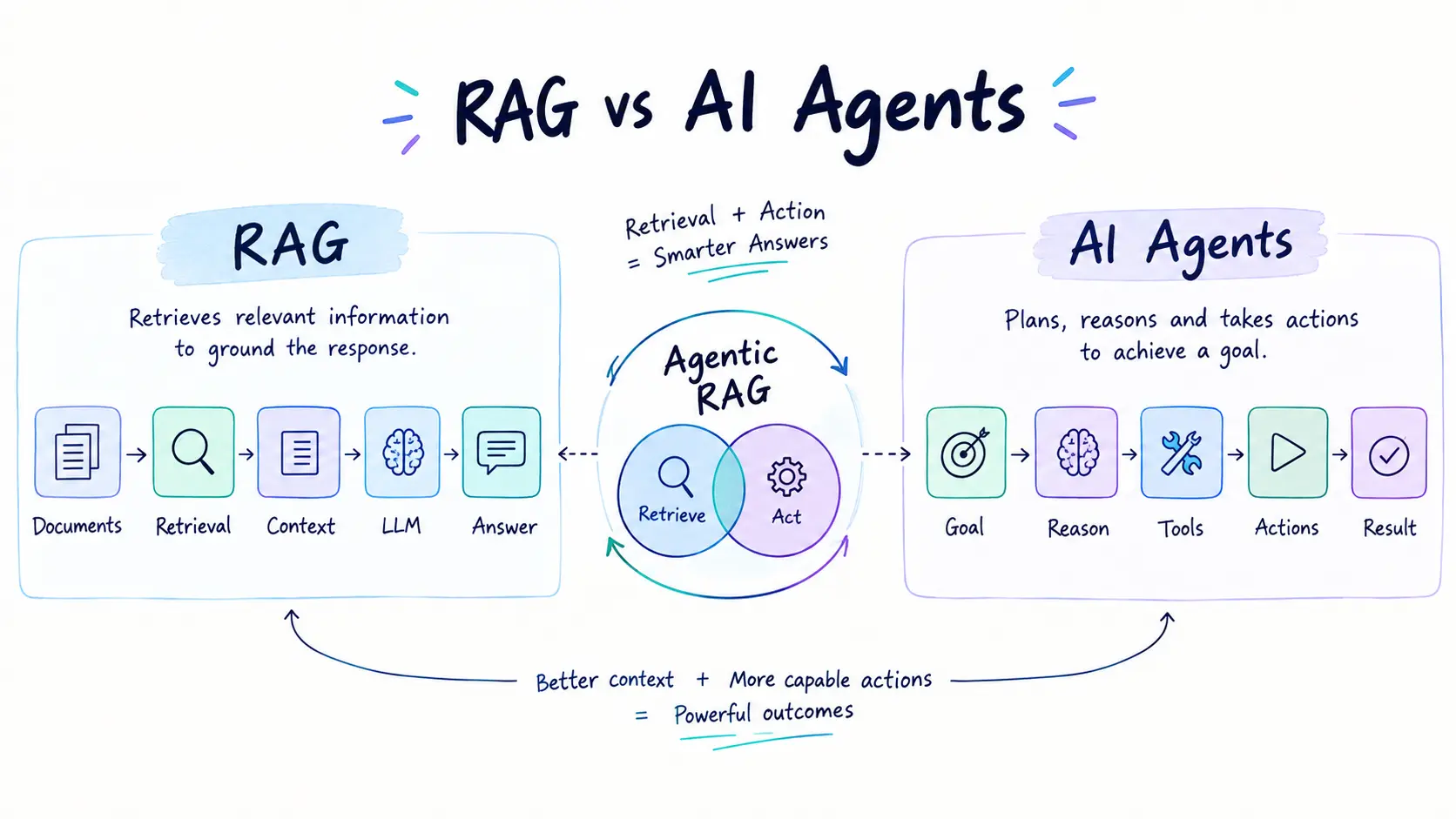
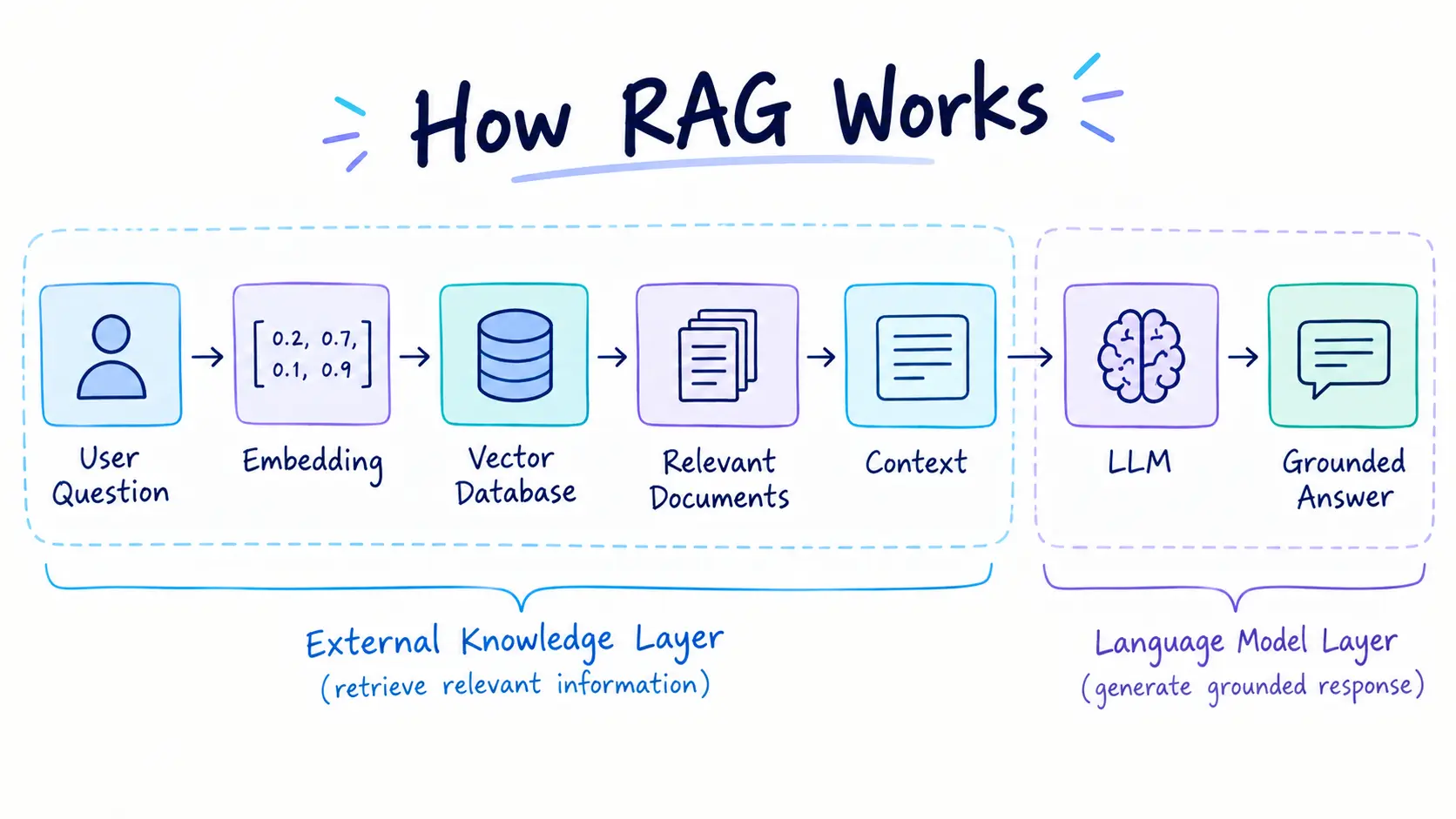
A simplified RAG pipeline looks like this:
User Question → Retrieve Information → Add Context → LLM → Answer
The three main stages are:
1. Retrieve
The system searches a knowledge source for relevant information.
This could include:
PDFs
Documentation
Databases
Knowledge bases
Websites
Internal company documents
Vector databases
2. Augment
The retrieved information is added to the user's query as context.
The LLM can then use this context when generating its response.
3. Generate
The language model produces an answer using the retrieved information.
This makes the response more grounded in external data instead of relying entirely on the model's internal knowledge. Ema
Example
Imagine a company has thousands of internal HR documents.
An employee asks:
"How many days of parental leave are employees entitled to?"
Instead of expecting the LLM to know the company's specific policy, the RAG system searches the HR documentation, retrieves the relevant policy, and provides that information to the LLM.
The model then generates the answer.
The primary job of RAG is knowledge retrieval and grounding.
RAG Architecture
A typical RAG system contains several components:
Documents → Chunking → Embeddings → Vector Database → Retrieval → Context → LLM → Response
During ingestion, documents are divided into smaller chunks.
Those chunks are converted into embeddings, which represent their semantic meaning.
The embeddings are stored in a vector database.
When a user asks a question, the question is also converted into an embedding.
The system searches for semantically similar content and retrieves the most relevant chunks.
Those chunks are then provided to the LLM.
A simple example
Suppose your company has this document:
"Employees can request up to 20 days of annual leave each year."
A user asks:
"How many annual leave days can I request?"
The retrieval system finds the relevant document.
The LLM then answers:
"Employees can request up to 20 days of annual leave each year."
The system doesn't need to independently plan actions.
It simply retrieves useful information and generates a response.
What Are AI Agents?
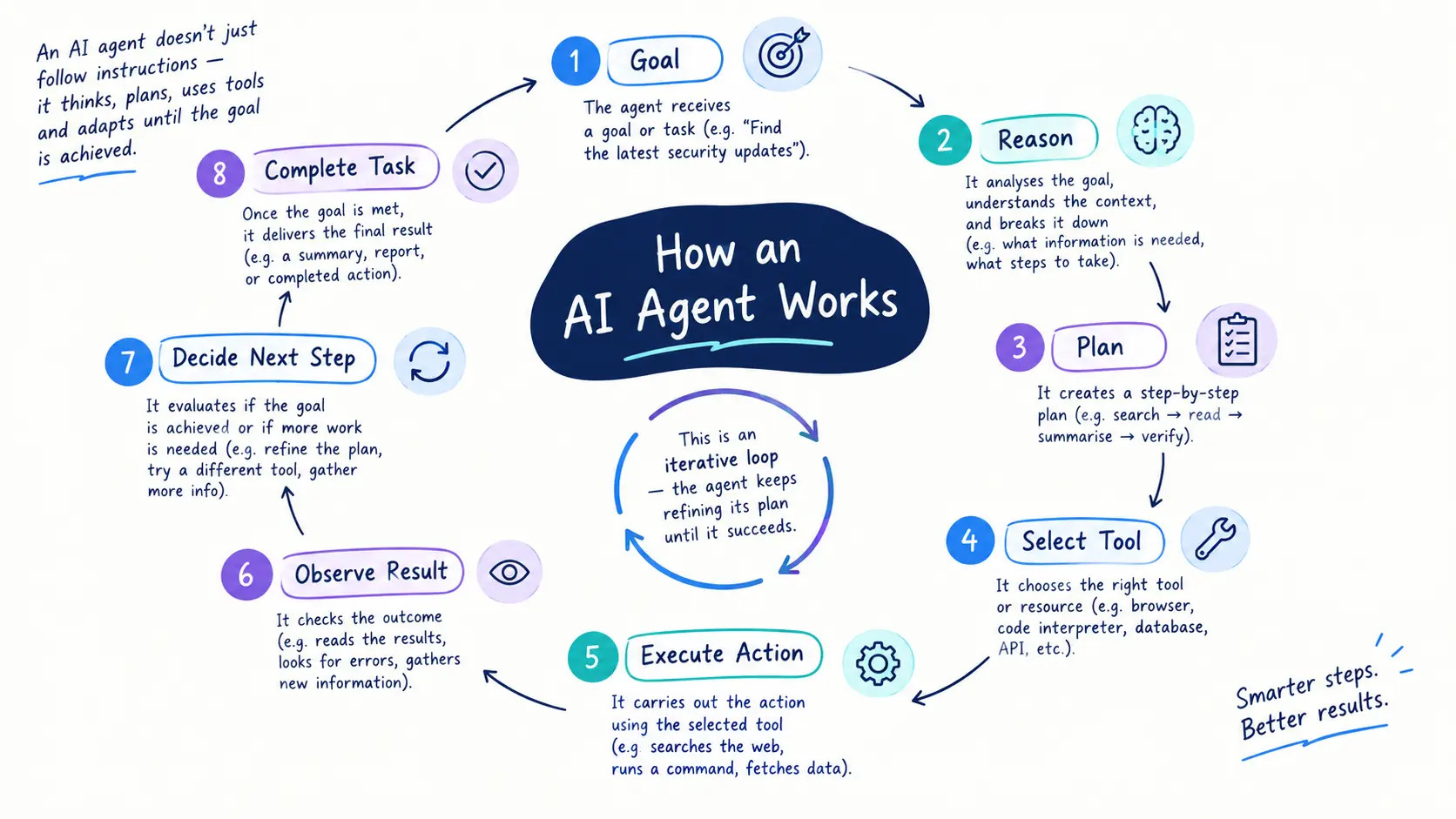
An AI agent is a system designed to work toward a goal by reasoning about what to do, selecting actions or tools, observing results, and continuing until the task is completed or it needs human intervention.
Unlike a simple RAG application, an agent does not necessarily follow one fixed path.
It may decide:
What information it needs
Which tool to use
What action to perform
Whether the result is sufficient
What to do next
A simplified agent workflow looks like:
Goal → Reason → Plan → Use Tool → Observe Result → Decide Next Step → Complete Task
This creates a fundamentally different control flow from traditional RAG.
Example
Imagine a user says:
"Find my latest order, check whether it qualifies for a refund, and submit the refund request."
An AI agent might:
Access the order-management system
Find the customer's latest order
Retrieve the refund policy
Compare the order against the policy
Decide whether the order qualifies
Submit a refund request
Return the result to the user
This is not simply a question-answering problem.
It is a multi-step workflow.
RAG vs AI Agents: The Core Difference
The easiest way to understand the difference is:
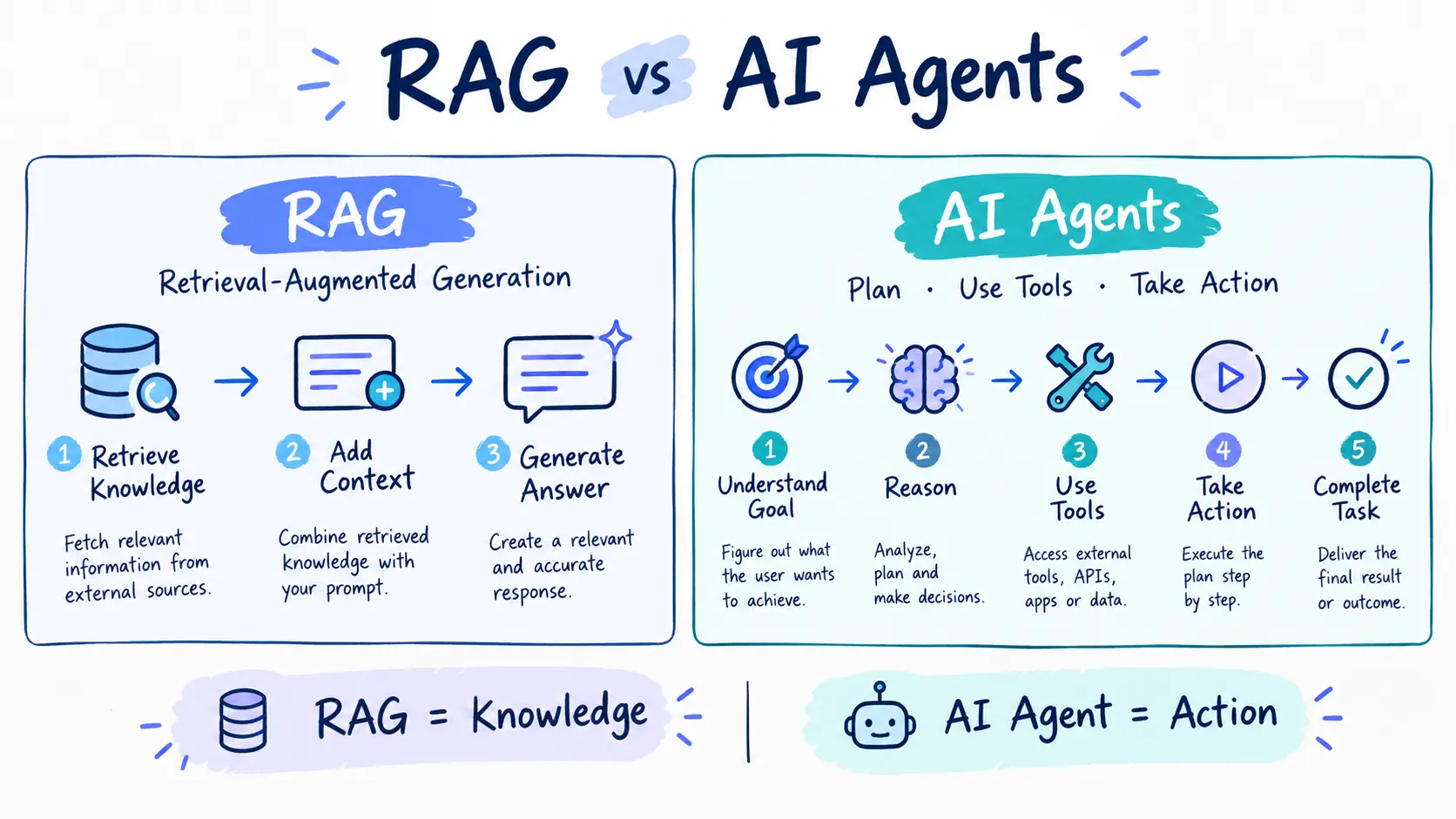
RAG gives AI better information. AI agents give AI the ability to pursue a goal and take actions.
RAG focuses primarily on retrieval and generation.
AI agents focus on reasoning, decision-making, orchestration, and action.
Capability | RAG | AI Agent |
|---|---|---|
Main purpose | Retrieve and ground information | Complete a goal |
Primary capability | Retrieval | Reasoning + action |
Workflow | Usually predefined | Dynamic |
Tool usage | Usually limited/predetermined | Often dynamic |
Planning | Not fundamental | Core capability |
Multi-step tasks | Limited | Strong fit |
External knowledge | Yes | Optional, often useful |
Actions | Usually read-oriented | Can read and write |
State | Often query-based | Can maintain task state |
Latency | More predictable | Can vary |
Cost | Generally more predictable | Can increase with iterations |
Governance | Data and retrieval controls | Data + tools + permissions + actions |
Typical output | Grounded answer | Completed task or outcome |
This distinction is reflected across the reference material: RAG is generally a bounded retrieval-and-generation workflow, while agents introduce dynamic decision-making and tool use.
RAG Is Not an AI Agent
This is one of the most common misunderstandings.
A RAG chatbot can look intelligent.
It can:
Search documents
Understand natural language
Retrieve relevant information
Generate detailed answers
Cite sources
But that does not automatically make it an AI agent.
Consider:
User → Question → Search Documents → Generate Answer
The system is following a predefined pipeline.
Now consider:
User → Goal → Agent → Decide → Search → Evaluate → Use Tool → Check Result → Act → Finish
The second system has a dynamic control loop.
That is what makes the architecture more agentic.
When Should You Use RAG?
RAG is usually the better choice when the main problem is access to accurate, relevant, or up-to-date information.
1. Internal Knowledge Assistants
Companies can build assistants that answer questions about:
Policies
Documentation
Procedures
Product information
Internal knowledge
2. Customer Support
A RAG system can retrieve relevant:
FAQs
Troubleshooting guides
Product documentation
Support articles
and use them to generate personalized answers.
3. Research
Researchers can use RAG to retrieve relevant information from large document collections.
4. Documentation Search
Developers can ask questions about large technical documentation repositories without manually searching hundreds of pages.
5. Legal and Regulatory Information
RAG can help retrieve relevant regulations, policies, and legal documents for analysis.
6. Enterprise Search
Instead of searching through folders and documents manually, employees can ask questions using natural language.
These information-centric use cases are among the strongest applications for RAG.
Limitations of RAG
RAG is powerful, but it isn't a solution for every AI problem.
RAG depends on data quality
If your source documents are:
Incorrect
Outdated
Incomplete
Poorly structured
the generated response may also be unreliable.
Retrieval can fail
The system might retrieve irrelevant documents or miss the information needed to answer the question.
RAG doesn't inherently perform actions
A RAG system can tell you:
"The refund policy allows refunds within 30 days."
But that doesn't mean it can automatically:
"Submit the refund."
Additional tools and an agentic layer may be required.
Complex workflows require more
If the task involves:
Multiple decisions
Several tools
Conditional logic
Retries
Approvals
Actions across systems
traditional RAG alone may not be enough.
When Should You Use AI Agents?
AI agents become useful when the problem is not simply finding information but getting work done.
1. Multi-Step Workflows
For example:
"Research three cloud providers, compare their pricing, create a report, and email it to me."
An agent can potentially coordinate those steps.
2. Customer Service Automation
An agent could:
Understand the customer's request
Retrieve account information
Check policies
Make a decision
Update the CRM
Send a response
3. IT Operations
An agent might:
Detect an issue
Check logs
Investigate possible causes
Run approved diagnostics
Create a ticket
Escalate the issue
4. Software Development
A coding agent can potentially:
Inspect a repository
Understand an issue
Modify code
Run tests
Analyze failures
Make another change
Prepare a pull request
5. Business Operations
Agents can coordinate workflows involving multiple applications and systems.
The key difference is that the system isn't simply answering a question.
It is trying to complete an outcome.
The Trade-Off: More Autonomy Means More Risk
AI agents provide more capability, but that capability comes with additional complexity.
A RAG system might produce a wrong answer.
An agent can potentially take a wrong action.
That difference is important.
For example, imagine a RAG system incorrectly explains a refund policy.
A human might notice the mistake before doing anything.
Now imagine an agent incorrectly interprets the policy and automatically issues a $10,000 refund.
The impact is much greater.
Agent systems therefore require stronger controls around:
Permissions
Tool access
Authentication
Authorization
Logging
Monitoring
Human approval
Error handling
Rate limits
Security
The reference sources similarly highlight governance, security, privacy, and unpredictable behavior as important considerations for agentic systems.
RAG + AI Agents: The Best of Both Worlds
This is where things get interesting.
RAG and AI agents don't necessarily need to compete.
They can work together.
Consider an AI customer-support agent.
The agent receives:
"My laptop stopped working after the latest update. Can you help me?"
The agent might first retrieve the relevant troubleshooting documentation using RAG.
It could then:
Understand the customer's problem
Search the knowledge base
Retrieve troubleshooting instructions
Ask the customer for additional information
Check the customer's device information
Decide which troubleshooting procedure applies
Execute an approved action
Verify the result
Escalate if necessary
Here, RAG provides knowledge, while the agent controls the workflow.
This combination is commonly described as Agentic RAG.
What Is Agentic RAG?
Agentic RAG combines retrieval with agentic decision-making.
Traditional RAG generally looks like:
Question → Retrieve → Generate
Agentic RAG can look more like:
Goal → Reason → Decide Whether Retrieval Is Needed → Retrieve → Evaluate → Decide Next Step → Retrieve Again / Use Tool / Act → Result
The important difference is that retrieval becomes part of a dynamic workflow.
The agent may decide:
"I don't have enough information."
It can then perform another search.
Or:
"The retrieved information conflicts with another source."
It can investigate further.
Or:
"I have enough information to take the next action."
It can use another tool.
This makes retrieval a capability inside the agent, rather than the entire system.
Traditional RAG vs Agentic RAG
The difference can be summarized simply:
Traditional RAG
User Question
↓
Retrieve Relevant Documents
↓
Add Context
↓
LLM
↓
Answer
The retrieval process is mostly predetermined.
Agentic RAG
User Goal
↓
AI Agent
↓
Decide What Information Is Needed
↓
Retrieve
↓
Evaluate Information
↓
Plan Next Step
↓
Retrieve Again / Use Tool / Take Action
↓
Final Outcome
The agent has more control over what happens next.
Recent discussions of Agentic RAG emphasize this distinction: retrieval becomes dynamically controlled by the agent instead of being a fixed retrieve-then-generate step.
A Practical Example
Let's compare three systems using the same business scenario.
Scenario
A customer asks:
"Can I get a refund for my order?"
System 1: LLM
The LLM answers based on its existing knowledge.
Problem: It may not know the company's current refund policy.
System 2: RAG
RAG retrieves the company's refund policy.
The LLM responds:
"According to our refund policy, orders can be refunded within 30 days if they meet the listed conditions."
Good for: Information.
System 3: AI Agent + RAG
The agent:
Retrieves the refund policy.
Finds the customer's order.
Checks the purchase date.
Checks the order status.
Determines whether the conditions are satisfied.
Requests approval if necessary.
Submits the refund.
Updates the customer record.
Notifies the customer.
Good for: Information + decision + action.
This illustrates why RAG and agents should not always be viewed as alternatives.
RAG vs AI Agents: How to Choose
A simple decision framework can help.
Choose RAG when:
The task ends with an answer.
Examples:
"What is our vacation policy?"
"Explain this product."
"Search our documentation."
"Summarize these documents."
"What does this regulation say?"
Choose an AI agent when:
The task ends with an action or outcome.
Examples:
"Create a support ticket."
"Analyze this incident and escalate it."
"Update the CRM."
"Run tests and fix the failing code."
"Compare options and complete the selected workflow."
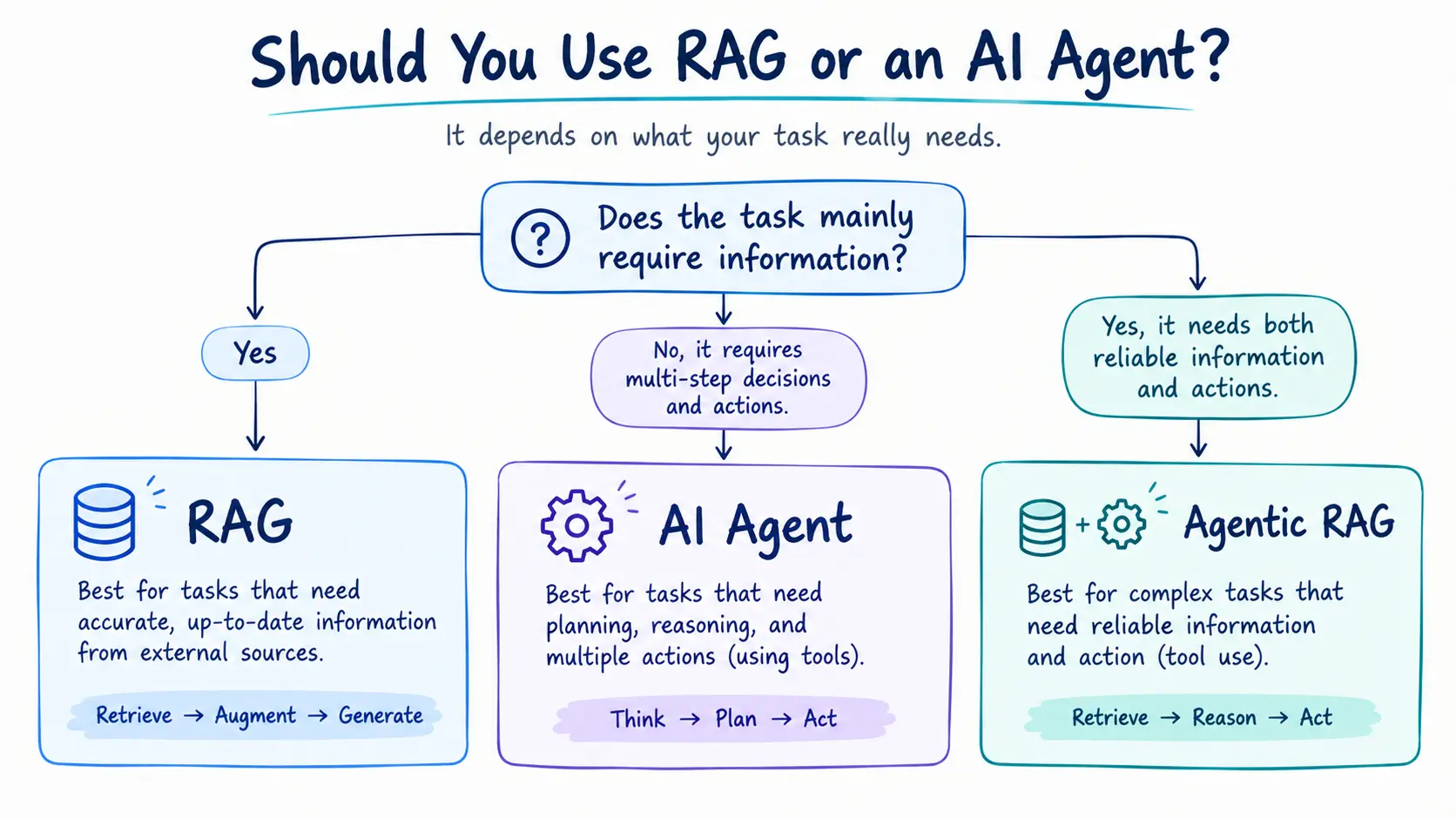
Choose Agentic RAG when:
The task requires both knowledge and action.
Examples:
Research assistant
Customer-support automation
IT operations
Security operations
Enterprise knowledge workers
Financial operations
Software engineering assistants
A useful rule is:
If your biggest problem is finding the right information, start with RAG. If your biggest problem is completing a multi-step task, consider an agent. If you need both, combine them.
Why You Shouldn't Build an Agent for Everything
There is a tendency to make every AI application "agentic."
That isn't always a good idea.
If a simple RAG pipeline can solve the problem, adding an autonomous agent may introduce unnecessary:
Complexity
Cost
Latencies
Failure modes
Security risks
Maintenance requirements
A straightforward architecture is often easier to test, monitor, and control.
For example, if your application only needs to answer questions from a product manual, you probably don't need an autonomous agent.
A well-designed RAG system may be enough.
The goal isn't to build the most autonomous AI system.
The goal is to build the simplest architecture that reliably solves the actual problem.
The Future: AI Systems That Combine Retrieval, Reasoning and Action
The distinction between RAG and AI agents is becoming increasingly important as AI applications move from chat interfaces toward actual workflows.
A modern enterprise AI architecture may contain several layers:
LLM
Provides language understanding and generation.
↓
RAG
Provides access to relevant external knowledge.
↓
AI Agent
Plans and coordinates tasks.
↓
Tools
Allow the system to interact with external applications.
↓
Human Oversight
Controls sensitive or high-impact decisions.
This architecture can provide both knowledge and action while maintaining appropriate controls.
Final Takeaway
RAG and AI agents are not simply two competing versions of AI.
They solve different problems.
RAG is primarily about knowledge.
It retrieves relevant information and gives the LLM the context it needs to produce a more grounded response.
AI agents are primarily about action.
They can reason about goals, select tools, make decisions, and coordinate multi-step workflows.
And Agentic RAG combines the two.
The agent controls the workflow, while RAG provides the knowledge required to make better decisions.
The most important question isn't:
"Should I use RAG or AI agents?"
Instead, ask:
"Does my application need to retrieve information, take action, or do both?"
If it only needs reliable information, RAG may be enough.
If it needs autonomous multi-step execution, an AI agent may be appropriate.
If it needs reliable knowledge plus execution, Agentic RAG can provide a stronger architecture.
Understanding this distinction helps developers avoid unnecessary complexity and build AI systems that are more useful, controllable, and scalable.
Frequently Asked Questions
Is RAG an AI agent?
No. RAG is a retrieval architecture or technique. It can be used inside an AI agent, but a RAG system does not automatically become an agent.
Can AI agents use RAG?
Yes. An AI agent can use RAG as one of its tools or capabilities when it needs information from external knowledge sources.
Is Agentic RAG the same as RAG?
No. Traditional RAG generally follows a predefined retrieval pipeline. Agentic RAG allows an agent to decide when and how retrieval should happen as part of a larger workflow.
Which is better, RAG or AI agents?
Neither is universally better. RAG is better for information-centric applications, while agents are better for multi-step tasks and actions. Many advanced systems use both.
Does RAG reduce hallucinations?
RAG can reduce hallucinations by providing relevant external context, but it does not guarantee that every generated answer will be correct. Retrieval quality and source quality remain important.
Are AI agents more expensive than RAG?
They can be. Agentic workflows may involve multiple model calls, tool calls, retrieval operations, and iterations, making their latency and cost less predictable than a simple RAG pipeline.
Ready to go deeper?
Professional Training
Hands-on, mentor-led training aligned with industry certifications.
About the Author
Sharper every day
Daily tutorials, analysis, and career playbooks across all 12 Xcademia disciplines, straight to your inbox. No spam.