PostgreSQL for Beginners: A Complete Guide to Databases, SQL and Queries
Learn PostgreSQL from scratch with this beginner-friendly guide covering databases, SQL queries, tables, CRUD operations, keys, JOINs, indexes, transactions, and real-world application development.
If you are learning backend development, data engineering, or modern web development, you will eventually encounter databases.
Applications need databases to store users, products, orders, payments, messages, transactions, application settings, and much more. One of the most widely used open-source relational database systems for these workloads is PostgreSQL.
PostgreSQL, often called Postgres, is an open-source object-relational database management system that uses SQL to create, store, retrieve, update, and manage structured data. It supports transactions, strong data integrity, multiple data types, indexing, concurrency, JSON/JSONB, extensions, and other features used in modern applications.
For beginners, PostgreSQL can look complicated at first. There are databases, tables, rows, columns, schemas, keys, constraints, queries, joins, indexes, and many SQL commands to learn.
The good news is that the basic concepts are easier to understand once they are connected together.
This guide explains PostgreSQL from the ground up and walks through the most important concepts and commands you need to start working with it.
What Is PostgreSQL?
PostgreSQL is a relational database management system (RDBMS).
In simple terms, PostgreSQL is software that helps applications store and work with structured information.
For example, imagine you are building an online learning platform.
You might need to store:
Student information
Instructor information
Courses
Enrollments
Payments
Assignments
Exam results
Login information
Instead of keeping all this information in separate files, you can organize it inside a PostgreSQL database.
A relational database stores information primarily in tables.
For example:
id | name | course | |
|---|---|---|---|
1 | Anika | PostgreSQL | |
2 | Rahul | Python | |
3 | Maya | Cloud Computing |
Each table contains:
Rows: individual records
Columns: properties or attributes
Values: the actual data stored in each column
PostgreSQL uses SQL, or Structured Query Language, to interact with this data.
For example:
SELECT name, email
FROM students;
This asks PostgreSQL to return the name and email columns from the students table.
DigitalOcean describes PostgreSQL as an open-source relational database system that stores information in tables made up of rows and columns and uses SQL to manage and query that information.
PostgreSQL vs SQL: What Is the Difference?
Beginners often confuse SQL and PostgreSQL.
They are not the same thing.
SQL is a language.
PostgreSQL is a database system that understands SQL.
Think about it this way:
SQL is the language you use to communicate with the database. PostgreSQL is the software that receives and processes those instructions.
For example:
SELECT * FROM students;This is SQL.
PostgreSQL executes that SQL statement and returns the requested data.
Other relational database systems also use SQL, including MySQL, MariaDB, Microsoft SQL Server, and Oracle Database.
Why Do Developers Use PostgreSQL?
PostgreSQL provides many features that make it useful for both small projects and large applications.
1. Open Source
PostgreSQL is open source and available under the PostgreSQL License.
Developers can use it locally, in cloud environments, inside containers, or on their own servers.
2. Strong Data Integrity
PostgreSQL provides mechanisms such as:
Primary keys
Foreign keys
Unique constraints
NOT NULL constraints
CHECK constraints
Transactions
These help prevent invalid or inconsistent data.
3. SQL Support
PostgreSQL supports standard SQL and provides additional PostgreSQL-specific capabilities.
You can use SQL for:
Creating databases and tables
Inserting data
Searching data
Updating records
Deleting records
Joining tables
Aggregating information
4. Transactions
Transactions allow multiple database operations to be treated as a single unit.
For example, when transferring money between two accounts, you would not want the withdrawal to succeed while the deposit fails.
A transaction can help ensure that either all required operations succeed or the changes are rolled back.
PostgreSQL supports ACID transaction properties and uses MVCC, or Multi-Version Concurrency Control, to support concurrent access to data.
5. JSON and JSONB
PostgreSQL also supports JSON-oriented data types.
For example:
CREATE TABLE users (
    id SERIAL PRIMARY KEY,
    name VARCHAR(100),
    preferences JSONB
);
This allows applications to store structured JSON information alongside traditional relational data.
6. Extensibility
PostgreSQL can be extended with additional data types, functions, operators, and extensions.
This flexibility makes it useful across many different application architectures.
PostgreSQL Architecture: A Simple Explanation
You do not need to understand PostgreSQL's internal architecture to start writing SQL, but knowing the basic structure helps.
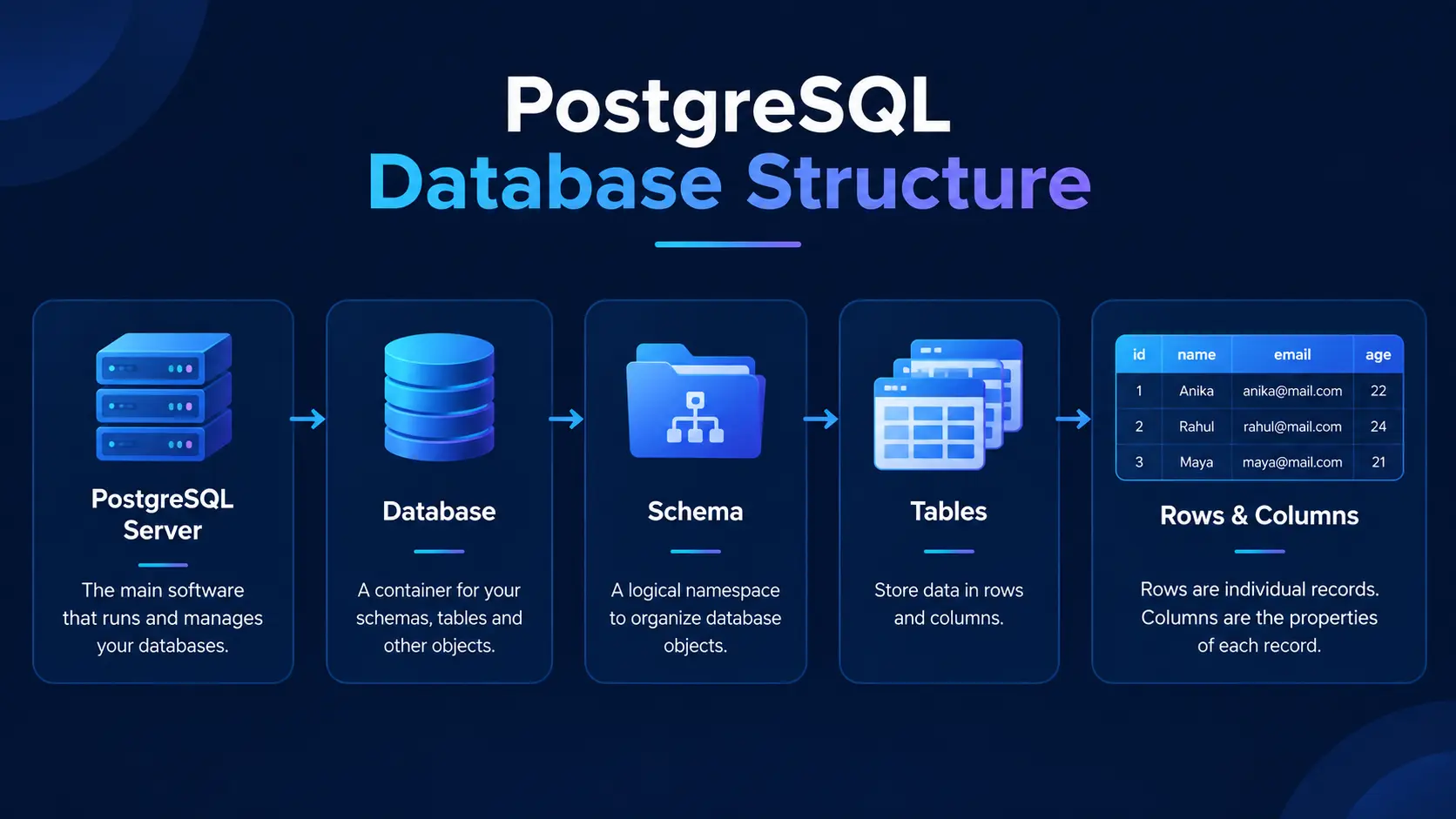
A simplified hierarchy looks like this:
PostgreSQL Server
       |
       +-- Database
              |
              +-- Schema
                     |
                     +-- Tables
                     |     |
                     |     +-- Rows
                     |     +-- Columns
                     |
                     +-- Views
                     +-- Functions
                     +-- Indexes
For example:
PostgreSQL
   |
   +-- ecommerce
          |
          +-- public
                |
                +-- customers
                +-- products
                +-- orders
A PostgreSQL installation can contain multiple databases.
A database can contain schemas, and schemas can contain tables and other database objects.
PostgreSQL Databases, Tables, Rows and Columns
Let's make this even simpler.
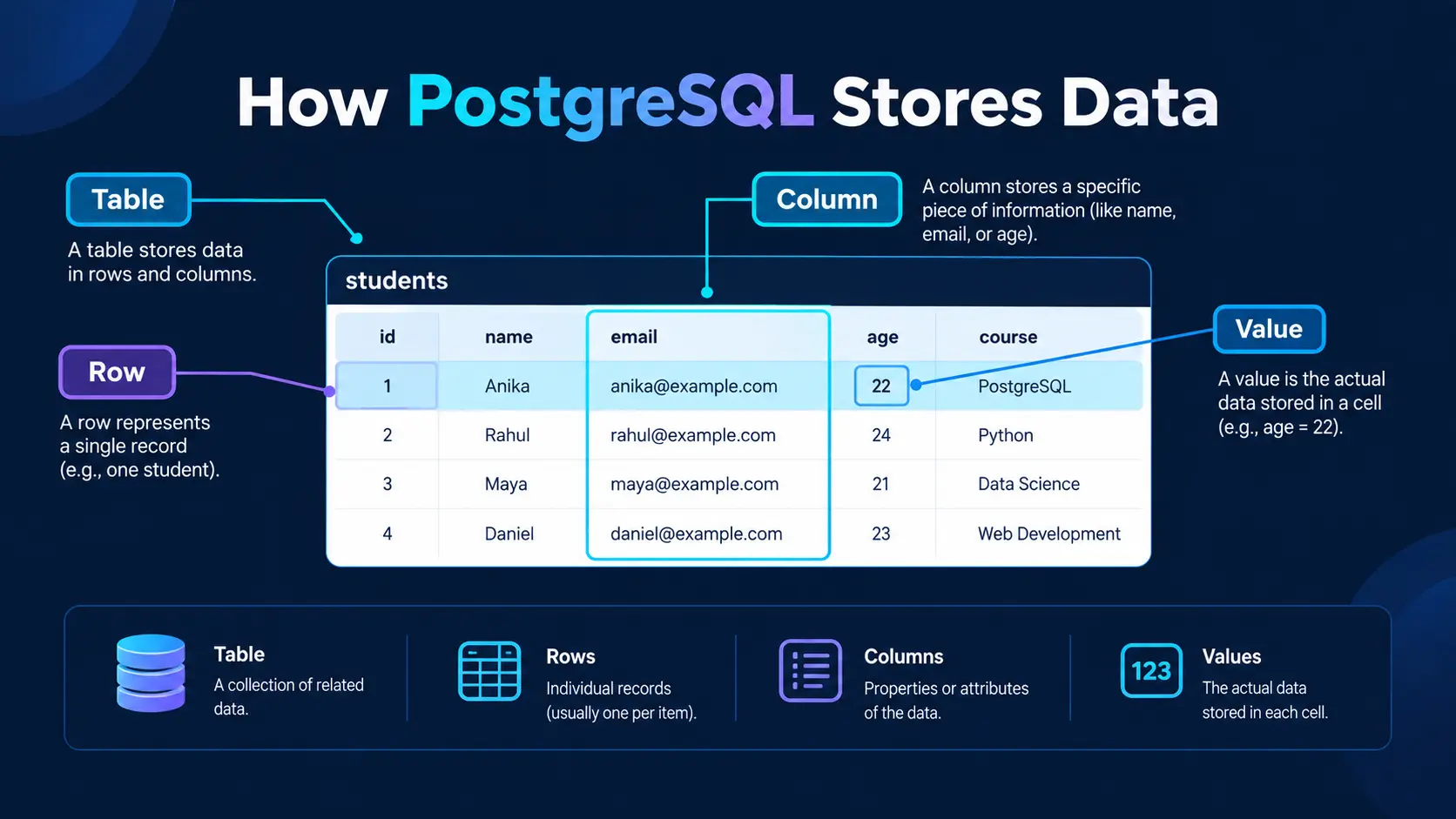
Imagine a spreadsheet containing student information.
The entire spreadsheet represents a table.
Each horizontal record is a row.
Each vertical field is a column.
For example:
students

+----+--------+---------------------+-------+
| id | name   | email               | age   |
+----+--------+---------------------+-------+
| 1  | Anika  | anika@example.com   | 22    |
| 2  | Rahul  | rahul@example.com   | 24    |
| 3  | Maya   | maya@example.com     | 21    |
+----+--------+---------------------+-------+
Here:
studentsis the tableid,name,email, andageare columnsEach student represents a row
This relational structure is one of the fundamental concepts behind PostgreSQL.
Installing PostgreSQL
Before running PostgreSQL commands, you need a PostgreSQL installation.
PostgreSQL can be installed on operating systems such as:
Windows
Linux
macOS
You can also use PostgreSQL through cloud database services or containers.
For beginners using Windows, the PostgreSQL installer provides the database server and commonly used tools such as pgAdmin.
pgAdmin provides a graphical interface for managing PostgreSQL databases.
SQLShack's beginner tutorial also demonstrates working with PostgreSQL through pgAdmin and its Query Tool.
Basic Installation Flow
The general process is:
Download PostgreSQL
       ↓
Run Installer
       ↓
Set Password
       ↓
Configure Port
       ↓
Install PostgreSQL
       ↓
Open pgAdmin or psql
       ↓
Create Database
The default PostgreSQL server port is commonly:
5432However, the port can be changed during configuration.
For installation guidance, see the W3Schools PostgreSQL installation tutorial.
PostgreSQL Tools: pgAdmin and psql
There are two common ways beginners interact with PostgreSQL.
pgAdmin
pgAdmin is a graphical administration tool.
It allows you to:
Create databases
Create tables
Run SQL queries
View records
Manage users
Inspect database objects
This can be useful when you are learning because you can see the database structure visually.
psql
psql is PostgreSQL's command-line interface.
For example:
psql -U postgresOnce connected, you can execute SQL commands directly.
For beginners, it is useful to learn both approaches.
pgAdmin makes database structures easier to visualize, while psql helps you become comfortable with the command line.
Creating Your First PostgreSQL Database
Let's create a simple database for an imaginary learning platform.
CREATE DATABASE learning_platform;To connect to it using psql:
\c learning_platformThe \c command is a psql command used to connect to a database.
You can then create your first table.
Creating a Table
Let's create a students table.
CREATE TABLE students (
    id SERIAL PRIMARY KEY,
    name VARCHAR(100) NOT NULL,
    email VARCHAR(255) UNIQUE NOT NULL,
    age INTEGER
);
Let's break this down.
id
id SERIAL PRIMARY KEYThe id column identifies each student.
PRIMARY KEY means the value must uniquely identify each row.
name
name VARCHAR(100) NOT NULLThis stores text up to the defined length.
NOT NULL means a value must be provided.
email VARCHAR(255) UNIQUE NOT NULLThe UNIQUE constraint prevents duplicate values in this column.
age
age INTEGERThis stores a whole number.
PostgreSQL Data Types
Choosing the correct data type is an important part of database design.
Some commonly used PostgreSQL data types include:
Data Type | Example | Typical Use |
|---|---|---|
INTEGER | 25 | Whole numbers |
BIGINT | 1000000 | Large whole numbers |
NUMERIC | 199.99 | Exact numeric values |
VARCHAR | "Anika" | Limited-length text |
TEXT | "Long description..." | Text |
BOOLEAN | TRUE | Yes/no values |
DATE | 2026-09-24 | Dates |
TIMESTAMP | 2026-09-24 10:30 | Date and time |
UUID | UUID value | Unique identifiers |
JSONB | JSON object | Structured JSON data |
PostgreSQL supports a broad range of data types, including numeric, text, date/time, Boolean, JSON/JSONB, UUID, and binary types.
Inserting Data into PostgreSQL
Once the table exists, you can insert records.
INSERT INTO students (name, email, age)
VALUES ('Anika', 'anika@example.com', 22);
You can insert multiple records at once:
INSERT INTO students (name, email, age)
VALUES
    ('Rahul', 'rahul@example.com', 24),
    ('Maya', 'maya@example.com', 21),
    ('Daniel', 'daniel@example.com', 23);
Now the table contains several students.
Reading Data with SELECT
The SELECT statement is one of the most important SQL commands.
To retrieve every column:
SELECT * FROM students;To retrieve specific columns:
SELECT name, email
FROM students;
You can also filter results.
SELECT *
FROM students
WHERE age > 21;
This returns students whose age is greater than 21.
Filtering Data with WHERE
The WHERE clause lets you specify conditions.
For example:
SELECT *
FROM students
WHERE name = 'Anika';
You can combine conditions:
SELECT *
FROM students
WHERE age >= 21
AND age <= 25;
You can also use operators such as:
=
>
<
>=
<=
<>
For example:
SELECT *
FROM students
WHERE age <> 22;
This retrieves students whose age is not 22.
Sorting Results with ORDER BY
Suppose you want to display students from youngest to oldest.
SELECT *
FROM students
ORDER BY age ASC;
For descending order:
SELECT *
FROM students
ORDER BY age DESC;
ASC means ascending.
DESC means descending.
Limiting Results
Sometimes an application only needs a specific number of records.
For example:
SELECT *
FROM students
LIMIT 5;
This returns up to five rows.
You can combine ORDER BY and LIMIT.
SELECT *
FROM students
ORDER BY age DESC
LIMIT 3;
This can be useful when retrieving things such as the latest posts, highest scores, or newest users.
PostgreSQL's querying capabilities include filtering, sorting, grouping, limiting results, and other SQL operations.
Updating Data
The UPDATE command changes existing records.
For example:
UPDATE students
SET age = 23
WHERE name = 'Anika';
The WHERE clause is extremely important.
Without a condition:
UPDATE students
SET age = 23;
you could update every row in the table.
A useful beginner habit is to always check the records with SELECT before performing an important UPDATE.
Deleting Data
The DELETE command removes records.
For example:
DELETE FROM students
WHERE name = 'Daniel';
Again, the WHERE condition matters.
Without it:
DELETE FROM students;PostgreSQL would attempt to delete all rows from the table.
Understanding CRUD
At this point, you have learned the four fundamental database operations.
They are commonly summarized as CRUD:
CRUD | SQL Command | Purpose |
|---|---|---|
Create | INSERT | Add data |
Read | SELECT | Retrieve data |
Update | UPDATE | Modify data |
Delete | DELETE | Remove data |
These operations appear in almost every application that interacts with a relational database.
For example, a student management application might:
Create → Register student
Read   → Display student profile
Update → Change student information
Delete → Remove student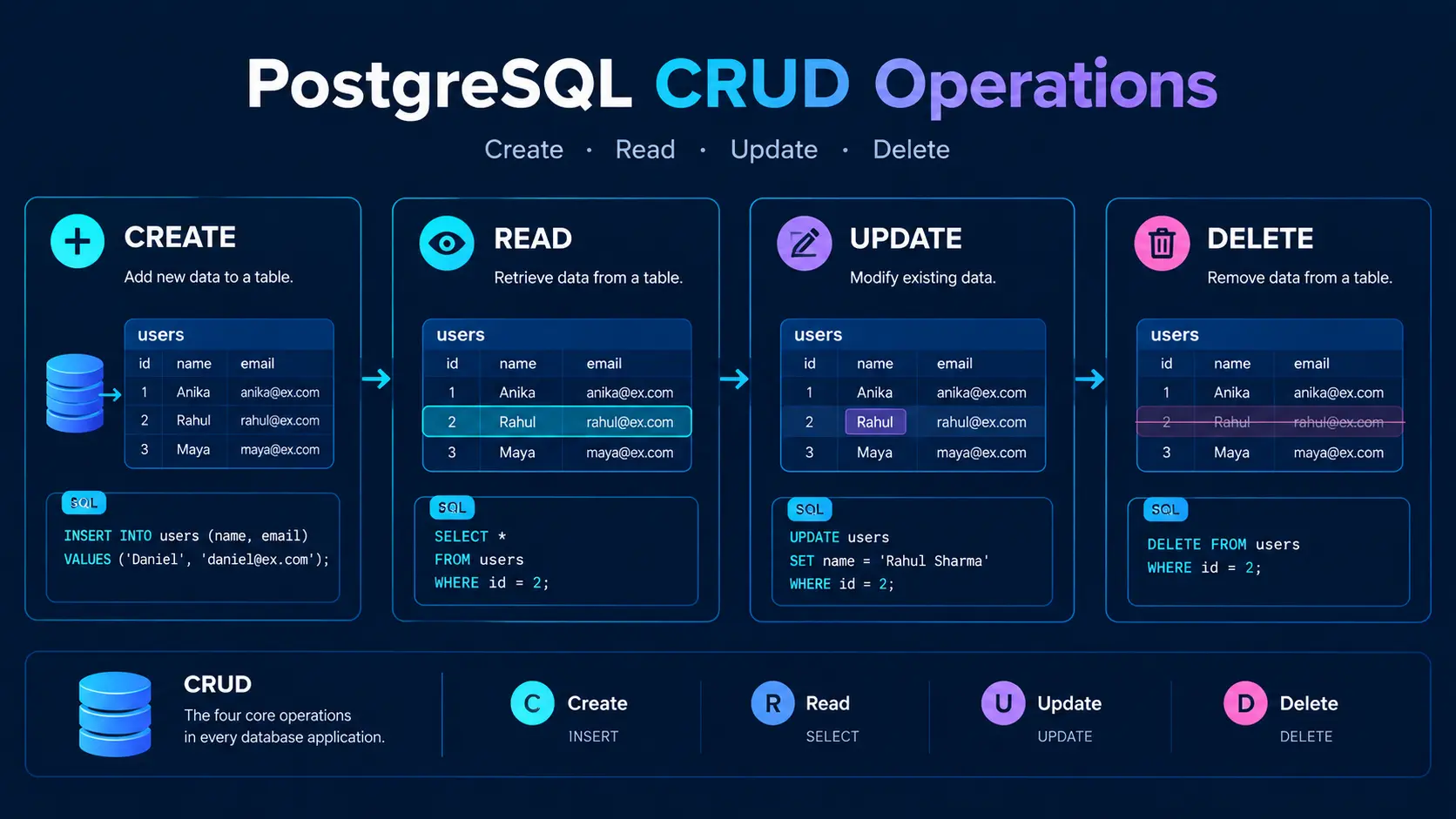
PostgreSQL Constraints
Constraints help PostgreSQL enforce rules on your data.
Some important constraints are:
PRIMARY KEY
Uniquely identifies a record.
id INTEGER PRIMARY KEYNOT NULL
Requires a value.
name VARCHAR(100) NOT NULLUNIQUE
Prevents duplicate values.
email VARCHAR(255) UNIQUECHECK
Enforces a condition.
age INTEGER CHECK (age >= 18)FOREIGN KEY
Creates a relationship between tables.
course_id INTEGER REFERENCES courses(id)Constraints help protect data integrity and prevent invalid records from entering the database.
Understanding Primary Keys and Foreign Keys
This is one of the most important concepts for beginners.
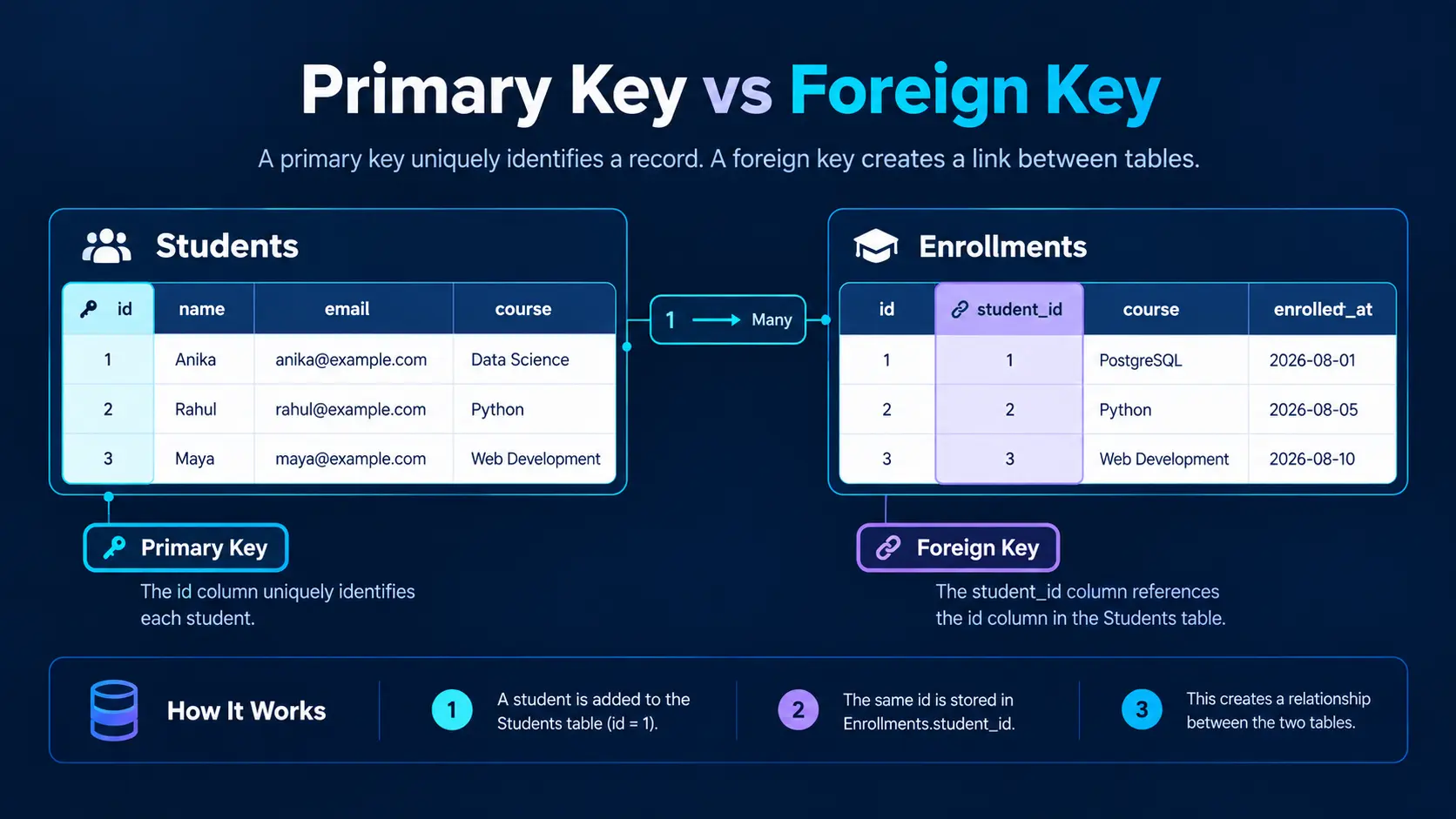
Imagine you have two tables:
Students
students
+----+--------+
| id | name   |
+----+--------+
| 1  | Anika  |
| 2  | Rahul  |
+----+--------+
Enrollments
enrollments
+----+------------+-----------+
| id | student_id | course    |
+----+------------+-----------+
| 1  | 1          | PostgreSQL|
| 2  | 2          | Python    |
+----+------------+-----------+
Here:
students.id
     ↓
enrollments.student_id
The students.id column is the primary key.
The student_id column in enrollments can be a foreign key referencing it.
This relationship allows PostgreSQL to connect information stored in separate tables.
What Are Joins in PostgreSQL?
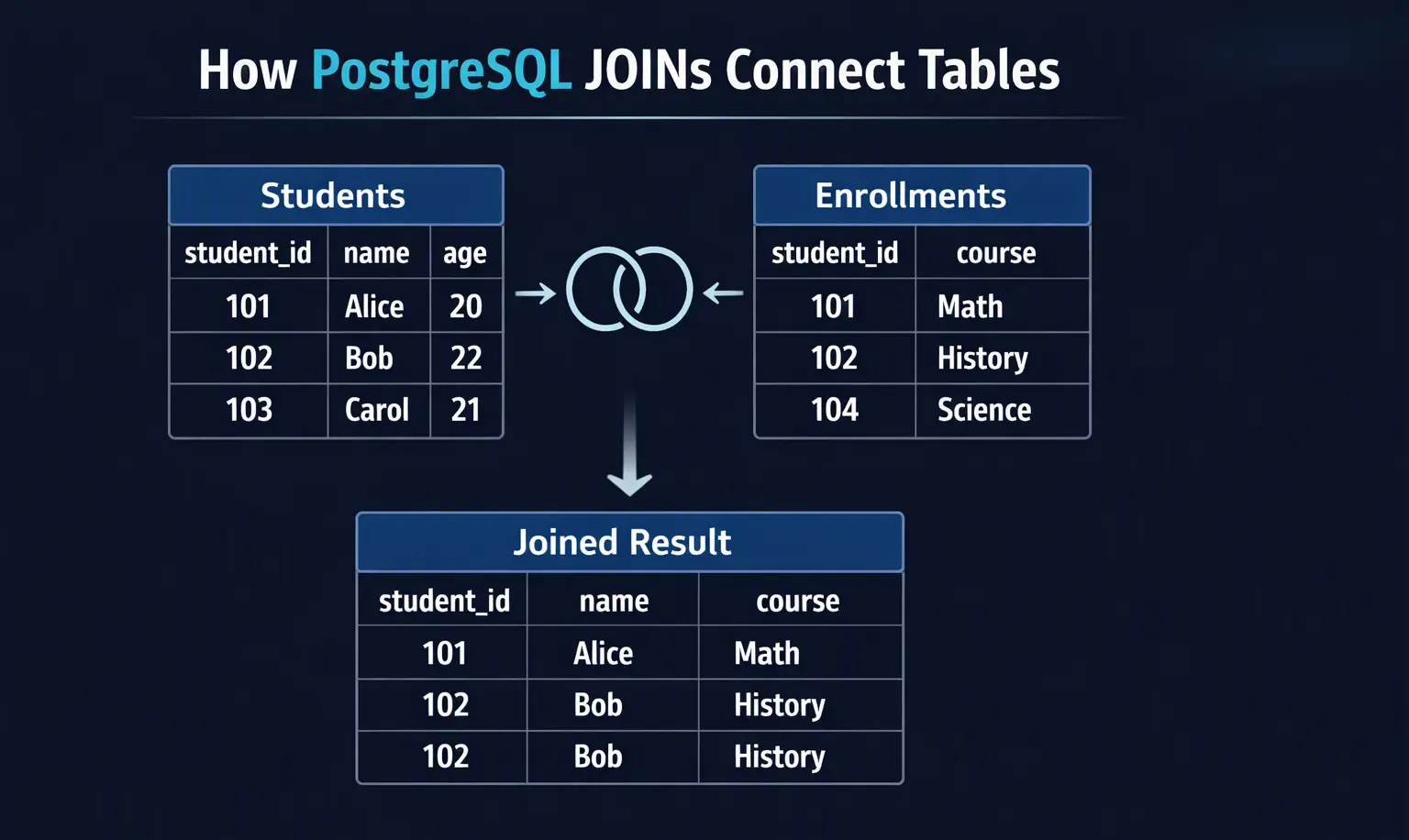
A JOIN allows you to retrieve related information from multiple tables.
For example:
SELECT
    students.name,
    enrollments.course
FROM students
JOIN enrollments
    ON students.id = enrollments.student_id;
The result could look like:
+--------+-------------+
| name   | course      |
+--------+-------------+
| Anika  | PostgreSQL  |
| Rahul  | Python      |
+--------+-------------+
Instead of storing all information in one giant table, relational databases can divide information into logical tables and connect them through relationships.
Common PostgreSQL joins include:
INNER JOIN
LEFT JOIN
RIGHT JOIN
FULL OUTER JOIN
SELF JOIN
SQLShack's beginner PostgreSQL material also introduces JOIN operations as part of working with multiple related tables.
What Is a PostgreSQL Schema?
A schema is a logical namespace used to organize database objects.
For example:
learning_platform
│
├── public
│     ├── students
│     ├── courses
│     └── enrollments
│
└── reporting
      ├── student_summary
      └── course_statistics
The public schema is commonly used by default.
Schemas become particularly useful when a database contains many objects or when different applications or teams need logical separation.
What Are PostgreSQL Indexes?
Imagine you have a table containing millions of users.
If you frequently search for users by email:
SELECT *
FROM users
WHERE email = 'anika@example.com';
PostgreSQL may benefit from an index on the email column.
For example:
CREATE INDEX idx_users_email
ON users(email);
An index is a data structure that can help PostgreSQL find matching records more efficiently.
However, indexes are not free.
They consume storage and can add overhead to data modifications.
Therefore, indexes should be created based on actual query patterns rather than simply indexing every column.
DigitalOcean's current PostgreSQL guide covers indexing strategies alongside database design and performance considerations.
What Is MVCC in PostgreSQL?
MVCC stands for Multi-Version Concurrency Control.
The concept can sound complicated, but the basic idea is easier to understand.
Imagine two users are accessing the same database at approximately the same time.
One user is reading data while another user updates it.
PostgreSQL uses MVCC to manage different versions of rows so that transactions can work concurrently without every read being blocked by a write.
This is one reason PostgreSQL can support multiple concurrent users and transactions.
You do not need to understand every internal detail of MVCC when starting out, but knowing that PostgreSQL uses it helps explain how concurrent database operations work.
PostgreSQL's MVCC approach is documented as one of its core concurrency features.
Transactions in PostgreSQL
A transaction groups multiple database operations together.
For example:
BEGIN;

UPDATE accounts
SET balance = balance - 500
WHERE id = 1;

UPDATE accounts
SET balance = balance + 500
WHERE id = 2;

COMMIT;
If everything succeeds, COMMIT makes the transaction permanent.
If something goes wrong, you can use:
ROLLBACK;This is important for operations where partial changes could cause inconsistent data.
For example:
Account A
   -500
     ↓
Account B
   +500
You would generally want both operations to succeed together.
PostgreSQL and MySQL: Basic Difference
PostgreSQL and MySQL are both widely used relational database systems.
They both use SQL and support common database operations.
However, they have differences in areas such as:
Area | PostgreSQL | MySQL |
|---|---|---|
Database model | Relational/object-relational | Relational |
SQL support | Strong SQL standards support plus extensions | SQL with its own features |
JSON support | JSON and JSONB | JSON |
Extensibility | Highly extensible | Extensible through its ecosystem |
Indexing | Multiple index types | Multiple index types |
Concurrency | MVCC-based | Depends on storage engine |
Use cases | Web apps, analytics, complex applications, enterprise systems | Web applications, transactional workloads, many general-purpose systems |
The choice between PostgreSQL and MySQL depends on the application's requirements, existing infrastructure, team knowledge, workload, and required features.
DigitalOcean's 2026 PostgreSQL guide discusses PostgreSQL and MySQL across areas such as SQL support, storage architecture, extensibility, performance, replication, and community.
PostgreSQL in Modern Web Applications
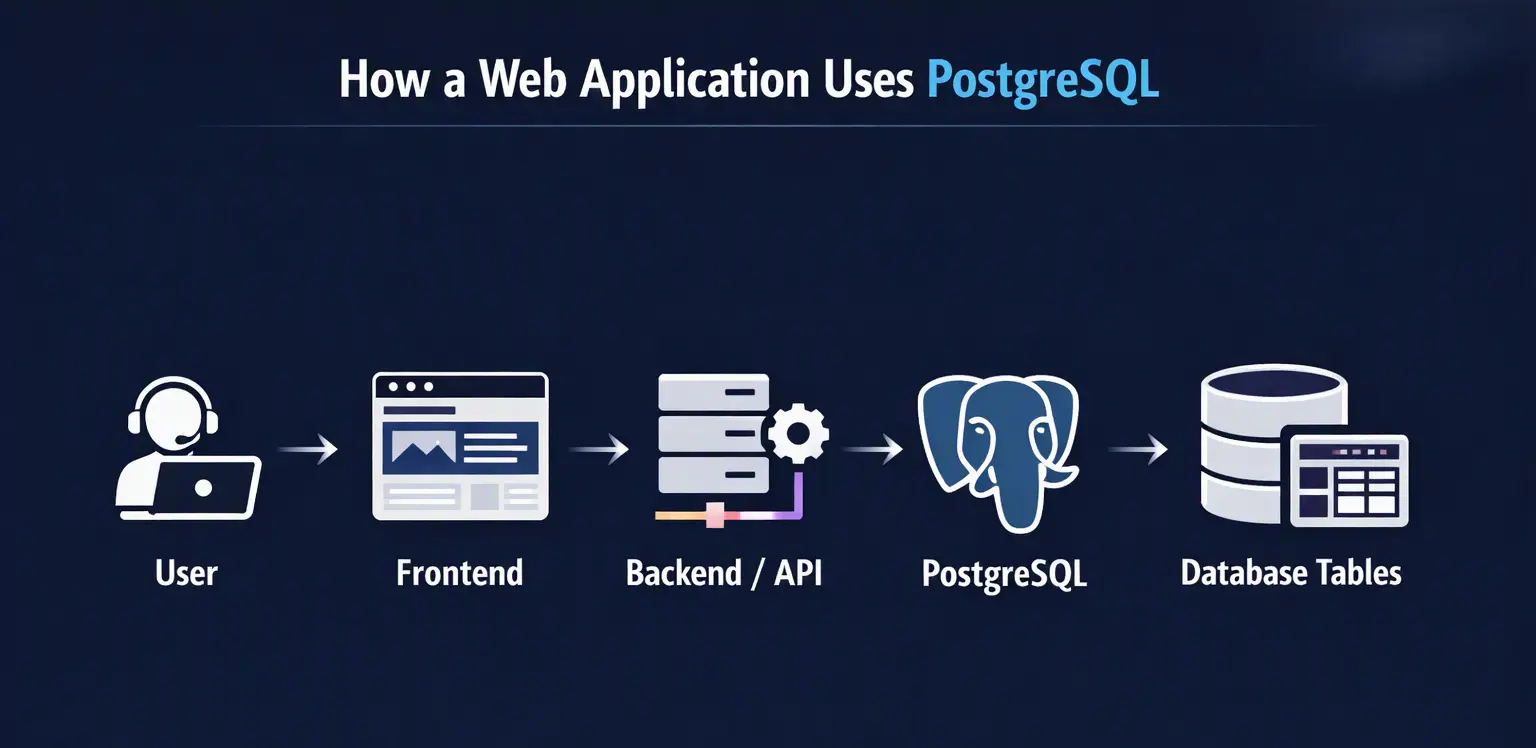
PostgreSQL is commonly used as the backend database for web applications.
A simplified architecture might look like this:
User
  ↓
Frontend
  ↓
Backend / API
  ↓
PostgreSQL
  ↓
Tables and Data
For example, imagine a React application.
The user submits a registration form.
The request might travel like this:
React Form
    ↓
POST /api/register
    ↓
Backend
    ↓
SQL Query
    ↓
PostgreSQL
    ↓
User Record Created
PostgreSQL therefore usually sits behind the application's backend rather than being accessed directly by a browser.
PostgreSQL and Backend Frameworks
PostgreSQL works with many programming languages and backend frameworks.
For example:
JavaScript / TypeScript
Commonly used with:
Node.js
Express
Next.js
NestJS
Python
Commonly used with:
Django
Flask
FastAPI
Java
Commonly used with:
Spring Boot
Hibernate
PHP
Commonly used with:
Laravel
Symfony
Applications can communicate with PostgreSQL using database drivers, libraries, ORMs, or query builders.
For example, a Node.js backend might use a PostgreSQL client or an ORM such as Prisma.
Common PostgreSQL Commands for Beginners
Here is a small cheat sheet worth saving.
Create database
CREATE DATABASE my_database;Connect using psql
\c my_databaseCreate table
CREATE TABLE users (
    id SERIAL PRIMARY KEY,
    name VARCHAR(100),
    email VARCHAR(255)
);
Insert data
INSERT INTO users (name, email)
VALUES ('Anika', 'anika@example.com');
Read data
SELECT * FROM users;Filter data
SELECT *
FROM users
WHERE name = 'Anika';
Update data
UPDATE users
SET name = 'Anika Sharma'
WHERE id = 1;
Delete data
DELETE FROM users
WHERE id = 1;
Create index
CREATE INDEX idx_users_email
ON users(email);
Delete table
DROP TABLE users;Exit psql
\qThese commands cover a large portion of the basic workflow a beginner needs to understand before moving to more advanced PostgreSQL topics.
PostgreSQL Best Practices for Beginners
As you start building projects, keep these habits in mind.
1. Use meaningful table and column names
Prefer:
students
course_enrollments
created_at
over unclear names such as:
data1
table2
x
2. Use constraints
Do not rely entirely on application code to maintain data integrity.
Use appropriate:
Primary keys
Foreign keys
UNIQUE constraints
NOT NULL constraints
CHECK constraints
3. Be careful with DELETE and UPDATE
Always check your WHERE condition.
Before:
DELETE FROM users
WHERE id = 5;
you can verify:
SELECT *
FROM users
WHERE id = 5;
4. Don't create unnecessary indexes
Indexes can improve reads but also add storage and maintenance overhead.
Create them based on actual access patterns.
5. Learn SQL before depending entirely on an ORM
Tools such as Prisma, Sequelize, SQLAlchemy, and Hibernate can make application development easier.
However, understanding SQL helps you understand what your application is actually doing.
6. Protect database credentials
Never hard-code production database passwords inside source code.
Use environment variables or a secure secrets-management system.
Common PostgreSQL Beginner Mistakes
Mistake 1: Confusing PostgreSQL with SQL
Remember:
SQL is a language. PostgreSQL is a database system that implements SQL.
Mistake 2: Forgetting WHERE
This:
UPDATE users
SET status = 'active';
can modify every row.
Mistake 3: Using the wrong data type
For example, storing dates as arbitrary text makes date operations harder.
Use appropriate types such as:
DATE
TIMESTAMP
TIMESTAMPTZ
when appropriate.
Mistake 4: Avoiding relationships
Putting everything into one huge table can create duplication and make data harder to maintain.
Relational database design uses tables and relationships to organize information.
Mistake 5: Creating indexes everywhere
More indexes do not automatically mean better performance.
Index according to actual query patterns.
A Simple PostgreSQL Learning Roadmap
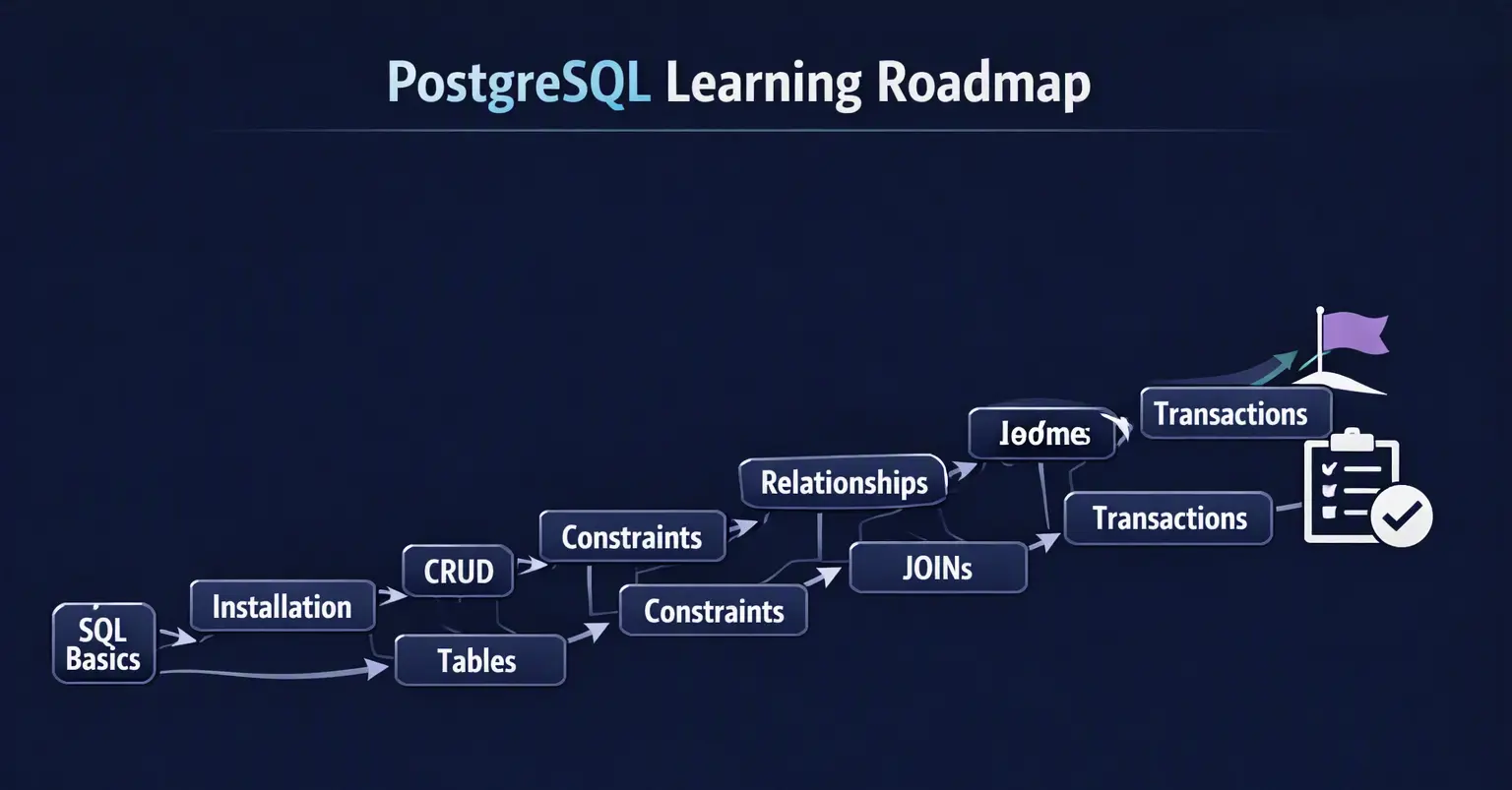
If you are completely new to PostgreSQL, you do not need to learn everything at once.
Follow this order:
1. Learn basic SQL
        ↓
2. Install PostgreSQL
        ↓
3. Learn databases and tables
        ↓
4. Learn data types
        ↓
5. Practice INSERT
        ↓
6. Practice SELECT
        ↓
7. Learn WHERE and ORDER BY
        ↓
8. Learn UPDATE and DELETE
        ↓
9. Learn PRIMARY KEY and FOREIGN KEY
        ↓
10. Learn JOINs
        ↓
11. Learn GROUP BY and aggregate functions
        ↓
12. Learn indexes
        ↓
13. Learn transactions
        ↓
14. Learn PostgreSQL security
        ↓
15. Build a real project
A good beginner project could be a:
Student management system
Blog application
E-commerce database
Course management system
Expense tracker
Employee management system
The goal is not just to memorize commands.
The goal is to understand how an application stores and retrieves real information.
Frequently Asked Questions
1. Is PostgreSQL difficult for beginners?
The basic concepts are approachable if you already understand simple SQL ideas. Start with tables, columns, rows, SELECT, INSERT, UPDATE, and DELETE, then gradually move into relationships, joins, indexes, and transactions.
2. Is PostgreSQL SQL or NoSQL?
PostgreSQL is fundamentally a SQL-based relational database system. It also supports data formats such as JSON and JSONB, which means applications can work with some semi-structured data inside PostgreSQL.
3. Is PostgreSQL free?
Yes. PostgreSQL is open-source software distributed under the PostgreSQL License.
4. What is pgAdmin?
pgAdmin is a graphical administration and development tool for PostgreSQL. It allows you to manage databases, create tables, run SQL queries, and inspect database objects.
5. What port does PostgreSQL use?
PostgreSQL commonly uses port 5432, although the configured port can be changed.
6. Is PostgreSQL the same as MySQL?
No. Both are relational database systems that use SQL, but they have different architectures, features, ecosystems, and capabilities.
7. Can PostgreSQL store JSON?
Yes. PostgreSQL provides JSON and JSONB data types. JSONB stores JSON data in a binary representation designed for efficient processing and indexing.
8. What should I learn before PostgreSQL?
Basic SQL concepts are helpful. You should understand ideas such as tables, rows, columns, SELECT, WHERE, and basic data types.
Conclusion
PostgreSQL is much more than a place to store rows of data.
It provides a complete relational database platform for building applications that need structured data, relationships, transactions, security, querying, indexing, and reliable data management.
For beginners, the most important concepts to understand first are:
What a database is
What PostgreSQL is
How tables work
Rows and columns
Data types
SQL queries
CRUD operations
Primary and foreign keys
Constraints
JOINs
Schemas
Indexes
Transactions
Once these fundamentals become familiar, you can move into more advanced areas such as query optimization, database security, replication, backups, high availability, extensions, stored procedures, advanced indexing, and PostgreSQL deployment in the cloud.
The best way to learn PostgreSQL is to build something with it.
Create a database, design a few tables, insert some records, write queries, connect those tables with relationships, and then connect the database to a real application.
That is where PostgreSQL starts to become much easier to understand.
Ready to go deeper?
Professional Training
Hands-on, mentor-led training aligned with industry certifications.
About the Author
Sharper every day
Daily tutorials, analysis, and career playbooks across all 12 Xcademia disciplines, straight to your inbox. No spam.