
Vwork and Gigabud: How Attackers Are Abusing Android App Cloning
Group-IB has uncovered how the Gigabud Android banking trojan uses Vwork, a modified open-source app cloner, to isolate cloned banking apps and evade security controls during fraudulent transactions.
Xcademia Team
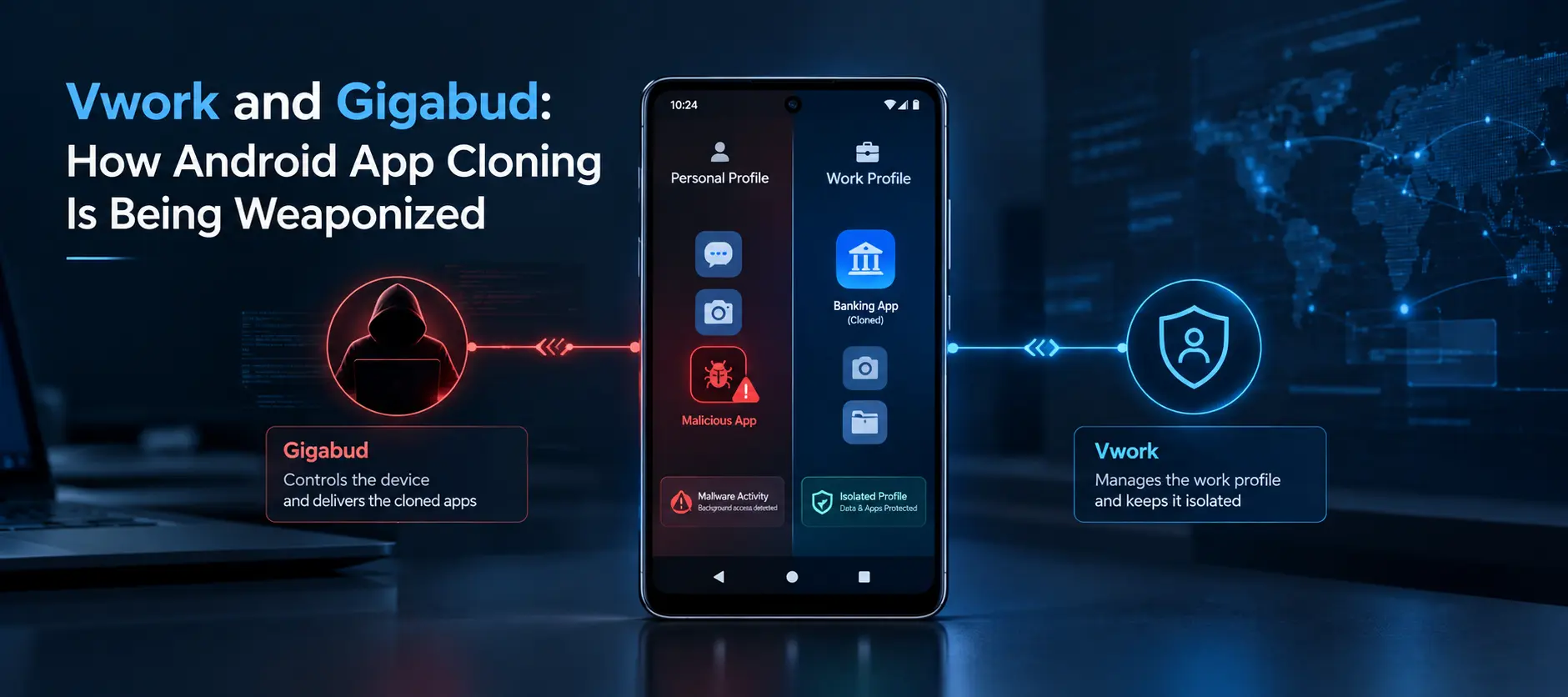
How Gigabud Uses Vwork in an Android Banking Attack
Android banking malware is increasingly finding ways to operate around the security controls designed to detect it.
A recent investigation by cybersecurity company Group-IB has uncovered a notable example involving Gigabud, an Android remote access banking trojan, and Vwork, an application derived from the open-source Android app cloner Shelter.
The research shows that Vwork is not simply another application found on an infected device. Instead, Group-IB observed Vwork being installed shortly after Gigabud infections and found Gigabud samples specifically designed to interact with it.
The two tools serve different purposes within the same attack chain. Gigabud provides remote control over the victim's Android device, while Vwork helps create an isolated Android Work Profile where applications can be cloned.
This separation can make malicious activity harder for security systems to connect to the original malware infection.
What is Gigabud?
Gigabud is an Android remote access banking trojan that has been active since 2022. According to Group-IB, attacks involving the malware have been observed across Southeast Asia, South Asia, the Middle East, Africa and Latin America.
Group-IB attributes Gigabud's development to the GoldFactory group.
The malware has used different social engineering lures depending on the target region. These have included impersonation of national airlines, tax authorities and government portals.
After installation, Gigabud asks victims for powerful permissions, including Accessibility access, permission to draw over other applications and exemption from battery-saving restrictions.
Once those permissions are granted, the malware operator can remotely control the device.
What is Vwork?
Vwork is a modified version, or fork, of Shelter, an open-source Android application that uses the Android Work Profile feature to create an isolated application environment.
Shelter is designed to be operated by the device owner through its user interface.
Vwork changes this model.
Instead of relying primarily on manual interaction, Vwork exposes application-management functions through an API. This allows another application to control activities such as work-profile provisioning and application cloning.
Group-IB's investigation found that this functionality is being used together with Gigabud.
Vwork does not contain its own command-and-control communication system. It therefore relies on an external application installed on the same device.
In the observed attack chain, that external application is Gigabud.
How the Gigabud and Vwork Attack Chain Works
The investigation describes a multi-stage process that begins with social engineering and ends with fraudulent transactions.
1. Delivery through social engineering
Victims are encouraged to install malicious applications through phishing websites, direct messaging applications or social media.
The fake applications can be disguised as legitimate services, including airline, tax authority or government applications.
The malware is installed outside official application stores.
2. Powerful permissions are requested
When Gigabud launches, it requests Accessibility access and other permissions that enable it to interact with the device.
Accessibility access is particularly important because it gives the operator extensive control over the Android device.
3. The malware inventories the device
Gigabud sends information about installed applications to its operator.
This allows attackers to identify which banking applications are present instead of attempting to target every possible financial application.
The malware then establishes communication with its operator's server and waits for instructions.
4. Banking credentials are targeted
When the victim opens a legitimate banking application, Gigabud can display a fake login interface over the real application.
Information entered by the victim can then be captured.
Group-IB also describes a separate invisible overlay that captures the device's lock-screen code.
5. Vwork is installed and used for cloning
The next stage introduces Vwork.
The operator instructs Gigabud to install Vwork and use it to clone a selected application into the Android Work Profile.
Group-IB confirmed cases where the cloned environment involved a fake version of a real Indonesian bank's application.
6. Fraudulent transactions are performed
With remote control of the device and, where applicable, a cloned banking application, the operator can conduct transactions.
A black screen can hide activity from the victim while the attacker operates the device.
The cloned environment also serves another purpose: it can separate the fraudulent activity from the original malware environment and potentially allow transactions to bypass existing monitoring controls if the environment is not detected.

Why Android Work Profiles Matter
The central security issue identified by Group-IB is the separation between Android profiles.
Applications installed in one Android profile are generally isolated from applications in another profile. This can be particularly important for signature-based malware detection.
That creates an opportunity for attackers.
In the scenario described by Group-IB, the malware first exists in the phone's personal profile. The attacker does not necessarily need to conduct the final fraudulent transaction from that same environment.
Instead, Vwork can create a separate work profile and clone the targeted banking application into it.
The result is a separation between the environment where the malware was initially detected and the environment where the banking transaction takes place.
From a security system's perspective, this can create a difficult relationship to establish.
The original malware activity may generate a security signal in the personal profile. However, the newly created work profile may not produce the same malware detection signal.
The transaction can consequently appear to originate from a different application environment.
This does not mean every work profile is malicious. Android Work Profile technology has legitimate uses, particularly for separating work applications and data from personal applications.
The concern identified by Group-IB is the unexpected creation and use of such an isolated environment on a consumer device, particularly when it occurs alongside other suspicious signals.
Technical Differences Between Shelter and Vwork
Group-IB's technical analysis found strong evidence that Vwork is a fork of Shelter.
The analyzed sample appeared to be under active development, with some newly introduced functionality still unstable on AOSP-like Android builds.
At the same time, researchers identified several OEM-specific code branches that appeared to address issues inherited from the upstream Shelter codebase.
The important differences include several changes that make Vwork more suitable for application-controlled cloning.
Cross-profile communication changes
Shelter's cross-profile intent signatures were removed in Vwork.
This allows applications to interact with Vwork more freely.
File exchange modifications
Shelter's cross-profile file exchange mechanism was changed so that Vwork provides read and write file capabilities to applications within the same profile.
Sideloading and Accessibility changes
Vwork ensures that sideloading is permitted and restricts its Accessibility service within the provisioned profile.
New exported components
Vwork introduces two exported components exposing four primary actions:
Starting work-profile provisioning
Cloning applications
Listing cloned applications
Opening arbitrary applications
These capabilities are significant because they allow external software to interact with the cloning functionality.
External authorization
Vwork's cloning capability requires authorization through an external server.
The authorization flow uses a server address and token supplied by a third-party application, along with the package name of the application that should be cloned.
Group-IB found that Gigabud contains logic associated with obtaining this authorization token from an exfiltration server.

Vwork Was Designed to Be Less Visible
The modifications to Vwork are not limited to functionality.
Group-IB also observed changes that reduce how visible the application is to the device owner.
Compared with Shelter, Vwork simplifies the work-profile setup process into a single-screen prompt.
The application icon is also not displayed in the launcher after installation.
However, Vwork can still be identified through the device's file manager because it continues to function as a document provider.
The user interface retains much of Shelter's underlying architecture but is trimmed and translated into Chinese.
The terminology is also changed from work-profile language toward the concept of a virtual space.
Internal settings controls are no longer exposed through the Vwork interface. Instead, they are delegated to external applications.
Taken together, these changes support Group-IB's conclusion that Vwork was deliberately modified to move application cloning from a user-controlled feature toward functionality that can be controlled by third-party software.
How Gigabud Interacts With Vwork
The relationship between the two applications is reinforced by changes found inside Gigabud.
Some Gigabud samples identified during Group-IB's earlier "Hook for Gold" research were observed to reference the Vwork package name:
net.yy.vwork
The samples also contained an older Android package-query permission.
More importantly, researchers found explicit logic for interacting with Vwork.
Existing Gigabud functionality related to application inventories and application opening had dedicated branches for Vwork.
Package names were also formatted with a vwa- prefix in command-and-control messages.
Group-IB identified three new command-and-control commands primarily associated with Vwork:
initVwacloneAppuploadCloneApps
The cloneApp operation relies on Vwork's external authorization mechanism.
Gigabud contains logic to obtain the required token, indicating that the infrastructure associated with the malware can support Vwork authorization.
These technical links provide additional evidence that Vwork and Gigabud are designed to work together rather than being unrelated applications found on the same devices.
GoldFactory Attribution
Group-IB detected Vwork in the wild within the "Hook for Gold" campaign, which the company attributes to GoldFactory.
The technical analysis also identified a dedicated Vwork code branch referencing Gigabud package names, overlapping network indicators and developer logs written in Chinese.
Group-IB says some of these indicators are sensitive and therefore are not publicly disclosed.
Based on the available technical evidence, the researchers conclude that Gigabud is not merely compatible with Vwork. They assess that both tools were developed or customized by the GoldFactory group.
This is important because it demonstrates how a threat actor can combine separate software components into a coordinated attack system.
Rather than building every capability from scratch, attackers can modify legitimate or open-source software and integrate it with existing malware.

Detection and Prevention
The research suggests that defenders should not rely only on traditional malware signatures.
One of the earliest warning signs can occur before credential theft or fraudulent transactions.
An unexpected isolated work profile appearing on a consumer phone can be suspicious, particularly when it is accompanied by other unusual behavior.
Group-IB identifies several behavioral indicators:
An isolated work profile appearing on a device where the user did not intend to create one.
Identical banking application installation markers across different profiles.
A clean isolated environment containing few or none of the user's normal applications, such as banking, messaging or social applications.
Accessibility access being enabled for an application that would not normally require it.
Device-management functionality being used to give an application broad control over other applications without an expected approval process.
An unexpected application being installed from a non-legitimate source shortly after another application installation.
The key point is correlation.
A single indicator may not establish that a device is compromised. Multiple signals appearing together provide a stronger indication that the device environment may be involved in malicious activity.
Group-IB says its Fraud Protection platform correlates these signals and treats the appearance of two or more signals in sessions as high risk, with the ability to block a transaction directly.
The company also describes device binding and key-signing controls as separate mechanisms that can prevent stolen login information from being used to authorize transactions on an attacker-controlled device.
What This Means for Banks and Security Teams
The Vwork and Gigabud combination highlights a broader industry shift toward behavior-based detection.
Attackers do not always need to create completely new malware capabilities. They can also repurpose legitimate operating-system functions and open-source software.
For banks, this creates a challenge because the malicious behavior may be distributed across different components.
The initial malware infection, application cloning and final fraudulent transaction may occur in different application environments.
A security system that evaluates these events independently may have difficulty identifying their relationship.
For defenders, the research suggests that application installation events, profile creation, Accessibility permissions, cloned applications and transaction behavior can provide valuable context when analyzed together.
The development also demonstrates why security teams need to consider the operating-system environment around a banking application, rather than focusing only on the banking application itself.
What Android Users Should Watch For
For everyday users, the most important warning signs are unexpected changes to the device.
Users should be cautious if an unfamiliar application requests powerful permissions, particularly Accessibility access, without a clear reason.
Unexpected applications installed from outside official app stores should also receive additional scrutiny.
An unfamiliar work profile or virtual application environment appearing without the user's knowledge is another potentially important warning sign.
Users should avoid installing applications received through suspicious links, messages or social media posts, particularly when the application claims to represent a government service, airline or financial institution.
The Group-IB findings also reinforce the importance of keeping financial applications within trusted environments and paying attention to unusual device behavior.
The Bigger Security Lesson
The Vwork case illustrates a broader problem in modern mobile security.
Security technologies often depend on signals that appear within a particular application, profile or device environment.
Attackers can attempt to weaken those signals by moving activity into another environment.
In this case, Vwork provides the mechanism for creating an isolated Android Work Profile, while Gigabud supplies the remote-control capability and coordinates the process.
That division of responsibilities makes the attack chain more difficult to understand if individual events are viewed separately.
It also shows the risks associated with weaponizing legitimate open-source software.
Shelter itself is not presented by Group-IB as malware. The security concern comes from how its underlying functionality was modified and integrated into a malicious ecosystem.
For enterprises and financial institutions, this could mean that security monitoring needs to look beyond known malicious applications and consider unusual combinations of otherwise legitimate operating-system capabilities.
Conclusion
Group-IB's discovery of Vwork adds another layer to the understanding of the Gigabud Android banking malware ecosystem.
The investigation shows how GoldFactory-linked activity combines remote device control with application cloning and Android Work Profile isolation.
The important innovation is not simply the use of a cloned banking application. It is the separation between the environment where malware is detected and the environment where fraudulent activity can later occur.
Vwork's relationship with Shelter also demonstrates how open-source software can be modified and repurposed for malicious objectives.
For defenders, the findings underline the value of behavioral correlation.
Unexpected profile creation, suspicious application installation, Accessibility permissions, application cloning and financial activity can become much more meaningful when analyzed as connected events rather than isolated alerts.
The research ultimately points to a fundamental security challenge: legitimate operating-system features can become part of sophisticated attack chains when threat actors find ways to automate and weaponize them.
Source: Group-IB
About the Author