
TerminalFix Campaign Uses Fake CAPTCHA to Deploy Reverse Tunnel Across Enterprise Networks
Microsoft has uncovered a TerminalFix campaign that uses fake CAPTCHA pages to trick users into executing PowerShell commands, followed by DLL sideloading, hidden payloads, persistence, Active Directory reconnaissance and a reverse tunnel.
Xcademia Team
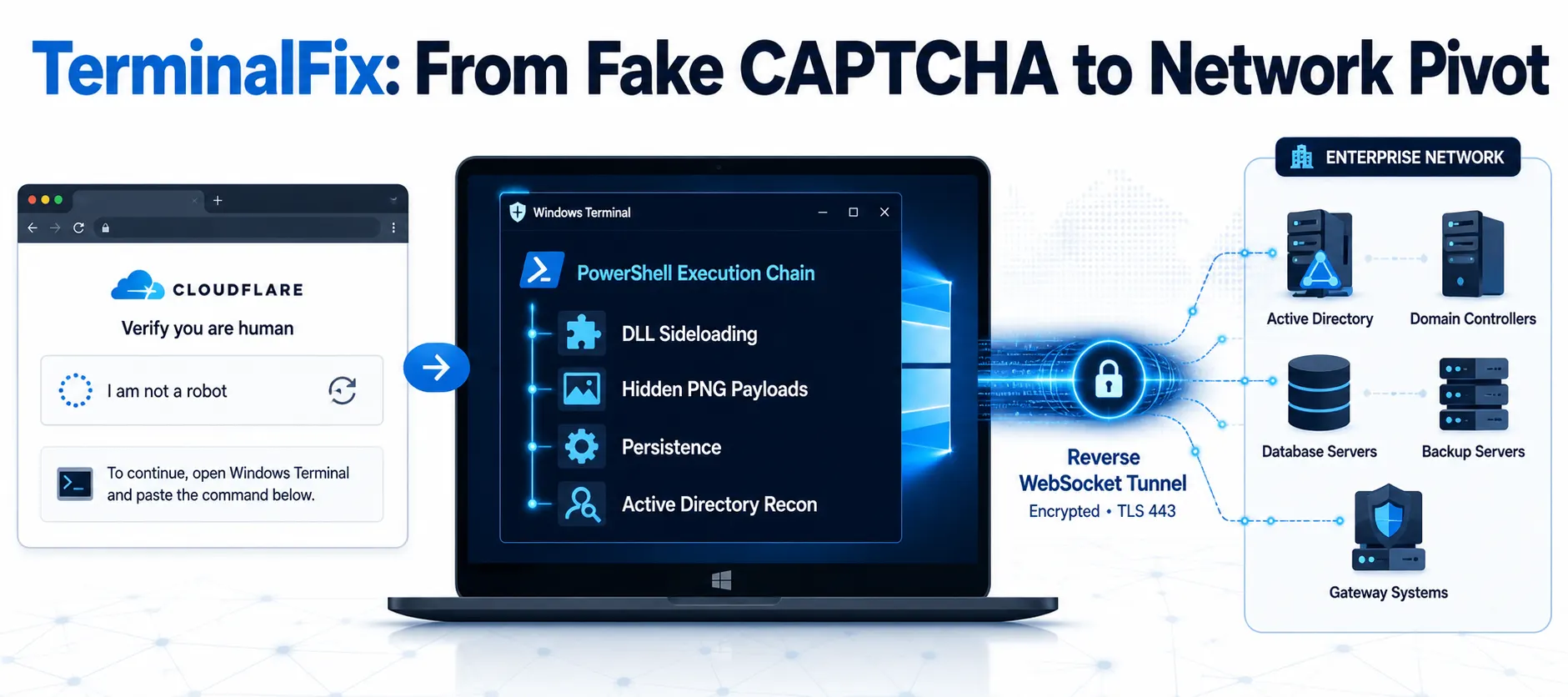
TerminalFix Campaign Turns a Fake CAPTCHA Into Enterprise Network Access
Microsoft Threat Intelligence has detailed a new TerminalFix campaign, a variant of the increasingly observed ClickFix social-engineering technique. The campaign targets organisations across multiple industries by using compromised websites and fake Cloudflare CAPTCHA verification prompts to persuade users to execute malicious PowerShell commands.
What makes TerminalFix particularly notable is what happens after the initial user interaction.
Rather than stopping after delivering a conventional infostealer, the observed campaign builds a multi-stage intrusion chain involving PowerShell, DLL sideloading, steganography, persistence, Active Directory reconnaissance and a custom reverse WebSocket tunnel.
The final reverse tunnel can provide the attacker with SOCKS-style access to systems reachable from the compromised machine, potentially turning that endpoint into a network pivot point. Microsoft says it did not observe the downstream actions described in its analysis occurring in the examined chain.
How the TerminalFix Attack Begins
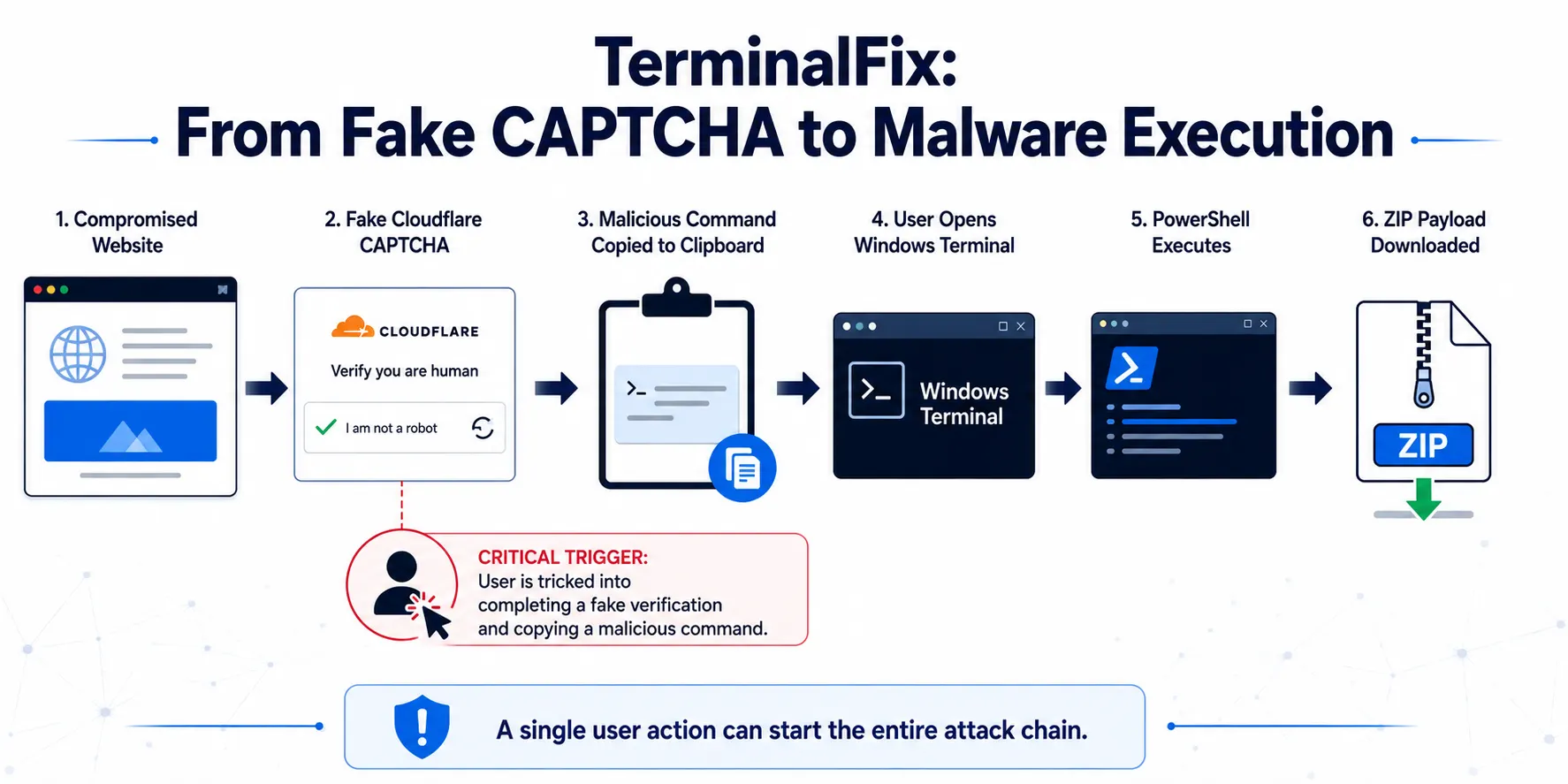
The campaign starts with a compromised website displaying a fake Cloudflare Turnstile CAPTCHA overlay.
The page attempts to make the verification process appear legitimate. Instead of simply asking the visitor to click a checkbox, the malicious page ultimately guides the user towards opening Windows Terminal or PowerShell and pasting a command.
This is an evolution of the broader ClickFix technique.
Traditional ClickFix campaigns have commonly instructed victims to paste commands into the Windows Run dialog. TerminalFix instead directs users towards Windows Terminal or PowerShell, allowing a more complex, multi-line command sequence to be executed.
The social-engineering component is therefore critical. The attacker does not initially need to exploit a software vulnerability. The user is persuaded to perform an action that initiates the intrusion.
PowerShell Delivers the First Payload
Once the user pastes the command, a disguised PowerShell script begins the next stage.
Microsoft's analysis says the command downloads a ZIP archive from attacker infrastructure, extracts it under C:\ProgramData, and silently launches a batch file. The batch file then executes LockScreenContentServer.exe.
The use of convincing terminal messages is another part of the deception. The command produces Cloudflare-themed output intended to make the activity appear to be a normal verification process.
The downloaded archive contains two important components:
LockScreenContentServer.exe, a legitimate signed Windows executable
dui70.dll, a malicious DLL used for sideloading
The legitimate executable becomes the vehicle for loading the malicious DLL.
DLL Sideloading Adds a Stealth Layer
TerminalFix then uses DLL sideloading, a technique in which a malicious DLL is loaded by a legitimate executable that has an expected dependency on that DLL.
Microsoft reports that LockScreenContentServer.exe loads the malicious dui70.dll. The DLL claims to correspond to the Windows DirectUI Engine, while the malicious file is unsigned and uses a forged future timestamp.
The malicious DLL also contains an obfuscated payload.
According to Microsoft, its initialization process retrieves the embedded resource, decodes it in memory and transfers execution without writing the decoded payload to disk during that stage.
This creates another layer between the initial user action and the actual malicious functionality.
Malware Hidden Inside PNG Images
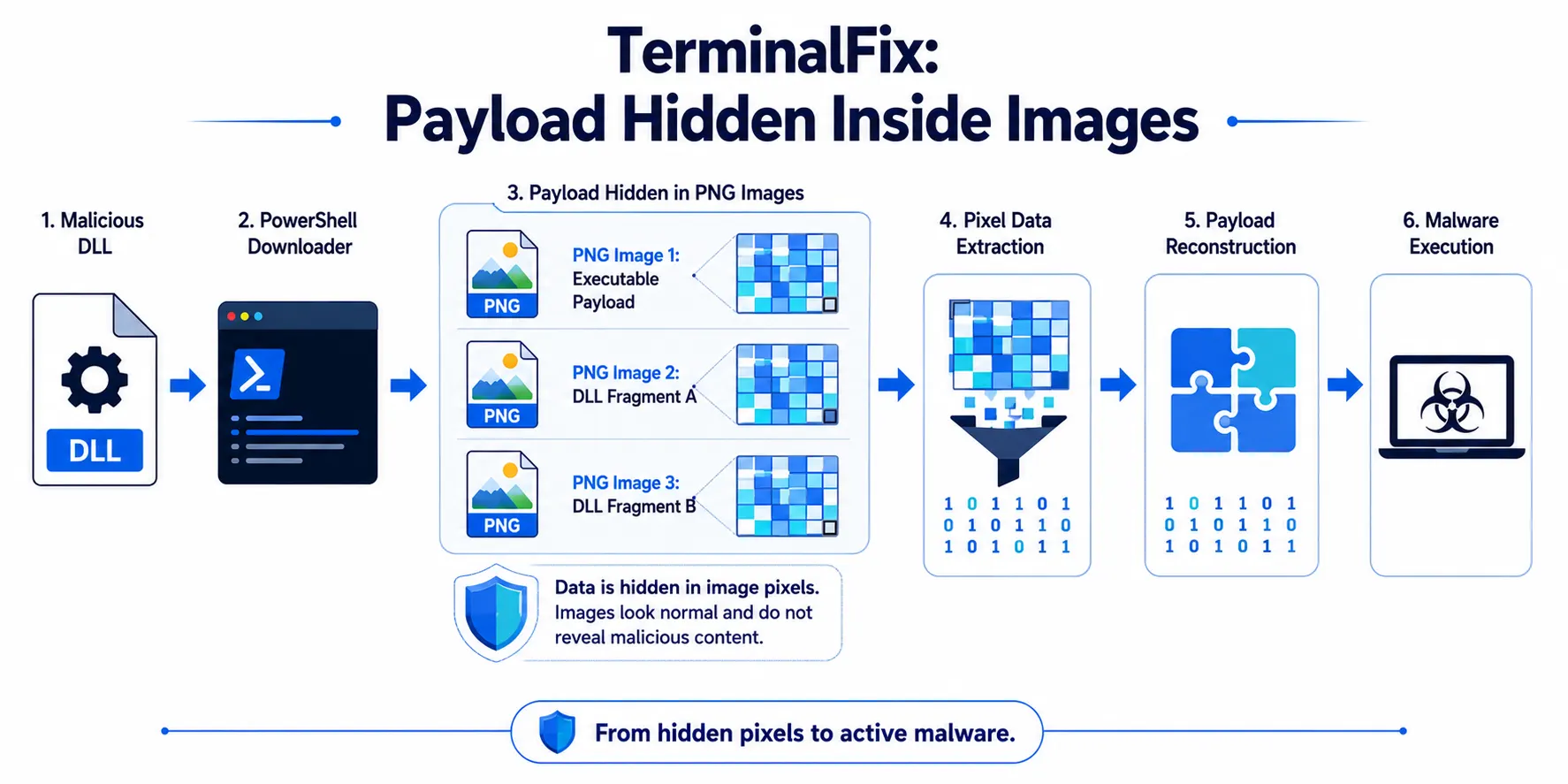
The campaign adds another evasion technique through steganography.
After the malicious DLL is loaded, it launches PowerShell code that retrieves PNG images from attacker-controlled infrastructure. Data hidden within the images' pixel information is then extracted and reconstructed into executable content.
Microsoft says the campaign downloads three images. The first contains an executable, while the second and third contain portions of a DLL that are later concatenated.
The approach makes the payload less obvious during transit because the downloaded files appear to be images rather than conventional executable files.
The campaign also deletes the source images after extraction, reducing some of the forensic traces left behind on the host.
TerminalFix Establishes Multiple Persistence Mechanisms
The campaign does not rely on a single mechanism to survive a reboot.
Microsoft observed two persistence methods:
Registry Run key
Scheduled task
The scheduled task is configured to execute the malicious component every 60 minutes. The malware directory is also hidden using system and hidden file attributes.
Using multiple persistence mechanisms gives the attacker more resilience if one mechanism is removed.
The campaign also uses a name resembling a legitimate Windows Lock Screen component, helping its files blend into the environment.
Active Directory Reconnaissance Comes Next
Once persistence has been established, TerminalFix begins examining the victim's environment.
Microsoft observed extensive reconnaissance, including:
Domain trust discovery
Domain administrator enumeration
Active Directory user and computer searches
System information collection
Targeted server probing
Ping sweeps of named systems
The activity includes searches for infrastructure such as domain controllers, databases, backup servers, gateways and mail systems.
This stage is important because the compromised endpoint is no longer simply an infected workstation.
The attacker is attempting to understand what the machine can see and what other systems may be reachable from it.
That reconnaissance becomes particularly relevant once the reverse tunnel is established.
A Local File Becomes a Command Channel
Before deploying the final tunnel, the malware also establishes a persistent PowerShell-based command execution mechanism.
Microsoft describes a file-watch loop that monitors a file for changes. When new content appears, the malware executes it using Invoke-Expression and writes the results to another file.
This provides a relatively simple asynchronous command channel.
The attacker can therefore interact with the compromised environment without relying solely on a conventional interactive command shell.
The Reverse Tunnel Turns the Endpoint Into a Network Pivot
The most significant stage of the campaign is the deployment of a custom reverse tunnel.
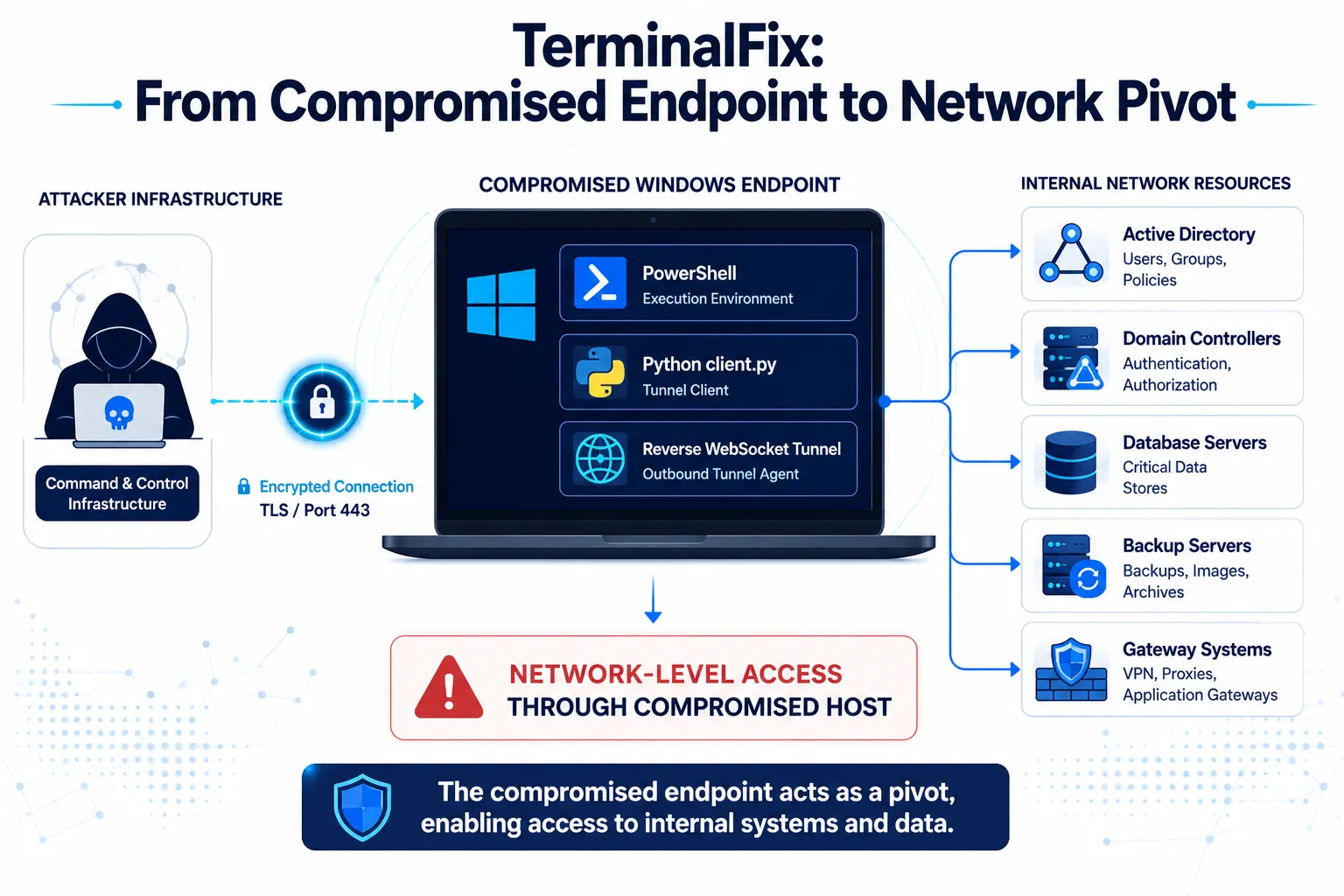
Microsoft observed a Python runtime and a custom client.py tunnelling implant being launched using pythonw.exe, which runs without displaying a visible console window.
The implant establishes an outbound WebSocket connection over TLS port 443.
Microsoft says the tunnel supports SOCKS5-style arbitrary TCP connections, allowing the command-and-control infrastructure to instruct the compromised system to connect to hosts and ports accessible from the victim's network.
This changes the role of the infected machine.
Instead of simply communicating with malware infrastructure, the endpoint can function as a bridge into the internal network.
Microsoft describes this as turning the compromised machine into a network pivot point. The capability becomes especially concerning when combined with the earlier reconnaissance of domain controllers, SQL servers, backup infrastructure and gateways.
Why the Reverse Tunnel Matters
Reverse tunnels can be difficult to detect because the compromised system initiates the outbound connection.
In this case, Microsoft observed the implant communicating through TLS and WebSocket traffic over port 443. The implant also rotates User-Agent strings to resemble common browsers.
The tunnel uses a custom protocol capable of multiplexing multiple connections through a single WebSocket connection. Microsoft also observed remote shutdown functionality and arbitrary TCP proxying.
The use of pythonw.exe further reduces visibility because no console window appears to the user.
For defenders, this means that simply looking for obviously malicious outbound traffic may not be enough.
The investigation needs to consider process behaviour, unusual parent-child relationships, persistence, DLL loading and network activity together.
Microsoft Did Not Observe the Full Downstream Attack
An important distinction in Microsoft's analysis is that some potential follow-on actions are described as risks rather than observed outcomes.
Microsoft states that it did not observe the downstream actions described in the analysed chain. However, the reconnaissance and reverse-tunnel capabilities could allow an attacker to identify and reach additional systems from the compromised endpoint.
This distinction matters when assessing the campaign.
The observed evidence establishes the intrusion chain and network-pivot capability. It does not establish that every possible post-compromise action occurred in the analysed environment.
Additional details were not disclosed in the announcement.
Detection and Defensive Guidance
Microsoft recommends several measures to reduce exposure to TerminalFix and similar ClickFix activity.
Restrict PowerShell and Run Dialog Usage
Organisations should consider application-control mechanisms such as AppLocker or Windows application control to restrict PowerShell execution for standard users. Microsoft also recommends evaluating whether the Windows Run dialog is necessary for everyday users.
Monitor DLL Sideloading
Security teams should investigate LockScreenContentServer.exe running from non-standard locations.
Microsoft specifically provides hunting guidance for identifying this sideloading behaviour.
Train Users Against Fake CAPTCHA Pages
Users should be trained not to paste commands into Windows Terminal, PowerShell or the Run dialog simply because a website tells them to complete a CAPTCHA or verification process.
This is particularly important because the initial stage relies heavily on social engineering rather than a traditional software exploit.
Investigate Compromised Hosts as Potential Pivot Points
Microsoft recommends treating affected systems as potential network-level access points.
Credential rotation should be prioritised for credentials accessible from the affected machine, including domain administrator credentials where applicable to a domain-joined system.
Improve PowerShell Visibility
Microsoft recommends enabling PowerShell Script Block Logging to improve visibility into obfuscated and encoded commands. It also recommends considering Constrained Language Mode and appropriate execution policies where feasible.
Strengthen Web and Endpoint Protection
Microsoft recommends enabling network protection, web protection, cloud-delivered protection and Microsoft Defender SmartScreen, alongside enterprise-managed browsers and appropriate email security controls.
Indicators and Hunting Opportunities
Microsoft has published specific hunting queries covering several stages of the campaign.
These include detection for:
ClickFix-triggered PowerShell activity
LockScreenContentServer.exeDLL sideloadingExecution of the custom reverse-tunnel implant
Connections to identified command-and-control domains
The activity has also been mapped to multiple MITRE ATT&CK techniques, including drive-by compromise, PowerShell execution, user execution, Registry Run keys, scheduled tasks, DLL sideloading, steganography, system discovery and protocol tunnelling.
Microsoft lists the following network indicators associated with the analysed campaign:
gitnow[.]devbestsocialmedianewspapper[.]comofflineupdater[.]comlinked-log[.]com
Security teams should validate these indicators against their own telemetry and Microsoft's latest threat intelligence before taking blocking or remediation actions.
What TerminalFix Says About Modern Social Engineering
Original analysis: The TerminalFix campaign highlights a broader industry shift toward attacks that combine human deception with increasingly sophisticated post-compromise tooling.
The fake CAPTCHA is only the entry point. The more consequential part of the intrusion happens after the user executes the initial command.
The campaign combines several layers:
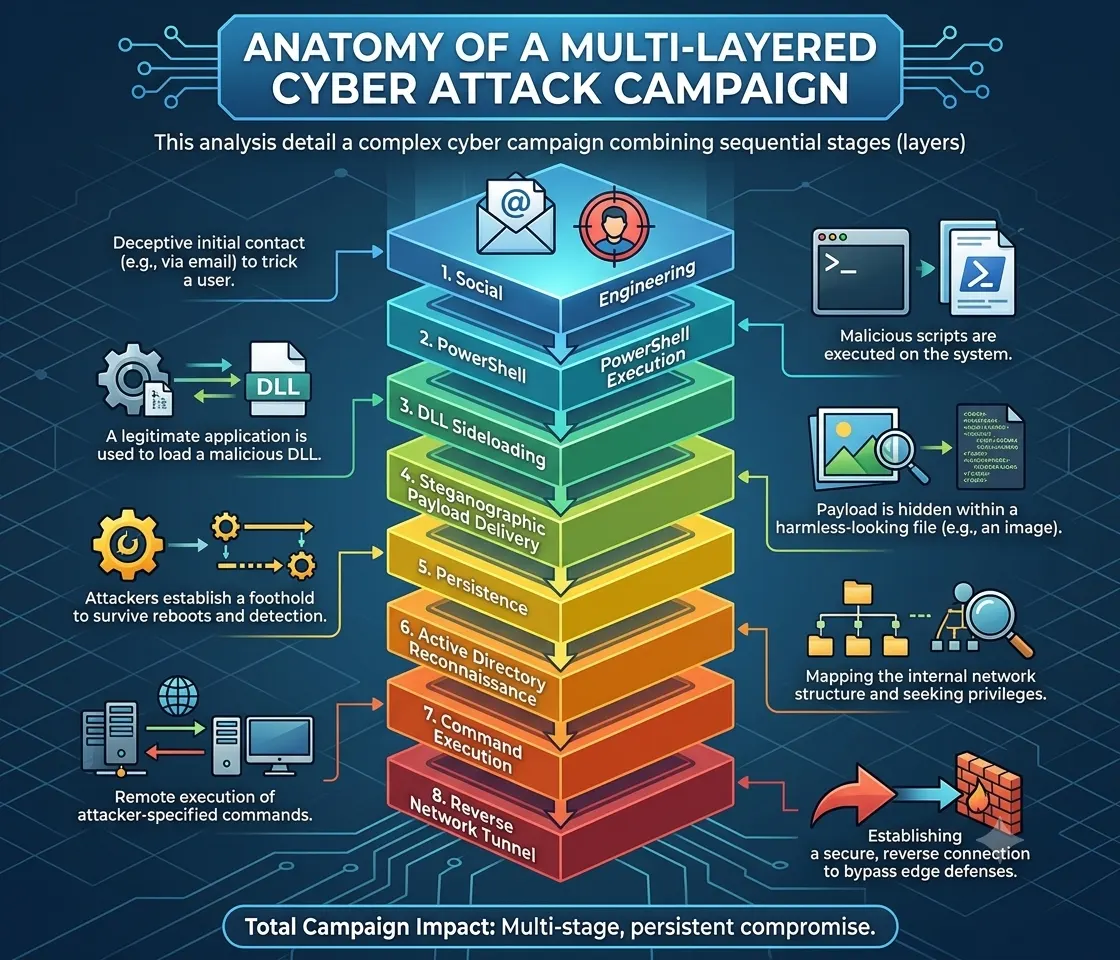
For enterprises, this could mean that security controls focused only on phishing, malware files or known indicators may miss the broader attack chain.
The development reflects growing demand for behaviour-based detection, particularly around suspicious PowerShell activity, unusual DLL loading, persistence creation, internal reconnaissance and unexpected outbound tunnelling.
It also reinforces the importance of treating a compromised endpoint as a potential network security incident, rather than simply an isolated malware infection.
Conclusion
TerminalFix demonstrates how a familiar ClickFix-style social-engineering tactic can be combined with multiple technical techniques to create a much deeper intrusion.
Microsoft's analysis shows a progression from a fake CAPTCHA and user-executed PowerShell command to DLL sideloading, image-based payload concealment, persistence, Active Directory reconnaissance and a custom reverse tunnel.
The reverse tunnel is the most significant escalation because it can provide network-level access through the compromised endpoint and allow connections to systems visible from that host.
For defenders, the key lesson is that the initial user action should not be viewed in isolation. Detection needs to connect the entire sequence of behaviours, from suspicious browser activity and PowerShell execution through persistence, discovery and unusual network connections.
Source: Microsoft Threat Intelligence
About the Author