
Microsoft Tracks Malware Campaign Using Counterfeit Software Installers
Microsoft is tracking an active malware campaign that uses fake software-download sites to distribute malicious installers, establish persistence, weaken Windows protections and communicate with attacker-controlled infrastructure.
Xcademia Team
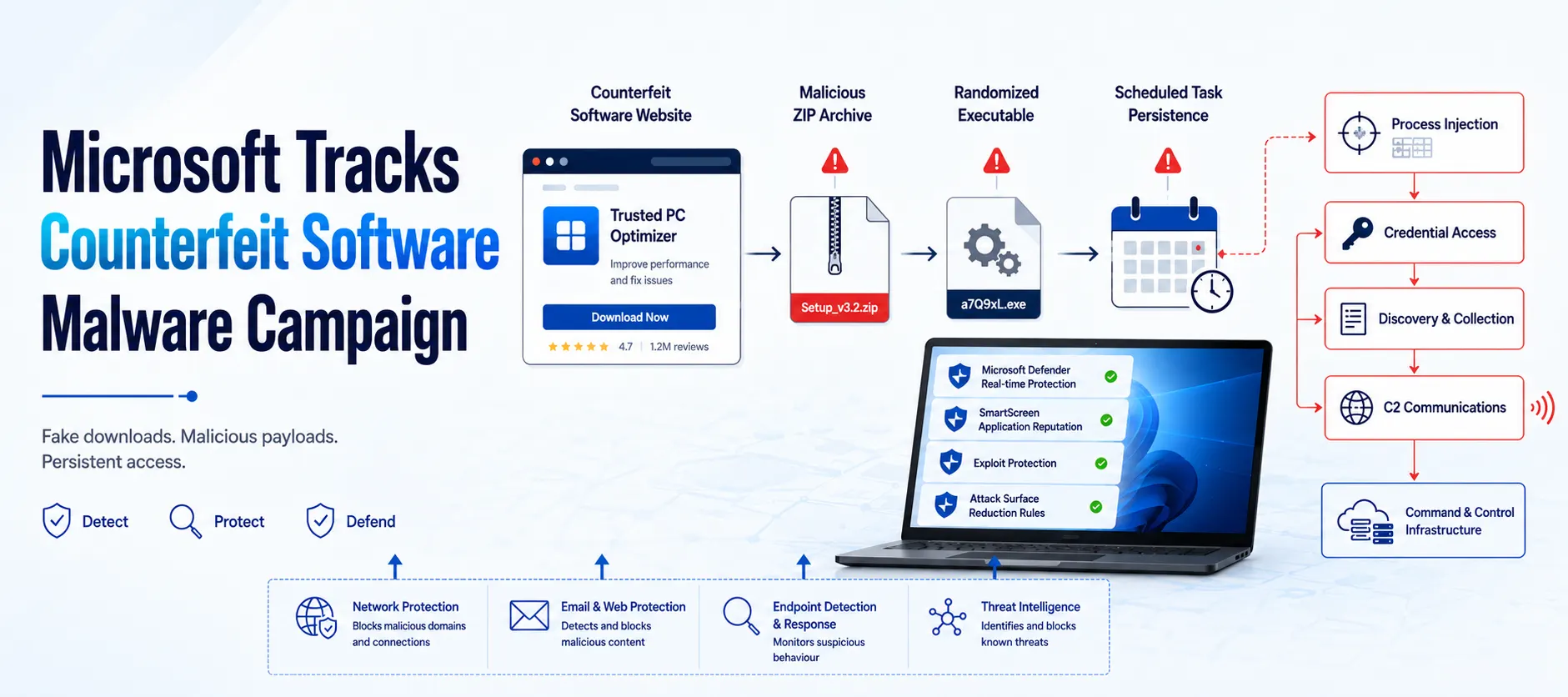
Microsoft Defender Experts is tracking an active malware campaign that uses counterfeit software-download websites to impersonate trusted vendors and distribute malicious installers.
According to Microsoft, the campaign has resulted in compromises across multiple organizations and industries. The activity has primarily affected China-based operations of multinational organizations and Chinese-speaking users, with observed victims across healthcare, manufacturing, gaming, technology, logistics, government and education.
The attack begins with a deceptive software-download page that imitates a legitimate vendor. Users who download and execute the counterfeit installer can trigger a multi-stage infection chain involving randomized payloads, persistence mechanisms, privilege escalation, defense evasion and command-and-control activity.
Microsoft assesses with moderate confidence that the activity is consistent with the publicly reported Silver Fox, also known as Yinhu (银狐), fake software campaign. However, Microsoft has not attributed the activity to a nation-state actor.
Microsoft says Microsoft Defender detected and disrupted activity across multiple stages of the attack, including automated containment through Attack Disruption.
The company recommends preventing software downloads from untrusted sources and ensuring protections such as SmartScreen, Network Protection, Tamper Protection and Microsoft Defender XDR are enabled.
Attack Chain Overview
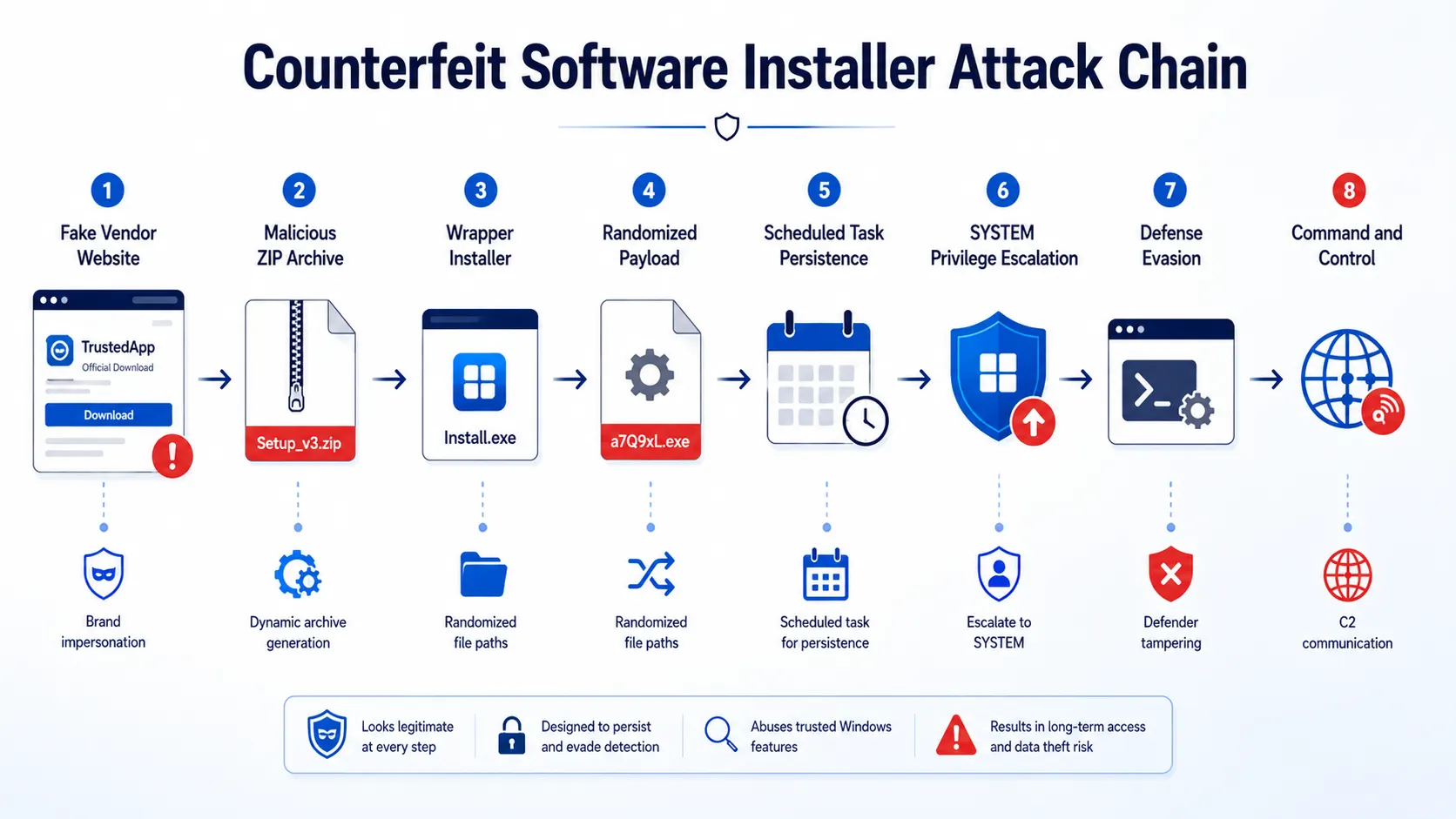
The campaign follows a consistent sequence that moves from a counterfeit vendor website to a persistent malware implant.
The observed chain includes:
Spoofed Software Website
↓
Malicious Installer Archive
↓
Wrapper Installer
↓
Randomized Stage-One Payload
↓
Persistence
↓
Privilege Escalation
↓
Defense Evasion
↓
Command and Control
Microsoft's investigation shows that the campaign does not depend on a single file name or delivery artifact. Instead, attackers use changing archive hashes, randomized paths and file names, multiple execution mechanisms and several layers of persistence.
This makes behavioral detection particularly important.
Campaign Scope and Targeting
Microsoft observed affected devices predominantly associated with China-based operations and Chinese-speaking users.
The company says this assessment is consistent with the Chinese-language lure content and the use of .com.cn and .hl.cn infrastructure.
Observed activity spans multiple sectors, including:
Healthcare
Medical devices
Manufacturing
Gaming
Technology
Logistics
Government
Higher education
The campaign uses software familiar to users in different categories, allowing attackers to disguise malicious downloads as legitimate applications and utilities.
Microsoft says affected organizations included multiple industries rather than a single vertical.
Initial Access: Spoofed Software Download Sites
The initial access mechanism is straightforward but deceptive.
Attackers create fraudulent websites that imitate legitimate software vendors and encourage visitors to download what appears to be genuine software.
In one case investigated by Microsoft, endpoint telemetry showed a device visiting a fake Razer download page at:
pc-razerzone[.]com[.]cnThe device subsequently downloaded:
app_setup.6653004.zipfrom a delivery host associated with:
gehie246[.]com/712downMicrosoft observed two content-distinct copies of the same-named archive being written within approximately 69 seconds.
According to the investigation, this provided direct evidence of server-side payload regeneration.
Across the observed environment, Microsoft used FileOriginReferrerUrl telemetry to connect downloaded archives with the impersonation pages that served them.
The delivery infrastructure included rotating hosts such as:
yimxg25ti[.]com/73instcc8ttkv35b[.]com/7qinstn7b8t85zsg[.]com/ins711
Microsoft also identified a suspected attacker-controlled Alibaba Cloud Object Storage Service bucket.
The lure domains predominantly used .com.cn, .hl.cn and .cn domains and embedded the names of impersonated software brands.
Delivery: Dynamically Generated Installer Archives
A notable feature of the campaign is the way malicious archives are delivered.
The same file name can be used across downloads while the contents and hash change.
Microsoft observed archive families using names such as:
app_setup.*zinst.*zintall.*intsoft.*innstll.*
The delivery URL could remain constant even though the downloaded archive changed.
This behavior is consistent with server-side generation of payloads for individual download requests.
Microsoft's investigation identified several examples where different counterfeit vendor websites routed users toward shared delivery infrastructure.
Impersonated site | Delivery infrastructure |
|---|---|
Razer |
|
Kaspersky |
|
Calibre |
|
The reuse of delivery infrastructure across unrelated software brands provides an important hunting opportunity for defenders.
Brand-Impersonation Infrastructure
Microsoft identified a broad set of vendor look-alike websites.
The pages were designed to resemble legitimate vendor websites and presented prominent download controls.
Examples identified by Microsoft include:
Impersonated brand | Spoofed domain | Category |
|---|---|---|
Razer |
| Peripherals / drivers |
Microsoft Edge |
| Browser |
Kaspersky |
| Security software |
Sejda PDF |
| Productivity |
NetEase Youdao Dictionary |
| Translation |
DiskGenius |
| Disk utility |
Baidu Netdisk |
| Cloud storage |
oCam Screen Recorder |
| Screen capture |
draw.io |
| Diagramming |
SteelSeries |
| Peripherals |
Sogou |
| Input method |
Calibre |
| E-book |
MindMaster |
| Mind-mapping |
Microsoft also identified additional domains associated with utilities and other software.
Although the sites impersonated unrelated vendors, Microsoft found infrastructure relationships connecting many of them.
Six domains resolved within AS132839, spread across four unrelated netblocks and three registered country codes, while sharing a common pair of nameservers.
Two additional domains resolved within AS8796 in a single /21 and used another nameserver pair.
Another domain was served through a content delivery network, which concealed its origin.
Microsoft notes that hosting and DNS services can be bundled by the same reseller. Therefore, these relationships are better interpreted as consistent procurement channels rather than independent corroborating signals.
For defenders, Microsoft says this means netblock and geographic grouping can miss relationships that become visible through Autonomous System Number (ASN) and nameserver analysis.
However, because these are shared commercial providers with unrelated tenants, Microsoft recommends treating ASN and nameserver information as hunting pivots rather than automatic blocklist entries.
Execution: Randomized Stage-One Payloads
Once a user opens the downloaded archive, the campaign moves to execution.
The archive contains a wrapper installer with a generated name, such as:
a_instapp83353001.exeor:
ainst8663586104.exeThe wrapper creates and launches a stage-one payload at a randomized location.
Microsoft observed payloads being placed in locations such as:
C:\Users\Public\<random>\<random>.exeand:
C:\Program Files (x86)\<random>\<random>.exeThe directory and file names change, but Microsoft observed stable payload content appearing under multiple names and paths.
For example, the same stage-one SHA-256 was observed under different randomized paths.
This means file names alone are unreliable detection indicators.
The Process Tree Reveals the Infection Sequence
Microsoft observed a parent-to-child process chain connecting the download to payload execution.
A representative sequence is:
msedge.exe
  └─ 7zFM.exe / 360zip.exe / WinRAR.exe
       └─ a_instapp83353001.exe
            └─ C:\Users\Public\<random>\<random>.exe
The sequence begins when Microsoft Edge downloads the archive.
The user then opens the archive using an archiving utility. The wrapper installer executes and launches the randomized stage-one payload.
This process relationship provides defenders with a behavioral detection opportunity even when individual file names change.
Payload Masquerading
Microsoft also observed payloads masquerading as legitimate software.
One later-stage payload was placed under a randomized directory and file name but contained version information claiming to be associated with Speech Processing Solutions GmbH and Philips speech-driver software.
The observed metadata included:
CompanyName: Speech Processing Solutions GmbH
FileDescription: Philips Speech Driver Client Configuration
OriginalFileName: PhilipsSpeechDriverConfiguration.exe
ProductVersion: 4.7.471.07
However, Microsoft observed that the payload was executing from a randomized directory and file name.
The version information also contained an unfilled build-template placeholder:
TODO: <product name>
Microsoft interpreted this as evidence that the version information had been fabricated rather than inherited from genuine vendor software.
The company also observed svchost.exe executing from a non-system location rather than the expected Windows system directory.
Legitimate Update Software Repurposed for Payload Delivery
Another payload staged under C:\ProgramData\<random>\ carried version metadata associated with the Indigo Rose TrueUpdate Client.
Microsoft observed the payload exhibiting runtime behavior associated with that product, including creation of _ir_tu2_temp_* files in the user's temporary directory.
The payload was dropped by a later-stage component and repeatedly launched by the Task Scheduler service.
It connected to an attacker-controlled Alibaba Cloud Object Storage Service endpoint over TLS on port 443 and wrote another payload into a second randomized C:\ProgramData\ directory.
This represents another layer of masquerading, where legitimate software behavior is repurposed to support malicious payload delivery.
Microsoft observed the sequence:
ErNGxW.exe
    ↓
C:\ProgramData\zsMmvukD\beuv4Mie.exe
    ↓
Task Scheduler service
    ↓
Alibaba Cloud OSS over TLS/443
    ↓
C:\ProgramData\uwMUCYBN\SaYC4Mga.exe
The TrueUpdate-related runtime artifacts appeared repeatedly as the payload was executed by scheduled tasks.
Alternate Execution Vector: Windows Installer
Microsoft also identified another execution path involving the Windows Installer service.
In this variant, the installer performs its expected function, but the campaign uses msiexec.exe as a trusted Windows component to launch a randomized payload.
The observed command structure included:
msiexec.exe -Embedding <productcode> E Global\MSI0000
  └─ C:\Users\Public\<random>\<random>.exe
The resulting executable was written to a randomized directory under C:\Users\Public\.
Microsoft observed more than 20 distinct payload names being written through this execution mechanism.
The observed parent processes included:
msedge.exeexplorer.exesvchost.exe
The use of msiexec.exe gives defenders another behavioral signal to monitor, particularly when it launches executables from unusual writable locations.
Persistence Through Disguised Scheduled Tasks
After execution, the campaign establishes recurring execution through Windows Scheduled Tasks.
Microsoft observed task names designed to resemble ordinary IT or productivity tasks.
Examples include:
Deadline Mission TargetHierarchy Tools Smooth InventoryEmpowering Status Tools productivity Ahead5nboF
Each scheduled task launches a specific payload stored under locations such as:
C:\ProgramData\Microsoft observed several payloads being repeatedly launched by the Task Scheduler service.
The parent process typically appeared as:
svchost.exe -k netsvcs -p -s ScheduleMultiple staggered scheduled tasks could run on the same device.
According to Microsoft, affected hosts consequently exhibited a characteristic execution pattern of approximately 60 seconds.
This recurring behavior can provide a useful detection signal even when malware file names change.
Privilege Escalation Through SYSTEM Scheduled Tasks
Microsoft also observed the campaign creating short-lived scheduled tasks that execute with SYSTEM privileges.
The technique was used to perform privileged actions, including writing Microsoft Defender exclusions.
A representative command sequence included:
SCHTASKS /Create /F /TN "Task1" /SC ONCE /ST 00:00 /RL HIGHEST /RU "SYSTEM"The task then executed the privileged command before being deleted:
SCHTASKS /Run /TN "Task1"
SCHTASKS /Delete /TN "Task1" /F
Microsoft says the combination of /RL HIGHEST and /RU "SYSTEM" allowed the exclusion write to execute with SYSTEM privileges.
The create-run-delete sequence also reduced the persistence of the helper task itself.
This technique is significant because the scheduled task may exist only briefly, making behavior and command-line monitoring important.
Process Injection
Process injection was another technique observed during the campaign.
Microsoft identified a persistent payload launched from C:\ProgramData\ by the Task Scheduler service.
The payload created a remote thread inside a legitimate user application shortly after the application started.
This allowed payload code to execute within the context of a trusted process.
Microsoft Defender detected the behavior with an alert describing a process being injected with potentially malicious code.
In one observed sequence:
02:44:20.887
Persistent payload starts
Parent: svchost.exe / Task Scheduler

02:44:21.971
Outbound C2 attempt
47.239.232[.]245:8050
Blocked by host firewall

02:44:24.860
Second outbound C2 attempt
47.243.218[.]255:28300
Blocked by host firewall

02:44:37.568
Target application starts

02:44:37.604
CreateRemoteThreadApiCall
Payload → target application
Microsoft says the injection occurred milliseconds after the target application started.
Defense Evasion: Weakening Host Protections
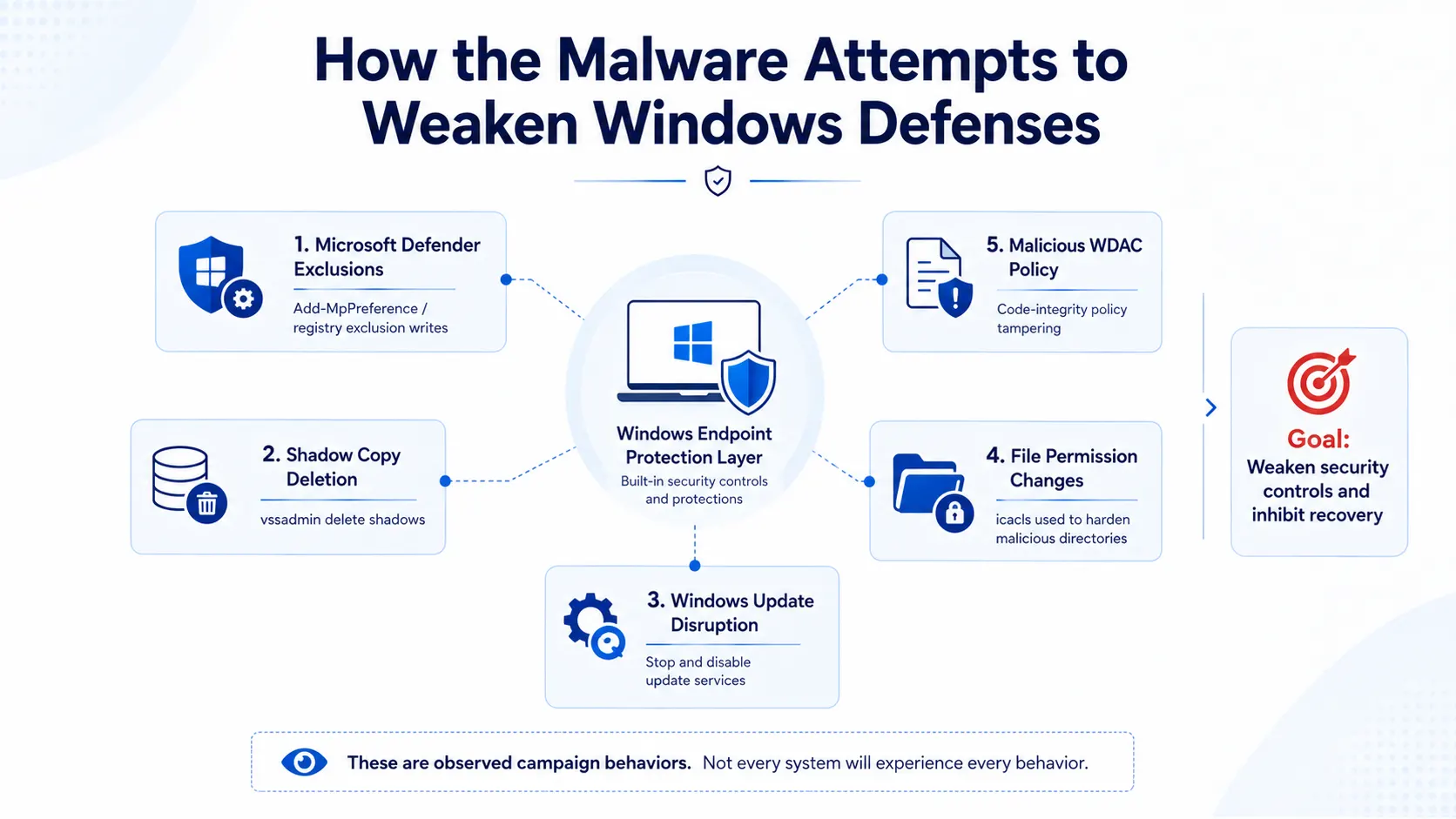
The campaign uses multiple methods to weaken Windows security and recovery mechanisms.
One of the most significant behaviors is the addition of broad Microsoft Defender exclusions.
Microsoft observed PowerShell commands using:
Add-MpPreference -ExclusionPathThe exclusions covered locations including:
C:\ProgramDataC:\UsersC:\Program Files (x86)C:\
The campaign also used SYSTEM-level scheduled tasks to modify Defender exclusion registry settings.
These actions attempt to make malicious files and directories less likely to be scanned.
Deleting Volume Shadow Copies
Microsoft observed commands designed to remove volume shadow copies:
vssadmin delete shadows /all /quietDeleting shadow copies can inhibit system recovery following an attack.
This behavior is mapped by Microsoft to the MITRE ATT&CK technique Inhibit System Recovery (T1490).
Hardening Malicious Files Against Removal
The campaign also used icacls to modify file and directory permissions.
Microsoft observed permissions being changed so that administrators and SYSTEM retained full control over payload directories.
This can make malicious files more difficult for standard users to remove.
The behavior is mapped to File and Directory Permissions Modification (T1222.001) in MITRE ATT&CK.
Attempting to Disable Windows Update
Microsoft observed attempts to stop and disable Windows Update-related services.
The campaign targeted:
wuauservUsoSvcuhssvcWaaSMedicSvc
The malware also attempted to rename Windows Update DLLs, modify registry settings and remove the SoftwareDistribution cache.
Observed commands included changes to the NoAutoUpdate policy and attempts to disable scheduled Windows Update tasks.
These actions can interfere with normal operating system update mechanisms and reduce the host's ability to receive updates.
Malicious Windows Defender Application Control Policy
Microsoft also observed a malicious Windows Defender Application Control policy being written to the code-integrity store on multiple devices.
Microsoft Defender Antivirus detected the behavior as:
Behavior:Win32/MpTamperGpDisableAVFriendly.AThis provides another indication that the campaign attempts to weaken or interfere with security controls rather than simply dropping malware.
Command-and-Control Infrastructure
Microsoft observed later-stage networking payloads establishing command-and-control communication using application-layer protocols over non-standard ports.
Observed ports included:
5090
7031
7032
7088
7089
7090
8050
28290
28300
Microsoft identified several six-character .net domains associated with the C2 infrastructure, including:
iualef[.]netoijfwe[.]neteuioxu[.]netczijbh[.]netwfmwsj[.]nettbdqxq[.]net
The investigation also identified IP-and-port endpoints.
Microsoft observed both successful and failed connections.
The dedicated C2 infrastructure was intermittently unreachable, while the same payloads continued to establish TLS connections with cloud object storage.
Microsoft says this was consistent with a dedicated C2 tier that was sometimes unavailable while cloud-hosted staging remained operational.
Detection and Disruption
Microsoft Defender detected activity at multiple stages of the attack.
Representative alerts included:
Modification attempt in Microsoft Defender Antivirus exclusion list
Compromised device
A process was injected with potentially malicious code
Potential C2 connection behavior
Suspicious Task Scheduler activity
Compromised account conducting hands-on-keyboard attack
Microsoft says the campaign was not entirely automated.
In some environments, automated execution was accompanied by interactive hands-on-keyboard activity.
Attack Disruption was used to contain affected devices and accounts when its criteria were met.
Microsoft also observed attempted SMB lateral movement to additional hosts.
Microsoft Defender blocked this activity and detected the associated C2 behavior.
The company notes that Attack Disruption contained devices and accounts, but full eradication of persistence still required responder action.
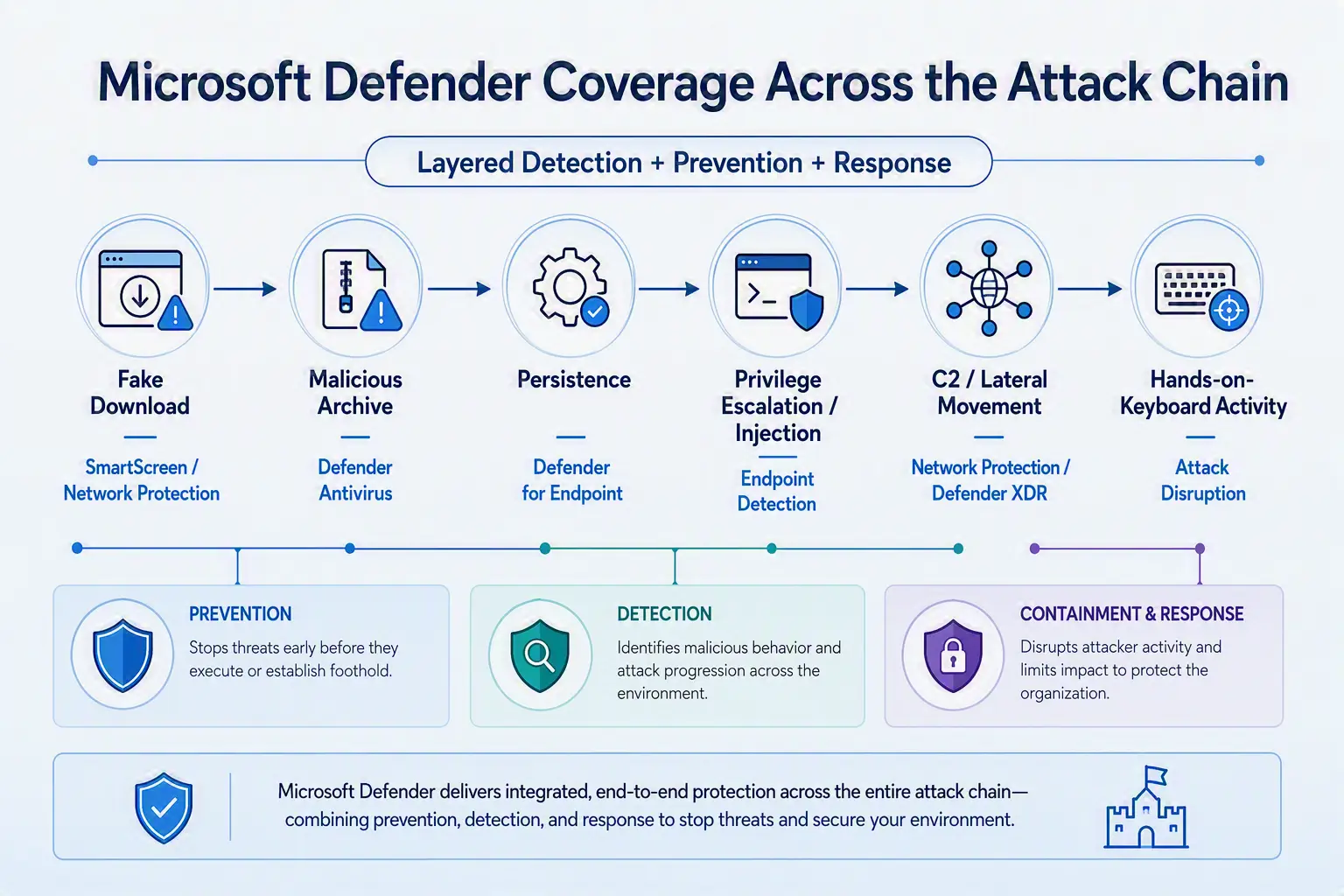
Microsoft Defender Coverage Across the Attack Chain
Microsoft maps different security protections to different stages of the campaign.
Attack stage | Microsoft security coverage |
|---|---|
Fake download pages and delivery domains | Microsoft Defender SmartScreen, Network Protection, Web Content Filtering |
Malicious ZIP and stage-one execution | Microsoft Defender Antivirus, cloud-delivered protection, Microsoft Defender for Endpoint |
Defender tampering | Tamper Protection and exclusion modification alerts |
Persistence and injection | Microsoft Defender for Endpoint detections |
C2 and lateral movement | Microsoft Defender XDR and Network Protection |
Hands-on-keyboard activity | Defender XDR and Attack Disruption |
The layered approach is important because the campaign changes file names, archive hashes and infrastructure over time.
Microsoft Security Copilot
Microsoft also highlights the use of Microsoft Security Copilot for investigation and response.
Security Copilot customers can use the standalone experience to create prompts or use prebuilt promptbooks related to the threat.
Microsoft lists promptbooks for:
Incident investigation
Microsoft user analysis
Threat actor profile
Threat Intelligence 360 report based on the MDTI article
Vulnerability impact assessment
These promptbooks can assist analysts with tasks such as summarizing affected entities, reviewing alert timelines and pivoting on indicators of compromise.
Microsoft notes that some promptbooks require access to plugins for Microsoft products such as Microsoft Defender XDR or Microsoft Sentinel.
Threat Intelligence Reports
Microsoft Defender XDR customers can also use threat analytics reports through the Defender portal.
Microsoft says these reports provide updated intelligence, protection information and recommended actions associated with the malicious activity and techniques discussed in the research.
Access requires a license for at least one Defender XDR product.
Advanced Hunting
Microsoft provides several Advanced Hunting queries for Defender XDR and Microsoft Sentinel customers.
These queries focus on behaviors and indicators associated with the campaign.
The hunting guidance includes detection for:
Campaign payloads and loaders
Randomized payload drop patterns
Microsoft Defender exclusion tampering
Recovery inhibition and Windows Update neutralization
Windows Installer embedded-mode execution
Disguised scheduled-task execution
C2 connections
Malicious delivery domains and download endpoints
The behavior-based queries are particularly relevant because Microsoft notes that file names, hashes and domains can rotate.
Behavior-Based Detection
One of the most important defensive lessons from Microsoft's investigation is the limitation of relying exclusively on file names.
The campaign uses:
Randomized file names
Randomized directories
Changing archive contents
Rotating delivery domains
Multiple execution mechanisms
Multiple C2 endpoints
For example, Microsoft's detection guidance identifies executable files dropped into randomized folders under locations such as:
C:\Users\Public\C:\ProgramData\C:\Program Files (x86)\This behavior can remain visible even when the malware's specific name changes.Security teams can therefore combine file indicators with process ancestry, command-line activity, directory patterns, scheduled-task behavior and network activity.
Microsoft Recommended Mitigations
Microsoft recommends several measures to reduce exposure to this campaign.
Enforce Tamper Protection
Microsoft recommends enabling Tamper Protection.
The company says this can block exclusion and registry writes targeting Microsoft Defender even when the payload executes with SYSTEM privileges.
This directly addresses the SYSTEM scheduled-task technique observed in the campaign.
Hunt for Behavior Rather Than File Names
Because file names and hashes can rotate, Microsoft recommends looking for behavioral patterns.
Relevant patterns include randomized executable paths under:
C:\Users\Public\C:\ProgramData\C:\Program Files (x86)\
Microsoft also recommends hunting for the observed Philips Speech masquerade and stable payload hashes.
Alert on Defender Tampering
Microsoft recommends monitoring for the combination of:
SYSTEM scheduled task creation
Windows Defender exclusion registry modification
Scheduled-task deletion
vssadmin delete shadowsWindows Update service disruption
These behaviors can provide high-value signals for investigation.
Treat Look-Alike Downloads as Suspicious
Microsoft recommends treating software archives served from counterfeit vendor domains as potentially malicious.
The company specifically identifies archive naming patterns such as:
app_setup.*zinst.*zintall.*intsoft.*innstll.*
It also identifies delivery paths such as:
/712down/73inst/7qinst/ins711
Correlate Download Referrers
Microsoft recommends using FileOriginUrl and FileOriginReferrerUrl telemetry to identify relationships between landing pages and delivery hosts.
This can help defenders continue tracking the campaign even when individual domains rotate.
Microsoft Defender XDR Hardening Recommendations
Microsoft Defender XDR customers can enable attack surface reduction rules designed to block several of the observed infection vectors.
Microsoft says customers that had certain rules enabled could mitigate the attack during its initial stages and prevent hands-on-keyboard activity.
The recommended rules include:
Block executable files from running unless they meet a prevalence, age, or trusted list criterion
Block execution of potentially obfuscated scripts
Block use of copied or impersonated system tools
Use advanced protection against ransomware
These controls are intended to reduce opportunities for malicious files and scripts to execute.
MITRE ATT&CK Techniques Observed
Microsoft maps the campaign to multiple MITRE ATT&CK techniques.
Tactic | Technique | ID | Observed behavior |
|---|---|---|---|
Resource Development | Acquire Infrastructure: Domains / Web Services | T1583.001 / T1583.006 | Look-alike domains, delivery hosts and cloud object storage |
Execution | User Execution: Malicious File | T1204.002 | Victims execute counterfeit installers |
Execution | PowerShell / Windows Command Shell | T1059.001 / T1059.003 | Security exclusions, shadow-copy deletion and Windows Update changes |
Execution | System Binary Proxy Execution: Msiexec | T1218.007 |
|
Persistence / Privilege Escalation | Scheduled Task/Job | T1053.005 | Recurring execution and SYSTEM-level task use |
Defense Evasion | Impair Defenses | T1562.001 | Microsoft Defender exclusions and security-control modification |
Defense Evasion | Masquerading | T1036.005 | Legitimate software names and locations are imitated |
Defense Evasion | DLL Side-Loading | T1574.002 | Malicious libraries loaded alongside payloads |
Defense Evasion | Process Injection | T1055 | Payload code injected into another process |
Defense Evasion | File and Directory Permissions Modification | T1222.001 | Payload directories hardened against removal |
Defense Evasion | Modify Registry | T1112 | Defender and Windows Update registry changes |
Lateral Movement | SMB / Windows Admin Shares | T1021.002 | SMB remote file access attempts |
Impact | Inhibit System Recovery | T1490 | Volume shadow copies deleted |
Impact | Service Stop | T1489 | Windows Update services stopped and disabled |
Command and Control | Ingress Tool Transfer | T1105 | Cloud-hosted payload retrieval |
Command and Control | Application Layer Protocol / Non-Standard Port | T1071 / T1571 | C2 activity over non-standard ports |
Indicators of Compromise
Microsoft's research includes indicators associated with several layers of the campaign.
These include:
Lure and impersonation domains
pc-razerzone[.]com[.]cnapp-microsoft-edge[.]com[.]cnkaspersky-lab[.]hl[.]cn
Delivery infrastructure
gehie246[.]comhxxps://www.gehie246[.]com/712down
Cloud staging
newopt001.oss-cn-hongkong.aliyuncs[.]com/innstll.1.0.61.zip
C2 domains
iualef[.]netoijfwe[.]net
C2 endpoints
202.95.14[.]237:5090103.183.3[.]162:5090
Payload indicators
Microsoft also provides SHA-256 values for stage-one, later-stage, networking, persistence and supporting payloads.
Security teams should use the full indicator set from Microsoft's original research when conducting environment-wide hunting.
What Security Teams Should Watch For
The campaign highlights several behaviors that can help defenders identify similar threats.
1. Counterfeit software download pages
Users downloading software from unfamiliar domains should be treated as a potential initial-access event, particularly when the page closely imitates a legitimate vendor.
2. Randomized executable paths
Executables appearing under randomized directories within writable Windows locations can provide a useful behavioral signal.
3. Unusual archive-to-process chains
Security teams should monitor suspicious relationships such as:
Browser → Archive Utility → Wrapper Installer → Randomized Executable
4. Suspicious msiexec activity
msiexec.exe launching executables from unusual locations warrants investigation.
5. Short-lived SYSTEM scheduled tasks
A scheduled task that is created, executed and deleted shortly afterward can still represent a privileged security modification.
6. Defender exclusion changes
Unexpected broad Defender exclusions should receive immediate investigation, particularly when combined with SYSTEM execution.
7. Windows Update disruption
Attempts to stop or disable multiple Windows Update services can indicate defense evasion or recovery interference.
8. Process injection
Unexpected CreateRemoteThread activity involving recently started applications should be investigated in context.
9. Non-standard C2 ports
Network activity from suspicious payloads to unusual ports and rotating .net domains can provide additional detection opportunities.
10. Hands-on-keyboard activity
Microsoft's observation of interactive activity in some environments demonstrates that the campaign can extend beyond automated malware execution.
The Broader Security Lesson
The announcement highlights a broader industry shift toward behavior-based threat detection as attackers increasingly change superficial indicators such as file names, domains and archive hashes.
In this campaign, the same delivery URL could provide different archive contents, while payloads could appear under randomized paths and names.
That makes a defense strategy based solely on static indicators less resilient.
For enterprises, this could mean greater emphasis on correlating multiple signals:
Web activity + Download telemetry + Process ancestry + Scheduled tasks + Privilege changes + Security tampering + Network activity
The Microsoft investigation also demonstrates why layered security controls matter.
A counterfeit download may bypass one control, but subsequent behaviors such as Defender tampering, suspicious scheduled tasks, process injection, C2 communication or lateral movement can create additional opportunities for detection and disruption.
The company says Microsoft Defender detected and disrupted activity at multiple stages in the observed environments.
Conclusion
Microsoft is tracking an active malware campaign that uses counterfeit software-download websites to distribute malicious installers and establish persistent access to Windows systems.
The campaign combines several techniques rather than relying on a single malware artifact.
Attackers impersonate legitimate software vendors, deliver dynamically generated archives, launch randomized payloads, establish scheduled-task persistence, obtain SYSTEM-level execution, inject code into other processes and attempt to weaken Windows security and recovery mechanisms.
The campaign also uses multiple C2 mechanisms and cloud object storage for payload staging.
Microsoft assesses with moderate confidence that the activity is consistent with the publicly reported Silver Fox, or Yinhu, fake software campaign, but the company has not attributed the activity to a nation-state actor.
For defenders, the campaign reinforces the importance of preventing downloads from untrusted sources and monitoring behavior beyond static file indicators.
Microsoft recommends enabling protections including SmartScreen, Network Protection, Tamper Protection and Microsoft Defender XDR capabilities, alongside relevant attack surface reduction rules.
The research also provides detailed hunting queries, indicators of compromise and MITRE ATT&CK mappings that security teams can use to investigate potential activity.
The central defensive lesson is clear: counterfeit software campaigns can evolve their visible indicators while retaining recognizable behavioral patterns. Monitoring how files are downloaded, executed, persisted, elevated and connected to external infrastructure can therefore provide valuable detection opportunities.
Source: Microsoft Security Blog
About the Author