
Homebrew 7.0.0 Strengthens Security With Built-In Vulnerability Checks and Sandboxing
Homebrew 7.0.0 adds built-in vulnerability scanning, a new advisory database and stronger installation protections, while ending macOS 10.15 support and moving Intel Macs to Tier 3.
Xcademia Team
Xcademia Research Team
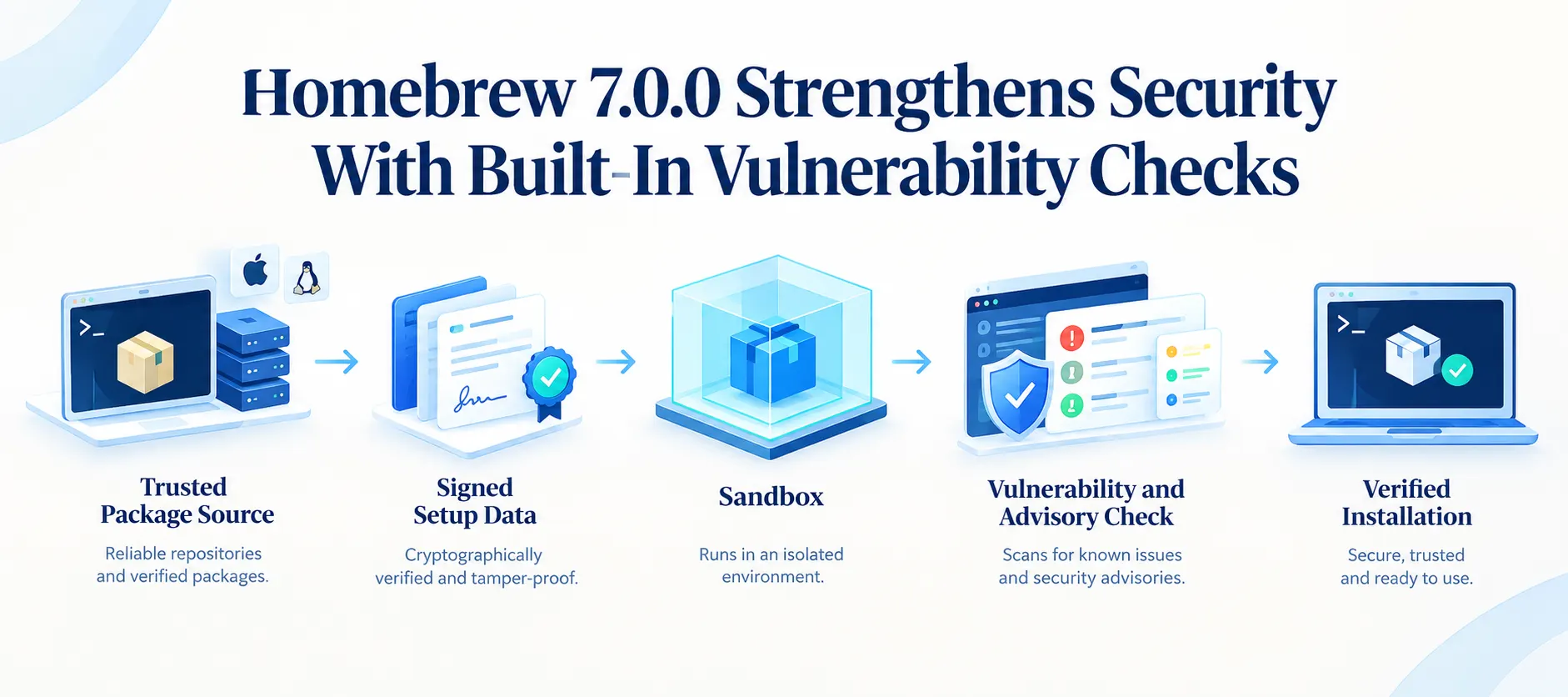
Homebrew has released version 7.0.0, introducing a broad set of changes across security, package installation, performance, platform support and developer workflows.
The project describes the release as its most significant set of changes since Homebrew 6.0.0. Among the headline additions are stronger sandboxing, built-in vulnerability checks, a new security advisory database and a native macOS application.
The release also changes Homebrew's platform support. macOS 10.15 and earlier are no longer supported, Intel Macs move to Tier 3, and macOS Sonoma 14 also moves to Tier 3. At the same time, Apple Silicon systems running macOS Golden Gate 27 receive Tier 1 support with prebuilt bottles.
For developers and security teams, however, the most significant changes are concentrated around how Homebrew handles package installation and vulnerability visibility.
Eight Security Advisories Are Part of the Release Story
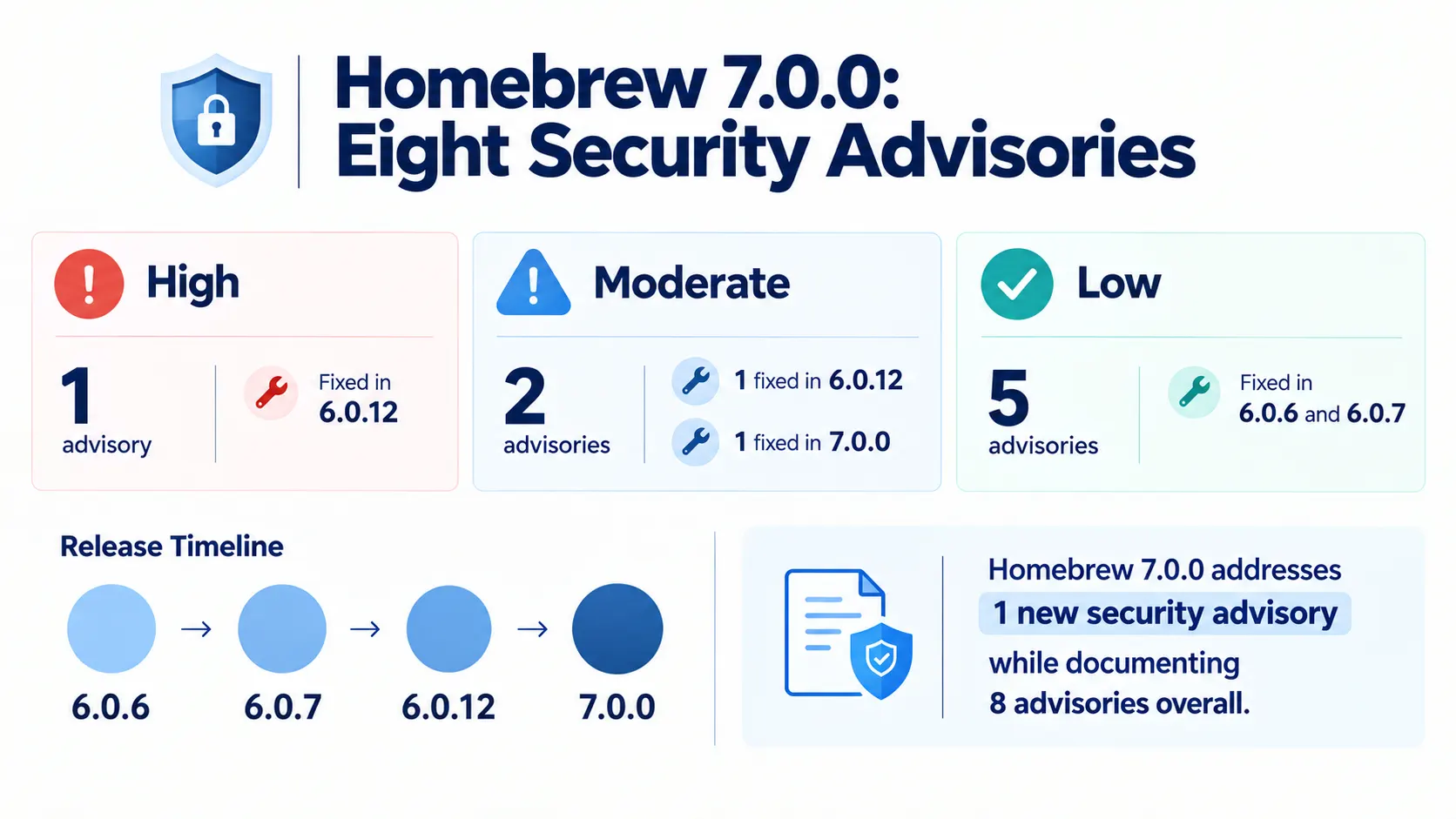
Homebrew's 7.0.0 announcement documents eight security advisories spanning High, Moderate and Low severity levels. Help Net Security reports that one is rated High, two are Moderate and five are Low.
There is an important distinction.
Seven of the eight advisories were already fixed through Homebrew 6.0.x releases. The remaining Moderate issue is fixed in Homebrew 7.0.0.
The High-severity advisory, GHSA-rg9r-ppxp-87hm, was fixed in version 6.0.12. It involved unsigned cask-removal metadata that could execute commands with sudo. Homebrew says the vulnerable recovery code and API accessors were removed.
A second Moderate issue, GHSA-hqpg-hjr9-c7j8, was also fixed in 6.0.12. It involved the macOS installer reading prefix-owned Git configuration that could potentially execute programs as root.
The security issue addressed specifically in 7.0.0 is GHSA-5263-whxq-77hp. Homebrew says a malicious cask could execute code outside the macOS installation sandbox through LaunchServices.
The new release restricts application launching, Mach services and Unix socket connections as part of the mitigation.
The five Low-severity advisories cover several areas, including redirects that could enable server-side request forgery or expose secret headers, Git redirects that could bypass tap restrictions, Subversion URLs becoming command options, and patch targets escaping the staged source tree. These issues were fixed in Homebrew 6.0.6 and 6.0.7 releases.
The security timeline matters
This means Homebrew 7.0.0 should not be described as a release that newly fixes eight vulnerabilities.
Instead, the release brings together a broader security effort that includes fixes already shipped through 6.0.x and a new sandbox-related fix in 7.0.0.
That distinction is important for users who already keep Homebrew updated automatically.
Homebrew Adds Built-In Vulnerability Scanning
One of the most notable additions in Homebrew 7.0.0 is brew vulns.
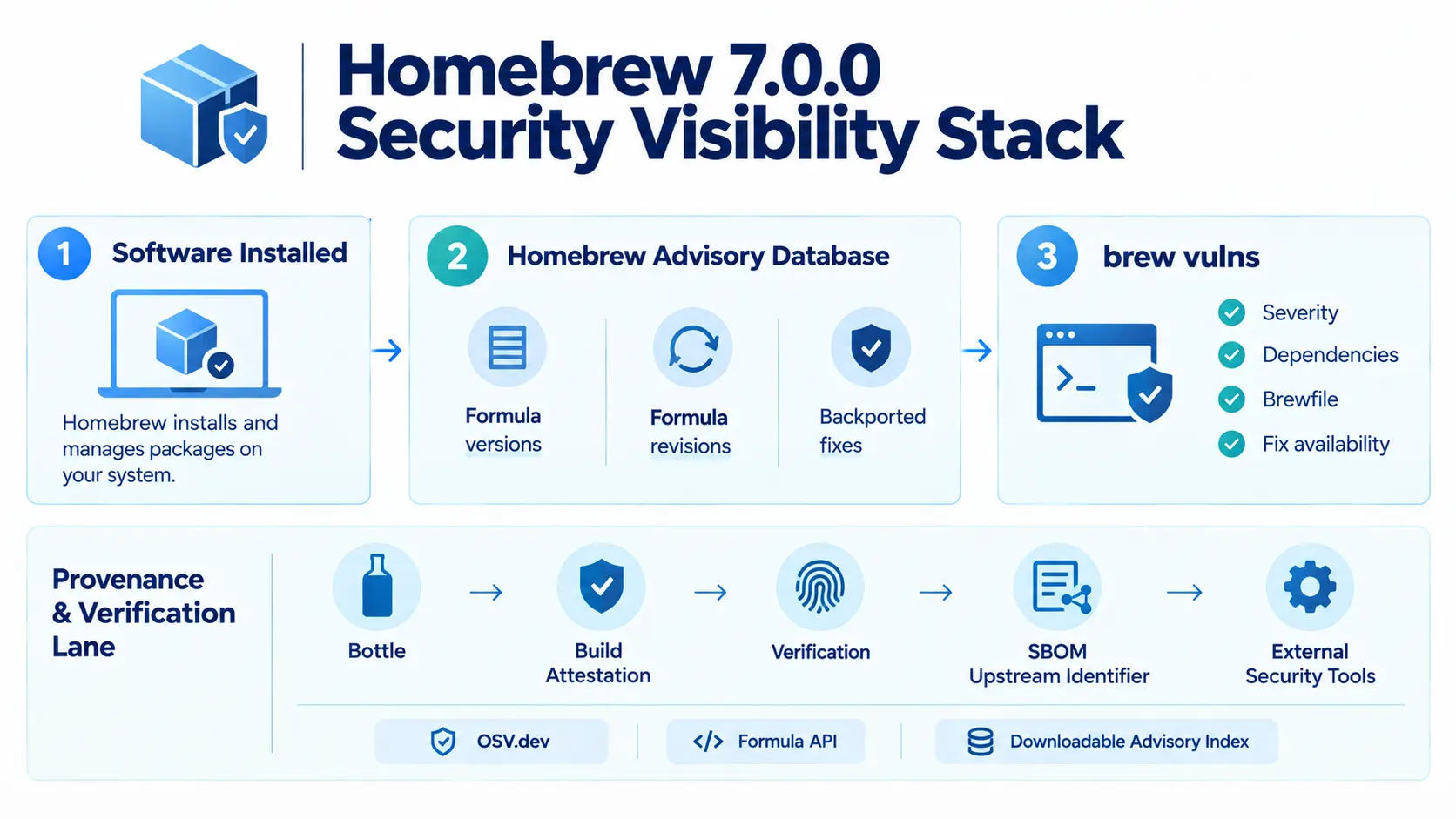
The command allows Homebrew to check installed formulae against known vulnerabilities through OSV.dev, without requiring another tap or Ruby gem.
The feature is backed by a new Homebrew advisory database.
Rather than simply associating a vulnerability with an upstream package version, the database records vulnerabilities against the specific formula versions and revisions that Homebrew ships. It also accounts for security fixes that have been backported.
That distinction can matter when a package receives a security patch without changing its upstream version number.
A scanner that only looks at version strings could otherwise report a vulnerability that has already been addressed by the package maintainer.
Homebrew's approach is intended to provide more package-specific vulnerability information.
The brew vulns command also includes options for narrowing results by severity, dependencies and Brewfile contents. It can distinguish between vulnerabilities with available fixes and those without available fixes.
Homebrew also publishes advisory findings through its formula API and as a downloadable advisory index.
The records use the OSV format and are available under a CC0 license.
For security teams, that creates another source of structured vulnerability information that can be consumed outside the command line.
Stronger Sandboxing, With Important Limits
Homebrew 7.0.0 also changes how package installation is isolated.
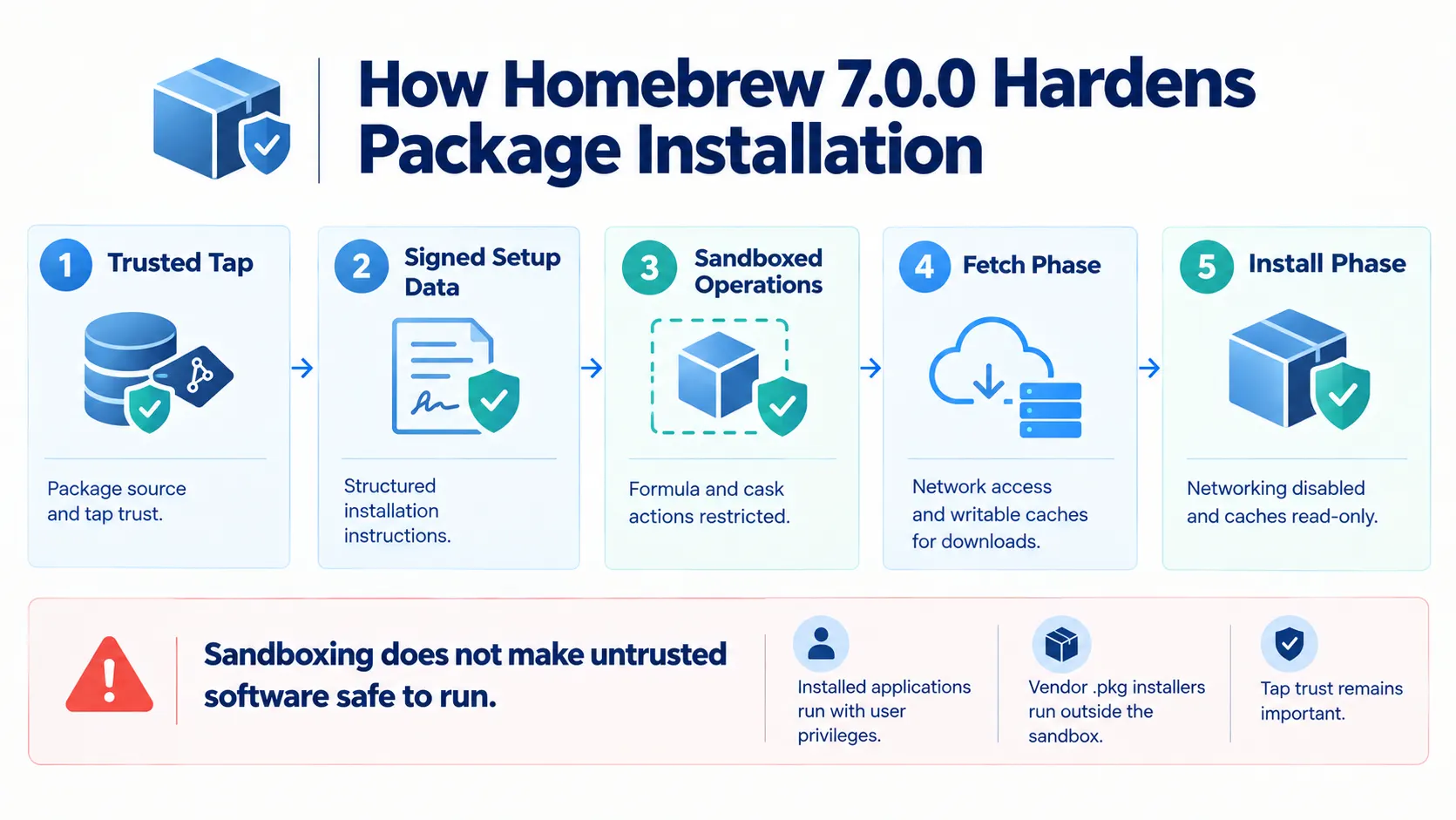
The project says it now delivers structured setup operations as signed data and applies sandboxing to formula and cask operations. The goal is to reduce arbitrary Ruby execution during installation and provide more controlled installation behavior.
Dependency downloads are also being separated from the installation phase.
For formulae that have migrated to the new process, downloads occur during a dedicated fetch phase with network access and writable caches. The subsequent installation phase disables networking and makes those caches read-only.
Homebrew notes that this migration is still in progress.
The release also blocks sandboxed reads of the home directory by default. This keeps unrelated personal files outside package builds while still allowing access to required Homebrew paths.
Another important change is the move away from arbitrary installation hooks.
Formula post_install and cask flight blocks are being deprecated in favor of declared installation steps. Homebrew says these structured steps allow operations and paths to be validated before execution.
Official taps reject the legacy hooks in 7.0.0, while third-party taps receive warnings until December 11, 2027.
Sandboxing does not make untrusted software safe
Homebrew is explicit about the limits of these protections.
Tap trust remains the primary protection against malicious third-party casks. Sandboxing is intended to reduce accidental damage and add installation safeguards, but it cannot make untrusted software safe to run. Installed applications still execute with the user's privileges.
Vendor .pkg installers also run outside the sandbox and may request sudo.
That distinction is important when evaluating Homebrew's new security model.
Linux Moves From Bubblewrap to Landlock
Linux users also get a significant security architecture change.
Homebrew 6.0.0 introduced Bubblewrap sandboxing. In version 7.0.0, Homebrew replaces Bubblewrap with Landlock, a Linux kernel security facility.
According to Homebrew, Landlock does not require additional dependencies or escalated Docker permissions, which addresses some of the setup difficulties associated with Bubblewrap.
The protection is dependent on the Linux kernel.
Systems without Landlock support continue to operate without the newer Linux sandboxing configuration. Homebrew describes this as the less secure configuration that predates version 6.0.0, and brew doctor reports the missing protection as an advisory.
Homebrew supports Landlock ABI 2 on Linux 6.1 and warns when the kernel cannot enforce network restrictions.
The result is a more integrated Linux sandboxing approach, but the level of protection still depends on the capabilities available on the underlying system.
Intel Mac Support Moves to Tier 3
Homebrew 7.0.0 also marks an important transition for Intel Mac users.
Intel x86_64 systems move to Tier 3. Existing bottles remain available, but Homebrew is no longer producing new bottles for Intel Macs as part of routine support. Updated formulae may therefore require local compilation.
Homebrew will continue running on Intel Macs until September 1, 2027, but project support is being reduced before that date.
Homebrew points to Apple's removal of Intel support from macOS 27 and GitHub's planned retirement of Intel macOS runners as factors behind the decision.
The release also removes support for macOS 10.15 and earlier.
macOS Sonoma 14 moves to Tier 3, with no new bottles. Homebrew recommends moving to macOS Sequoia 15 or later for bottles and .pkg installations.
By contrast, Apple Silicon systems running macOS Golden Gate 27 receive Tier 1 support with prebuilt bottles.
BrewUI Brings Homebrew to a Native macOS App
Homebrew 7.0.0 also expands beyond the terminal.
The project has fully released BrewUI, its official graphical interface for macOS. It can be installed with brew install homebrew-app on macOS Tahoe 26 or later.
The application provides package browsing, search and installed-version information in a graphical interface.
Importantly, BrewUI also displays the underlying brew commands used for package operations.
That keeps the graphical experience connected to Homebrew's existing command-line workflow rather than hiding the underlying package-management operations.
Homebrew 7.0.0 Also Targets Performance
Security is one of the most visible themes in the release, but performance improvements are another major part of Homebrew 7.0.0.
The project has increased concurrency across downloads, package preparation and installation.
Commands including brew install, brew reinstall and brew upgrade can overlap package preparation and downloads. Homebrew says the same shared installation work can benefit brew bundle batches.
Other changes include concurrent system information gathering in brew config, faster tap metadata collection, fewer repeated cache scans during cleanup and more direct download metadata handling.
Homebrew also reuses parsed API data during warm runs while continuing to verify signatures on every load.
The project has also reduced the number of subprocesses launched during startup.
These changes are aimed at reducing overhead across common package-management operations rather than introducing a single headline performance feature.
More Visibility for Security Teams and Auditors
The new advisory database is particularly relevant beyond individual developers.
Homebrew records vulnerabilities against the versions and revisions it actually ships, including backported fixes. This gives security teams more context than a simple upstream package version lookup.
Homebrew also adds upstream package identifiers to software bills of materials.
The identifiers can help external tools connect source archives with package registries such as PyPI, npm and Cargo.
Build provenance is another part of the release.
Homebrew verifies attestations for supported bottles from third-party taps. The project also says taps created with brew tap-new publish attesting bottle workflows by default.
Together, these changes extend Homebrew's security model beyond the installation process itself.
They add more visibility into what software is installed, whether known vulnerabilities apply and where package provenance information can be checked.
What Developers and Maintainers Need to Know
The release introduces several migration requirements beyond the security changes.
Users on macOS 10.15 or earlier need to upgrade to macOS 11 or later.
Intel Mac users should plan for the September 2027 end of Homebrew support, while Apple Silicon users on older macOS releases should review the project's support schedule.
CI environments also need attention.
The ghcr.io/homebrew/ubuntu22.04 image has been removed, and Homebrew directs users toward its maintained general-purpose image. Homebrew Actions using removed @master references need to migrate to a CalVer release or full SHA, while @main users are also encouraged to migrate to pinned releases or SHAs.
For tap maintainers, legacy installation hooks are being phased out.
Formula post_install and cask flight blocks should move to the declared *_steps model. Official taps reject legacy hooks in 7.0.0, while third-party taps have until December 11, 2027 before the deprecation progresses further.
Linux users should also check whether their kernel supports the Landlock functionality Homebrew expects for sandboxing.
Analysis: Package Management Is Becoming a Security Boundary
The announcement highlights a broader industry shift toward treating package managers as part of the software supply chain security layer, rather than only as installation utilities.
Homebrew's new advisory database, built-in vulnerability command, SBOM identifiers and build-attestation verification all extend security visibility beyond the simple question of whether a package can be installed.
The release also tightens what installation processes are allowed to do.
For enterprises and security teams, this could make Homebrew-managed software easier to evaluate within vulnerability and software inventory workflows. The announcement does not provide specific information about integration coverage across external security platforms.
The other notable shift is the emphasis on reducing arbitrary installation behavior.
Moving from arbitrary Ruby hooks toward declared installation steps gives Homebrew a more structured model for validating package operations. The project is also separating dependency downloads from installation for formulae that have migrated to the new process.
However, Homebrew's own warning remains important: these protections do not eliminate the need to trust package sources.
The security model is therefore layered rather than absolute.
What Homebrew 7.0.0 Means for Users
Homebrew 7.0.0 is more than a routine package-manager update.
It combines security fixes, vulnerability visibility, sandbox changes, platform support changes, performance work and a new graphical interface.
For security-conscious developers, the addition of brew vulns and the Homebrew advisory database may be among the most significant changes because they bring vulnerability checking directly into the package manager.
For macOS users, the platform changes may be just as important.
Intel Macs are entering Tier 3, macOS 10.15 support has ended, and Sonoma 14 is also moving to Tier 3. Apple Silicon systems, meanwhile, receive stronger support on newer macOS releases.
For Linux users, the move from Bubblewrap to Landlock changes the underlying sandboxing mechanism, while kernel support remains an important consideration.
For maintainers and CI teams, the release brings a series of migration deadlines and removed interfaces that should be reviewed before they affect automated workflows.
Final Takeaway
Homebrew 7.0.0 marks a significant shift toward making package installation more controlled and vulnerability-aware.
The release combines a new advisory database and brew vulns with stronger sandboxing, structured installation steps, build-attestation verification and additional SBOM information.
At the same time, Homebrew is tightening its platform support policy, particularly around Intel Macs and older macOS versions.
The result is a release that addresses both sides of package management: how software gets installed and how its security can be evaluated after installation.
Homebrew's security changes do not remove the need for trusted package sources, but they give developers and security teams more tools for understanding and controlling the software entering their environments.
Source: Homebrew
About the Author