
ConnectWise Suspends Cloud Backup Services After Unauthorized Access to Application Identities
ConnectWise has suspended Cloud Backup, SaaS Security, and Cloud Management following unauthorized access to application identities. The investigation continues, while partners are urged to review Microsoft 365 tenants, preserve audit logs, and investigate suspicious access.
Xcademia Team
ConnectWise has suspended three services, Cloud Backup, SaaS Security, and Cloud Management, following the discovery of unauthorized access to application identities associated with its Cloud Backup environment, formerly known as SkyKick Cloud Backup.
In its latest advisory, updated on October 19, 2026, the company said containment measures remain in place and that it has not observed successful threat activity in the environments it monitors since implementing its mitigations. However, its investigation, remediation, and service validation efforts are still underway. ConnectWise has not confirmed when the affected services will be restored.
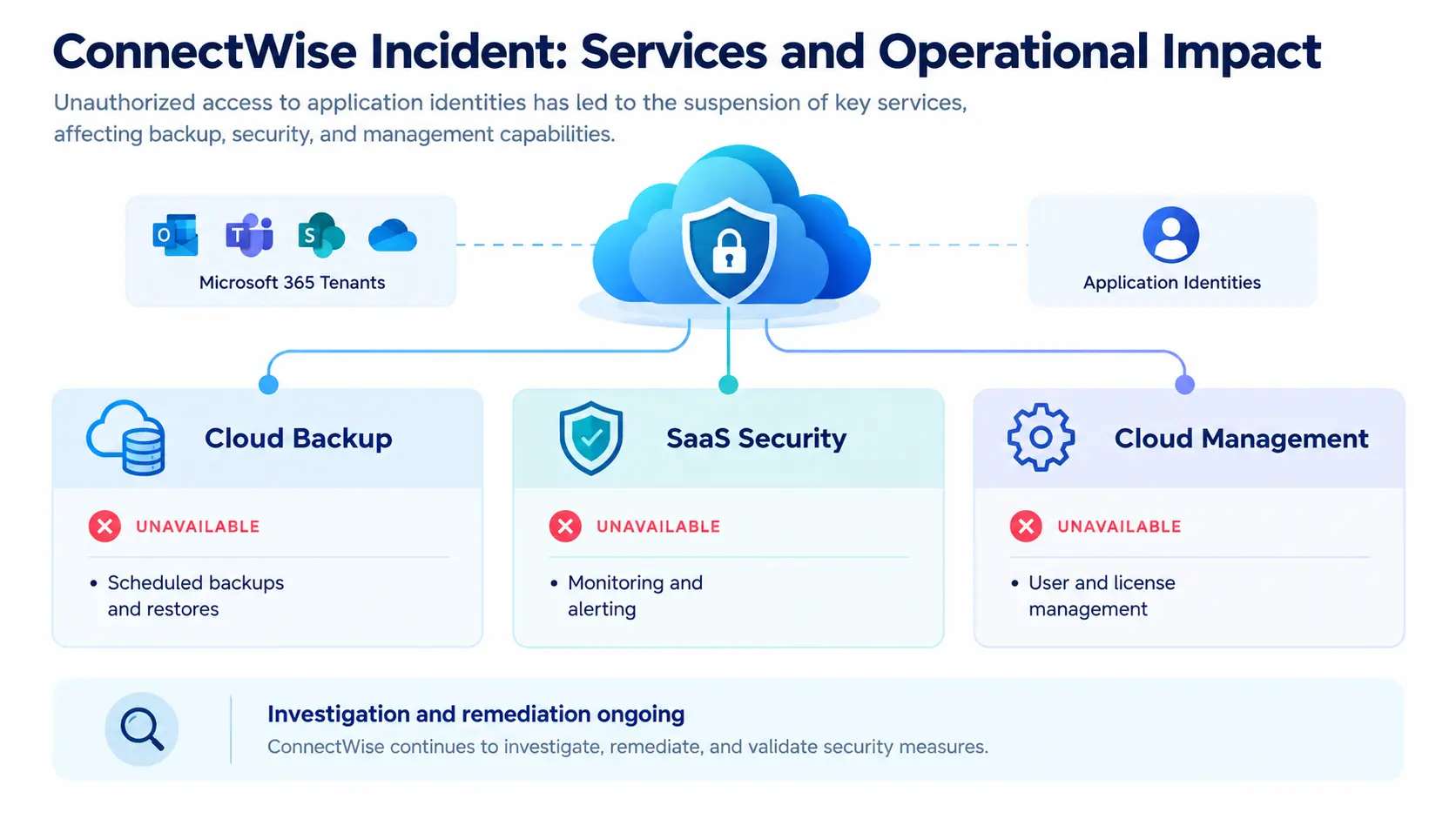
The interruption affects managed service providers (MSPs) and their customers who rely on the affected services. Scheduled backups, access to affected backup archives, and restoration capabilities remain unavailable. SaaS Security monitoring and alerting, along with Cloud Management user and license management, are also unavailable during the suspension.
The incident highlights the importance of reviewing application identities and permissions in cloud environments, particularly when third-party services have access to customer Microsoft 365 tenants.
Key details at a glance
Company | ConnectWise |
Incident | Unauthorized access to application identities |
Discovery date | October 15, 2026 |
Affected services | Cloud Backup, SaaS Security, and Cloud Management |
Current status | Services suspended; investigation and remediation ongoing |
Backup archive status | ConnectWise says existing archives remain encrypted and isolated, with no evidence of compromise reported in the advisory |
Restoration timeline | Not confirmed |
What happened in the ConnectWise incident?
ConnectWise reported that it discovered unauthorized access to application identities within its Cloud Backup environment on October 15, 2026.
Application identities allow software services to authenticate and interact with other systems. In Microsoft cloud environments, these identities can be associated with permissions that allow applications to access resources or perform administrative tasks.
If an application identity is accessed without authorization, the resulting risk depends on the permissions assigned to it, the resources it can reach, and whether an attacker can maintain access through other credentials or identities.
ConnectWise has not publicly attributed the incident to a specific threat actor in the advisory. The company also has not confirmed a complete account of the incident's impact on individual customer Microsoft 365 environments.
The company initiated incident response measures and subsequently disabled seven application identities listed in its technical guidance. It also revoked certificates used for affected application connections and suspended Cloud Backup services as a protective measure.
The company emphasized that disabling affected application identities prevents new authentication through those connections, but does not automatically reverse changes that may already have been made within a customer tenant.
This distinction is important. Removing one access path does not necessarily eliminate other credentials, permissions, or identities that may have been modified during an incident.
Which ConnectWise services are affected?
The suspension covers three services associated with the incident response.
Service | Impact during the suspension |
|---|---|
Cloud Backup | Scheduled backups, access to affected backup archives, and restoration capabilities are unavailable. |
SaaS Security | Monitoring and alerting are unavailable. |
Cloud Management | User and license management are unavailable. |
The company said it suspended SaaS Security and Cloud Management as an additional precaution because those services are integrated with Cloud Backup.
This does not, by itself, establish that every affected service or customer environment was compromised. ConnectWise described the service interruptions as protective actions taken while investigation and remediation continue.
The operational consequences are nevertheless significant for organizations that depend on these services. MSPs may need to coordinate alternative monitoring, administrative workflows, and incident-response activities while waiting for formal restoration instructions.
The company has not provided a confirmed restoration time.
What has ConnectWise done to contain the incident?
ConnectWise has implemented several containment and investigation measures.
According to its October 19 advisory, the company has:
Disabled seven application identities identified in its technical guidance.
Revoked certificates used for affected application connections.
Invalidated the affected shared Cloud Backup credentials.
Suspended Cloud Backup, SaaS Security, and Cloud Management.
Engaged third-party incident response specialists.
Continued forensic analysis, threat hunting, monitoring, and remediation.
The company said it had not observed successful threat activity in the environments it monitors since implementing its mitigations. Investigation and security validation remain ongoing.
One technical consideration remains important: previously issued access tokens may remain usable until they expire or are otherwise invalidated. In addition, unauthorized credentials, permissions, or access established through separate identities may require independent investigation and remediation.
For defenders, this illustrates why incident containment involves more than disabling an affected application. Security teams must also investigate whether other access paths were created or changed.
Are customer backup archives compromised?
ConnectWise has stated that existing backup archives remain encrypted and isolated, and that it has no evidence that these archives have been compromised or accessed, according to its published advisory.
However, the company distinguishes the status of stored backup archives from potential activity within live Microsoft 365 environments.
These are separate security questions:
Stored backup archives: ConnectWise has reported no evidence of compromise in its existing archives.
Live Microsoft 365 tenants: Individual environments still require investigation to determine whether unauthorized activity occurred.
The advisory does not establish that every customer tenant was compromised, nor does the reported status of stored archives establish that every live Microsoft 365 environment is unaffected.
ConnectWise says it does not have the downstream security visibility needed to independently determine whether a particular partner or customer tenant experienced unauthorized activity.
Organizations should therefore avoid treating the backup archive statement as confirmation that their entire Microsoft 365 environment is safe.
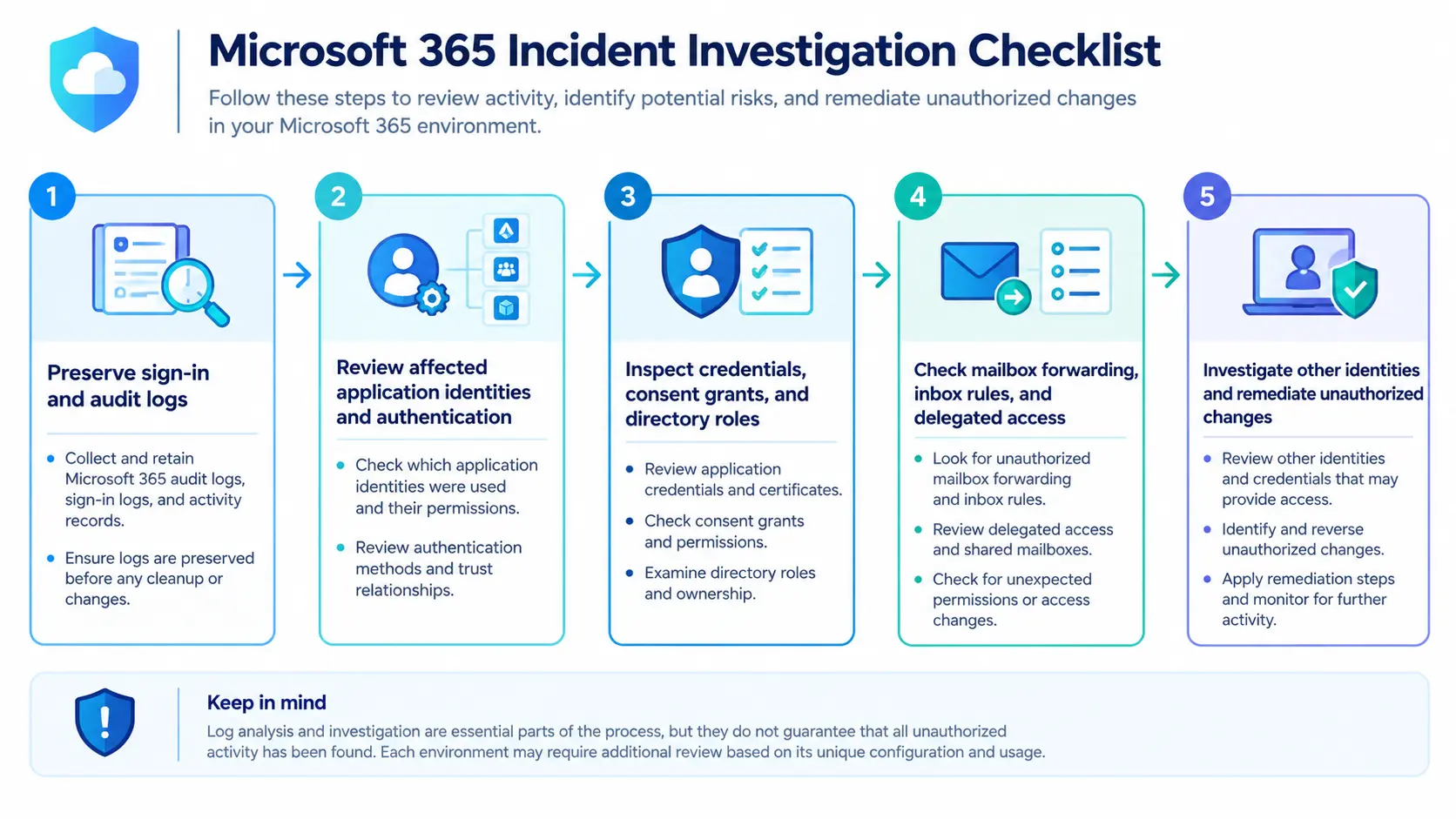
The appropriate next step is to review available authentication and audit records, examine application permissions, and investigate suspicious changes in coordination with internal security teams or managed security providers.
Technical indicators and Microsoft 365 investigation guidance
ConnectWise has published technical guidance for MSPs and customer administrators. Its October 18 update also listed IP addresses supplied through downstream security monitoring of partner and customer environments.
The advisory identifies the following indicators for review:
Indicator | Address | Advisory status |
|---|---|---|
IP address |
| Newly listed on October 18 |
IP address |
| Newly listed on October 18 |
IP address |
| Previously listed |
These addresses are presented in defanged format, which is commonly used in cybersecurity reporting to reduce the risk of accidental interaction with potentially suspicious infrastructure.
Security teams should compare these indicators with available Microsoft 365 authentication and audit logs. An IP match should be treated as a signal for investigation rather than conclusive proof of compromise.
ConnectWise's technical guidance also recommends reviewing the following areas:
Application and user sign-in activity.
Application credentials and federation trusts.
Directory roles, application owners, and consent grants.
Recent policy changes and unexpected permission assignments.
Unauthorized mailbox forwarding, inbox rules, and transport rules.
Delegated mailbox access.
Other identities that may have been changed or used during suspicious activity.
The company advises partners to preserve available sign-in and audit records promptly while taking any urgent containment action.
What should MSPs and customer administrators do now?
ConnectWise has asked partners to review both their own Microsoft 365 tenants and every customer tenant they manage, including environments with dormant SkyKick connections.
The company's published guidance calls for keeping affected applications disabled until formal restoration instructions are provided. Partners should also ensure that customers receiving services through resellers, distributors, or marketplaces receive the guidance and arrange the required investigation.
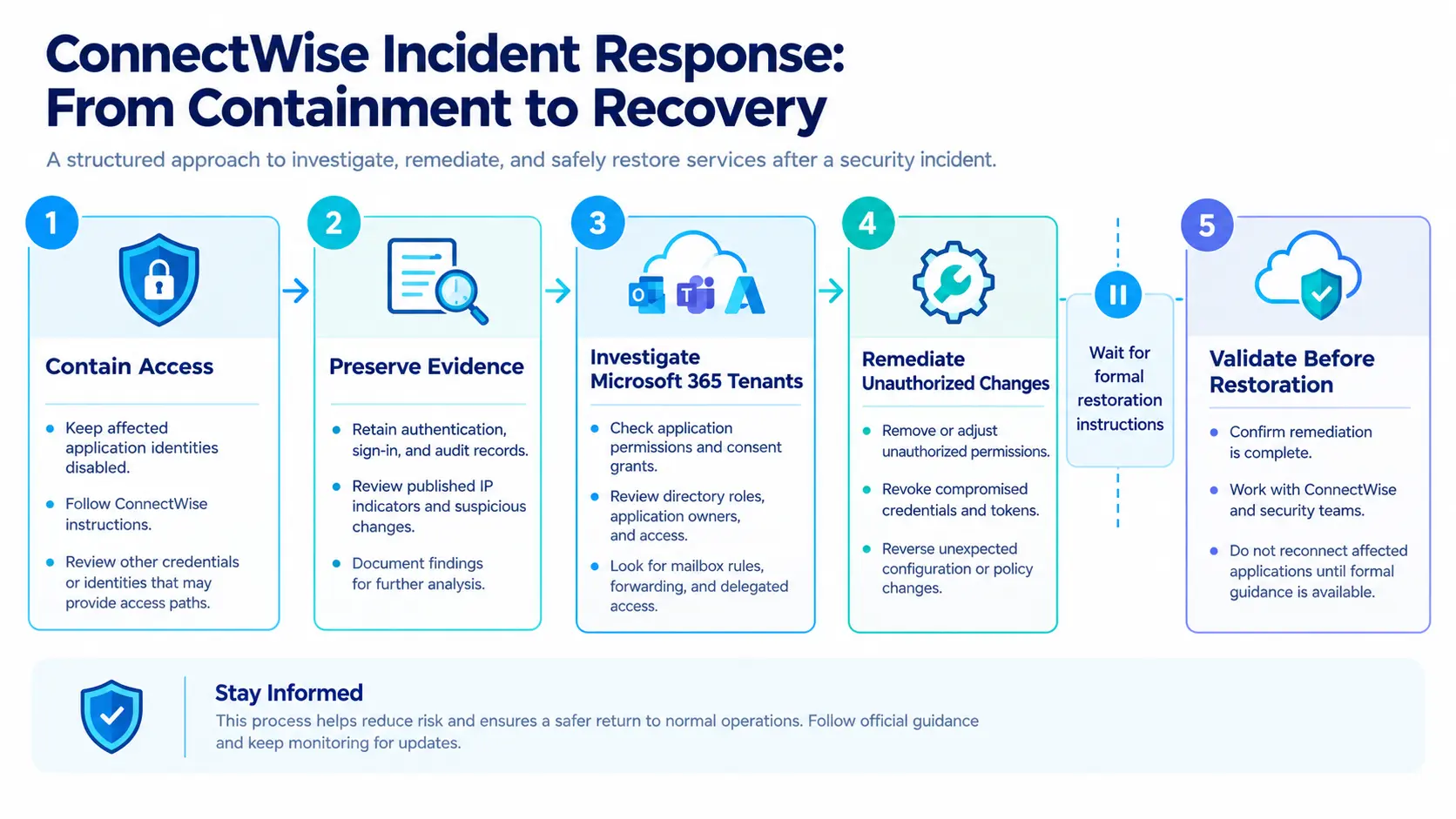
A practical response plan can be organized into four stages.
1. Contain access
Keep affected application identities disabled and follow ConnectWise's formal instructions. Review other credentials or identities that may provide separate access paths.
2. Preserve evidence
Retain available authentication, sign-in, and audit records. Investigate the published IP indicators and suspicious changes without assuming that a single match proves an intrusion.
3. Investigate each tenant
Examine application permissions, directory roles, mailbox rules, delegated access, and any other identities involved in suspicious activity.
4. Validate before restoring service
Coordinate with ConnectWise and the relevant security team. Do not reconnect affected applications until formal restoration guidance is available.
These stages summarize the response priorities in the advisory. They are not a replacement for ConnectWise's full technical investigation and remediation guide or an organization's incident response procedures.
Why application identity security matters
The ConnectWise incident highlights a broader cybersecurity concern: applications and automated services can hold access to sensitive business environments without requiring a person to sign in for every operation.
In Microsoft 365, application identities can have permissions to access organizational resources. These permissions are necessary for legitimate integrations, but they also make identity management an important part of cloud security.
Organizations should consider three lessons from the incident.
First, review application permissions regularly. Applications should have only the permissions required for their intended tasks. Dormant integrations and unused identities should not be overlooked during security reviews.
Second, investigate beyond the original identity. Disabling a compromised connection may prevent further authentication through that connection, but it does not necessarily remove access created through other identities, credentials, or permission changes.
Third, preserve independent visibility into cloud activity. Authentication records, audit logs, directory changes, and mailbox activity can help security teams investigate potential unauthorized access. Organizations should understand what their available logs can and cannot establish.
These are general security lessons drawn from the incident, rather than additional capabilities or guarantees announced by ConnectWise.
For managed service providers, the situation also emphasizes the need for tenant-by-tenant investigation. A provider may manage many customer environments, so the response needs to account for both the provider's own systems and the tenants it administers.
Current status and what happens next
As of October 19, 2026, ConnectWise says its investigation and remediation efforts remain active. The company continues working with third-party specialists to validate security measures and prepare for safe service restoration.
Cloud Backup, SaaS Security, and Cloud Management remain suspended. ConnectWise has not confirmed a restoration timeline and has said it will provide further updates as reliable information becomes available.
The company has also advised partners to continue monitoring its Trust Center for updates and to contact Partner Care for service assistance. Suspicious activity can be reported to SecurityPartnerSupport@ConnectWise.com.
Conclusion
The ConnectWise incident demonstrates why cloud security investigations must consider application identities, permissions, credentials, and activity across connected environments.
Although the company has reported no evidence that its existing backup archives have been compromised, the security status of individual live Microsoft 365 tenants remains a separate matter requiring investigation.
For MSPs and their customers, the immediate priorities are to keep affected applications disabled as instructed, preserve available logs, examine suspicious identity and mailbox changes, and follow official remediation guidance.
The next important development will be ConnectWise's findings from its ongoing investigation and confirmation of when the suspended services can safely return.
Source: ConnectWise Trust Center
About the Author