
Google Cloud Shares a Six-Step Playbook for Handling Cloud Reliability Incidents
Google Cloud outlines a structured approach to handling cloud outages, covering preparation, verification, investigation, reporting, resolution and post-incident review.
Xcademia Team
Xcademia Research Team
Cloud outages can affect an entire platform, a single region, a zone, a project, or even one application. For organizations running critical workloads in the cloud, knowing how to respond when something breaks is just as important as designing the system itself.
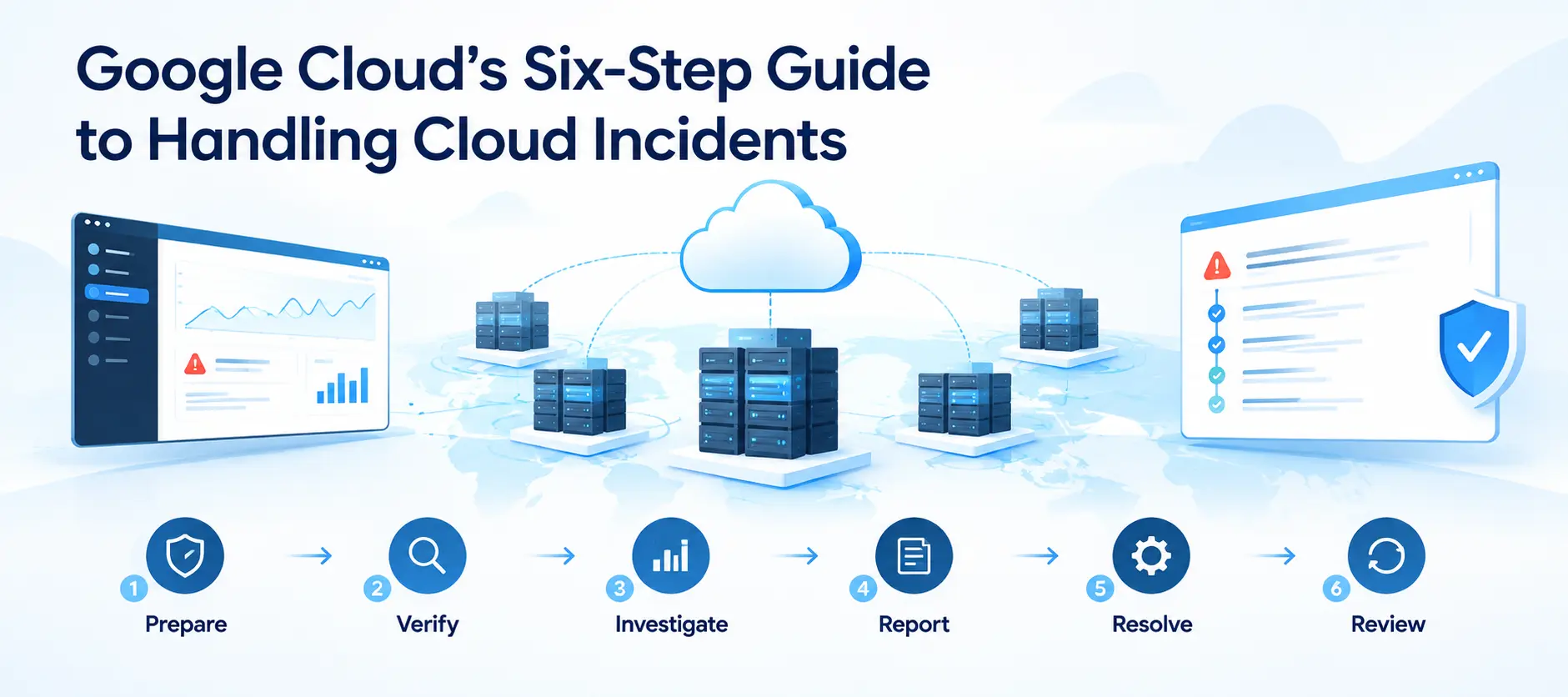
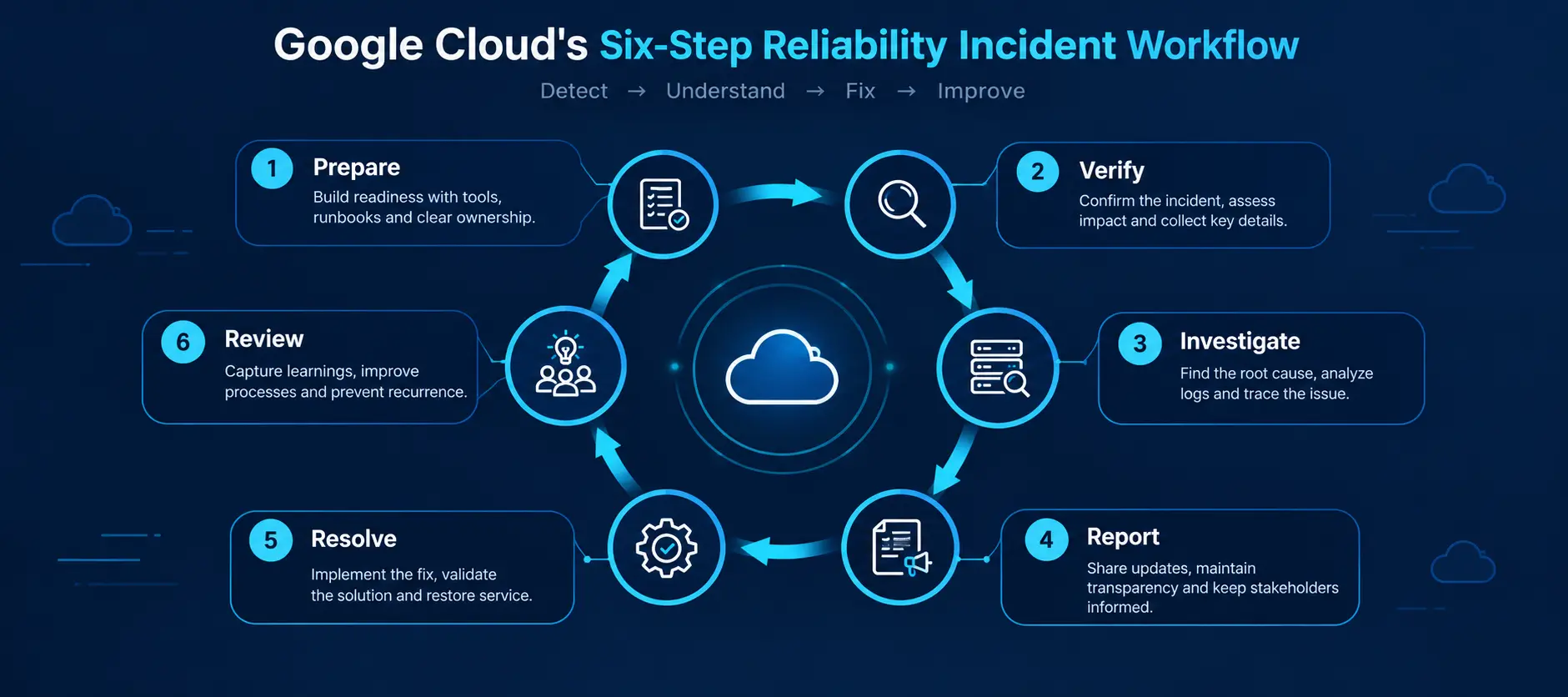
In a new Google Cloud blog published on September 15, 2026, Google Cloud Product Manager and Technical Solutions Engineer Flemming Christensen outlines a structured approach for handling reliability incidents. The recommended workflow is:
Prepare → Verify → Investigate → Report → Resolve → Review
Google describes the article as a primer rather than an exhaustive guide. It focuses on reliability incidents and does not cover additional practices specifically related to security incidents.
The guidance also points toward newer AI-assisted approaches to incident handling, but Google emphasizes that strong foundational incident-response practices should come first.
Why Cloud Incident Preparation Matters
An outage is rarely the right time to decide who should respond, which tools should be used, or where important monitoring data is stored.
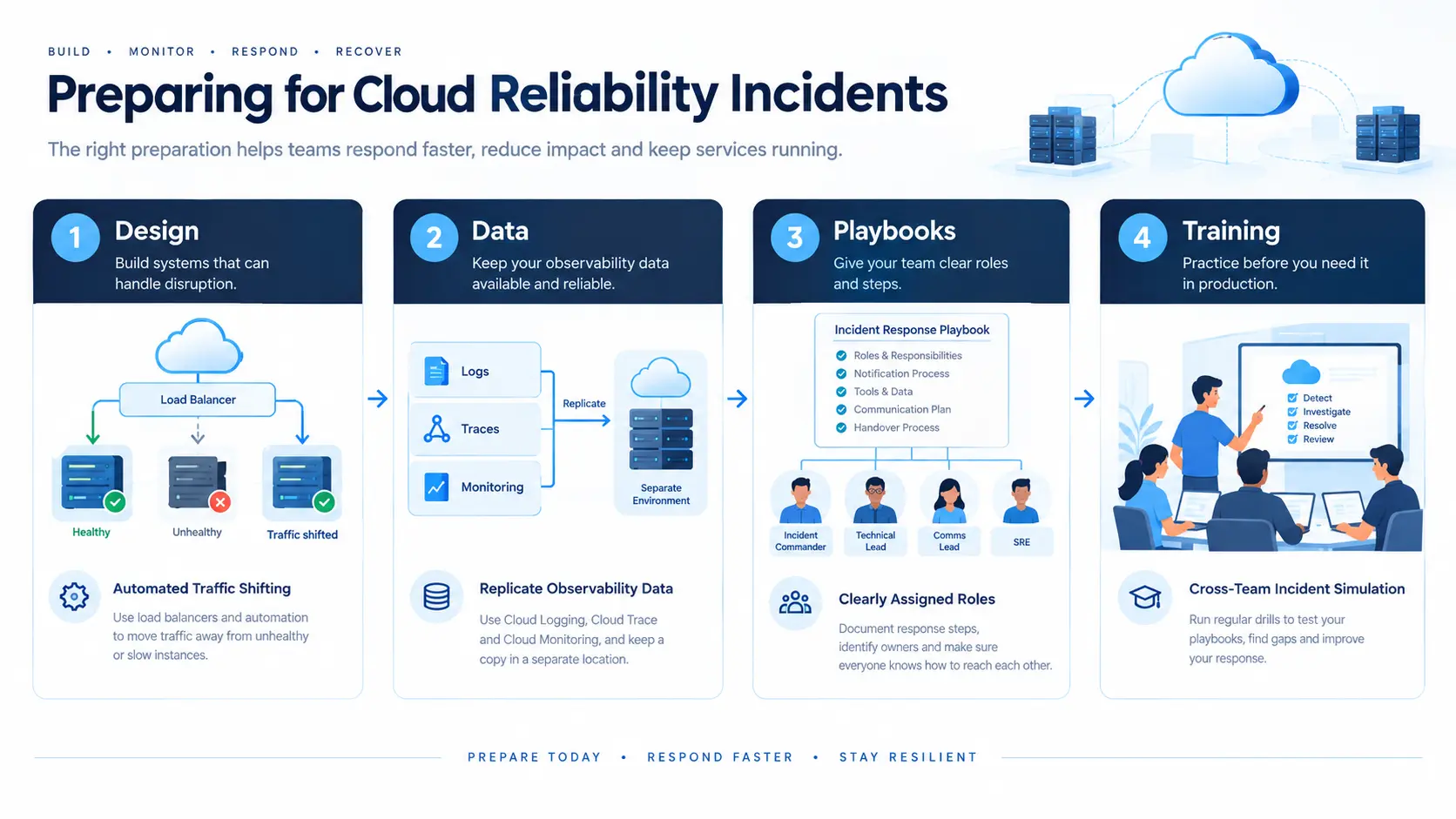
Google Cloud recommends preparing for disruptions before they happen across four main areas:
Design
Data
Playbooks
Training
Design for Failure
Critical applications should be designed with failure in mind.
Google gives automated traffic shifting as an example. A load balancer could move traffic away from slow or unresponsive instances. Organizations can also automate portions of their incident-response playbooks to reduce the amount of manual work required during an outage.
The broader principle is straightforward: the more appropriate recovery actions can be automated before an incident, the less teams have to improvise during one.
Keep Observability Data Available
During an incident, teams need reliable information about what is happening.
Google recommends using observability services such as Cloud Logging, Cloud Trace and Cloud Monitoring, or suitable third-party tools. It also recommends replicating observability data to a redundant stack located separately from the systems being monitored.
Timestamp consistency is another important consideration. When logs and monitoring systems use synchronized timestamps, teams can correlate events more effectively.
Build an Incident Playbook
A playbook should clearly explain:
Who is responsible for each task
Who needs to be notified
How responders can be reached
Which tools and data are available
How information should be communicated
How responsibilities are handed over during long-running incidents
Google also recommends testing the playbook through simulated incidents and reviewing the exercise afterward.
Train the Response Team
Incident response is not something teams should practice only after a real outage.
Google recommends running simulated cross-team incident-response drills several times per year. These exercises can reveal gaps in responsibilities, processes and documentation before an actual disruption occurs.
Step 1: Verify What Actually Broke
When an incident occurs, the first challenge is determining whether the problem is actually a cloud-provider outage.
Google recommends using several sources to detect or verify disruptions, including observability tools, Unified Maintenance Management notifications, Personalized Service Health notifications and proactive customer monitoring.
The investigation should establish who is responsible for the problem.
Google broadly categorizes potential causes as:
Google Cloud, such as a software bug, code rollout or hardware failure.
The customer, such as a configuration change, increased load or quota limit.
A third party, such as an external service hosted by another cloud provider.
This distinction matters because the recovery strategy depends heavily on where the failure originates.
Personalized Service Health Should Be Checked First
Google specifically recommends checking Personalized Service Health first when investigating a suspected Google Cloud incident.
It provides information relevant to a customer's projects and regions and distinguishes between different incident states.
Emerging Incidents
Google has received an alert and its on-call teams are investigating, but the impact is not yet known.
Confirmed Incidents
Google has investigated the problem and determined that customers are affected.
Personalized Service Health can also expose limited-scope incidents that may not appear on the public Cloud Service Health dashboard.
Google also notes that Gemini Cloud Assist is integrated with Personalized Service Health, allowing users to query relevant information using natural language.
Cloud Service Health Provides a Public Alternative
The Cloud Service Health dashboard is the public, unauthenticated channel for broad and severe incidents affecting many customers.
However, limited-blast-radius disruptions may not appear there.
Google says the information available through the public dashboard is also available through Personalized Service Health. The public dashboard can additionally serve as an alternative channel if Personalized Service Health becomes unavailable.
Teams can also check the Known Issues section in the Google Cloud console when troubleshooting a particular resource.
Step 2: Investigate the Blast Radius
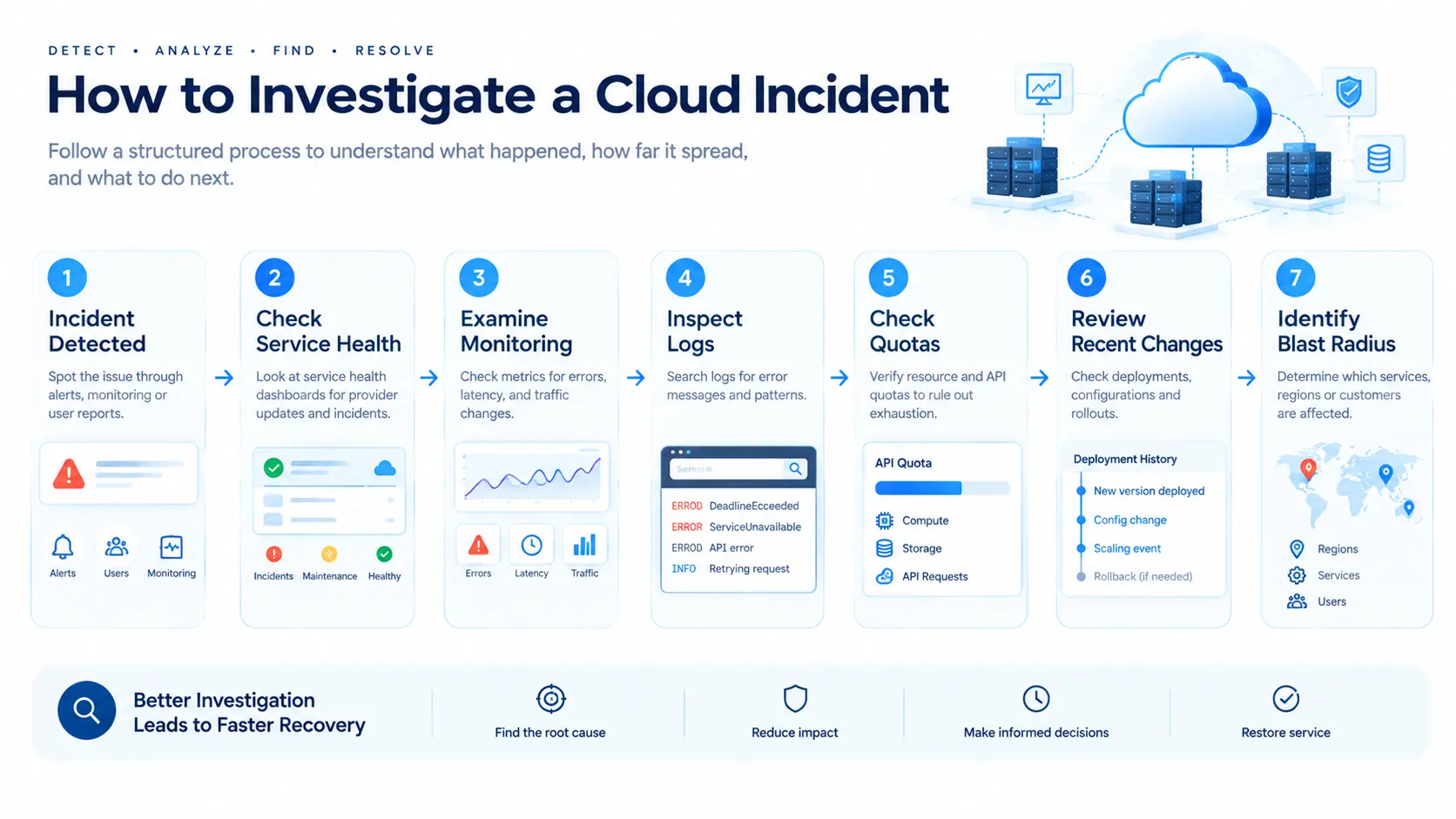
Once a potential incident has been verified, the next task is determining how much of the environment is affected.
Google recommends first reviewing Personalized Service Health updates to understand the technical problem and then mapping the impact across the organization's cloud footprint.
If Google has not declared an incident, teams should investigate their own environment.
Check Monitoring Metrics
Cloud Monitoring can help teams look for:
Increased error rates
5xx errors
Increased latency
Drops in traffic
These signals can help establish when the problem started and which services are affected.
Examine Logs
Google recommends using Log Explorer to investigate specific error messages, including examples such as:
DEADLINE_EXCEEDEDSERVICE_UNAVAILABLESpecific API errors
The purpose is to determine whether the symptoms point toward a provider incident, an application problem or another cause.
Check Quotas
Quota exhaustion can sometimes look like an outage.
Google recommends checking whether the project has reached a relevant quota, such as CPU or API rate limits.
Review Recent Changes
Recent configuration or deployment changes can also provide an important clue.
Google notes that a problem appearing soon after a change does not prove that the change caused the incident, but the timing can be a useful indicator.
If symptoms appear immediately after a rollout and no other clear cause is identified, Google recommends considering a rollback to a last known good configuration.
Step 3: Report the Incident
Sometimes a customer's metrics indicate a failure even though both Cloud Service Health and Personalized Service Health appear normal.
In that situation, Google says the issue should be reported to Google Cloud.
Google outlines two relevant support priorities:
P1 - Critical
The production service is unusable or severely impacted and there is no workaround.
P2 - High
There is significant impact or degradation, but a workaround may exist.
Customers can create a support case through:
Support → Cases → Create Case
Google recommends explaining the measurable business impact so the submitted priority is properly supported.
A useful incident report should include:
Project ID
Affected region or zone
Start time
Whether the incident is ongoing
Clearly identified timezone
Specific error messages or log snippets
Scope of the impact
Affected users, systems or locations
For customers with Premium or Enhanced support, Google also provides an escalation option for P1 cases that require additional attention.
Step 4: Resolve and Reduce the Impact
Incident resolution is not only about waiting for the underlying problem to disappear.
While an incident is active, Google recommends several actions to reduce its impact.
Communicate With Stakeholders
Teams should keep affected stakeholders and customers informed.
Clear communication can help manage expectations and reduce duplicate internal reports while technical teams focus on restoration.
Fail Over When Appropriate
Organizations with multi-regional architectures may be able to move traffic to a healthy region.
However, Google recommends first confirming that the problem is actually at the infrastructure level rather than being caused by the workload itself.
A secondary environment should therefore be verified as healthy before relying on it for recovery.
Look for Temporary Workarounds
Google may publish temporary workarounds through Service Health Dashboard or Personalized Service Health updates.
These workarounds can provide an alternative path while the underlying problem is being addressed.
Consider Regulatory Reporting
Organizations should also understand whether they have regulatory reporting obligations related to service disruptions.
Google Cloud can prepare Incident Reports for incidents that meet certain criteria. Premium Support customers may also request an Incident Summary customized to their account and hosting environment.
When Is an Incident Really Closed?
Service recovery and official incident closure are not necessarily the same moment.
Google explains that a customer's specific service may recover before the broader incident is officially closed because other customers may still be affected.
Once systems are stable, Google downgrades severity levels and deactivates active on-call escalation processes. The Cloud Service Health dashboard officially closes an incident after systems remain stable for a designated period.
For customers, the important step is to verify that their own services are operating normally rather than relying only on the incident's overall closure status.
Step 5: Review the Incident With a Blameless Post-Mortem
Recovery should not be the end of the incident-response process.
Google recommends conducting a post-mortem after operations return to a steady state.
The objective is to identify how the team can respond more effectively to future disruptions.
Google recommends a blameless approach and highlights four useful questions:
What went well?
What could we have done better?
Where did we get lucky?
Where did we get unlucky?
The resulting lessons should then feed back into the team's playbooks, tools and training.
Google also publishes post-mortems and Incident Reports for major outages through Personalized Service Health. Reviewing those reports can help organizations adjust their own disaster-recovery plans.
Typical Cloud Incident Patterns
Google also provides examples of common incident patterns based on blast radius, likely causes, communication channels and potential response strategies.
Incident pattern | Typical cause | General response |
|---|---|---|
Single zone or region, subset of products | Software problem triggered by a rollout | Consider failover after verifying the secondary stack |
Single zone, most or all products | Power or cooling issue | Consider failover to another zone |
Single region, most or all products | Backbone networking infrastructure issue | Consider regional failover |
Product control-plane issue | Potentially late-detected issue | Look for workarounds and wait for provider remediation |
Multi-regional issue affecting a global product | Rare global disruption | Consider regional variants or alternative products where available |
Capacity or stockout issue | Demand exceeding available capacity | Plan capacity needs and consider placement flexibility |
Quota exhaustion | Traffic difficult to predict accurately | Monitor consumption against quota ceilings |
Google notes that communication can vary according to the blast radius. Major incidents can appear on Cloud Service Health, while major and minor incidents based on customer impact can be communicated through Personalized Service Health. Highly localized incidents may not appear in either service.
What This Means for Cloud Teams
Google's guidance highlights a broader industry shift toward treating reliability as an ongoing operational discipline rather than simply an infrastructure feature.
A reliable cloud environment is not only about keeping applications running. Teams also need to know what to do when normal operation fails.
For enterprises, this could mean investing more attention in:
Tested incident playbooks
Clear ownership and escalation paths
Independent observability data
Multi-zone or multi-region recovery options
Regular incident simulations
Documented rollback procedures
Post-mortem processes
Continuous improvements based on previous incidents
The key lesson is that incident response starts before the incident.
Preparation determines how quickly teams can understand the problem, identify its scope, communicate with stakeholders and begin recovery.
AI Is Entering Incident Handling, But Foundations Still Matter
Google also points to emerging AI-assisted approaches for incident handling.
The company references agentic AI in Site Reliability Engineering and highlights tools such as Cloud Assist investigations, Agent Skills and remote managed MCP servers as additional ways teams can investigate problems.
However, the article places these techniques after the foundational incident-response practices.
That ordering is significant. AI-assisted investigation can become another tool in an incident-response workflow, but teams still need reliable observability, clearly defined responsibilities, tested recovery procedures and a process for learning from incidents.
Additional details about specific performance improvements from these AI-assisted approaches were not disclosed in this announcement.
Source: Google Cloud Blog
About the Author